Python Foundations
Mathematics, code, environments, and finite-precision numbers
Today we build a working map of scientific Python: how a question becomes code, how code becomes an output, and how we decide what that output can support.
What is scientific computing?
Scientific computing uses computation to represent, explore, measure, test, and communicate ideas about the world.
| We use computation to… | Example |
|---|---|
| calculate from a model | compute an orbital speed from mass and radius |
| analyze observations | find a period in a light curve |
| simulate a system | evolve a numerical model through time |
| quantify uncertainty | repeat a calculation across plausible inputs |
| make evidence inspectable | save code, inputs, figures, and environment |
The computer is not replacing scientific judgment. It makes a model’s consequences visible, repeatable, and challengeable.
Why code instead of a calculator?
Code can:
name quantities and units;
repeat a calculation for 10, 10,000, or 10 million cases;
preserve the exact model and assumptions used;
make tables and figures from the same calculation;
be inspected, tested, revised, and rerun by someone else.
A program that runs is not automatically correct. But readable, restartable code gives us something concrete to inspect when a result is surprising.
Why Python?
Python is a general-purpose language with a readable syntax and a large, well-documented ecosystem.
| Area | Typical work |
|---|---|
| science and engineering | simulation, numerical methods, instruments |
| data analysis | tables, statistics, visualization |
| astronomy and physics | images, spectra, time series, catalogs |
| software systems | automation, web services, testing |
| AI and machine learning | models and data pipelines |
Its popularity gives us:
useful libraries;
examples, documentation, and human help;
tools that work from quick exploration to large scientific projects.
It does not make any of these correct:
a model;
an algorithm;
a scientific conclusion.
I · Write a calculation another person can read
Question
How do we turn an equation into inspectable Python?
You will leave this section able to
distinguish a terminal, prompt, and notebook;
use operators and parentheses deliberately;
name quantities with units and explain a code choice;
use the
mathmodule and read a function’s documentation.
Through-line focus: mathematical model → inspectable code.
Math is not code
orbital_speed_cm_s = (G_cm3_g_s2 * mass_g / radius_cm) ** 0.5The equation does not specify:
units;
a numerical representation;
behavior for invalid inputs;
a test of the output.
Code has to make those choices visible.
Course convention: use CGS by default.
centimeters;
grams;
seconds.
Encode units in quantity names. Convert only at an external data boundary.
Read the equation and code together
| Mathematical role | Code representation | What a reader can inspect |
|---|---|---|
| G | G_cm3_g_s2 | the value and CGS units |
| M | mass_g | the physical quantity and unit |
| r | radius_cm | the physical quantity and domain |
| GM/r | (G_cm3_g_s2 * mass_g / radius_cm) ** 0.5 | grouping and numerical operation |
| v | orbital_speed_cm_s | what the result represents |
This is the visual annotation habit for the course: every meaningful code expression should have a mathematical and physical reading.
Where math → code can fail
| Layer | A failure that can happen |
|---|---|
| mathematical model | the equation omits an important physical effect |
| assumptions and units | centimeters are mixed with kilometers |
| translation into code | parentheses encode the wrong grouping |
| numerical representation | f32 loses detail that f64 retains |
| algorithm | an unstable form loses precision |
| environment and data | the wrong package, file, or notebook state is used |
| interpretation | a numerical match is mistaken for scientific validation |
Running without an error tells us only that Python followed the instructions.
Three places you will work
| Place | Purpose | Example |
|---|---|---|
| Terminal | start programs; manage files and environments | python --version |
| Python / IPython prompt | quick experiments and diagnosis | 2 + 2 |
| Notebook | saved cells, output, text, and figures | an analysis record |
$ python --version
$ ipython
print("This is Python code, not a terminal command.")Python evaluates expressions
print(2 + 2)       # addition
print(10 / 3)      # division produces a float
print(2**10)       # exponentiation
print(17 // 7)     # floor division
print(17 % 7)      # remainder
Use these deliberately:
//for cycles, bins, and complete groups;%for remainders and positions within a cycle;negative-value tests, because floor division goes toward negative infinity.
How to read a function call
result = module.function(argument, keyword=value)| Piece | What it means | Example |
|---|---|---|
module | a namespace of related tools | math |
function | a named operation | sqrt |
| positional argument | input identified by its position | math.sqrt(9) |
| keyword argument | input identified by its name | round(3.14159, ndigits=2) |
| return value | value produced by the call | math.sqrt(9) returns 3.0 |
Before calling an unfamiliar function, ask:
What inputs does it accept?
What does it return?
What units or domain restrictions apply?
Arithmetic operators: keep this table nearby
| Operator | Meaning | Example | Result |
|---|---|---|---|
+ | addition | 2 + 3 | 5 |
- | subtraction / negation | 2 - 3 | -1 |
* | multiplication | 2 * 3 | 6 |
/ | true division | 10 / 4 | 2.5 |
// | floor division | 10 // 4 | 2 |
% | remainder | 10 % 4 | 2 |
** | exponentiation | 2 ** 3 | 8 |
Use parentheses in scientific expressions even when you know the precedence. They document the intended mathematics for your reader.
PEMDAS is a reminder, not a substitute for parentheses
| First → last | Python examples |
|---|---|
| parentheses | (a + b) |
| exponentiation | a ** b |
| unary signs | -x |
| multiplication, division, floor division, remainder | *, /, //, % |
| addition and subtraction | +, - |
At the same level, operations generally proceed left to right. The exception:
2**3**2 means 2**(3**2), because exponentiation associates from the right.
Predict · what will Python print?
print(2 + 3 * 4)
print((2 + 3) * 4)
print(-2**2)
print((-2)**2)
print(2**3**2)
Write five predictions before you run the experiment. Identify the one output that would change if exponentiation were left-associative.
Run · edit parentheses, then explain
Change one expression, run it, and say which rule—not merely which number—explains the change.
Worked result: 14, 20, -4, 4, 512. Exponentiation comes before
unary minus, and ** groups from the right.
Grouping and units make the model inspectable
G_cm3_g_s2 = 6.67430e-8
mass_g = 1.98847e33
radius_cm = 1.495978707e13

wrong_units = G_cm3_g_s2 * mass_g / radius_cm**0.5
orbital_speed_cm_s = (G_cm3_g_s2 * mass_g / radius_cm) ** 0.5
The second expression implements GM/r.
The first has different dimensions, so it cannot be a speed.
Check units before admiring decimals.
Names, types, and output
distance_cm = 38_440_000_000
speed_cm_s = 100_000.0
travel_time_s = distance_cm / speed_cm_s

print(f"travel time = {travel_time_s / 3_600:.2f} h")=assigns a name; it is not mathematical equality.Python names refer to objects, not permanent numeric slots.
A name can later refer to a different type; in scientific code, an unexpected type change is usually a bug.
Similar-looking values are not interchangeable
for value in [7, 7.0, "7", 3 + 4j, True]:
    print(f"{value!r:>8}  →  {type(value).__name__}")

print("7" + "7")   # text: "77"
print(int(3.9))     # truncates: 3
print(round(3.9))   # rounds: 4
Formatting makes a result readable.
Formatting cannot create precision absent from the measurement, calculation, or uncertainty record.
Comments explain what code alone cannot
# G is expressed in CGS units: cm³ g⁻¹ s⁻².
G_cm3_g_s2 = 6.67430e-8

# Use the stable identity because 1 - cos(x) cancels for small x.
one_minus_cos = 2 * math.sin(x / 2) ** 2

radius_km = 4.2
radius_cm = radius_km * 1e5  # km → cm at the input boundary
Use # comments for:
why a choice was made;
units, assumptions, or provenance;
a surprising but intentional numerical choice.
Do not use a comment merely to narrate a line the reader can already read.
The math module: Python’s standard calculator
import math

print(math.pi, math.e, math.tau)
print(math.sqrt(2))
print(math.log10(1000))
print(math.factorial(5))
math is a standard-library module: no extra installation is needed. It
provides real-number functions and numerical helpers. It is not NumPy, and it
does not attach physical units to a number.
Read the contract of each call:
math.sqrt(x)expects a nonnegative realx.math.log10(x)expects a positive realx.math.factorial(n)expects a nonnegative integern.Each returns a new value; it does not change its argument.
Official documentation: Python math module
Predict · trigonometry uses radians
What does Python mean by math.sin(30)?
import math

angle_degrees = 30
angle_radians = math.radians(angle_degrees)
print(math.sin(angle_radians))
Predict the output. Then explain why the conversion belongs at the boundary between:
a human-facing angle in degrees;
the calculation, which expects radians.
Run · degrees versus radians
Move the slider, run the code, and identify which line implements the intended mathematical quantity.
Worked result: for 30∘, sin(radians(angle_degrees)) is 0.5.
sin(angle_degrees) instead treats 30 as radians.
Read documentation where you work
import math

help(math.sqrt)           # standard Python help
print(math.sqrt.__doc__)  # a function’s docstring
In IPython or a notebook, use math.sqrt? for documentation and the call
signature; use math.sqrt?? for source when it is available.
Before using a function, read:
its inputs and keyword arguments;
dtype behavior, when relevant;
its return value and exceptions;
at least one example.
Official documentation: Python built-in functions
Preview · a function’s contract
def orbital_speed_cm_s(mass_g, radius_cm):
    """Return circular-orbit speed in cm/s for positive CGS inputs.

    Uses v = sqrt(G M / r), a two-body approximation.
    Raises ValueError when an input is not positive.
    """
    if mass_g <= 0 or radius_cm <= 0:
        raise ValueError("mass_g and radius_cm must be positive")
    return (6.67430e-8 * mass_g / radius_cm) ** 0.5
The first string inside a function is its docstring. It records:
input meaning;
output and units;
assumptions;
failure behavior.
Chapter 5 develops this pattern.
II · Where the computation runs
Question
What exactly runs our code, and why can the same file behave differently on two machines?
You will leave this section able to
name the interpreter, module, package, library, and environment;
state why notebooks need a clean-kernel rule;
diagnose an import disagreement without guessing.
Through-line focus: source code → interpreter, packages, and machine.
Python is the language; the interpreter runs it
print("Hello, COMP 521")source code → Python interpreter → value / output / errorThe interpreter executes the instructions we give it. It cannot infer:
units;
intent;
physical meaning omitted from the code.
The software words, used precisely
A module is an importable namespace, often a
.pyfile.A package is Python software distributed and installed together; it can contain modules.
A library is the broader collection of reusable tools.
An environment is the interpreter, packages, versions, and configuration that actually run the work.
math is a standard-library module. NumPy is a package and a numerical
library. Both must be available to the interpreter that runs your code.
What import is asking for
import math

print(math.pi)
print(math.sqrt(9))
interpreter → finds a module → initializes it → gives us its namesFor ordinary file-based imports:
Python searches locations in
sys.pathin order.A local file called
math.pycan shadow the real module.
When an import breaks: inspect, then diagnose
import math
import sys
import importlib.util

print("interpreter:", sys.executable)
print("Python:", sys.version.split()[0])
math_spec = importlib.util.find_spec("math")
print("math origin:", math_spec.origin)
For an installed package, inspect:
python -m pip show package_name;importlib.util.find_spec("package_name").origin.
Read the result:
A local
numpy.pyormath.pyin the reported location is shadowing the module you intended to import.find_spec(name)takes the module name as a string and returns import metadata..origintells us whether the module is built in or where it was found.
This is a diagnostic protocol, not a list to memorize.
Notebooks are computational documents
| Useful for | Risk |
|---|---|
| exploration, explanation, figures | cells can run out of order |
| visible code and output together | variables persist in memory |
| rapid questions and prototypes | an old result can look current |
A script begins fresh and runs top to bottom.
A notebook can be reproducible too, but only if its visible result survives a clean, top-to-bottom run.
Predict · can this result be trusted?
parameter = 70.0
result = 1000 / parameter

parameter = 67.4
print(result)
The calculation that produced result is valid. Is the displayed result valid
for the current parameter? What provenance would let another reader decide?
The clean-kernel rule
Before trusting or sharing notebook output:
Restart the kernel.
Run every cell from top to bottom.
Record the inputs, command, environment, and seed.
Move reusable computation into named functions and
.pymodules.
Notebook state needs a multi-cell interaction: a one-cell editor would hide the execution-order problem we are trying to see.
Run · reproduce notebook state
What to notice: the first order stores a result with the old parameter, then changes the current parameter. A clean top-to-bottom execution makes the stored result and the visible configuration agree.
An environment is part of the result
For work worth sharing, record:
command · input identifier · configuration · random seed
Python executable · Python version · relevant package versions/origins
An environment file helps someone recreate software context. It does not by itself validate the model, data, calculation, or scientific claim.
A result has a provenance chain
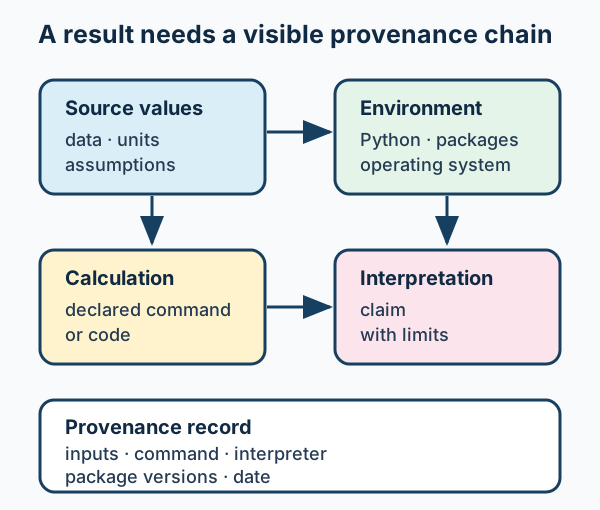
A calculation becomes scientific evidence only when another person can inspect its inputs, environment, method, and interpretation.
Connection: this is the through-line diagram made concrete. An unexpected result may originate at any link—not only in the Python expression.
Paths and randomness are hidden inputs
from pathlib import Path
import random

data_root = Path.cwd() / "data"  # only when notebook starts in project root
rng = random.Random(42)
Do not hard-code your personal desktop path.
A seed can reproduce a stochastic run; it does not make its model scientifically adequate.
III · Numbers are representations, not real numbers
Question
What does Python store when we write a number, and what can go wrong when it computes?
You will leave this section able to
distinguish
int, f32, and f64;explain the
0.1 + 0.2surprise;choose a comparison rule tied to a claim;
recognize cancellation, non-finite values, and extreme-scale failures.
Through-line focus: code and runtime → finite stored numbers.
Integers and floats make different promises
huge_count = 10**80
print(huge_count * huge_count)  # Python int: arbitrary precision

ratio = 10 / 3
print(ratio)                    # float: finite approximation
Contrast the promises:
Python integers grow as needed, with a time and memory cost.
A float has fixed storage, enormous range, and finite precision.
A float cannot represent every real number—or every decimal—exactly.
f64 / binary64: what a Python float usually is
On ordinary CPython platforms, float is IEEE 754 binary64, also called
float64, double precision, or f64.
64 bits = 1 sign + 11 exponent + 52 stored fraction bitsFor ordinary nonzero values:
the leading binary
1is implicit;that yields 53 bits of significant precision;
that is about 15–16 decimal digits.
Inspect sys.float_info on an unfamiliar runtime.
f32 versus f64 is an error-budget choice
| dtype | storage | significant decimal digits | largest finite magnitude |
|---|---|---|---|
float32 / f32 | 4 bytes | about 7 | 3.4×1038 |
float64 / f64 | 8 bytes | about 15–16 | 1.8×10308 |
For array code:
a library can choose a dtype different from ordinary Python
float;choose a dtype from the required range and error budget;
measure performance on the hardware and workload you actually intend to use.
Predict · why is 0.1 awkward in binary?
In base 10, 1/3=0.333… repeats forever. In base 2, 1/10 repeats
forever. So 0.1, 0.2, and 0.3 are each rounded to nearby binary values.
result = 0.1 + 0.2
print(result == 0.3)
print(f"{result:.17f}")
Predict whether f32 and f64 preserve the same displayed digits.
Run · inspect a Python float and binary fractions
Change 0.1 and 0.2 to other decimal fractions. Explain what remains true:
the values are finite binary64 representations, not failed mathematics.
Worked result: Python’s usual f64 representation reveals a rounded binary
value, and epsilon is about 2.22e-16. The f32/f64 comparison table tells
us why array code may make a different precision choice.
Machine epsilon is local spacing—not universal accuracy
import sys
import math

eps = sys.float_info.epsilon
print(1.0 + eps / 2 == 1.0)  # True
print(1.0 + eps == 1.0)      # False
print(math.ulp(1.0))
Epsilon is the binary64 gap just above
1.0; gaps grow with magnitude.math.ulp(x)asks about spacing near a particularx.Neither one tells you whether an instrument, a model, or an algorithm is accurate.
IV · Use numerical results responsibly
Question
What numerical comparison or representation supports the claim we actually want to make?
You will leave this section able to
distinguish absolute from relative tolerance;
explain why finite values can still be numerically unsafe;
identify cancellation and choose a stable form;
separate numerical agreement from scientific validation.
Through-line focus: numerical result → defensible claim.
Equality is sometimes right; often it is the wrong question
import math

measured_offset_cm_s = 10.0
expected_offset_cm_s = 0.0
resolution_cm_s = 100.0

print(measured_offset_cm_s == expected_offset_cm_s)
print(math.isclose(measured_offset_cm_s, expected_offset_cm_s,
                   rel_tol=0.0, abs_tol=resolution_cm_s))
Near zero, use an absolute tolerance with the quantity’s units. This asks “within 100 cm/s resolution,” not “identical.”
math.isclose(a, b, *, rel_tol, abs_tol) returns True or False.
aandbare the values being compared.rel_tolis a fractional allowance.abs_tolis an absolute allowance in the quantity’s units.*means the tolerances must be named explicitly.
Run · choose a tolerance that matches the claim
Move one slider at a time. State the conclusion in words and include its unit.
Worked result: at the default values, the offset is not exactly zero but
is within the stated 100 cm/s resolution.
Relative tolerance answers a scale-dependent question
import math

predicted_flux_erg_s_cm2 = 2.00e-14
measured_flux_erg_s_cm2 = 2.03e-14

print(math.isclose(measured_flux_erg_s_cm2, predicted_flux_erg_s_cm2,
                   rel_tol=0.02, abs_tol=0.0))
This asks whether values agree within 2%.
Use both absolute and relative tolerances only when each has an independent reason.
Use exact
==when exact identity is genuinely the contract.
A passing tolerance is not scientific validation
computed residual:      10 cm/s
instrument resolution:  100 cm/s
This supports one narrow conclusion:
the residual is within the stated resolution, if that is the relevant acceptance rule.
It does not establish:
that an instrument has no bias;
calibration, uncertainty, or agreement with a reference standard.
Check non-finite values at meaningful boundaries
import math

for value in [1.0, float("inf"), float("nan")]:
print(value, math.isfinite(value))nanandinfare diagnostic signals, not valid scientific answers.A guard must name the quantity, units, failure mode, and consequence.
Do not impose an arbitrary threshold without a model-based reason.
Predict · algebraically equal can compute differently
import math

x = 1e-8
direct = 1 - math.cos(x)
stable = 2 * math.sin(x / 2) ** 2
These expressions are exactly equal on paper. Predict what happens as x
becomes extremely small in binary64.
Run · cancellation and a stable identity
Decrease power. Identify the operation that loses the information and the
mathematical identity that preserves it.
Worked result: subtracting two nearly equal numbers loses informative digits. 2sin2(x/2) retains the small, nonzero scale that 1−cos(x) is trying to measure.
Same mathematics, different computation
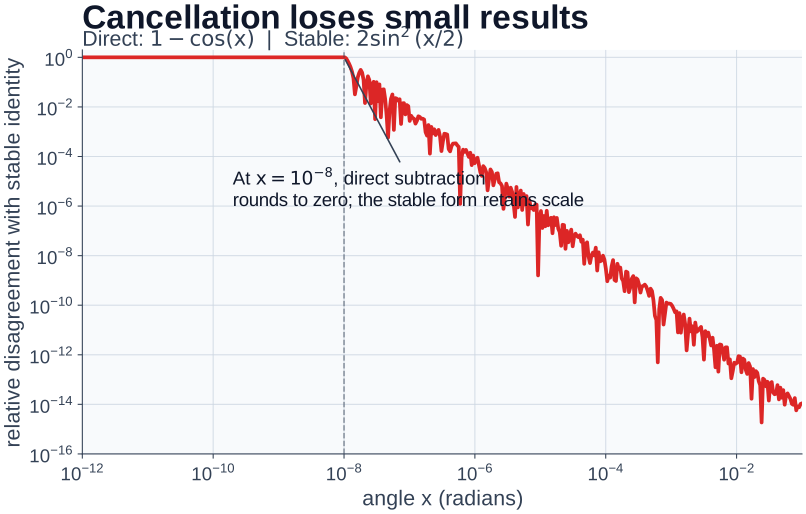
Algebraic equivalence does not guarantee numerical equivalence. At small scales, the direct subtraction can round away the very quantity we need.
Takeaway: choose a formulation for the behavior of its computation, not only for its appearance on paper.
Stable helpers and extreme scales
import math

print(math.expm1(1e-16))  # exp(x) - 1 near zero
print(math.log1p(1e-16))  # log(1 + x) near zero
print(math.hypot(3, 4))
print(math.fsum([1e16, 1.0, -1e16]))
For extreme scales:
log space turns multiplication into addition, helping with product overflow/underflow;
sums in log space need
logsumexp;zero or negative quantities need a different representation.
Complex numbers carry amplitude and phase
import cmath
import math

z = 3 + 4j
print(abs(z))               # magnitude
print(cmath.phase(z))       # phase in radians
print(cmath.exp(1j * math.pi))
Python uses
jfor −1.Complex arithmetic appears in waves, Fourier transforms, signal processing, and quantum mechanics.
Use
cmathif a value may be complex;mathis for real-number functions.
Official documentation: Python cmath module
V · From one calculation to scientific work
Question
What habits make an exploratory calculation understandable, repeatable, and worth building on?
You will leave this section able to
distinguish a numerical check from scientific validation;
state a minimal reproducibility record;
recognize the direction from notebook exploration to reusable code.
Through-line focus: the whole chain → reusable scientific work.
Good scientific code makes thinking visible
# Orbital speed at radius r for a two-body approximation.
orbital_speed_cm_s = (G_cm3_g_s2 * mass_g / radius_cm) ** 0.5
Good code is not code with the fewest characters. It has:
clear names;
visible grouping;
justified comments;
a stated expectation;
no hidden dependence on yesterday’s notebook memory.
From experiment to reusable computation
def schwarzschild_radius_cm(mass_g):
    if mass_g <= 0:
        raise ValueError("mass_g must be positive")

    G_cm3_g_s2 = 6.67430e-8
    c_cm_s = 2.99792458e10
    return 2 * G_cm3_g_s2 * mass_g / c_cm_s**2
This function makes visible:
the input unit and physical domain;
a guard that is meaningful because the model requires positive mass.
It does not prove the constants, model, or interpretation are adequate.
One source of truth; two ways to use it
def calculate():
    ...

if __name__ == "__main__":
    calculate()
Put reusable logic in modules so a notebook, script, or test can import it.
The
__name__ == "__main__"block runs only when a file is executed directly.We will build this pattern carefully in Chapter 5.
Five questions before trusting a calculation
Before trusting a calculation, ask:
What question, model, units, and assumptions am I encoding?
Which interpreter, packages, inputs, paths, and seed actually ran it?
Is this a clean notebook run or a reusable script/module path?
What types and dtypes represent the values?
What does a comparison, guard, or stable form establish—and what does it not establish?
Reference · calls for ordinary Python work
| Call | Arguments | Returns / use |
|---|---|---|
print(*values, sep=" ", end="\n") | values to display; optional separator/end | formatted text output |
type(value) | one object | its Python type |
int(x) / round(x, ndigits) | value; optional number of decimal places | converted or rounded number |
format(value, spec) | value; format specification such as ".17f" | display-ready string |
help(object) | a module, function, or class | documentation in the current session |
Use these to:
inspect;
convert;
display;
document a calculation.
They do not add scientific meaning that the model and units have not supplied.
Reference · environment and provenance calls
| Call | Arguments | Returns / use |
|---|---|---|
sys.executable | none; an attribute, not a call | path of the running interpreter |
Path.cwd() | none | current working directory as a Path |
random.Random(seed) | optional seed, such as 42 | reproducible pseudo-random generator |
importlib.util.find_spec(name) | module name string | import metadata; inspect .origin |
module.function(...) | depends on that module | use the module’s documentation for its contract |
Record these contexts when they affect a result.
A reproducible seed does not validate:
a model;
an input data set;
a scientific claim.
Reference · numerical calls and their arguments
| Call | Arguments | Returns / use |
|---|---|---|
math.sqrt(x) | nonnegative real x | x |
math.radians(degrees) / math.sin(x) | angle in degrees / angle in radians | converted angle / its sine |
math.isclose(a, b, *, rel_tol, abs_tol) | two values and named tolerances | whether the stated numerical comparison passes |
math.isfinite(x) | one number | whether x is neither nan nor infinite |
math.ulp(x) | one finite float | local binary64 spacing near x |
The arguments define the question.
A
Truereturn value does not by itself validate the model or instrument behind the numbers.
Reference · stable and complex-number helpers
| Call | Arguments | Use when |
|---|---|---|
math.expm1(x) / math.log1p(x) | one value near zero | evaluating exp(x)-1 or log(1+x) stably |
math.hypot(x, y) | two coordinate components | computing x2+y2 stably |
math.fsum(values) | iterable of floats | summing values with improved accuracy |
abs(z) / cmath.phase(z) | complex value | magnitude / phase in radians |
cmath.exp(z) | complex exponent | wave and complex-exponential calculations |
Use a specialized helper when its documented numerical behavior matches the calculation.
Do not use one merely because it exists.
Reference · official documentation used in Lecture 1
| You need help with… | Official Python documentation |
|---|---|
| arithmetic, trig, tolerances, floating point | math |
print, type, int, round, format, help | built-in functions |
| interpreter path and Python version | sys |
| paths and working directories | pathlib |
| seeded pseudo-random generators | random |
| import origins and module specifications | importlib |
| complex values, phases, and exponentials | cmath |
Class rule: before using an unfamiliar call, read:
its signature;
arguments;
return value;
raised exceptions;
at least one example.
See also: Docs First.
Exit check
For this code, write the narrowest defensible statement:
import math

calculated_offset_cm_s = 10.0
resolution_cm_s = 100.0

math.isclose(calculated_offset_cm_s, 0.0,
             rel_tol=0.0, abs_tol=resolution_cm_s)
Then write:
one fact you would record so a collaborator could reproduce the calculation;
one thing you would inspect before calling an instrument unbiased.