Skip to article frontmatterSkip to article content
Site not loading correctly?

This may be due to an incorrect BASE_URL configuration. See the MyST Documentation for reference.

Lecture 4 · NumPy, Matplotlib, and Readable Evidence

Block 1 · Week 2 | Chapters 7–8

San Diego State University

NumPy, Matplotlib, and readable evidence

Arrays, figures, and executable code

Use one small synthetic brightness record to inspect arrays and figures.

Run the Python cells in order. They print the arrays and render the figures used in this lecture.

Use the docs for the full API

We show a small, useful subset of NumPy and Matplotlib. Use the official docs to check the full API: signatures, options, return values, errors, and examples.

The through-line

  1. A numerical record

  2. A one-dimensional array

  3. A selection rule

  4. Named axes in an ND array

  5. A vectorized calculation

  6. A labeled figure

  7. A limited claim

State what positions, axes, and marks mean before interpreting a result.

Today’s question

How do we organize values across positions and axes, select and combine them safely, and make a figure a reader can check?

By the end of class, you should be able to:

  • create and inspect NumPy arrays with shape, size, and dtype;

  • use indexing, slicing, and Boolean masks while preserving aligned data;

  • read and index 2-D and ND arrays by their named axes and shape order;

  • use a length-one axis to broadcast an explicitly owned quantity safely;

  • write and check a vectorized calculation; and

  • construct a readable Matplotlib figure and state what it shows—and what it cannot establish alone.

One synthetic record supplies the values

These synthetic brightness measurements let us practice array operations and plots without reproducing a Project 1 analysis. A periodic reference curve appears later to distinguish calculated values from observations.

QuantityMeaningUnits
observation_time_daysobservation timedays
observed_brightnessinvented measurementnormalized; dimensionless
reference_period_daysperiod used by one reference curvedays
dimming_depthreference-curve drop from bright to dimdimensionless

I · NumPy arrays: quantities, positions, and elementwise operations

Question

What is an array, and what must be true before one operation can safely apply to many values?

You will leave this section able to

  • distinguish a Python list from a NumPy array;

  • read shape, size, and dtype;

  • create a numerical grid with np.linspace; and

  • explain elementwise arithmetic.

Through-line focus: named quantity → numerical array.

A list and an array make different promises

  • A list can hold related Python objects.

  • A numerical array supports elementwise arithmetic.

  • Neither stores units or validates a model for you.

list * 2: [1.0, 0.997, 0.991, 1.0, 0.997, 0.991]
array * 2: [2.    1.994 1.982]
ExpressionMeaning
brightness_list * 2Python repeats the list.
brightness_array * 2NumPy doubles each position.

Shape says how positions are organized

time: [0.  0.5 1.  1.5 2.  2.5 3.  3.5 4.  4.5 5.  5.5 6. ]
brightness: [0.986 0.971 0.973 0.984 0.999 0.997 0.985 0.973 0.97  0.986 0.997 0.999
 0.984]
time shape: (13,)
brightness shape: (13,)
number of observations: 13
dtype: float64

shape says how positions are organized. Both arrays have shape (13,): one dimension with one value per observation, in order.

Index i has the same meaning in both arrays:

observation_time_days[i] ↔ observed_brightness[i]

Matching shapes do not prove a correct pairing. A mismatch is an immediate reason to stop and inspect the record.

A numerical grid names its endpoints and count

np.linspace(start, stop, num) returns num evenly spaced values, including both endpoints.

The grid is an input to a calculation, not an observation by itself.

time grid: [0.  0.5 1.  1.5 2.  2.5 3.  3.5 4. ]
shape: (9,)
spacing: 0.5 days

Common array generators

Choose a generator from the structure you need:

  • np.arange for integer steps;

  • np.linspace for a stated interval and count;

  • np.logspace for powers of a base;

  • np.zeros, np.ones, or np.full for a stated shape and initial value.

integer steps: [0 1 2 3 4]
log values: [   1.   10.  100. 1000.]
blank shape: (3, 5)
weights: [1. 1. 1. 1. 1.]
missing values: [nan nan nan nan nan]

np.logspace(0, 3, 4) returns 10**0 through 10**3. For a floating-point grid with a stated number of values, use np.linspace rather than np.arange.

Elementwise arithmetic follows positions

Subtracting a scalar applies the same operation at every position.

[b₀, b₁, b₂, …] - background

= [b₀ - background, b₁ - background, b₂ - background, …]

This only makes sense when the scalar has the same meaning for every observation. A time-dependent correction needs an aligned array.

first three corrected values: [0.983 0.968 0.97 ]
shape preserved: (13,)

dtype is a numerical representation, not a unit

integer_counts stores integers. Division produces floating-point normalized brightness because the result is not generally an integer.

Use variable names, labels, and documentation for units. Use dtype to inspect how values are stored.

count dtype: int64
normalized dtype: float64
normalized values: [1.    0.997 0.991]

Reference · array creation and inspection

ExpressionWhat it does
np.array(values)Creates an array from a sequence.
np.arange(start, stop, step)Creates regularly spaced values; stop is excluded.
np.linspace(start, stop, num)Creates an evenly spaced grid.
np.logspace(start, stop, num)Creates powers of 10 from 10**start through 10**stop with the default base=10.
np.zeros(shape)Creates an array of zeros with the given shape.
np.ones(shape)Creates an array of ones with the given shape.
np.full(shape, fill_value)Creates an array filled with one value.
np.eye(N)Creates an N-by-N array with ones on the main diagonal.
array.shapeReports dimension lengths, such as (13,).
array.sizeCounts all elements.
array.dtypeReports stored numerical type.
array + scalarApplies the operation at every position.

Rule: state what each position represents before combining arrays.

II · Indexing, slicing, and Boolean selection

Question

How do we retrieve or select values while preserving the relationships among aligned arrays?

You will leave this section able to

  • retrieve the first, last, or a contiguous range of positions;

  • construct a Boolean mask from a stated rule;

  • apply the same mask to paired arrays; and

  • count selected values before interpreting them.

Through-line focus: paired arrays → same selection.

Indexing starts at 0; negative indices count from the end

  • values[0] selects the first position; values[1] selects the second.

  • values[-1] selects the last position; values[-2] selects the one before it.

  • values[start:stop] includes start and stops before stop.

  • Apply the same slice to every array in the same record.

Indexing is not permission to choose a convenient point after seeing a result. Use it for a stated role: a reference point, documented event, or predeclared check.

first observation: 0.0 days
third observation: 1.0 days; 0.973
last observation: 6.0 days
one before last: 5.5 days
early times: [0.  0.5 1. ]
early brightness: [0.986 0.971 0.973]

A Boolean mask selects the same positions from both arrays

Make one mask, then use it on every aligned array.

The mask has one True or False value per observation. Applying it to both arrays preserves the time--brightness pairing.

mask: [False  True  True  True False False False  True  True False False False
  True]
selected times: [0.5 1.  1.5 3.5 4.  6. ]
selected brightness: [0.971 0.973 0.984 0.973 0.97  0.984]
selected count: 6

Arrays need an explicit many-value question

if low_brightness: fails because low_brightness contains many Boolean values.

Use np.any for “at least one” and np.all for “every.”

ValueError: The truth value of an array with more than one element is ambiguous. Use a.any() or a.all()
any low values? True
all low values? False

A threshold is a selection rule

Reference · indexing and Boolean selection

ExpressionRead it as
array[0]First position.
array[-1]Last position.
array[i]One value at position i.
array[start:stop]A slice; stop is excluded.
array[mask]Positions where the same-shaped mask is True.
mask = values < thresholdOne Boolean decision per position.
np.count_nonzero(mask)Number of selected positions.
np.any(mask) / np.all(mask)At least one / every position.

Rule: use the same selection on every array that describes the same observations.

III · 2-D and ND arrays: matrices, axes, and shape

Question

How do we represent values across multiple named axes without losing the meaning of any dimension?

You will leave this section able to

  • read ndim and a two-dimensional shape;

  • state what each axis and position represents;

  • index a row, column, or one specific value;

  • state what axis=0 and axis=1 leave behind; and

  • broadcast one owned value per source across time.

Through-line focus: named positions → named axes.

A 2-D array can represent a labeled matrix

A regular two-dimensional ndarray is NumPy’s representation for a matrix or any rectangular table of values. Its shape uses the matrix convention: (number_of_rows, number_of_columns).

brightness_by_source is a measurement matrix with shape (3, 5):

  • axis 0: three sources (rows);

  • axis 1: five observing times (columns);

  • brightness_by_source[source_index, time_index]: one measurement.

The layout is matrix-like; the axis meanings are scientific: (source, time). State what every axis owns.

* is elementwise multiplication for ndarray objects. A @ B is matrix multiplication. Use @ only when the inner dimensions and the linear mapping have been stated.

Here, matrices are data tables with named axes. We will use matrix multiplication when its linear-algebra meaning is the topic.

source row / time column0 (0 days)1 (1 day)2 (2 days)3 (3 days)4 (4 days)
0 · source A1.0000.9980.9850.9971.001
1 · source B0.9800.9790.9660.9780.981
2 · source C1.0201.0181.0061.0171.021

brightness_by_source[1, 2] is the bold entry: source B at day 2.0.

ndim: 2
shape: (3, 5)
row labels: ['A' 'B' 'C']
column times (days): [0. 1. 2. 3. 4.]

Matrix order and coordinate order are different conventions

For a matrix or ordinary 2-D array, use array[row, column]: first vertical row, then horizontal column.

Cartesian coordinates are conventionally written (x, y): horizontal position first, then vertical position. An image stored in a 2-D array is therefore commonly accessed as image[y, x], not image[x, y].

Shape and indexing use the same axis order

NumPy lists axis lengths left to right:

array.shape == (axis_0_length, axis_1_length, ...)

Indexing follows the same order:

array[axis_0_index, axis_1_index, ...]

For a conventional 2-D table, that is (row, column) and array[row, column]. In this lecture, the axes are (source, time), so brightness_by_source[source, time] uses the same convention.

An array does not assign the meanings “row,” “column,” “source,” or “time.” You define and document them.

axis order: (source, time)
shape: (3, 5)
value at [source, time]: 0.966
transposed axis order: (time, source)
transposed shape: (5, 3)
same value at [time, source]: 0.966

For a 3-D array, use the same rule: a shape such as (3, 5, 2) could mean (source, time, filter) and be indexed as array[source, time, filter].

Indexing a 2-D array names both axes

Read these in order:

  • brightness_by_source[1] selects source B across all times: shape (5,).

  • brightness_by_source[:, 2] selects all sources at day 2.0: shape (3,).

  • brightness_by_source[1, 2] selects one scalar measurement.

one source: [0.98  0.979 0.966 0.978 0.981]
one time across sources: [0.985 0.966 1.006]
one measurement: B at day 2.0 = 0.966

A reduction consumes one axis

mean(axis=1) reduces the time axis, leaving one mean per source.

mean(axis=0) reduces the source axis, leaving one mean per observing time.

The output shape is part of the scientific meaning, not an implementation detail.

per-source shape: (3,)
per-source means: [0.9962 0.9768 1.0164]
per-time shape: (5,)
per-time means: [1.         0.99833333 0.98566667 0.99733333 1.001     ]

Broadcasting: one operation across compatible shapes

Definition: Broadcasting is NumPy’s shape-matching rule for elementwise operations. NumPy aligns shapes from the right. On each aligned axis, the lengths must match or one length must be 1; missing leading axes behave like length 1. The result uses the larger length on each axis.

NumPy does not need to copy a value into a larger array. Broadcasting describes how the operation is evaluated.

Apply the shape rule before the operation

Left shapeRight shapeResult shapeWhat repeats conceptually
(3, 5)(5,)(3, 5)One value per column across every row.
(3, 5)(3, 1)(3, 5)One value per row across every column.
(3, 1)(1, 5)(3, 5)A row quantity and column quantity combine.
(3, 5)(3,)errorTrailing lengths 5 and 3 conflict.

Equal lengths are compatible. A length-one axis can expand. Any other pair of aligned lengths raises ValueError.

See broadcasting on generic rows and columns

values_by_row_and_column has shape (3, 5).

  • per_column has shape (5,), so it aligns with the trailing column axis.

  • per_row has shape (3,), so it conflicts with the trailing axis.

  • per_row[:, np.newaxis] has shape (3, 1), so its length-one column axis expands across five columns.

per-column result shape: (3, 5)
per-row without newaxis: ValueError
per-row result shape: (3, 5)
per-row result:
 [[1. 1. 1. 1. 1.]
 [2. 2. 2. 2. 2.]
 [3. 3. 3. 3. 3.]]

Apply broadcasting to one baseline per source

brightness_by_source has shape (3, 5) with axes (source, time). baseline_per_source has shape (3,). Right alignment compares its 3 with the table’s trailing time length 5, so the operation fails.

baseline_per_source[:, np.newaxis] has shape (3, 1): one baseline per source and a length-one time axis. Broadcasting expands that time axis across the five columns, giving shape (3, 5).

without an explicit axis: ValueError
baseline shape: (3,)
explicit baseline shape: (3, 1)
normalized shape: (3, 5)
first normalized row: [1.    0.998 0.985 0.997 1.001]

Reference · ND arrays, axes, and broadcasting

ExpressionRead it as
array.ndimNumber of axes.
array.shape == (3, 5)Three row positions and five column positions.
array[row, column]One value with both positions named.
array.mean(axis=1)One value per row after reducing columns.
array.mean(axis=0)One value per column after reducing rows.
values[:, np.newaxis]Add a length-one column axis.
array + valuesAlign shapes from the right; each axis must match or have length 1.

Rule: before combining ND arrays, name each axis, its owner, and the expected output shape.

Practice the 2-D case before using it in larger work

The Vectorization and Broadcasting Lab repeats this reasoning with a fresh data table. Complete it after this lecture: predict a shape, write the axis meaning, then run the expression.

IV · Vectorized calculations and shape checks

Question

How can one stated calculation accept a scalar or many positions while preserving correspondence and checking shape?

You will leave this section able to

  • write a vectorized function with an explicit input contract;

  • check an array result against one scalar result; and

  • distinguish a vectorized one-dimensional calculation from an ND-array broadcasting operation.

Through-line focus: paired array → stated calculation.

A vectorized calculation accepts a scalar, list, or array

time_days must be finite. reference_period_days must be finite and positive. dimming_depth is the drop from 1.0 to 1.0 - dimming_depth in this reference curve.

reference shape: (13,)
reference values: [0.985 0.972 0.972 0.985 0.998 0.998 0.985 0.972 0.972 0.985 0.998 0.998
 0.985]

Check one vectorized result against one scalar call

The assertion checks the scalar and vector paths at the same input.

scalar and vector results agree at index 4

A shape error asks a representation question

These arrays represent different grids: one has 13 positions and the other has 400. NumPy should not invent a one-to-one correspondence.

Before combining arrays, ask:

  1. What does each position mean?

  2. Which positions should correspond?

  3. Did a grid or selection change one array?

ValueError: operands could not be broadcast together with shapes (13,) (400,) 

Reference · vectorization and compatible shapes

IdeaRead it as
Elementwise operationApply one operation at corresponding positions.
(n,)One-dimensional array with n positions.
Scalar checkCompare one array position with the same scalar calculation.
Shape errorStop and state which positions should correspond.

Rule: write the shape and physical meaning of every position before combining arrays.

V · Matplotlib: readable figures and bounded evidence

Question

What must a reader identify to interpret a figure and assess a bounded claim?

You will leave this section able to

  • create a figure and axes object;

  • distinguish observations, a reference calculation, and a threshold;

  • choose scales and axis direction deliberately; and

  • write a bounded evidence statement from a figure.

Through-line focus: stated calculation → readable figure.

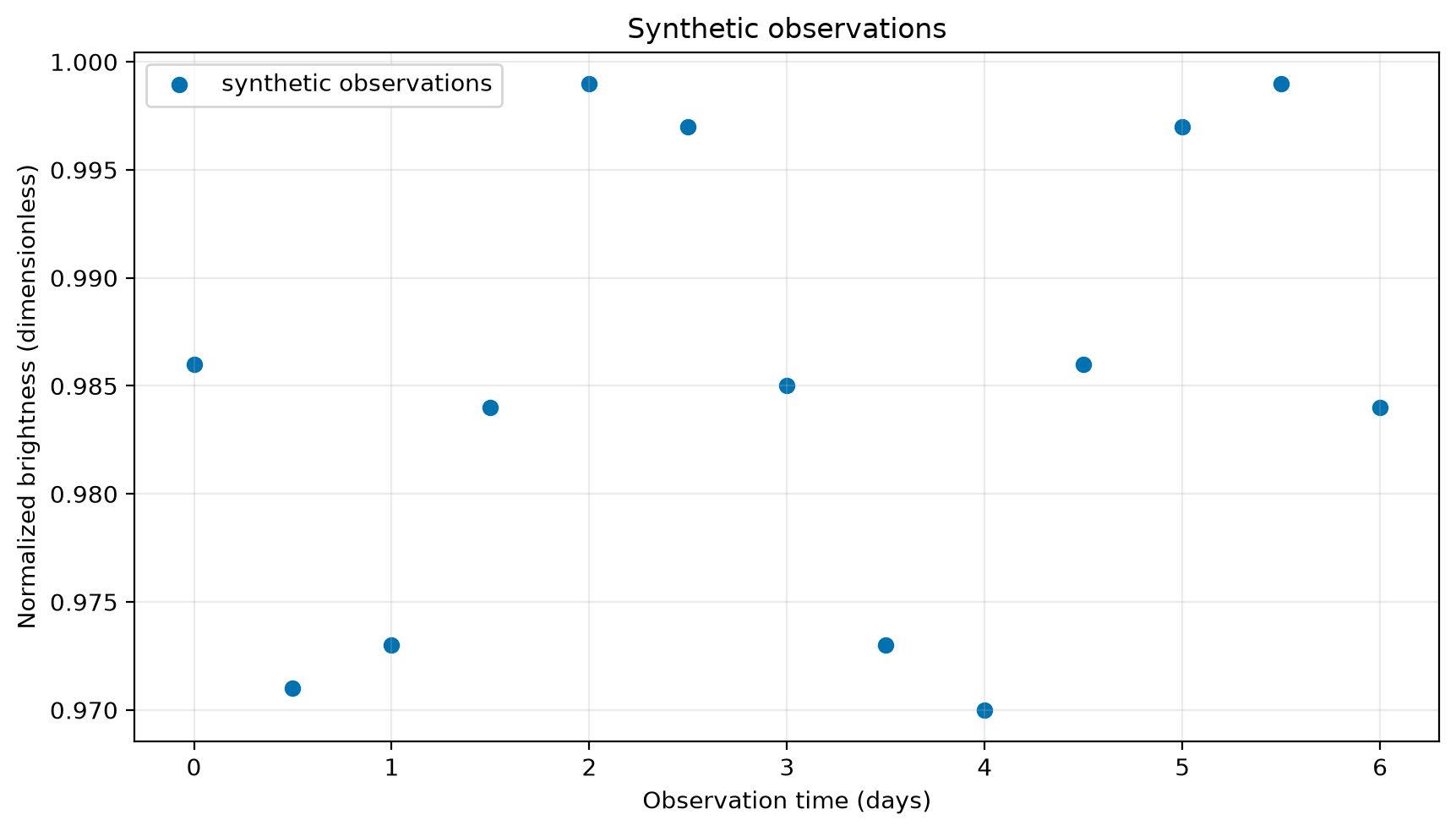
Run this: render the observations

fig is the whole figure. ax is the plotting area that owns the data, labels, limits, legend, and grid.

Use fig, ax = plt.subplots() as the default course pattern. It keeps later choices attached to a named axes object and extends cleanly to multi-panel figures.

Thirteen blue circular markers show synthetic normalized brightness from 0 to 6 days, ranging from 0.970 to 0.999. No curve is shown.

Figure 1:Synthetic observations plotted as discrete markers.

Read the rendered output: each circle is one observation. No curve is shown yet.

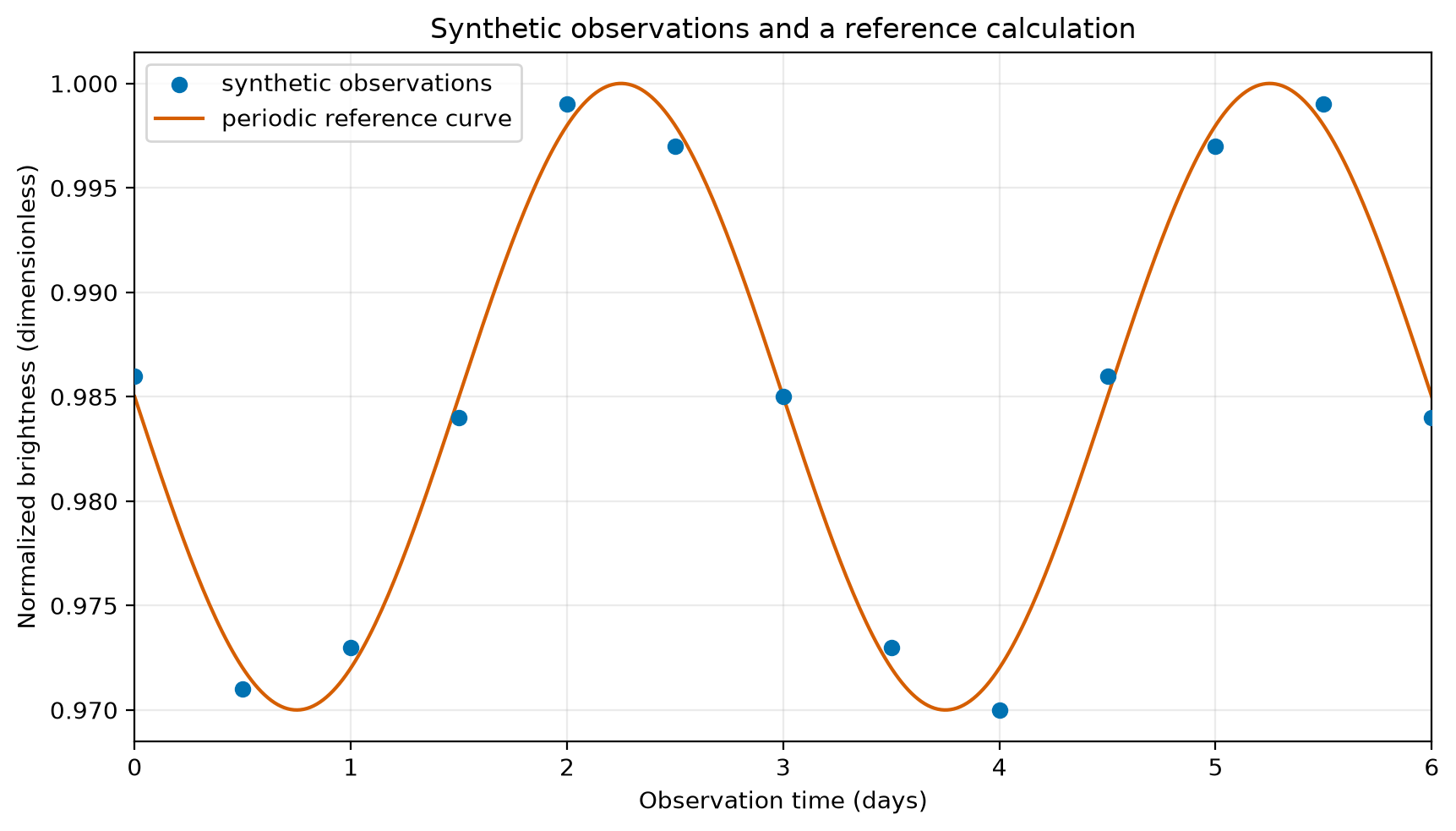
Add a separately named reference curve

A line can look more authoritative than the data. Name it as a reference calculation and use a denser, separately named grid so the reader can distinguish calculated values from observations.

Thirteen blue circular observations are plotted from 0 to 6 days with an orange periodic reference curve on a denser time grid. Both range from about 0.970 to 1.000.

Figure 2:Synthetic observations and a separately evaluated reference curve.

Read the rendered output: markers are 13 observations; the solid line uses a denser reference grid.

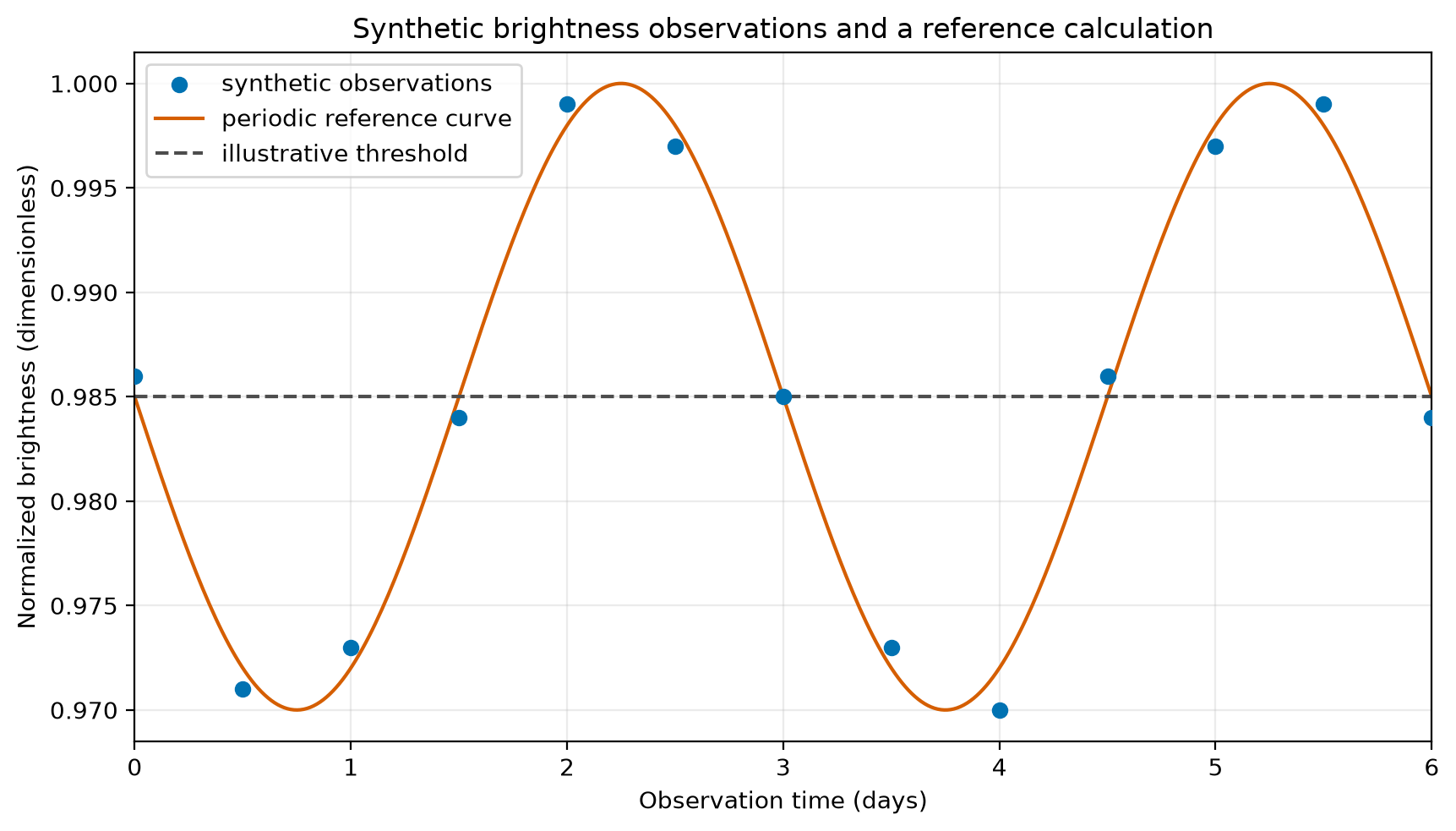
Add a threshold and complete the figure

Thirteen blue circular observations and an orange periodic reference curve range from about 0.970 to 1.000 normalized brightness. A gray dashed horizontal line marks the illustrative 0.985 threshold.

Figure 3:Synthetic observations, a periodic reference curve, and an illustrative threshold.

  • Circles are the synthetic observations.

  • The solid line is a reference calculation, not a fit.

  • The dashed line is an illustrative threshold.

  • Marker shape and line style work even without color.

Read the rendered output: markers, the solid line, and the dashed line represent different things. The legend names them.

Use figure anatomy as a checklist

The Matplotlib Anatomy of a Figure is a reference for figure and axes vocabulary.

saved: lecture-04-synthetic-brightness-figure.png (exists: True)

plt.show() displays a figure in a notebook. savefig(...) writes an image file. The examples do both so this page can display the executed figures.

Save only after you set labels, limits, scale, and legend.

PartCheck
Axis labelsQuantity and units are visible.
Limits and scaleThe relevant range is visible.
LegendEvery encoding is identified.
Title or captionIt says what is shown.
ExportText remains readable.

Check the axes before exporting

x label: Observation time (days)
y label: Normalized brightness (dimensionless)
title: Synthetic brightness observations and a reference calculation
legend labels: ['synthetic observations', 'periodic reference curve', 'illustrative threshold']

The figure object exposes labels and legend entries for code-based checks.

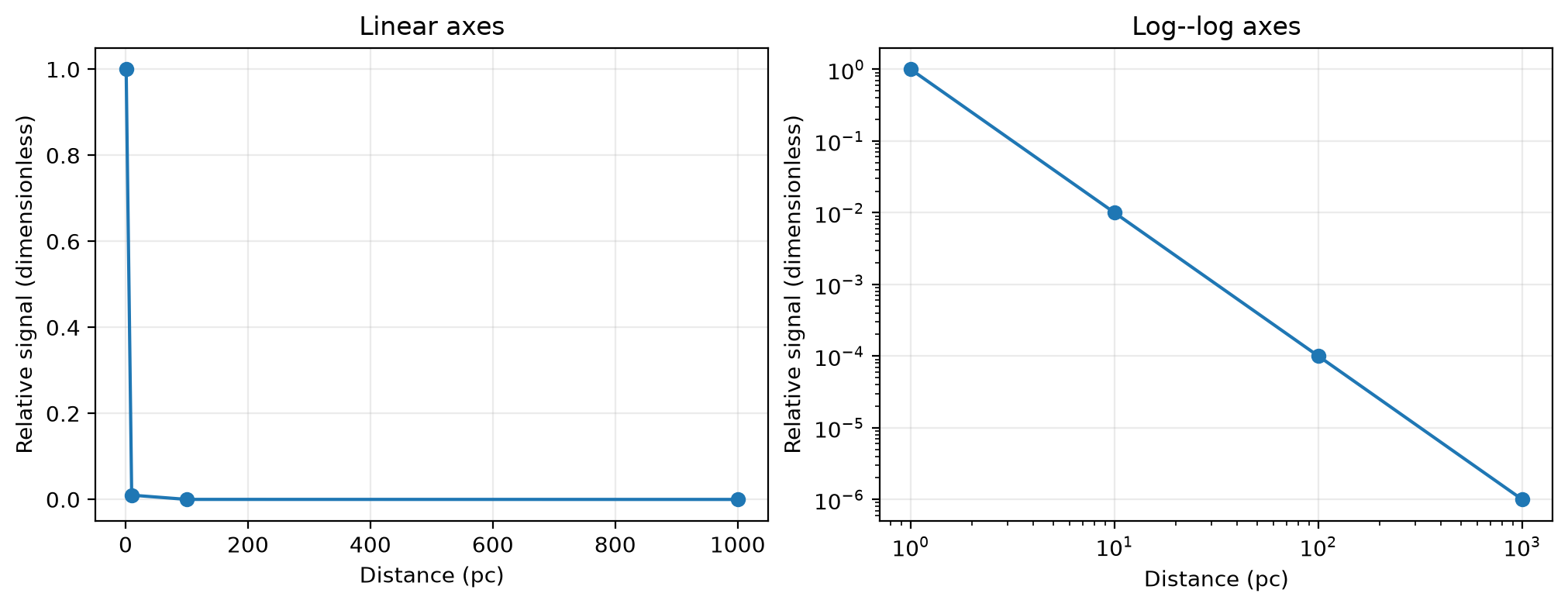
Scale changes what a reader can see

Two panels show the same inverse-square relative signal versus distance from 1 to 1,000 parsecs. On linear axes the three farthest values cluster near zero; on log-log axes the points form a descending straight line.

Figure 4:The same inverse-square relationship on linear and log-log axes.

The values are positive, so logarithmic axes are allowed. Equal ratios occupy equal distances on a log axis. A log scale changes the view, not the values.

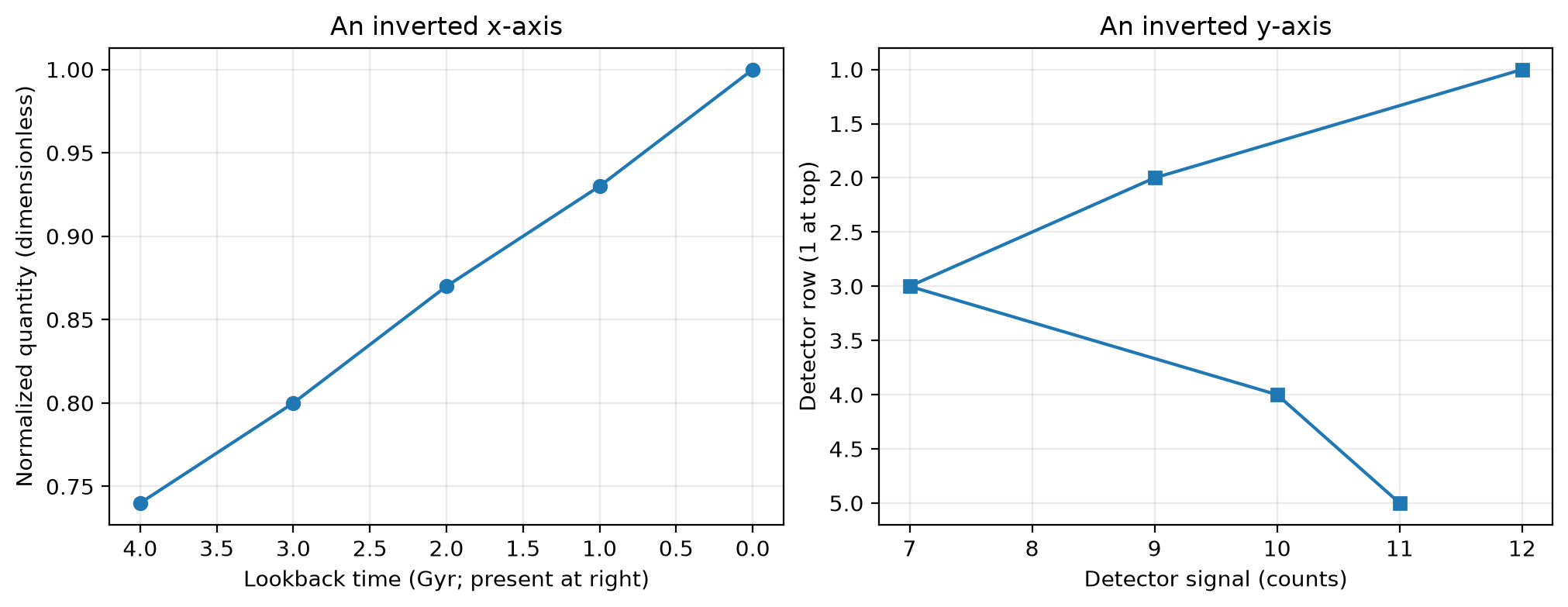
Axis direction is a stated convention

Two panels demonstrate stated axis inversions. The left panel places present-day lookback time at the right; the right panel places detector row 1 at the top.

Figure 5:Inverted axes require an explicit convention in the axis label.

Call invert_xaxis() or invert_yaxis() only when the label states the convention.

State what the figure shows

Use three parts:

  1. Visible: Several synthetic observations and portions of the reference curve lie below the 0.985 illustrative threshold.

  2. Evidence: The labeled axes, circular markers, solid line, and dashed threshold distinguish the three visual elements.

  3. Open: The reference calculation has no measured uncertainty, calibration, or competing physical explanation.

Reference · a readable Matplotlib figure

PatternPurpose
fig, ax = plt.subplots()Creates a figure and named axes.
ax.scatter(x, y, ...)Shows discrete observations.
ax.plot(reference_x, reference_y, ...)Draws a separately named reference curve.
ax.axhline(value, ...)Shows a horizontal rule or threshold.
ax.set(xlabel=..., ylabel=..., title=...)Names quantities, units, and subject.
ax.legend()Identifies plotted series and rules.
ax.grid(alpha=0.25)Aids coordinate reading without dominating data.
brightness_fig.savefig(...)Exports after the figure is checked.

Rule: name variables, units, calculation status, and selection rules.

Documentation for the next question

ResourceUse it for
NumPy user guideconcepts and worked guides
NumPy API referenceexact functions, parameters, and returns
Matplotlib documentationplotting guides and API
Matplotlib API referenceexact plotting methods, parameters, and returns
Matplotlib cheatsheetscompact reminders
Matplotlib Anatomy of a Figurefigure and axes vocabulary

Start with the user guide for concepts and worked examples. Use an API reference when you need an exact parameter, return type, or error condition.

Use the cheatsheets and figure anatomy page while you are building a plot, not after you have guessed at the method names.

Exit check

A teammate writes:

ax.plot(observation_time_days, observed_brightness)
ax.axhline(0.985)

Name three additions needed before this can serve as a course figure, and say why each matters. Then answer:

  1. Why must one Boolean mask select both observation_time_days and observed_brightness?

  2. What does a threshold line show directly? What does it not establish?

  3. What does reference_brightness.shape == observation_time_days.shape check, and what does it not prove about the pairing?

  4. brightness_by_source has shape (3, 5) and baseline_per_source has shape (3,). Why does their division fail? What does baseline_per_source[:, np.newaxis] change, and why does (3, 1) work?

  5. Why might a Cartesian point (x, y) be accessed as image[y, x] in a 2-D image array?

Carry forward

state quantities and units

→ build and inspect arrays

→ select with a documented rule

→ evaluate a stated calculation

→ make a labeled figure

→ claim only what the figure supports

Reuse this workflow in later work. The next scientific question determines the data, assumptions, and validation it needs.