Chapter 8: Matplotlib and Visual Evidence
Figures that make claims, units, uncertainty, and limits inspectable
Learning objectives
By the end of this chapter, you will be able to:
(1) Implement Matplotlib’s object-oriented interface to create publication-quality scientific figures with full control over every visual element
(2) Analyze the hierarchical structure of Matplotlib figures to manipulate axes, subplots, labels, legends, and other components independently
(3) Design appropriate visualizations for different data types (light curves, spectra, images, color-magnitude diagrams) by selecting optimal plot types
(4) Evaluate and choose between linear, logarithmic, and semilog scales to reveal hidden patterns and relationships in your data
(5) Debug visualization problems through iterative experimentation with different representations, scales, and visual encodings
(6) Create reusable plotting functions that encapsulate domain knowledge and best practices for common scientific visualizations
(7) Apply perceptually uniform colormaps and appropriate normalizations to honestly represent 2D data and avoid creating visual artifacts
(8) Configure export settings (DPI, format, size) to meet publication requirements for journals, presentations, and web display
Prerequisites
Before starting this chapter, verify you can:
Create and manipulate NumPy arrays (Chapter 7)
Perform array operations and indexing (Chapter 7)
Use array methods like mean(), std(), max() (Chapter 7)
Generate random numbers with NumPy (Chapter 7)
Work with 2D arrays and meshgrid (Chapter 7)
Self-Assessment Diagnostic
Test your readiness by predicting the outputs and identifying any issues:
import numpy as np

# Question 1: What shape will this array have?
x = np.linspace(0, 10, 100)
y = np.sin(x)
# Shape of y: _______

# Question 2: What will this boolean mask select?
data = np.array([1, 5, 3, 8, 2, 9])
mask = data > 5
selected = data[mask]
# selected contains: _______

# Question 3: What's wrong with this code?
# matrix = np.array([[1, 2], [3, 4]])
# result = matrix + [10, 20, 30]  # Will this work?
# Your answer: _______

# Question 4: What will this create?
X, Y = np.meshgrid(np.arange(5), np.arange(3))
# Shape of X and Y: _______
Self-Assessment Answers
Shape of y:
(100,)- 1D array with 100 elementsselected contains:
[8, 9]- values greater than 5Broadcasting error - shapes (2,2) and (3,) are incompatible
Shape of X and Y: Both are
(3, 5)- 2D grids
If you got all four correct, you’re ready for Matplotlib! If not, review Chapter 7.
Why this chapter matters
Data without visualization is like a telescope without an eyepiece – you might have collected photons from distant galaxies, but you can’t see the universe they reveal. Many major scientific arguments have been communicated through carefully crafted visualizations: Hubble’s distance–velocity relation, Hertzsprung and Russell’s diagram of stellar populations, and cosmic-microwave-background power spectra that became central evidence in models of the early universe. These were not just pretty pictures; they made measurements, model comparisons, and uncertainty visible. Matplotlib (Hunter 2007), the foundational plotting library for scientific Python, gives you the power to turn NumPy arrays into evidence that can be inspected, shared, published, and understood.
But here’s what many tutorials won’t tell you: Matplotlib isn’t just a plotting library – it’s an artist’s studio. Like an artist selecting brushes, canvases, and colors, you’ll learn to choose plot types, figure sizes, and colormaps that best express your data’s story. Creating a great visualization isn’t about following rigid rules; it’s about experimentation, iteration, and developing an aesthetic sense for what works. You’ll discover that the difference between a confusing plot and a revealing one often comes down to trying different scales – linear versus logarithmic, different color mappings, or simply adjusting the aspect ratio. This chapter embraces that experimental nature, teaching you not just the mechanics of plotting but the art of visual exploration. You’ll learn to approach each dataset as a unique challenge, trying multiple visualizations until you find the one that makes the patterns jump off the page.
This chapter introduces Matplotlib’s two main interfaces – pyplot for quick exploration and the object-oriented API for full control – but focuses on the latter because it’s what you’ll use for research. You’ll master the anatomy of a figure, understanding how figures contain axes, how axes contain plots, and how every element can be customized. You’ll learn the visualization canon: light curves that reveal exoplanets, spectra that encode stellar chemistry, color-magnitude diagrams that map stellar populations, and images that capture the structure of galaxies. Most crucially, you’ll develop visualization taste – the ability to choose the right plot type, scale, and layout to honestly and effectively communicate your scientific findings. By the chapter’s end, you won’t just make plots; you’ll craft visual narratives that can stand alongside those historic diagrams that revolutionized science. And you’ll have built your own library of plotting functions, turning common visualizations into single function calls that encode your hard-won knowledge about what works.
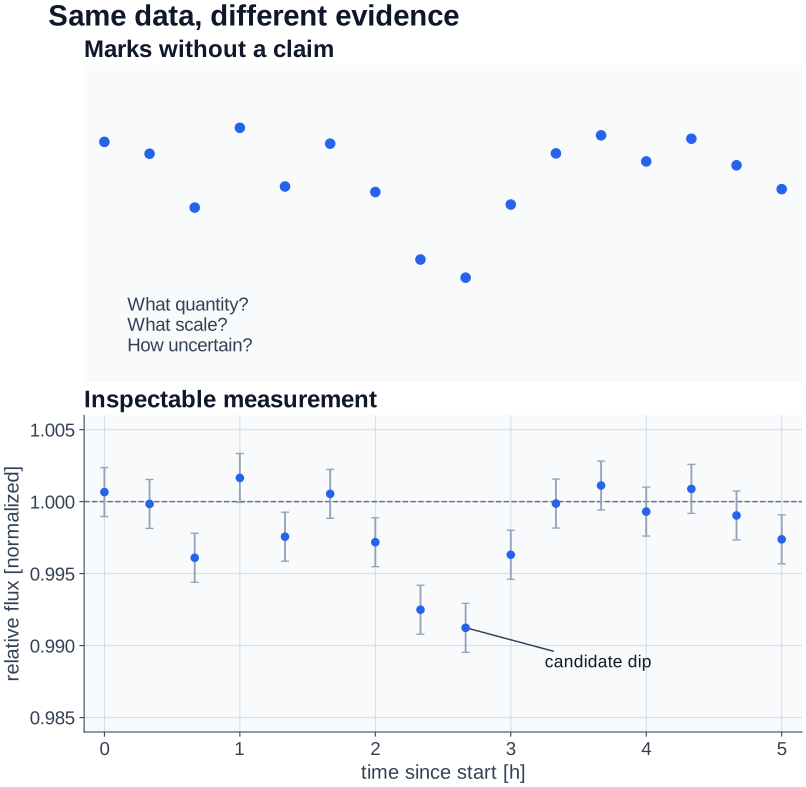
Figure 1:The same marks become more inspectable when the quantity, scale, uncertainty, and narrowest warranted language are visible.
What to notice: the right panel supports a more precise question, not a larger conclusion. Error bars and a label make the candidate dip inspectable; they do not establish an astrophysical interpretation, calibration, or detection.
8.1 Matplotlib as Your Artistic Medium
Before we dive into technical details, let’s establish a fundamental principle: creating visualizations is an inherently creative act. You’re not just displaying data; you’re making countless aesthetic choices that affect how your message is received. Consider these two philosophies:
import numpy as np
import matplotlib.pyplot as plt

# Generate some data - a damped oscillation
time = np.linspace(0, 10, 1000)
signal = np.exp(-time/3) * np.sin(2 * np.pi * time)

# Approach 1: The Default Plot (technically correct but uninspiring)
fig, (ax1, ax2) = plt.subplots(1, 2, figsize=(12, 5))

ax1.plot(time, signal)
ax1.set_title('Default: Technically Correct')

# Approach 2: The Artistic Plot (same data, different choices)
ax2.plot(time, signal, color='#2E86AB', linewidth=2, alpha=0.8)
ax2.fill_between(time, signal, alpha=0.2, color='#2E86AB')
ax2.axhline(y=0, color='#A23B72', linestyle='-', linewidth=0.5, alpha=0.5)
ax2.set_xlabel('Time (s)', fontsize=11)
ax2.set_ylabel('Amplitude', fontsize=11)
ax2.set_title('Artistic: Same Data, Better Story', fontsize=13, fontweight='bold')
ax2.grid(True, alpha=0.15, linestyle='-', linewidth=0.5)
ax2.spines['top'].set_visible(False)
ax2.spines['right'].set_visible(False)

plt.tight_layout()
plt.show()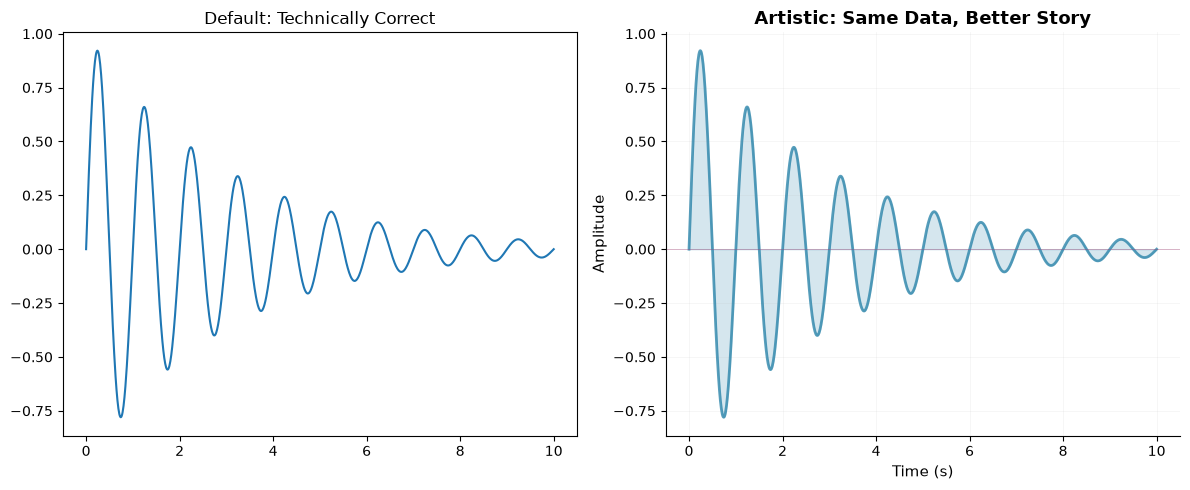
Comparison of default vs artistic plotting approaches
Both plots show the same data, but the second one makes deliberate choices about color, transparency, and styling that make it more engaging. This is what we mean by being an artist with Matplotlib – every element is under your control, and those choices matter.
The executable examples establish the standard imports import numpy as np and
import matplotlib.pyplot as plt. Later static snippets continue from that
convention unless they show their own imports; when copying one into a fresh
notebook, bring those imports with it and state any optional dependency.
The Experimentation Mindset
Creating effective visualizations requires experimentation. You rarely get it right on the first try. Here’s a realistic workflow:
import numpy as np
import matplotlib.pyplot as plt

# Synthetic teaching sample, not a stellar catalog or population model.
# For dN/dM ∝ M^(-2.35), NumPy's Pareto-II shape is 2.35 - 1.
rng = np.random.default_rng(42)
salpeter_slope = 2.35
minimum_mass_solar = 0.1
pareto_shape = salpeter_slope - 1
masses = minimum_mass_solar * (rng.pareto(pareto_shape, 1000) + 1)
luminosities = masses ** 3.5 * np.exp(rng.normal(0, 0.1, len(masses)))

# Try different visualizations to find what reveals the pattern best
fig, axes = plt.subplots(2, 3, figsize=(12, 8))

# Attempt 1: Simple scatter
axes[0, 0].scatter(masses, luminosities, s=1, alpha=0.5)
axes[0, 0].set_title('Linear Scale: Pattern Hidden')
axes[0, 0].set_xlabel(r'Mass [$M_\odot$]')
axes[0, 0].set_ylabel(r'Luminosity [$L_\odot$]')

# Attempt 2: Log-log reveals power law!
axes[0, 1].loglog(masses, luminosities, '.', markersize=2, alpha=0.5)
axes[0, 1].set_title('Log-Log: Power Law Revealed!')
axes[0, 1].set_xlabel(r'Mass [$M_\odot$]')
axes[0, 1].set_ylabel(r'Luminosity [$L_\odot$]')

# Attempt 3: Semilog-x (wrong choice for this data)
axes[0, 2].semilogx(masses, luminosities, '.', markersize=2, alpha=0.5)
axes[0, 2].set_title('Semilog-X: Not Helpful Here')
axes[0, 2].set_xlabel(r'Mass [$M_\odot$]')
axes[0, 2].set_ylabel(r'Luminosity [$L_\odot$]')

# Attempt 4: 2D histogram for density
h = axes[1, 0].hist2d(np.log10(masses), np.log10(luminosities),
                       bins=30, cmap='YlOrRd')
axes[1, 0].set_title('2D Histogram: Shows Density')
axes[1, 0].set_xlabel('log(Mass)')
axes[1, 0].set_ylabel('log(Luminosity)')

# Attempt 5: Hexbin for large datasets
axes[1, 1].hexbin(masses, luminosities, gridsize=20,
                  xscale='log', yscale='log', cmap='Blues')
axes[1, 1].set_title('Hexbin: Good for Large N')
axes[1, 1].set_xlabel(r'Mass [$M_\odot$]')
axes[1, 1].set_ylabel(r'Luminosity [$L_\odot$]')

# Attempt 6: KDE-colored scatter for local density
# Optional: requires SciPy (skip if not installed)
try:
    from scipy.stats import gaussian_kde
    xy = np.vstack([np.log10(masses), np.log10(luminosities)])
    z = gaussian_kde(xy)(xy)
    idx = z.argsort()
    x, y, z = np.log10(masses)[idx], np.log10(luminosities)[idx], z[idx]
    axes[1, 2].scatter(x, y, c=z, s=1, cmap='viridis')
    axes[1, 2].set_title('KDE-Colored: Shows Structure')
except ImportError:
    axes[1, 2].text(0.5, 0.5, 'SciPy required', ha='center', va='center',
                    transform=axes[1, 2].transAxes)
    axes[1, 2].set_title('KDE (requires SciPy)')
axes[1, 2].set_xlabel('log(Mass)')
axes[1, 2].set_ylabel('log(Luminosity)')

plt.suptitle('Experimentation Reveals the Best Visualization',
             fontsize=14, fontweight='bold')
plt.tight_layout()
plt.show()

print("Key lesson: the log-log plot makes the simulated power-law relationship")
print("easier to inspect than the linear display. Compare representations deliberately.")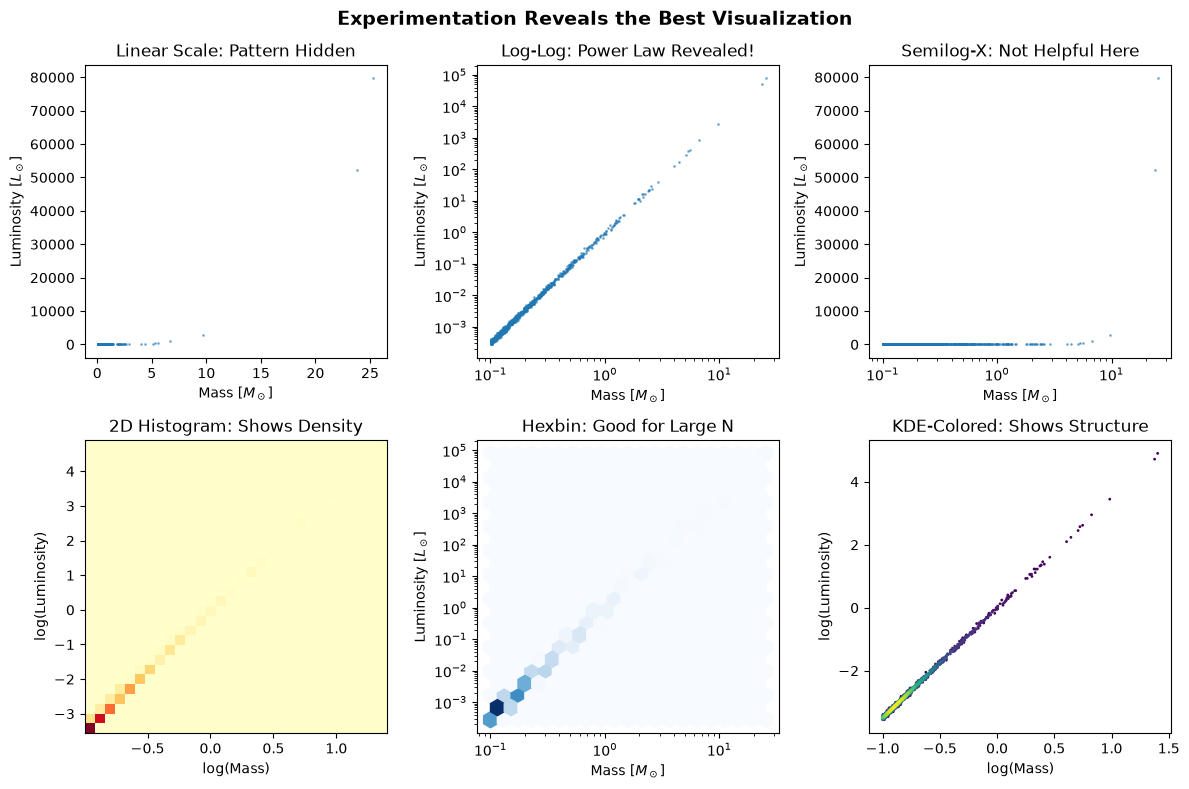
Key lesson: the log-log plot makes the simulated power-law relationship
easier to inspect than the linear display. Compare representations deliberately.
Experimenting with different visualizations reveals hidden patterns
The sample is deliberately synthetic: its lower mass cutoff, power-law slope, mass--luminosity exponent, and multiplicative scatter are teaching choices, not a calibrated stellar-population model. The point is to compare displays of a positive power-law relationship while keeping the assumptions inspectable.
The More You Know: How Residual Plots Clarified Supernova Evidence
In 1998, two teams measured cosmic expansion with Type Ia supernovae – objects whose calibrated luminosities can estimate distance. The Supernova Cosmology Project and the High-Z Supernova Search Team compared distant supernovae with cosmological models and found evidence inconsistent with a decelerating, matter-only universe (Riess et al. 1998; Perlmutter et al. 1999).
Residual Hubble diagrams are a powerful way to make such a comparison inspectable: plot the difference between an observed magnitude and the prediction from a stated reference model. The plot does not replace calibration, uncertainty analysis, selection-bias checks, or alternatives to the reference model. It helps readers see exactly which comparison those analyses must support.
# Schematic residual plot, not a reproduction of the survey data or analysis.
z = np.array([0.01, 0.1, 0.3, 0.5, 0.7, 0.9])  # Redshift
# Expected magnitudes for matter-only universe
m_expected = 5 * np.log10(z * 3000) + 25  # Simplified
# Synthetic magnitudes with a stated positive residual trend.
m_observed = m_expected + 0.25 * z

fig, (ax1, ax2) = plt.subplots(1, 2, figsize=(12, 5))

# Raw magnitude comparison
ax1.plot(z, m_observed, 'ro', markersize=8)
ax1.plot(z, m_expected, 'b--', label='Expected (matter only)')
ax1.set_xlabel('Redshift (z)')
ax1.set_ylabel('Magnitude')
ax1.set_title('Original Plot: Hard to See')
ax1.legend()

# Residual plot: the discrepancy from the chosen reference model is visible.
ax2.plot(z, m_observed - m_expected, 'ro', markersize=8)
ax2.axhline(y=0, color='k', linestyle='--', label='Reference model')
ax2.set_xlabel('Redshift (z)')
ax2.set_ylabel('Δm (observed − reference)')
ax2.set_title('Residual Plot: Model Discrepancy Visible')
ax2.legend()
The residual plot makes the synthetic discrepancy visible. The real scientific conclusion came from calibrated supernova data, quantified statistical and systematic uncertainty, and model comparison—not from a figure alone. Sometimes the difference between confusion and clarity is choosing a plot that makes the required evidence inspectable.
8.2 Anatomy of a Figure
Understanding Matplotlib’s hierarchy is crucial for controlling your visualizations. Nicolas P. Rougier created the definitive visualization of this anatomy (Rougier 2016), which has become the standard reference for the Matplotlib community.
# =============================================================================
# Anatomy of a Matplotlib Figure
# =============================================================================
# Copyright (c) 2016 Nicolas P. Rougier - MIT License
# Source: http://github.com/rougier/figure-anatomy
# This figure shows the name of several matplotlib elements composing a figure

import numpy as np
import matplotlib.pyplot as plt
from matplotlib.ticker import MultipleLocator, FuncFormatter

rng = np.random.default_rng(123)

X = np.linspace(0.5, 3.5, 100)
Y1 = 3 + np.cos(X)
Y2 = 1 + np.cos(1 + X/0.75)/2
# The curves cross, so name valid elementwise lower and upper bounds.
Y3 = rng.uniform(np.minimum(Y1, Y2), np.maximum(Y1, Y2))

fig = plt.figure(figsize=(8, 8), facecolor="w")
ax = fig.add_subplot(1, 1, 1, aspect=1)

def minor_tick(x, pos):
    if not x % 1.0:
        return ""
    return "%.2f" % x

ax.xaxis.set_major_locator(MultipleLocator(1.000))
ax.xaxis.set_minor_locator(MultipleLocator(0.250))
ax.yaxis.set_major_locator(MultipleLocator(1.000))
ax.yaxis.set_minor_locator(MultipleLocator(0.250))
ax.xaxis.set_minor_formatter(FuncFormatter(minor_tick))

ax.set_xlim(0, 4)
ax.set_ylim(0, 4)

ax.tick_params(which='major', width=1.0)
ax.tick_params(which='major', length=10)
ax.tick_params(which='minor', width=1.0, labelsize=10)
ax.tick_params(which='minor', length=5, labelsize=10, labelcolor='0.25')

ax.grid(linestyle="--", linewidth=0.5, color='.25', zorder=-10)

ax.plot(X, Y1, c=(0.25, 0.25, 1.00), lw=2, label="Blue signal", zorder=10)
ax.plot(X, Y2, c=(1.00, 0.25, 0.25), lw=2, label="Red signal")
ax.scatter(X, Y3, c='w')

ax.set_title("Anatomy of a figure", fontsize=20)
ax.set_xlabel("X axis label")
ax.set_ylabel("Y axis label")
ax.legend(frameon=False)

def circle(x, y, radius=0.15):
    from matplotlib.patches import Circle
    from matplotlib.patheffects import withStroke
    circle = Circle((x, y), radius, clip_on=False, zorder=10, linewidth=1,
                    edgecolor='black', facecolor=(0, 0, 0, .0125),
                    path_effects=[withStroke(linewidth=5, foreground='w')])
    ax.add_artist(circle)

def text(x, y, text):
    ax.text(x, y, text, backgroundcolor="white",
            ha='center', va='top', weight='bold', color='blue')

# Minor tick label
circle(0.50, -0.10)
text(0.50, -0.32, "Minor tick label")

# Major tick
circle(4.00, 2.00)
text(4.00, 1.80, "Major tick")

# Minor tick
circle(0.25, 4.00)
text(0.25, 3.80, "Minor tick")

# Major tick label
circle(-0.05, 3.00)
text(-0.05, 2.80, "Major tick label")

# X Label
circle(1.80, -0.27)
text(1.80, -0.45, "X axis label")

# Y Label
circle(-0.27, 1.80)
text(-0.27, 1.6, "Y axis label")

# Title
circle(1.60, 4.13)
text(1.60, 3.93, "Title")

# Blue plot
circle(1.75, 2.80)
text(1.75, 2.60, "Line\n(line plot)")

# Red plot
circle(1.20, 0.60)
text(1.20, 0.40, "Line\n(line plot)")

# Scatter plot
circle(3.20, 1.75)
text(3.20, 1.55, "Markers\n(scatter plot)")

# Grid
circle(3.00, 3.00)
text(3.00, 2.80, "Grid")

# Legend
circle(3.70, 3.80)
text(3.70, 3.60, "Legend")

# Axes
circle(0.5, 0.5)
text(0.5, 0.3, "Axes")

# Figure
circle(-0.3, 0.65)
text(-0.3, 0.45, "Figure")

color = 'blue'
ax.annotate('Spines', xy=(4.0, 0.35), xycoords='data',
            xytext=(3.3, 0.5), textcoords='data',
            weight='bold', color=color,
            arrowprops=dict(arrowstyle='->',
                            connectionstyle="arc3",
                            color=color))

ax.annotate('', xy=(3.15, 0.0), xycoords='data',
            xytext=(3.45, 0.45), textcoords='data',
            weight='bold', color=color,
            arrowprops=dict(arrowstyle='->',
                            connectionstyle="arc3",
                            color=color))

ax.text(4.0, -0.5, "Made with http://matplotlib.org",
        fontsize=10, ha="right", color='.5')

plt.tight_layout()
plt.show()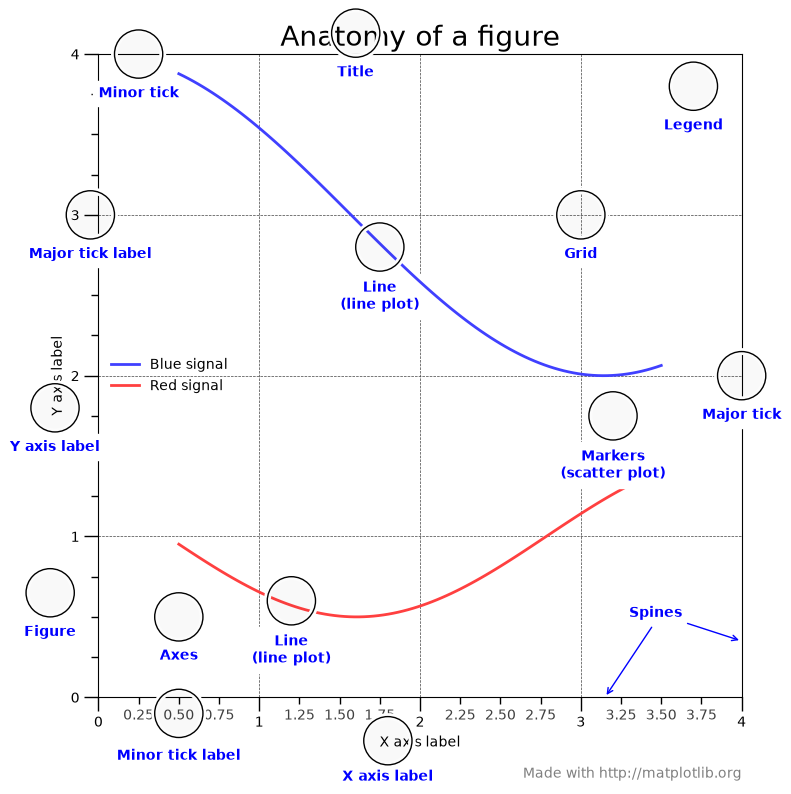
The complete anatomy of a Matplotlib figure, showing all components. Credit: Nicolas P. Rougier (MIT License)
This visualization by Rougier (2016) shows how every element – from the figure container down to individual tick labels – forms part of Matplotlib’s hierarchical structure. Understanding these relationships is what gives you the power to customize every aspect of your plots.
Working with the Object-Oriented Interface
Now that you understand the anatomy, let’s see how to manipulate these elements:
# Create a figure with explicit control over components
fig = plt.figure(figsize=(10, 6))

# Add axes manually to see the structure
# [left, bottom, width, height] in figure coordinates (0-1)
ax_main = fig.add_axes([0.1, 0.3, 0.7, 0.6])   # Main plot
ax_zoom = fig.add_axes([0.65, 0.6, 0.2, 0.2])  # Inset zoom
ax_residual = fig.add_axes([0.1, 0.05, 0.7, 0.2])  # Residual panel

# Generate data
x = np.linspace(0, 10, 100)
y = np.sin(x) * np.exp(-x/10)
y_model = np.sin(x) * np.exp(-x/10.5)  # Slightly different model

# Main plot
ax_main.plot(x, y, 'ko', markersize=3, alpha=0.5, label='Data')
ax_main.plot(x, y_model, 'r-', linewidth=2, label='Model')
ax_main.set_ylabel('Signal', fontsize=12)
ax_main.legend(loc='upper right')
ax_main.grid(True, alpha=0.3)

# Zoom inset
zoom_mask = (x > 3) & (x < 5)
ax_zoom.plot(x[zoom_mask], y[zoom_mask], 'ko', markersize=2)
ax_zoom.plot(x[zoom_mask], y_model[zoom_mask], 'r-', linewidth=1)
ax_zoom.set_xlim(3, 5)
ax_zoom.grid(True, alpha=0.3)
ax_zoom.set_title('Zoom', fontsize=9)

# Residuals
residuals = y - y_model
ax_residual.scatter(x, residuals, s=5, alpha=0.5, color='blue')
ax_residual.axhline(y=0, color='red', linestyle='--', linewidth=1)
ax_residual.set_xlabel('Time', fontsize=12)
ax_residual.set_ylabel('Residuals', fontsize=10)
ax_residual.grid(True, alpha=0.3)

fig.suptitle('Explicit Control Over Figure Components', fontsize=14, fontweight='bold')
plt.show()Sharing Axes with GridSpec
When plotting multi-wavelength data, you often want aligned time axes:
from matplotlib.gridspec import GridSpec

# Create figure with shared x-axes using GridSpec
fig = plt.figure(figsize=(10, 8))
gs = GridSpec(3, 1, hspace=0.05)

# Create subplots with shared x-axis
ax1 = fig.add_subplot(gs[0])
ax2 = fig.add_subplot(gs[1], sharex=ax1)
ax3 = fig.add_subplot(gs[2], sharex=ax1)

# Generate multi-wavelength data
time = np.linspace(0, 10, 200)
rng = np.random.default_rng(42)
optical = np.sin(2 * np.pi * time / 3) + rng.normal(0, 0.1, 200)
xray = 2 * np.sin(2 * np.pi * time / 3 + 0.5) + rng.normal(0, 0.2, 200)
radio = 0.5 * np.sin(2 * np.pi * time / 3 - 0.3) + rng.normal(0, 0.05, 200)

# Plot with shared axes
ax1.plot(time, optical, 'b-', alpha=0.7)
ax1.set_ylabel('Optical')
ax1.tick_params(labelbottom=False)  # Hide x labels except bottom

ax2.plot(time, xray, 'r-', alpha=0.7)
ax2.set_ylabel('X-ray')
ax2.tick_params(labelbottom=False)

ax3.plot(time, radio, 'g-', alpha=0.7)
ax3.set_ylabel('Radio')
ax3.set_xlabel('Time (days)')

fig.suptitle('Multi-wavelength Observations with Shared Time Axis')
plt.show()
8.3 Choosing the Right Scale: Linear, Log, and Everything Between
One of the most important skills in data visualization is choosing the right scale for your axes. The wrong scale can hide patterns; the right scale makes them obvious. A log axis is not a styling choice: it requires positive values on that axis, and it changes which differences the eye treats as equally large.
# Generate different types of relationships
x = np.logspace(-1, 3, 100)  # 0.1 to 1000

# Different mathematical relationships
linear = 2 * x + 5
quadratic = 0.5 * x**2
exponential = np.exp(x/100)
power_law = 10 * x**(-1.5)
logarithmic = 50 * np.log10(x) + 10

# Create a comprehensive comparison
fig, axes = plt.subplots(5, 4, figsize=(14, 16))

datasets = [
    (linear, 'Linear: y = 2x + 5'),
    (quadratic, 'Quadratic: y = 0.5x^2'),
    (exponential, 'Exponential: y = e^(x/100)'),
    (power_law, 'Power Law: y = 10x^(-1.5)'),
    (logarithmic, 'Logarithmic: y = 50log(x) + 10')
]

for i, (data, title) in enumerate(datasets):
    # Linear-linear
    axes[i, 0].plot(x, data, 'b-', linewidth=2)
    axes[i, 0].set_title(f'{title}\nLinear-Linear')
    axes[i, 0].grid(True, alpha=0.3)

    # Log-log: both axes must be positive. Never take abs(data) to force this.
    if np.all(data > 0):
        axes[i, 1].loglog(x, data, 'r-', linewidth=2)
        axes[i, 1].set_title('Log-Log')
        axes[i, 1].grid(True, alpha=0.3, which='both')
    else:
        axes[i, 1].text(0.5, 0.5, 'Invalid: y contains\nzero or negative values',
                        ha='center', va='center', transform=axes[i, 1].transAxes)
        axes[i, 1].set_title('Log-Log: not valid')

    # Semilog-x
    axes[i, 2].semilogx(x, data, 'g-', linewidth=2)
    axes[i, 2].set_title('Semilog-X')
    axes[i, 2].grid(True, alpha=0.3)

    # Semilog-y has the same positive-y requirement.
    if np.all(data > 0):
        axes[i, 3].semilogy(x, data, 'm-', linewidth=2)
        axes[i, 3].set_title('Semilog-Y')
        axes[i, 3].grid(True, alpha=0.3)
    else:
        axes[i, 3].text(0.5, 0.5, 'Invalid: y contains\nzero or negative values',
                        ha='center', va='center', transform=axes[i, 3].transAxes)
        axes[i, 3].set_title('Semilog-Y: not valid')

# Highlight which scale reveals linearity
axes[0, 0].set_facecolor('#E8F4F8')  # Linear shows linear
axes[2, 3].set_facecolor('#F8E8E8')  # Semilogy shows exponential
axes[3, 1].set_facecolor('#F8F8E8')  # Loglog shows power law
axes[4, 2].set_facecolor('#E8F8E8')  # Semilogx shows logarithmic

fig.suptitle('Choose the Scale that Reveals Your Data\'s Nature',
             fontsize=16, fontweight='bold')
plt.tight_layout()
plt.show()

print("Key insight: The 'right' scale makes relationships linear!")
print("- Power laws -> log-log")
print("- Exponential growth -> semilog-y")
print("- Logarithmic growth -> semilog-x")Practical Guidelines for Scale Selection
# Synthetic, shape-only Schechter-style luminosity-function example.
# It illustrates scale choice; it is not a calibrated number-density estimate.
rng = np.random.default_rng(42)

# Schechter function parameters (Schechter 1976)
L_star = 1e10  # Characteristic luminosity
alpha = -1.25  # Faint-end slope

# Generate a relative luminosity-function shape and multiplicative scatter.
L = np.logspace(7, 12, 1000)
relative_phi = (L/L_star)**alpha * np.exp(-L/L_star)

# This is synthetic scatter, not observational uncertainty.
observed_relative_phi = relative_phi * rng.lognormal(0, 0.2, len(relative_phi))

fig, axes = plt.subplots(2, 2, figsize=(10, 10))

# Linear scale - useless for this data
axes[0, 0].plot(L, observed_relative_phi, '.', markersize=1, alpha=0.5)
axes[0, 0].set_xlabel(r'Luminosity [$L_\odot$]')
axes[0, 0].set_ylabel('Relative number density (arbitrary normalization)')
axes[0, 0].set_title('Linear Scale: Cannot See Structure')

# Log-log - reveals power law at faint end
axes[0, 1].loglog(L, observed_relative_phi, '.', markersize=1, alpha=0.5,
                  label='Synthetic sample')
axes[0, 1].loglog(L, relative_phi, 'r-', linewidth=2,
                  label='Schechter-style shape')
axes[0, 1].set_xlabel(r'Luminosity [$L_\odot$]')
axes[0, 1].set_ylabel('Relative number density (arbitrary normalization)')
axes[0, 1].set_title('Log-Log: Reveals Power Law + Exponential Cutoff')
axes[0, 1].legend()

# Semilog-y - emphasizes exponential cutoff
axes[1, 0].semilogx(L, observed_relative_phi, '.', markersize=1, alpha=0.5)
axes[1, 0].semilogx(L, relative_phi, 'r-', linewidth=2)
axes[1, 0].set_xlabel(r'Luminosity [$L_\odot$]')
axes[1, 0].set_ylabel('Relative number density (arbitrary normalization)')
axes[1, 0].set_title('Semilog-X: Emphasizes Bright End Cutoff')

# Custom: log-log with ratio to model
ratio = observed_relative_phi / relative_phi
axes[1, 1].semilogx(L, ratio, '.', markersize=1, alpha=0.5)
axes[1, 1].axhline(y=1, color='red', linestyle='--', linewidth=2)
axes[1, 1].set_xlabel(r'Luminosity [$L_\odot$]')
axes[1, 1].set_ylabel('Observed / Model')
axes[1, 1].set_title('Residual Plot: Shows Systematic Deviations')
axes[1, 1].set_ylim(0.1, 10)

fig.suptitle('Galaxy Luminosity Function: Scale Choice Matters', fontsize=14, fontweight='bold')
plt.tight_layout()
plt.show()8.4 Building Your Plotting Toolkit: Reusable Functions
As you develop as a scientific programmer, you’ll find yourself making similar plots repeatedly. Instead of copying and pasting code, build a library of plotting functions that encode your hard-won knowledge about what works:
# Example: A reusable light curve plotting function
def plot_light_curve(time, flux, flux_err=None, period=None,
                     title=None, figsize=(12, 8)):
    """
    Create a publication-quality light curve plot with optional phase folding.

    Parameters
    ----------
    time : array-like
        Time values (days)
    flux : array-like
        Flux or magnitude values
    flux_err : array-like, optional
        Flux uncertainties
    period : float, optional
        Period for phase folding (days)
    title : str, optional
        Plot title
    figsize : tuple, optional
        Figure size (width, height)

    Returns
    -------
    fig, axes : matplotlib figure and axes objects
    """
    if period is not None:
        fig, axes = plt.subplots(2, 2, figsize=figsize)
        axes = axes.flatten()
    else:
        fig, axes = plt.subplots(1, 1, figsize=(figsize[0], figsize[1]/2))
        axes = [axes]  # Make it iterable

    # Main light curve
    ax = axes[0]
    if flux_err is not None:
        ax.errorbar(time, flux, yerr=flux_err, fmt='k.', markersize=2,
                   alpha=0.5, elinewidth=0.5, capsize=0)
    else:
        ax.scatter(time, flux, s=1, alpha=0.5, color='black')

    ax.set_xlabel('Time (days)', fontsize=11)
    ax.set_ylabel('Relative Flux', fontsize=11)
    ax.set_title('Light Curve' if title is None else title, fontsize=12)
    ax.grid(True, alpha=0.3)

    # If period provided, add phase-folded plot
    if period is not None:
        phase = (time % period) / period

        # Phase folded
        ax = axes[1]
        if flux_err is not None:
            ax.errorbar(phase, flux, yerr=flux_err, fmt='b.', markersize=2,
                       alpha=0.3, elinewidth=0.5, capsize=0)
        else:
            ax.scatter(phase, flux, s=1, alpha=0.3, color='blue')
        ax.set_xlabel('Phase', fontsize=11)
        ax.set_ylabel('Relative Flux', fontsize=11)
        ax.set_title(f'Phase Folded (P = {period:.3f} days)', fontsize=12)
        ax.set_xlim(0, 1)
        ax.grid(True, alpha=0.3)

        # Double-plotted phase folded
        ax = axes[2]
        phase_double = np.concatenate([phase, phase + 1])
        flux_double = np.concatenate([flux, flux])
        if flux_err is not None:
            err_double = np.concatenate([flux_err, flux_err])
            ax.errorbar(phase_double, flux_double, yerr=err_double,
                       fmt='r.', markersize=2, alpha=0.3,
                       elinewidth=0.5, capsize=0)
        else:
            ax.scatter(phase_double, flux_double, s=1, alpha=0.3, color='red')
        ax.set_xlabel('Phase', fontsize=11)
        ax.set_ylabel('Relative Flux', fontsize=11)
        ax.set_title('Double Phase Plot', fontsize=12)
        ax.set_xlim(0, 2)
        ax.grid(True, alpha=0.3)

        # Binned phase curve - more efficient version
        ax = axes[3]
        n_bins = 50
        binned_flux, bin_edges = np.histogram(phase, bins=n_bins, weights=flux)
        bin_counts, _ = np.histogram(phase, bins=n_bins)
        bin_centers = (bin_edges[:-1] + bin_edges[1:]) / 2

        # Estimate each occupied bin's sample mean and standard error.
        # A one-point bin has no sample scatter estimate, so do not draw it
        # as though it had a measured standard error.
        valid_bins = bin_counts > 1
        binned_mean = np.full(n_bins, np.nan)
        binned_mean[valid_bins] = binned_flux[valid_bins] / bin_counts[valid_bins]

        # The sample variance needs the n - 1 correction before the SEM.
        flux_squared, _ = np.histogram(phase, bins=n_bins, weights=flux**2)
        sample_variance = np.full(n_bins, np.nan)
        sample_variance[valid_bins] = (
            flux_squared[valid_bins]
            - bin_counts[valid_bins] * binned_mean[valid_bins]**2
        ) / (bin_counts[valid_bins] - 1)
        binned_err = np.full(n_bins, np.nan)
        binned_err[valid_bins] = np.sqrt(
            np.maximum(sample_variance[valid_bins] / bin_counts[valid_bins], 0)
        )

        # Only plot bins with a stated uncertainty estimate.
        ax.errorbar(bin_centers[valid_bins], binned_mean[valid_bins],
                   yerr=binned_err[valid_bins],
                   fmt='go-', markersize=4, linewidth=1, capsize=3)
        ax.set_xlabel('Phase', fontsize=11)
        ax.set_ylabel('Relative Flux', fontsize=11)
        ax.set_title(f'Binned ({n_bins} bins)', fontsize=12)
        ax.set_xlim(0, 1)
        ax.grid(True, alpha=0.3)

    plt.tight_layout()
    return fig, axes

# Test the function with synthetic data
rng = np.random.default_rng(42)
time = np.linspace(0, 30, 500)
period = 2.3456  # days
phase = 2 * np.pi * time / period
flux = 1.0 - 0.01 * np.sin(phase)**2  # Transit-like signal
flux += rng.normal(0, 0.002, len(time))  # Add noise
flux_err = np.ones_like(flux) * 0.002

fig, axes = plot_light_curve(time, flux, flux_err, period=period,
                            title='Exoplanet Transit Light Curve')
plt.show()

print("This reusable function encodes best practices:")
print("- Automatic phase folding when period is provided")
print("- Double phase plot to see continuity")
print("- Binned version to see average behavior")
print("- Consistent styling throughout")
Building a Personal Plotting Library
Here’s a template for organizing your plotting functions:
# my_plots.py - Your personal plotting library
import numpy as np
import matplotlib.pyplot as plt

def plot_spectrum(wavelength, flux, flux_err=None, lines=None,
                  title=None, figsize=(12, 5)):
    """Plot a stellar spectrum with optional line identification."""
    fig, ax = plt.subplots(figsize=figsize)

    # Plot spectrum
    ax.plot(wavelength, flux, 'k-', linewidth=0.8, label='Spectrum')

    if flux_err is not None:
        ax.fill_between(wavelength, flux - flux_err, flux + flux_err,
                        alpha=0.3, color='gray', label='Uncertainty')

    # Mark spectral lines
    if lines is not None:
        for wave, name in lines:
            ax.axvline(x=wave, color='red', linestyle=':', alpha=0.5)
            ax.text(wave, ax.get_ylim()[1]*0.95, name,
                   rotation=90, va='top', ha='right', fontsize=8)

    ax.set_xlabel('Wavelength (Å)', fontsize=11)
    ax.set_ylabel('Normalized Flux', fontsize=11)
    ax.set_title('Spectrum' if title is None else title, fontsize=12)
    ax.grid(True, alpha=0.3)
    ax.legend(loc='best')

    return fig, ax

def plot_cmd(color, magnitude, title=None, figsize=(8, 10)):
    """Create a color-magnitude diagram."""
    fig, ax = plt.subplots(figsize=figsize)

    # 2D histogram for density
    h = ax.hist2d(color, magnitude, bins=50, cmap='YlOrBr',
                  density=True)

    ax.set_xlabel('Color (B-V)', fontsize=11)
    ax.set_ylabel('Absolute Magnitude', fontsize=11)
    ax.invert_yaxis()  # Astronomical convention
    ax.set_title('Color-Magnitude Diagram' if title is None else title,
                fontsize=12)

    plt.colorbar(h[3], ax=ax, label='Density')

    return fig, ax

def plot_finding_chart(ra, dec, image=None, sources=None,
                       figsize=(10, 10)):
    """Create a finding chart with marked sources."""
    fig, ax = plt.subplots(figsize=figsize,
                           subplot_kw={'projection': 'rectilinear'})

    if image is not None:
        im = ax.imshow(image, cmap='gray_r', origin='lower',
                      extent=[ra.min(), ra.max(), dec.min(), dec.max()])
        plt.colorbar(im, ax=ax, label='Intensity')

    if sources is not None:
        for source in sources:
            circle = plt.Circle((source['ra'], source['dec']),
                               source.get('radius', 0.1),
                               fill=False, color='red', linewidth=2)
            ax.add_patch(circle)
            ax.text(source['ra'], source['dec'] + 0.15,
                   source.get('name', ''),
                   ha='center', color='red')

    ax.set_xlabel('RA (degrees)', fontsize=11)
    ax.set_ylabel('Dec (degrees)', fontsize=11)
    ax.set_title('Finding Chart', fontsize=12)
    ax.invert_xaxis()  # RA increases to the left

    return fig, ax

# Example usage
print("Your personal plotting library is ready!")
print("Available functions:")
print("  - plot_light_curve(): For time series photometry")
print("  - plot_spectrum(): For spectroscopic data")
print("  - plot_cmd(): For color-magnitude diagrams")
print(" - plot_finding_chart(): For sky position plots")8.5 Essential Plot Types for Scientific Data
Line Plots: Time Series and Spectra
Line plots are workhorses for scientific data:
# Synthetic stellar-spectrum teaching model, not a calibrated observation.
rng = np.random.default_rng(42)
wavelength = np.linspace(4000, 7000, 1000)  # Angstroms
continuum = 1 - 0.0001 * (wavelength - 5500)**2 / 1e6  # Continuum shape

# Add toy absorption features at H-alpha, H-beta, and H-gamma.
lines = [(6563, 50, 0.3), (4861, 30, 0.25), (4340, 25, 0.2)]  # center, width, depth
spectrum = continuum.copy()
for center, width, depth in lines:
    spectrum *= (1 - depth * np.exp(-0.5 * ((wavelength - center) / width)**2))

# Add noise
spectrum += rng.normal(0, 0.01, len(wavelength))

# Create publication-quality spectrum plot
fig, ax = plt.subplots(figsize=(12, 5))

ax.plot(wavelength, spectrum, 'k-', linewidth=0.8, label='Synthetic flux')
ax.axhline(y=1, color='gray', linestyle='--', alpha=0.5, label='Continuum')

# Mark important lines
for center, width, depth in lines:
    ax.axvline(x=center, color='red', linestyle=':', alpha=0.5)
    ax.text(center, 0.65, f'{center}Å', rotation=90,
            va='bottom', ha='right', fontsize=9)

ax.set_xlabel('Wavelength (Å)', fontsize=12)
ax.set_ylabel('Normalized Flux', fontsize=12)
ax.set_title('Synthetic Stellar Spectrum with Balmer Lines', fontsize=14)
ax.set_xlim(4000, 7000)
ax.set_ylim(0.6, 1.1)
ax.grid(True, alpha=0.2)
ax.legend(loc='lower right')

plt.tight_layout()
plt.show()
Scatter Plots: Correlations and Diagrams
Scatter plots reveal relationships between variables:
import numpy as np
import matplotlib.pyplot as plt

# Create a color-magnitude diagram (CMD)
rng = np.random.default_rng(42)

# Main sequence stars
n_ms = 500
color_ms = rng.uniform(-0.3, 2.0, n_ms)
mag_ms = 4 * color_ms + rng.normal(0, 0.5, n_ms) + 4

# Red giants
n_rg = 100
color_rg = rng.uniform(0.8, 2.0, n_rg)
mag_rg = rng.normal(0, 0.5, n_rg)

# White dwarfs
n_wd = 50
color_wd = rng.uniform(-0.3, 0.5, n_wd)
mag_wd = rng.normal(11, 0.5, n_wd)

# Create the CMD
fig, ax = plt.subplots(figsize=(8, 10))

ax.scatter(color_ms, mag_ms, c='navy', s=10, alpha=0.6, label='Main Sequence')
ax.scatter(color_rg, mag_rg, c='red', s=30, alpha=0.7, label='Red Giants')
ax.scatter(color_wd, mag_wd, c='lightblue', s=20, alpha=0.8, label='White Dwarfs')

ax.set_xlabel('B - V Color Index', fontsize=12)
ax.set_ylabel('V Magnitude', fontsize=12)
ax.set_title('Color-Magnitude Diagram\n(Hertzsprung-Russell Diagram)', fontsize=14)
ax.invert_yaxis()  # Astronomical convention
ax.grid(True, alpha=0.3)
ax.legend(loc='upper left')

# Add annotations
ax.annotate('Turn-off point', xy=(0.6, 6), xytext=(1.2, 7),
            arrowprops=dict(arrowstyle='->', color='black', alpha=0.5))

plt.tight_layout()
plt.show()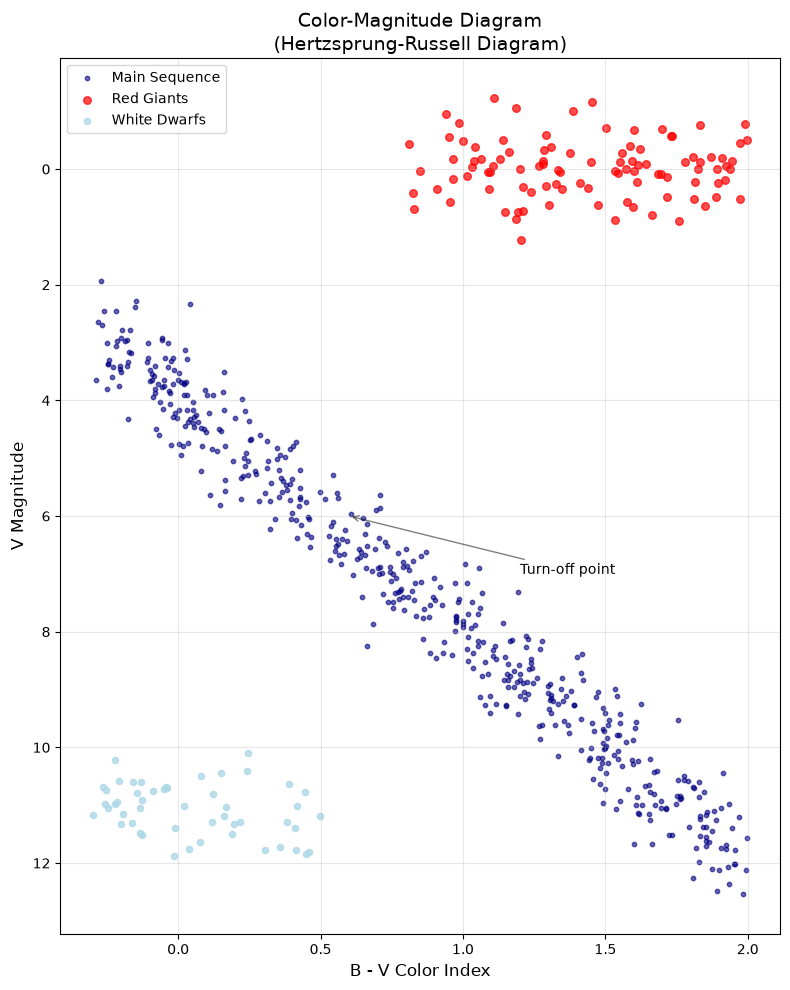
Color-Magnitude Diagram showing different stellar populations
Error Bars: Proper Uncertainty Visualization
# Demonstrating proper error bar visualization
rng = np.random.default_rng(42)

# Generate data with stated one-standard-deviation measurement uncertainties.
x = np.linspace(1, 10, 20)
y_err = 0.5 + 0.1 * x + rng.uniform(0, 0.5, 20)
y_true = 2 * x + 3
y = y_true + rng.normal(0, y_err)  # Simulated noise matches the displayed y_err

fig, axes = plt.subplots(1, 3, figsize=(14, 5))

# Standard error bars
axes[0].errorbar(x, y, yerr=y_err, fmt='o', capsize=3, capthick=1,
                 elinewidth=1, markersize=5, label='Data')
axes[0].set_title('Standard Error Bars')
axes[0].set_xlabel('X')
axes[0].set_ylabel('Y')
axes[0].grid(True, alpha=0.3)

# Error bars with a fit-derived uncertainty band
axes[1].errorbar(x, y, yerr=y_err, fmt='o', capsize=0,
                 elinewidth=0.5, markersize=5, alpha=0.7)
# `polyfit` expects inverse-standard-deviation weights, not inverse variance.
coeffs, parameter_covariance = np.polyfit(x, y, 1, w=1 / y_err, cov='unscaled')
model_x = np.linspace(0, 11, 100)
model_y = np.polyval(coeffs, model_x)
design_matrix = np.column_stack([model_x, np.ones_like(model_x)])
model_sigma = np.sqrt(
    np.einsum('ij,jk,ik->i', design_matrix, parameter_covariance, design_matrix)
)
axes[1].plot(model_x, model_y, 'r-', label='Weighted linear fit')
axes[1].fill_between(model_x, model_y - model_sigma, model_y + model_sigma,
                     alpha=0.3, color='red',
                     label='1σ parameter uncertainty (not prediction error)')
axes[1].set_title('Fit with Parameter-Uncertainty Band')
axes[1].set_xlabel('X')
axes[1].legend()
axes[1].grid(True, alpha=0.3)

# Weighted fit visualization
weights = 1 / y_err
# Fit weighted linear model with the same stated convention.
coeffs = np.polyfit(x, y, 1, w=weights)
fit_y = np.polyval(coeffs, x)

axes[2].errorbar(x, y, yerr=y_err, fmt='none', capsize=3,
                 elinewidth=1, alpha=0.6)
axes[2].scatter(x, y, s=20 + 40 * weights / weights.max(), alpha=0.6,
                label='Data (marker area ∝ 1 / σ)')
axes[2].plot(x, fit_y, 'g-', linewidth=2, label='Weighted fit')
axes[2].set_title('Weighted Fitting')
axes[2].set_xlabel('X')
axes[2].legend()
axes[2].grid(True, alpha=0.3)

fig.suptitle('Error Bar Visualization Best Practices', fontsize=14)
plt.tight_layout()
plt.show()8.6 Images and 2D Data Visualization
Images and 2D data require special consideration for display:
# Create synthetic galaxy image
rng = np.random.default_rng(42)
x = np.linspace(-5, 5, 200)
y = np.linspace(-5, 5, 200)
X, Y = np.meshgrid(x, y)

# Exponential disk profile
R = np.sqrt(X**2 + Y**2)
disk = np.exp(-R / 1.5)

# Add spiral arms (simplified)
theta = np.arctan2(Y, X)
spiral = 1 + 0.3 * np.sin(2 * theta - R)
galaxy = disk * spiral

# Add noise and background
galaxy += rng.normal(0, 0.02, galaxy.shape)
galaxy += 0.1  # Sky background

# Display with different scaling
fig, axes = plt.subplots(2, 3, figsize=(12, 8))

# Linear scale
im1 = axes[0, 0].imshow(galaxy, cmap='gray', origin='lower')
axes[0, 0].set_title('Linear Scale')
plt.colorbar(im1, ax=axes[0, 0], fraction=0.046)

# Log scale
from matplotlib.colors import LogNorm
galaxy_positive = galaxy - galaxy.min() + 1e-3  # Ensure positive
im2 = axes[0, 1].imshow(galaxy_positive, cmap='gray',
                         norm=LogNorm(), origin='lower')
axes[0, 1].set_title('Log Scale')
plt.colorbar(im2, ax=axes[0, 1], fraction=0.046)

# Histogram equalization (adaptive)
from matplotlib.colors import PowerNorm
im3 = axes[0, 2].imshow(galaxy, cmap='gray',
                         norm=PowerNorm(gamma=0.5), origin='lower')
axes[0, 2].set_title('Power Scale (gamma=0.5)')
plt.colorbar(im3, ax=axes[0, 2], fraction=0.046)

# Different colormaps
im4 = axes[1, 0].imshow(galaxy, cmap='viridis', origin='lower')
axes[1, 0].set_title('Viridis Colormap')
plt.colorbar(im4, ax=axes[1, 0], fraction=0.046)

im5 = axes[1, 1].imshow(galaxy, cmap='hot', origin='lower')
axes[1, 1].set_title('Hot Colormap')
plt.colorbar(im5, ax=axes[1, 1], fraction=0.046)

im6 = axes[1, 2].imshow(galaxy, cmap='cividis', origin='lower')
axes[1, 2].set_title('Cividis Colormap')
plt.colorbar(im6, ax=axes[1, 2], fraction=0.046)

for ax in axes.flat:
    ax.set_xlabel('X (pixels)')
    ax.set_ylabel('Y (pixels)')

fig.suptitle('Galaxy Image with Different Displays', fontsize=14)
plt.tight_layout()
plt.show()
Coordinate Displays and Genuine WCSAxes
When working with FITS files and World Coordinate Systems, distinguish an
approximate coordinate display from a World Coordinate System (WCS). Supplying
an extent labels a rectangular image in chosen coordinates; it does not
encode a FITS header, projection, distortion model, or coordinate transform.
# Simulated coordinate-display example: no FITS WCS is present here.
fig = plt.figure(figsize=(10, 8))

# Create synthetic data
ra_range = np.linspace(150, 151, 100)  # RA in degrees
dec_range = np.linspace(2, 3, 100)     # Dec in degrees
RA, DEC = np.meshgrid(ra_range, dec_range)

# Synthetic astronomical image
image = np.exp(-((RA - 150.5)**2 + (DEC - 2.5)**2) / 0.01)

# Standard matplotlib plot (pixel coordinates)
ax1 = fig.add_subplot(121)
im1 = ax1.imshow(image, origin='lower', cmap='viridis')
ax1.set_xlabel('X (pixels)')
ax1.set_ylabel('Y (pixels)')
ax1.set_title('Pixel Coordinates')
plt.colorbar(im1, ax=ax1)

# Approximate RA/Dec display; `extent` is not a WCS transform.
ax2 = fig.add_subplot(122)
im2 = ax2.imshow(image, origin='lower', cmap='viridis',
                 extent=[ra_range[0], ra_range[-1],
                        dec_range[0], dec_range[-1]])
ax2.set_xlabel('RA (degrees)')
ax2.set_ylabel('Dec (degrees)')
ax2.set_title('Approximate RA/Dec Display (not WCS)')
ax2.invert_xaxis()  # RA increases to the left
plt.colorbar(im2, ax=ax2)

plt.suptitle('Pixel Coordinates vs an Approximate Coordinate Display')
plt.tight_layout()
plt.show()
For a genuine WCS-aware plot, use the image’s header to create a WCS object and pass it as the projection. This static pattern requires Astropy and a FITS file with valid WCS keywords:
from astropy.io import fits
from astropy.wcs import WCS

with fits.open('science_image.fits') as hdul:
    image = hdul[0].data
    wcs = WCS(hdul[0].header)

fig, ax = plt.subplots(subplot_kw={'projection': wcs})
ax.imshow(image, origin='lower', cmap='viridis')
ax.coords.grid(color='white', ls='solid', alpha=0.4)
ax.set(xlabel='Right Ascension', ylabel='Declination')8.7 Color Theory and Publication Standards
Choosing appropriate colormaps is crucial for honest data representation (Crameri et al. 2020):
import numpy as np
import matplotlib.pyplot as plt

# Demonstrate perceptual uniformity
rng = np.random.default_rng(42)
data = rng.standard_normal((10, 10))

fig, axes = plt.subplots(2, 4, figsize=(14, 7))

# Bad colormaps (not perceptually uniform)
bad_cmaps = ['jet', 'rainbow', 'nipy_spectral', 'gist_ncar']
for ax, cmap in zip(axes[0], bad_cmaps):
    im = ax.imshow(data, cmap=cmap)
    ax.set_title(f'{cmap} (Avoid!)')
    ax.axis('off')
    plt.colorbar(im, ax=ax, fraction=0.046)

# Good sequential colormaps for ordered, non-cyclic values.
good_cmaps = ['viridis', 'plasma', 'cividis', 'magma']
for ax, cmap in zip(axes[1], good_cmaps):
    im = ax.imshow(data, cmap=cmap)
    ax.set_title(f'{cmap} (Good!)')
    ax.axis('off')
    plt.colorbar(im, ax=ax, fraction=0.046)

fig.suptitle('Perceptually Uniform vs Non-Uniform Colormaps', fontsize=14)
plt.tight_layout()
plt.show()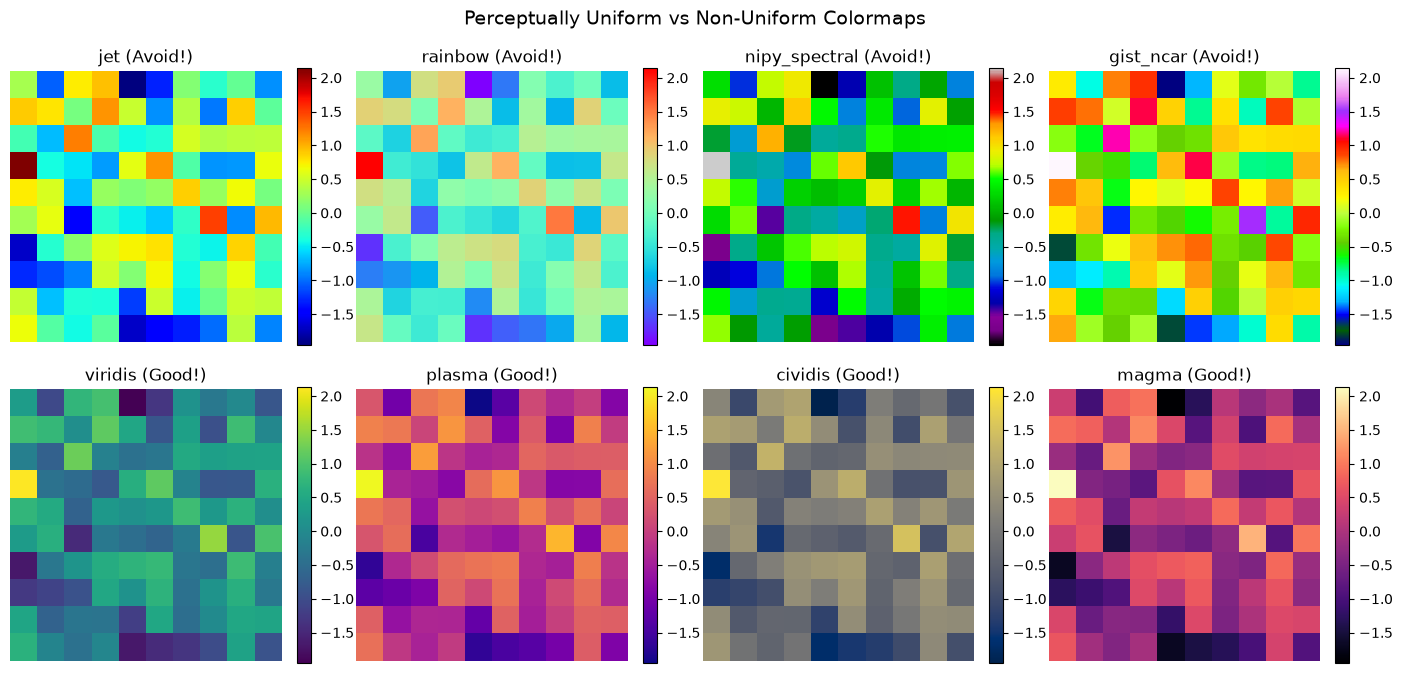
Comparison of problematic vs perceptually uniform colormaps
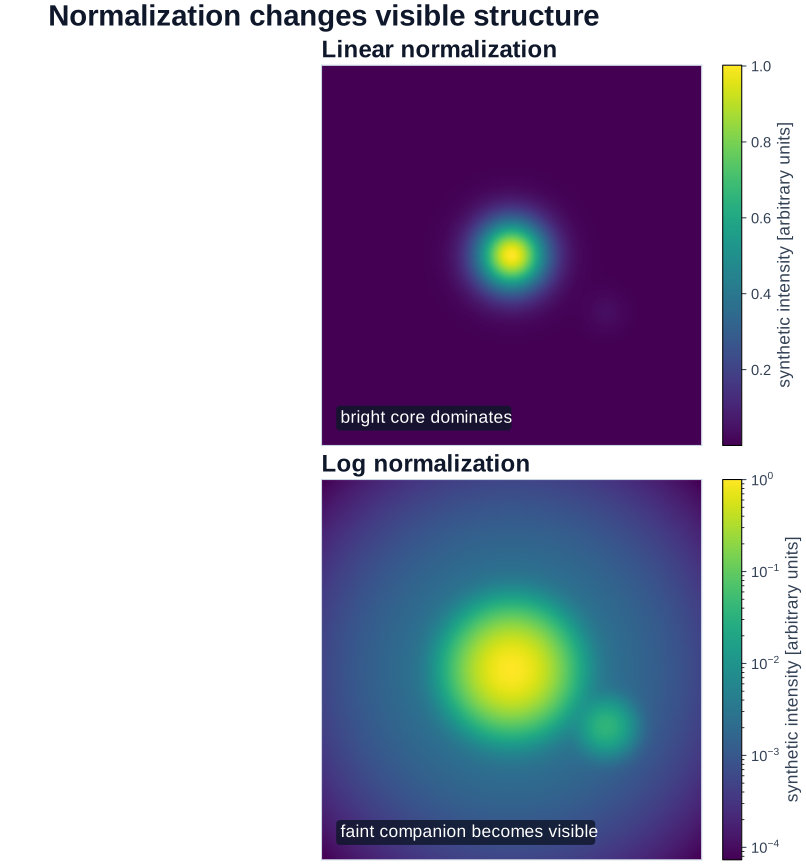
Figure 2:Normalization is a modeling and communication choice: the same field can make different structures inspectable without changing any underlying values.
What to notice: neither normalization is universally more honest. The relevant choice depends on the quantity, dynamic range, scientific question, and a colorbar that makes the mapping from value to color inspectable.
Reusable Publication-Style Defaults
For a compact, reproducible starting style. This is not an official journal template: check the target venue’s current author instructions before export.
# Example of journal-specific styling
# Note: SciencePlots package provides pre-configured styles

# Manual compact serif style; adapt it to the figure's final placement.
def apply_compact_serif_style():
    """Apply a compact serif style for a draft figure."""
    plt.rcParams.update({
        'font.size': 10,
        'font.family': 'serif',
        'font.serif': ['Computer Modern Roman'],
        'text.usetex': False,  # Set True if LaTeX is installed
        'figure.figsize': (3.5, 3.5),  # Single column
        'figure.dpi': 300,
        'savefig.dpi': 300,
        'savefig.bbox': 'tight',
        'axes.linewidth': 0.5,
        'lines.linewidth': 1.0,
        'lines.markersize': 4,
        'xtick.major.width': 0.5,
        'ytick.major.width': 0.5,
    })

# Example plot with journal style
apply_compact_serif_style()
fig, ax = plt.subplots()
x = np.linspace(0, 2*np.pi, 100)
ax.plot(x, np.sin(x), label='sin(x)')
ax.plot(x, np.cos(x), label='cos(x)')
ax.set_xlabel('Phase')
ax.set_ylabel('Amplitude')
ax.legend()
ax.grid(True, alpha=0.3)
plt.show()

# Reset to defaults
plt.rcParams.update(plt.rcParamsDefault)8.8 Optional Deep Dive: yt for Astrophysical Simulations
Optional deep‑dive — skip this section until a concrete volumetric-data task calls for it.
Introduction to yt
For those working with simulation data, yt (Turk et al. 2011) is a specialized tool that complements Matplotlib for 3D volumetric data visualization. It supports a broad range of simulation data models; verify that its current frontend and field conventions match your specific output.
# Conceptual example of yt usage (requires yt installation)
"""
# yt installation: pip install yt
import yt

# Load simulation data (supports many formats)
ds = yt.load("galaxy_simulation/output_0050")

# Create a slice plot through the simulation volume
slc = yt.SlicePlot(ds, 'z', 'density')
slc.set_cmap('density', 'viridis')
slc.annotate_timestamp()
slc.save()

# Volume rendering
sc = yt.create_scene(ds, 'density')
sc.save()

# Phase plots
plot = yt.PhasePlot(ds.all_data(),
                    'density', 'temperature', 'cell_mass')
plot.save()
"""

# Demonstrate the concept with synthetic data
from matplotlib.colors import LogNorm

fig, axes = plt.subplots(2, 3, figsize=(14, 9))

# Simulate different yt-style visualizations
# 1. Density slice
x = np.linspace(-10, 10, 100)
y = np.linspace(-10, 10, 100)
X, Y = np.meshgrid(x, y)
density = np.exp(-(X**2 + Y**2)/10) + 0.5*np.exp(-((X-3)**2 + Y**2)/5)

im1 = axes[0, 0].imshow(density, cmap='magma', origin='lower')
axes[0, 0].set_title('Density Slice (z=0)')
plt.colorbar(im1, ax=axes[0, 0], label='Synthetic density (arbitrary units)')

# 2. Temperature slice
rng = np.random.default_rng(42)
temperature = 1e4 * density**0.5 + rng.normal(0, 100, density.shape)
im2 = axes[0, 1].imshow(temperature, cmap='hot', origin='lower')
axes[0, 1].set_title('Temperature Slice')
plt.colorbar(im2, ax=axes[0, 1], label='T [K]')

# 3. Velocity field
u = -Y / np.sqrt(X**2 + Y**2 + 0.1)
v = X / np.sqrt(X**2 + Y**2 + 0.1)
axes[0, 2].streamplot(x, y, u, v, density=1, color='blue', alpha=0.7)
axes[0, 2].set_title('Velocity Streamlines')
axes[0, 2].set_xlim(-10, 10)
axes[0, 2].set_ylim(-10, 10)

# 4. Phase plot
n_points = 1000
dens_sample = rng.lognormal(0, 1, n_points)
temp_sample = 1e4 * dens_sample**0.5 + rng.normal(0, 500, n_points)
h = axes[1, 0].hist2d(np.log10(dens_sample), np.log10(temp_sample),
                       bins=30, cmap='YlOrBr')
axes[1, 0].set_xlabel('log(Density)')
axes[1, 0].set_ylabel('log(Temperature)')
axes[1, 0].set_title('Phase Diagram')
plt.colorbar(h[3], ax=axes[1, 0])

# 5. Projection (column density)
column_density = np.sum(np.stack([density]*20), axis=0)  # Fake projection
im5 = axes[1, 1].imshow(column_density, cmap='viridis',
                         origin='lower', norm=LogNorm())
axes[1, 1].set_title('Column Density Projection')
plt.colorbar(im5, ax=axes[1, 1], label='Synthetic column sum (arbitrary units)')

# 6. Multi-field composite
axes[1, 2].imshow(density, cmap='Blues', alpha=0.7, origin='lower')
contour = axes[1, 2].contour(temperature, levels=5, colors='red',
                              linewidths=2, alpha=0.8)
axes[1, 2].set_title('Multi-field Visualization')
axes[1, 2].clabel(contour, inline=True, fontsize=8)

fig.suptitle('yt-style Visualizations for Simulation Data',
             fontsize=14, fontweight='bold')
plt.tight_layout()
plt.show()

print("\nyt advantages for simulation data:")
print("✓ Supports many simulation-data frontends; verify your output format")
print("✓ Handles AMR and particle data seamlessly")
print("✓ Unit-aware (automatic unit conversions)")
print("✓ Parallel processing for large datasets")
print("✓ Volume rendering capabilities")
print("✓ On-the-fly derived fields")
print("\nLearn more at: https://yt-project.org/")
Why This Matters: Visualizing the Invisible Universe
Modern astrophysical simulations can generate enormous, structurally diverse datasets. yt can be useful when its supported frontend and field conventions match the simulation because it:
Offers shared analysis concepts: It can present supported grid and particle data through a common analysis interface.
Works with complex structures: AMR grids, particle data, and octree structures have different assumptions that must be checked explicitly.
Supports inspection: Slices, projections, phase diagrams, and rendered fields can expose model behavior worth validating with quantitative diagnostics.
The combination of a domain-aware analysis tool and Matplotlib can form a useful workflow when the data conventions, units, and derived fields are documented.
8.9 Deep Dive: When Matplotlib Isn’t Enough: Domain-Specific Tools
While Matplotlib is the foundation of scientific visualization in Python, specialized libraries can dramatically accelerate common tasks. Knowing when to reach for these tools is part of becoming an efficient scientific programmer.
Statistical Visualization: Seaborn
Seaborn (Waskom 2021) provides a high-level interface for statistical graphics. It excels at visualizing distributions, relationships, and categorical data with minimal code:
import numpy as np
import matplotlib.pyplot as plt

# Seaborn example (if installed)
try:
    import seaborn as sns

    # Generate correlated data (stellar mass-radius relation)
    rng = np.random.default_rng(42)
    n = 200
    mass = rng.lognormal(0, 0.5, n)
    radius = mass**0.8 * (1 + rng.normal(0, 0.1, n))
    temperature = 5800 * mass**0.5 * (1 + rng.normal(0, 0.05, n))

    fig, axes = plt.subplots(1, 3, figsize=(14, 4))

    # Joint distribution with marginals
    axes[0].scatter(mass, radius, c=temperature, cmap='coolwarm', alpha=0.6, s=20)
    axes[0].set_xlabel(r'Mass ($M_\odot$)')
    axes[0].set_ylabel(r'Radius ($R_\odot$)')
    axes[0].set_title('Scatter: Mass-Radius Relation')

    # KDE plot
    sns.kdeplot(x=mass, y=radius, ax=axes[1], cmap='Blues', fill=True, levels=10)
    axes[1].set_xlabel(r'Mass ($M_\odot$)')
    axes[1].set_ylabel(r'Radius ($R_\odot$)')
    axes[1].set_title('Seaborn KDE: Density Contours')

    # Histogram with KDE
    sns.histplot(mass, kde=True, ax=axes[2], color='steelblue')
    axes[2].set_xlabel(r'Mass ($M_\odot$)')
    axes[2].set_title('Seaborn Histogram + KDE')

    plt.tight_layout()
    plt.show()

    print("Seaborn excels at:")
    print("✓ Statistical plots (violin, box, swarm)")
    print("✓ Distribution visualization")
    print("✓ Faceted plots (small multiples)")
    print("✓ Beautiful default themes")

except ImportError:
    print("Seaborn not installed. Install with: pip install seaborn")
    print("Seaborn provides high-level statistical visualization.")
Seaborn not installed. Install with: pip install seaborn
Seaborn provides high-level statistical visualization.
Seaborn creates publication-quality statistical plots with minimal code
Interactive Visualization: Plotly
Plotly creates interactive plots ideal for exploration and web deployment:
# Plotly example (requires installation: pip install plotly)
import plotly.express as px
import plotly.graph_objects as go
import numpy as np

# Create interactive 3D scatter plot
rng = np.random.default_rng(42)
n = 500
x = rng.normal(0, 1, n)
y = rng.normal(0, 1, n)
z = x**2 + y**2 + rng.normal(0, 0.2, n)
colors = np.sqrt(x**2 + y**2)

fig = go.Figure(data=[go.Scatter3d(
    x=x, y=y, z=z,
    mode='markers',
    marker=dict(size=3, color=colors, colorscale='Viridis', opacity=0.8)
)])

fig.update_layout(
    title='Interactive 3D Scatter (drag to rotate!)',
    scene=dict(xaxis_title='X', yaxis_title='Y', zaxis_title='Z')
)
fig.show()

print("Plotly excels at:")
print("✓ Interactive exploration (zoom, pan, hover)")
print("✓ 3D visualization")
print("✓ Web deployment and dashboards")
print("✓ Animations")
Astronomy-Specific: Astropy Visualization
For astronomical data with coordinates, Astropy provides specialized tools:
# Astropy visualization (requires: pip install astropy)
from astropy.visualization import astropy_mpl_style, quantity_support
from astropy.coordinates import SkyCoord
from astropy import units as u
import matplotlib.pyplot as plt

# Enable Astropy's matplotlib style
plt.style.use(astropy_mpl_style)
quantity_support()

# Create sky coordinates
ra = [10.5, 15.2, 20.8, 25.1, 30.0] * u.degree
dec = [-25.3, -30.1, -22.7, -28.5, -24.2] * u.degree
coords = SkyCoord(ra=ra, dec=dec, frame='icrs')

# Plot with proper coordinate handling
fig = plt.figure(figsize=(8, 6))
ax = fig.add_subplot(111, projection='aitoff')
ax.scatter(coords.ra.wrap_at(180*u.deg).radian, coords.dec.radian,
           s=50, c='red', marker='*')
ax.set_title('All-Sky Projection (Aitoff)')
ax.grid(True)
plt.show()

print("Astropy visualization excels at:")
print("✓ WCS (World Coordinate System) support")
print("✓ All-sky projections")
print("✓ Unit-aware plotting")
print("✓ FITS image display")
When to Use What: Decision Guide
# Decision guide for visualization tools
print("=" * 60)
print("VISUALIZATION TOOL SELECTION GUIDE")
print("=" * 60)

tools = {
    "Matplotlib": {
        "use_when": [
            "Publication-quality static figures",
            "Full control over every element",
            "Custom, complex layouts",
            "Embedding in applications"
        ],
        "examples": "Journal figures, reports, custom visualizations"
    },
    "Seaborn": {
        "use_when": [
            "Statistical analysis plots",
            "Quick distribution visualization",
            "Faceted plots (small multiples)",
            "Beautiful defaults needed fast"
        ],
        "examples": "Violin plots, pair plots, heatmaps"
    },
    "Plotly": {
        "use_when": [
            "Interactive exploration",
            "Web deployment",
            "3D visualization",
            "Animations and dashboards"
        ],
        "examples": "Exploratory analysis, presentations, web apps"
    },
    "yt": {
        "use_when": [
            "Simulation data (ENZO, FLASH, Gadget)",
            "Volumetric rendering",
            "AMR data handling",
            "Large-scale parallel analysis"
        ],
        "examples": "Galaxy simulations, stellar formation, cosmology"
    },
    "Astropy": {
        "use_when": [
            "FITS files and WCS",
            "Sky coordinate systems",
            "Unit-aware calculations",
            "Astronomical image analysis"
        ],
        "examples": "Survey data, telescope images, catalogs"
    }
}

for tool, info in tools.items():
    print(f"\n{tool}:")
    print(f"  Use when: {', '.join(info['use_when'][:2])}")
    print(f"  Examples: {info['examples']}")

print("\n" + "=" * 60)
print("TIP: Start with Matplotlib, add others as needed!")
print("=" * 60)
============================================================
VISUALIZATION TOOL SELECTION GUIDE
============================================================
Matplotlib:
Use when: Publication-quality static figures, Full control over every element
Examples: Journal figures, reports, custom visualizations
Seaborn:
Use when: Statistical analysis plots, Quick distribution visualization
Examples: Violin plots, pair plots, heatmaps
Plotly:
Use when: Interactive exploration, Web deployment
Examples: Exploratory analysis, presentations, web apps
yt:
Use when: Simulation data (ENZO, FLASH, Gadget), Volumetric rendering
Examples: Galaxy simulations, stellar formation, cosmology
Astropy:
Use when: FITS files and WCS, Sky coordinate systems
Examples: Survey data, telescope images, catalogs
============================================================
TIP: Start with Matplotlib, add others as needed!
============================================================
Reference: installation and scale-aware performance choices
Installation reference
Install optional libraries only in the selected project environment and only when a concrete workflow requires them:
Performance considerations
Different libraries have different performance characteristics, but there is no universal point count at which one becomes the right answer. Rendering time depends on the browser or backend, figure size, marker type, aggregation, hardware, and the actual question the figure must answer.
| Library | Good starting point | Ask before choosing it |
|---|---|---|
| Matplotlib | Static figures and explicit publication control | Can aggregation, rasterization, or fewer artists answer the question? |
| Seaborn | Statistical summaries and small multiples | Does its convenience obscure an estimator, grouping, or uncertainty choice? |
| Plotly / Bokeh | Interactive exploration and dashboards | Does interaction improve the decision, and can the target browser render the data? |
| Datashader | Rasterized density views of very large point clouds | Which aggregation, pixel size, and color mapping preserve the feature of interest? |
For very large catalogs, consider Datashader, which rasterizes observations before plotting. Benchmark a representative slice and compare the resulting aggregate with the question you need the figure to answer.
Answer
For 10 million points, begin by asking whether individual marks are meaningful at the intended pixel resolution. Consider:
Datashader + Bokeh/Matplotlib: Rasterizes the data into an aggregate image, displaying density as color. Compare the aggregation and color scale with a smaller direct plot.
Matplotlib hist2d/hexbin: For simpler cases, these aggregate data into bins before plotting.
yt: If this is simulation output, its field and projection tools may fit the data model better than a catalog plot.
Example with Datashader:
import datashader as ds
# `df` is a table with numeric 'ra' and 'dec' columns in the chosen coordinates.
canvas = ds.Canvas(plot_width=800, plot_height=600)
agg = canvas.points(df, 'ra', 'dec')
img = ds.transfer_functions.shade(agg, cmap='viridis')
8.10 Debugging Your Plots: Troubleshooting Guide
Even experienced programmers spend time debugging plots. Here’s a quick reference for common issues:
Main Takeaways
You’ve now developed the art and science of data visualization with Matplotlib, but more importantly, you’ve learned to think like a visual artist-scientist. The journey from simple plots to publication-ready figures has taught you that visualization isn’t just about displaying data – it’s about experimentation, iteration, and making deliberate aesthetic choices that preserve scientific meaning. You’ve discovered that creating effective visualizations requires trying multiple approaches: different scales (linear, log, semilog), different plot types (scatter, line, histogram), and different visual encodings (color, size, transparency), then checking that each choice still represents the stated data and uncertainty. This experimental mindset, combined with the technical skills you’ve developed, transforms you from someone who makes plots into someone who crafts inspectable visual arguments.
The distinction between Matplotlib’s two interfaces – pyplot and object-oriented – initially seemed like unnecessary complexity, but you now understand it’s about control and reproducibility. While pyplot suffices for quick exploration, the object-oriented approach gives you the artist’s palette you need for research-quality visualizations. You’ve seen how professional figures require attention to countless details: choosing perceptually uniform colormaps over the problematic jet (Crameri et al. 2020), using appropriate scales to reveal power laws or exponential relationships, properly labeling axes with units, and following scientific conventions like inverting magnitude axes. These aren’t arbitrary rules but hard-won practices that ensure your visualizations communicate honestly and effectively. The famous anatomy figure by Nicolas P. Rougier (2018) that you studied shows how every element – from figure to axes to individual tick marks – is under your control, waiting for your artistic vision.
Most importantly, you’ve learned to build your own plotting toolkit, creating reusable functions that encode your domain knowledge and aesthetic preferences. Instead of copy-pasting code and creating technical debt, you now write functions like plot_light_curve() or plot_spectrum() that embody best practices and can be shared with collaborators. This approach follows the DRY (Don’t Repeat Yourself) principle, ensuring consistency across all your visualizations while making it easy to update styles globally. These personal plotting libraries become more valuable over time, accumulating the wisdom of what works for different types of scientific data. Whether you’re phase-folding light curves to find exoplanets, creating color-magnitude diagrams to study stellar populations, or displaying multi-wavelength observations to understand cosmic phenomena, you have both the technical skills and the artistic sensibility to create visualizations that don’t just show data but tell stories.
For those working with simulation data, the optional introduction to yt opens up a useful path into volumetric visualization. Check its current frontend, units, fields, and rendering assumptions against the simulation output before relying on it. Combined with Matplotlib for publication figures, it can support a transparent simulation-visualization workflow.
Looking ahead to robust computing, the visualization skills you’ve developed become essential debugging tools. When your code fails or produces unexpected results, a well-chosen plot can reveal a discrepancy worth investigating. The ability to quickly visualize intermediate results, check distributions, and compare expected versus actual outputs will make you a more effective debugger and a more reliable scientific programmer. Historic figures from Hubble’s distance–velocity relation to supernova Hubble diagrams and Kepler light curves illustrate the same discipline: a plot makes a comparison inspectable, while calibrated measurement, uncertainty analysis, and alternative explanations determine what can be concluded.
Definitions
AMR: Adaptive Mesh Refinement - a computational technique for solving PDEs with varying resolution in simulations.
Axes: The plotting area within a figure where data is visualized, including the x and y axis, tick marks, and labels.
Backend: The rendering engine Matplotlib uses to create and display figures (e.g., Agg, TkAgg, Qt5Agg).
Colormap: A mapping from data values to colors for visualization, critical for representing 2D data and images.
DPI: Dots per inch, determining raster-image resolution for printing or display. Vector formats preserve paths and text without a fixed pixel resolution.
Experimentation: The iterative process of trying different visualizations to find the most revealing representation.
Figure: The overall container for all plot elements, like a canvas that holds one or more axes.
GridSpec: Matplotlib’s flexible system for creating complex subplot layouts with varying sizes and positions.
LaTeX: A typesetting system commonly used for scientific publications, supported by Matplotlib for mathematical notation.
Light Curve: A plot showing how an object’s brightness varies over time.
Linear Scale: Equal steps in data correspond to equal distances on the plot.
Logarithmic Scale: Equal multiplicative factors correspond to equal distances on the plot.
Normalization: Scaling data values to a standard range for display, such as linear, logarithmic, or power scaling.
Object-Oriented API: Matplotlib’s powerful interface providing full control over every plot element through explicit objects.
Power Law: A mathematical relationship where y x^n, appearing as a straight line on a log-log plot.
pyplot: Matplotlib’s MATLAB-like procedural interface for quick plotting using implicit current figure/axes.
Spectrum: A plot showing intensity as a function of wavelength or frequency, fundamental in spectroscopy.
yt: A Python package for analyzing and visualizing volumetric data from astrophysical simulations.
Seaborn: A statistical visualization library built on Matplotlib, providing high-level functions for attractive statistical graphics.
Plotly: An interactive visualization library that creates web-based plots with zoom, pan, and hover capabilities.
Bokeh: An interactive visualization library designed for modern web browsers, excellent for streaming and large datasets.
Datashader: A graphics pipeline for creating meaningful representations of extremely large datasets through rasterization.
Key Takeaways
✓ Matplotlib is your artistic medium – Every plot is an opportunity for deliberate design and experimentation
✓ Always experiment with different scales – Linear, log-log, semilog-x, and semilog-y reveal different patterns in your data
✓ Use the object-oriented interface for research – fig, ax = plt.subplots() gives you explicit control needed for publication
✓ Build reusable plotting functions – Create your own library encoding best practices for common scientific plots
✓ Choose perceptually uniform colormaps – Use viridis, plasma, or cividis; avoid jet which creates false features
✓ Master the anatomy of figures – Understanding Rougier’s diagram empowers you to customize every element
✓ Different plots for different data – Use scatter for measurements, lines for models, histograms for distributions
✓ Save in appropriate formats – Vector (PDF, SVG) for plots, raster (PNG) for images, both for safety
✓ Follow scientific conventions – Invert magnitude axes, use proper coordinate systems, follow field standards
✓ Visualization makes patterns inspectable – A useful plot motivates a test; it does not establish a conclusion by itself
✓ Consider yt for simulation data – Essential tool for volumetric data from computational codes
✓ WCSAxes for sky coordinates – Use proper astronomical projections when working with FITS data
✓ Know when to use specialized tools – Seaborn for statistics, Plotly for interactivity, yt for simulations, Datashader for big data
Quick Reference Tables
Choosing the Right Scale
| Data Type | Useful scale | Precondition / reason |
|---|---|---|
| Power law (y x^n) | log-log | Both plotted coordinates must be positive; a power law appears as a straight line. |
| Exponential (y e^x) | semilog-y | The plotted values must be positive; exponential behavior appears as a straight line. |
| Logarithmic (y log(x)) | semilog-x | The plotted values must be positive; may cross zero. |
| Linear relationship | linear | Direct differences remain visible. |
| Wide positive dynamic range | log | Equal ratios, rather than equal differences, receive equal visual spacing. |
| Magnitudes | linear (inverted) | Astronomical convention; state the magnitude system. |
Essential Plot Types
| Function | Use Case | Example |
|---|---|---|
ax.plot() | Continuous data, models | ax.plot(x, y, 'b-') |
ax.scatter() | Discrete measurements | ax.scatter(x, y, s=20) |
ax.errorbar() | Data with uncertainties | ax.errorbar(x, y, yerr=err) |
ax.loglog() | Power laws | ax.loglog(freq, power) |
ax.semilogy() | Exponential growth | ax.semilogy(time, counts) |
ax.semilogx() | Logarithmic relationships | ax.semilogx(mass, radius) |
ax.hist() | Distributions | ax.hist(data, bins=30) |
ax.hist2d() / ax.hexbin() | Dense paired observations | Aggregate before interpreting density or color scale. |
ax.imshow() | 2D arrays, images | ax.imshow(image, cmap='viridis') |
fig.colorbar() | Explain an image or density encoding | fig.colorbar(image, ax=ax, label='...') |
Common Customizations
| Method | Purpose | Example |
|---|---|---|
ax.set_xlabel() | Label x-axis | ax.set_xlabel('Time (days)') |
ax.set_ylabel() | Label y-axis | ax.set_ylabel('Flux (Jy)') |
ax.set_title() | Add title | ax.set_title('Light Curve') |
ax.legend() | Add legend | ax.legend(loc='upper right') |
ax.grid() | Add grid lines | ax.grid(True, alpha=0.3) |
ax.set_xlim() | Set x-axis limits | ax.set_xlim(0, 10) |
ax.invert_yaxis() | Flip axis | ax.invert_yaxis() |
ax.tick_params() | Adjust ticks | ax.tick_params(labelsize=10) |
Figure Export Settings
| Format | Use Case | Typical Settings |
|---|---|---|
| Publication (vector) | bbox_inches='tight'; inspect final embedded font and layout. | |
| PNG | Web, backup (raster) | dpi=150-300, transparent=False |
| SVG | Vector editing | bbox_inches='tight' |
| EPS | Legacy journals | bbox_inches='tight'; use only when requested by the venue. |
References
Borucki, W. J., et al. (2010). Kepler planet-detection mission: introduction and first results. Science, 327(5968), 977-980.
Crameri, F., Shephard, G. E., & Heron, P. J. (2020). The misuse of colour in science communication. Nature Communications, 11(1), 1-10.
Garrett, J. D. (2022). SciencePlots: Matplotlib styles for scientific plotting. GitHub repository. https://
github .com /garrettj403 /SciencePlots Hubble, E. (1929). A relation between distance and radial velocity among extra-galactic nebulae. Proceedings of the National Academy of Sciences, 15(3), 168-173.
Hunter, J. D. (2007). Matplotlib: A 2D graphics environment. Computing in Science & Engineering, 9(3), 90-95.
Perlmutter, S., et al. (1999). Measurements of and from 42 high-redshift supernovae. The Astrophysical Journal, 517(2), 565-586.
Riess, A. G., et al. (1998). Observational evidence from supernovae for an accelerating universe and a cosmological constant. The Astronomical Journal, 116(3), 1009-1038.
Rougier, N. P. (2018). Scientific Visualization: Python + Matplotlib. Self-published. Available at: https://
github .com /rougier /scientific -visualization -book Rougier, N. P., et al. (2014). Ten simple rules for better figures. PLoS Computational Biology, 10(9), e1003833.
Salpeter, E. E. (1955). The luminosity function and stellar evolution. The Astrophysical Journal, 121, 161-167.
Schechter, P. (1976). An analytic expression for the luminosity function for galaxies. The Astrophysical Journal, 203, 297-306.
Tufte, E. R. (2001). The Visual Display of Quantitative Information (2nd ed.). Graphics Press.
Turk, M. J., et al. (2011). yt: A Multi-code Analysis Toolkit for Astrophysical Simulation Data. The Astrophysical Journal Supplement Series, 192(1), 9.
VanderPlas, J. (2016). Python Data Science Handbook. O’Reilly Media.
Wilke, C. O. (2019). Fundamentals of Data Visualization. O’Reilly Media.
Wong, B. (2011). Points of view: Color blindness. Nature Methods, 8(6), 441.
The Matplotlib Development Team. (2025). Matplotlib Documentation (v3.10). https://
matplotlib .org /stable /index .html The yt Project. (2025). yt Documentation. https://
yt -project .org/ Waskom, M. L. (2021). seaborn: statistical data visualization. Journal of Open Source Software, 6(60), 3021.
Plotly Technologies Inc. (2025). Plotly Python Graphing Library. https://
plotly .com /python/ Bokeh Development Team. (2025). Bokeh: Python library for interactive visualization. https://bokeh.org/
Hoyer, S., & Hamman, J. (2017). xarray: N-D labeled arrays and datasets in Python. Journal of Open Research Software, 5(1).
NASA. (2018). Kepler’s legacy: discoveries and more. https://
science .nasa .gov /exoplanets /keplerscience/ The Astropy Project. (2025). Making plots with world coordinates (WCSAxes). https://
docs .astropy .org /en /stable /visualization /wcsaxes /index .html
Next Chapter Preview
In Chapter 9: Testing, Failure Modes, and Reproducible Scientific Code, you’ll learn how to transform your scripts from fragile prototypes into robust, reliable tools that can handle the messiness of real scientific data. You’ll master error handling with try-except blocks, learning to gracefully manage missing files, corrupted data, and numerical edge cases that would otherwise crash your analysis. You’ll discover defensive programming techniques that validate inputs, check assumptions, and fail informatively when something goes wrong. Most importantly, you’ll learn to write code that helps you debug problems quickly – using logging instead of print statements, creating useful error messages, and structuring your code to isolate failures. The visualization skills you’ve developed with Matplotlib will become powerful debugging tools, helping you create diagnostic plots that reveal where your code is failing and why. These skills are essential for research computing, where your code needs to process thousands of files from telescopes, handle incomplete observations, and work with data that’s often messier than textbook examples. You’ll learn that robust code isn’t about preventing all errors – it’s about failing gracefully, recovering when possible, and always giving you enough information to understand what went wrong!