Chapter 7: NumPy Arrays for Scientific Reasoning
Shapes, dtypes, and operations that make numerical assumptions inspectable
Why this chapter matters
You’ve been using Python lists to store collections of numbers, and the math module to perform calculations. But what happens when you need to analyze a million stellar spectra, each with thousands of wavelength points? Or when you need to perform the same calculation on every pixel in a telescope image? Try using a list comprehension on a million-element list, and you’ll be waiting a while. This is where NumPy transforms Python from a general-purpose language into a powerhouse for scientific computing, providing the speed and tools necessary for research-grade computational science.
NumPy, short for Numerical Python, is the foundation upon which the entire scientific Python ecosystem is built. Every plot you’ll make with Matplotlib, every optimization you’ll run with SciPy, every dataframe you’ll analyze with Pandas – they all build on NumPy arrays. But NumPy isn’t just about speed; it’s about expressing mathematical operations naturally. Instead of writing loops to add corresponding elements of two lists, you simply write a + b. Instead of nested loops for matrix multiplication, you write a @ b. This isn’t just convenience – it’s a fundamental shift in how you think about numerical computation, from operating on individual elements to operating on entire arrays at once.
This chapter introduces you to NumPy’s ndarray (n-dimensional array), the object that makes scientific Python possible. You’ll discover why NumPy arrays are often much faster than Python lists for numerical operations, and how vectorization eliminates the need for most explicit loops. You’ll master broadcasting, NumPy’s powerful mechanism for operating on arrays of different shapes, which enables elegant solutions to complex problems. Most importantly, you’ll learn to think in arrays – a skill that transforms you from someone who writes code that processes data to someone who writes code that expresses mathematical ideas directly. The examples lean astro‑flavored, but the patterns apply just as well to climate, biology, imaging, and signal processing.
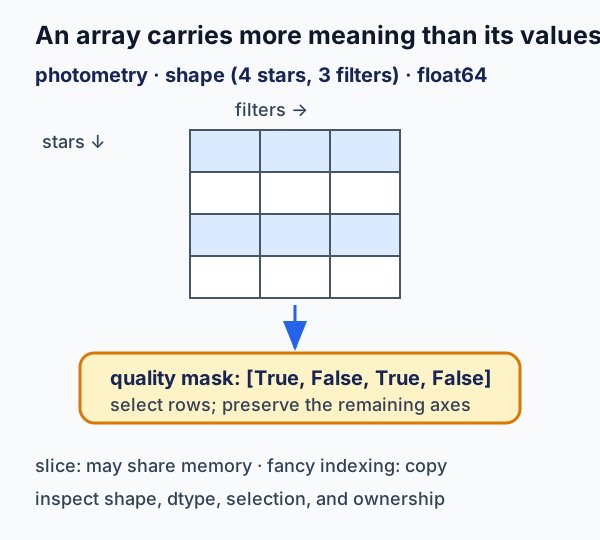
Figure 1:In NumPy, shape, dtype, selection rule, and memory ownership are part of the data model—not incidental implementation detail.
What to notice: a mask preserves the axes it selects from, while a slice and a fancy-indexed result can differ in whether later mutation is shared. Inspect shape, dtype, and memory ownership before treating an array operation as routine.
For a first reading, follow Sections 7.1–7.7 in order. Return to the Deep Dives when a project needs random sampling, grids, sampled signals, or a measured performance decision; use the Reference when you need an operation or creation function quickly.
Try this chapter
Browser Python lab · Shape, Mask, and View Inspector: predict an output shape, then test broadcasting and distinguish a memory-sharing slice from a fancy-indexed copy. This activity is optional; its source is Markdown and opens in the browser.
Learning objectives
By the end of this chapter, you will be able to:
(1) Inspect an array’s shape, axes, and dtype and choose an appropriate construction method
(2) Apply vectorized, masked, and broadcast operations while predicting the resulting shape
(3) Distinguish views from copies and diagnose an unintended array mutation
(4) Generate reproducible synthetic arrays with a local random generator and stated distributional assumptions
(5) Use selected numerical tools only with their sampling, grid, or missing-data boundaries made explicit
Prerequisites
Before starting this chapter, verify you can:
Work with Python lists and list comprehensions (Chapter 4)
Use the math module for mathematical operations (Chapter 2)
Understand functions and return values (Chapter 5)
Work with nested data structures (Chapter 4)
Import and use modules (Chapter 5)
Self-Assessment Diagnostic
Test your readiness by predicting these outputs WITHOUT running the code:
# Question 1: What does this produce?
result = [x**2 for x in range(5) if x % 2 == 0]
# Your answer: _______

# Question 2: What's the final value of total?
total = sum([len(str(x)) for x in [10, 100, 1000]])
# Your answer: _______

# Question 3: What error (if any) occurs here?
import math
values = [1, 4, 9]
# roots = math.sqrt(values)  # Uncomment to test
# Your answer: _______

# Question 4: Can you understand this nested structure?
matrix = [[1, 2], [3, 4]]
flattened = [item for row in matrix for item in row]
# Your answer: _______
Self-Assessment Answers
[0, 4, 16]- squares of even numbers from 0-49- lengths are 2, 3, 4, sum = 9TypeError- math.sqrt() doesn’t accept lists, only single values[1, 2, 3, 4]- flattens the 2D list into 1D
If you got all four correct, you’re ready for NumPy! If not, review the indicated chapters.
7.1 From Lists to Arrays: Why NumPy?
Let’s start with a problem you already know how to solve, then see how NumPy transforms it. Imagine you’re analyzing brightness measurements from a variable star:
import time
import math

# Python list approach (what you know from Chapter 4)
magnitudes_list = [12.3, 12.5, 12.4, 12.7, 12.6] * 20000  # 100,000 measurements
fluxes = []

start = time.perf_counter()
for mag in magnitudes_list:
    flux = 10**(-mag/2.5)  # Convert magnitude to relative flux
    fluxes.append(flux)
list_time = time.perf_counter() - start

print(f"List approach: {list_time*1000:.2f} ms")
print(f"First 5 fluxes: {fluxes[:5]}")
List approach: 13.44 ms
First 5 fluxes: [1.2022644346174132e-05, 1e-05, 1.0964781961431852e-05, 8.31763771102671e-06, 9.120108393559096e-06]
Now let’s see the NumPy approach:
import time
import numpy as np  # Standard abbreviation used universally

# NumPy array approach (what you're learning)
magnitudes = np.array([12.3, 12.5, 12.4, 12.7, 12.6] * 20000)

start = time.perf_counter()
fluxes_np = 10**(-magnitudes/2.5)  # Operates on entire array at once!
numpy_time = time.perf_counter() - start

assert np.allclose(fluxes, fluxes_np)
print(f"NumPy approach: {numpy_time*1000:.2f} ms")
print(f"Speedup: {list_time/numpy_time:.1f}x faster")
print(f"First 5 fluxes: {fluxes_np[:5]}")
NumPy approach: 1.99 ms
Speedup: 6.7x faster
First 5 fluxes: [1.20226443e-05 1.00000000e-05 1.09647820e-05 8.31763771e-06
9.12010839e-06]
The NumPy version is not only faster but also cleaner – no explicit loop needed! This is called vectorization, and it’s the key to NumPy’s power.
NumPy vs. the math Module: Arrays vs. Scalars
You’ve been using the math module for operations like math.sin(), math.sqrt(), and math.log(). NumPy covers most of the same operations while adding array support, which is why it becomes the default tool in scientific computing:
# Math module - works on single values only
import math
x = 2.0
math_result = math.sin(x)
print(f"math.sin({x}) = {math_result}")

# Try with a list - this fails!
# values = [0, 1, 2, 3]
# math.sin(values)  # TypeError!

# NumPy - works on single values AND arrays
x = 2.0
numpy_scalar_result = np.sin(x)
print(f"np.sin({x}) = {numpy_scalar_result}")

# NumPy shines with arrays
values = np.array([0, 1, 2, 3])
numpy_array_result = np.sin(values)
print(f"np.sin({values}) = {numpy_array_result}")

# NumPy has everything math has (and more)
print(f"\nComparison for x = {x}:")
print(f"  math.sqrt({x}) = {math.sqrt(x):.6f}")
print(f"  np.sqrt({x})   = {np.sqrt(x):.6f}")
print(f"  math.exp({x})  = {math.exp(x):.6f}")
print(f"  np.exp({x})    = {np.exp(x):.6f}")
print(f"  math.log10({x}) = {math.log10(x):.6f}")
print(f"  np.log10({x})   = {np.log10(x):.6f}")
Key insight: For arrays, prefer NumPy. For scalar-only work, math is perfectly fine. A few specialized functions live in math or scipy.special, so use the tool that matches the problem.
🎯 The More You Know: NumPy Powers Gravitational Wave Detection
In the mid-2010s, the Laser Interferometer Gravitational-Wave Observatory (LIGO) detected gravitational waves for the first time, opening a new window on the universe. This discovery depended on sophisticated data analysis pipelines, including PyCBC, which relies heavily on NumPy.
Astro example — the same signal‑processing workflow appears in seismology, acoustics, and medical imaging.
LIGO’s detectors produce high-rate, noisy data streams. Detecting a gravitational wave requires comparing those streams against large banks of theoretical waveform templates using matched filtering — a computationally intensive process that would be impossible without efficient numerical libraries.
The PyCBC pipeline is built on NumPy arrays and operations. The power of NumPy’s vectorized operations, which call optimized compiled routines (often BLAS/LAPACK; FFT via optimized routines), enables the analysis of gravitational wave data at practical timescales. Here’s how NumPy transforms the core matched filtering operation:
# Traditional loop-based approach
def matched_filter_slow(data, template):
    result = 0
    for i in range(len(data)):
        result += data[i] * template[i]
    return result

# NumPy vectorized approach
def matched_filter_fast(data, template):
    return np.dot(data, template)  # Or simply: data @ template
The vectorized NumPy version is dramatically faster, enabling searches through large template banks. NumPy’s FFT implementation accelerates the frequency-domain operations that are central to the analysis.
Today, gravitational-wave detections are processed through analysis pipelines built on NumPy arrays. The library you’re learning provides the computational foundation for this new kind of astronomy.
7.2 Creating Arrays: Your Scientific Data Containers
NumPy provides many ways to create arrays, each suited for different scientific tasks:
# From Python lists (most common starting point)
measurements = [23.5, 24.1, 23.8, 24.3]
arr = np.array(measurements)
print(f"From list: {arr}, dtype: {arr.dtype}")

# Specify data type for memory efficiency
counts = np.array([1000, 2000, 1500], dtype=np.int32)
print(f"Integer array: {counts}, dtype: {counts.dtype}")

# 2D array (matrix) - like an image
image_data = np.array([[10, 20, 30],
                       [40, 50, 60],
                       [70, 80, 90]])
print(f"2D array shape: {image_data.shape}")
print(f"2D array:\n{image_data}")
Essential Array Creation Functions for Science
These functions are workhorses in scientific computing:
Unit clarity matters: even without a units library, include units in variable names (e.g., wavelengths_nm, mass_g) and stay consistent within a workflow.
# linspace: Evenly spaced values (inclusive endpoints)
# Perfect for wavelength grids, time series
wavelengths_nm = np.linspace(400, 700, 11)  # 11 points from 400 to 700 nm
print(f"Wavelengths (nm): {wavelengths_nm}")

# Convert to CGS (cm) - standard in stellar atmosphere models
wavelengths_cm = wavelengths_nm * 1e-7
print(f"Wavelengths (cm): {wavelengths_cm}")

# logspace: Logarithmically spaced values
# Essential for frequency grids, stellar masses
masses_solar = np.logspace(-1, 2, 4)  # 0.1 to 100 solar masses
masses_g = masses_solar * 1.989e33  # Convert to grams (CGS)
print("Stellar masses (g):", ", ".join(f"{x:.2e}" for x in masses_g))
# arange: Like Python's range but returns array
# `arange` is convenient when the step is the contract. Do not rely on it to
# land exactly on a floating-point endpoint; use `linspace` for a fixed count.
times_s = np.arange(0, 10, 0.1) # 0 to 9.9 in nominal 0.1 s steps
print(f"Time points: {len(times_s)} samples from {times_s[0]} to {times_s[-1]}")
# zeros and ones: Initialize arrays
dark_frame = np.zeros((100, 100)) # 100x100 CCD dark frame
flat_field = np.ones((100, 100)) # Flat field (perfect response)
print(f"Dark frame shape: {dark_frame.shape}, sum: {dark_frame.sum()}")
print(f"Flat field shape: {flat_field.shape}, sum: {flat_field.sum()}")
# full: Create array filled with specific value
bias_level = np.full((100, 100), 500) # CCD bias level
print(f"Bias array: all values = {bias_level[0, 0]}")
# eye: Identity matrix
identity = np.eye(3)
print(f"Identity matrix:\n{identity}")Reference: saving and loading arrays
This section introduces NumPy’s array-specific storage operations locally. They are useful when a calculation needs to preserve values, shape, and dtype together:
import os  # For cleanup
rng = np.random.default_rng(42)

# Save astronomical data in binary format
flux_data = rng.normal(1000, 50, size=1000)
np.save('observations.npy', flux_data)  # Binary format, fast

# Load for analysis
loaded_data = np.load('observations.npy')
print(f"Loaded {len(loaded_data)} measurements")

# For text format (human-readable but slower)
np.savetxt('observations.txt', flux_data[:10], fmt='%.2f')
text_data = np.loadtxt('observations.txt')
print(f"Text file sample: {text_data[:3]}")

# Clean up files
os.remove('observations.npy')
os.remove('observations.txt')
7.3 Random Numbers for Monte Carlo Simulations
Scientific computing often requires random data for Monte Carlo simulations, noise modeling, and statistical testing. NumPy’s random module provides a comprehensive suite of distributions essential for computational astrophysics:
Legacy np.random.* functions still exist, but they rely on global state. In new scientific code, prefer a local generator created with np.random.default_rng(...).
Common Distributions
The three distributions you’ll use most frequently are uniform, normal (Gaussian), and Poisson. Master these first before moving to specialized distributions.
Uniform Distribution
Use for random positions, phases, and any quantity that’s equally likely across a range:
import numpy as np

# Create a local Generator for reproducibility without global state
rng = np.random.default_rng(42)

# Uniform distribution: random positions, phases
# Generate random sky coordinates uniformly on the sphere
n_stars = 1000
ra = rng.uniform(0, 360, n_stars)  # Right Ascension in degrees
u = rng.uniform(-1, 1, n_stars)  # Uniform in sin(dec), not in dec
dec = np.degrees(np.arcsin(u))  # Declination in degrees
print(f"Generated {n_stars} random sky positions")
print(f"RA range: [{ra.min():.1f}, {ra.max():.1f}] deg")

# Random phases for periodic variables
phases = rng.uniform(0, 2*np.pi, n_stars)
print(f"Phase range: [0, 2pi]")

# Shorthand for uniform [0, 1)
random_fractions = rng.random(5)
print(f"Random fractions: {random_fractions}")
Generated 1000 random sky positions
RA range: [0.4, 359.7] deg
Phase range: [0, 2pi]
Random fractions: [0.82922114 0.59409599 0.24485475 0.745675 0.0844809 ]
Uniform sky coverage is a subtle but important point: equal-area sampling on a sphere means uniform in , not uniform in declination itself. Sampling dec uniformly would over-weight the poles.
Normal (Gaussian) Distribution
Use for measurement errors, thermal noise, and any quantity resulting from many small independent effects:
# Normal (Gaussian) distribution: measurement errors, thermal noise
# Simulate CCD readout noise
rng = np.random.default_rng(42)
mean_counts = 1000  # electrons
read_noise = 10  # electrons RMS
n_pixels = 10000

pixel_values = rng.normal(mean_counts, read_noise, n_pixels)
print(f"Pixel statistics:")
print(f"  Mean: {pixel_values.mean():.1f} (expected: {mean_counts})")
print(f"  Std: {pixel_values.std():.1f} (expected: {read_noise})")
print(f"  SNR: {pixel_values.mean()/pixel_values.std():.1f}")

# Shorthand for standard normal (mean=0, std=1)
standard_normal = rng.standard_normal(5)
print(f"Standard normal samples: {standard_normal}")
Pixel statistics:
Mean: 999.9 (expected: 1000)
Std: 10.1 (expected: 10)
SNR: 99.4
Standard normal samples: [ 0.17627704 0.89912348 -1.47227062 -0.28529816 0.8291533 ]
Poisson Distribution
Use for counting statistics—photon counting, radioactive decay, or any discrete events occurring at a constant average rate:
# Poisson distribution: photon counting, radioactive decay
# Simulate photon arrival statistics
rng = np.random.default_rng(42)
mean_photons = 100  # photons per exposure
n_exposures = 1000

photon_counts = rng.poisson(mean_photons, n_exposures)
print(f"Photon counting statistics:")
print(f"  Mean: {photon_counts.mean():.1f} (expected: {mean_photons})")
print(f"  Std: {photon_counts.std():.2f} (expected: {np.sqrt(mean_photons):.2f})")
print(f"  Variance/Mean: {photon_counts.var()/photon_counts.mean():.2f} (should be ~1)")
Photon counting statistics:
Mean: 99.9 (expected: 100)
Std: 10.04 (expected: 10.00)
Variance/Mean: 1.01 (should be ~1)
Deep Dive: Sampling Models and Their Assumptions
The following distributions are tools for generating stated synthetic assumptions. A random draw is not evidence that a phenomenon follows that distribution; the model choice and seed are part of the result.
Advanced Distributions for Astrophysics
These distributions are less common but essential for specific astrophysical applications.
Exponential Distribution
Use for waiting times between events (time to next supernova, time between cosmic ray hits):
# Exponential distribution: time between events, decay processes
# Simulate time between supernova detections (days)
rng = np.random.default_rng(42)
mean_interval = 30  # days
n_events = 100
intervals = rng.exponential(mean_interval, n_events)
print(f"Supernova intervals: mean = {intervals.mean():.1f} days")
Supernova intervals: mean = 27.0 days
Power-Law Distribution
Use for stellar masses (IMF), galaxy luminosities, and many astrophysical scaling relations:
# Power-law distribution (using Pareto for x_min=1)
# Initial Mass Function approximation
rng = np.random.default_rng(42)
alpha = 2.35  # Salpeter IMF slope (dN/dM ∝ M^-alpha)
n_stars = 1000
# Draw candidates above 0.1 solar masses, then reject the high-mass tail.
# This is rejection truncation, so the retained sample size is not fixed.
a = alpha - 1  # np.random.pareto(a) has p(x) ∝ x^-(a+1)
x = rng.pareto(a, n_stars) + 1  # Pareto starts at 1
masses = 0.1 * x  # Scale to start at 0.1 solar masses
masses = masses[masses < 100]  # Truncate at 100 solar masses
print(f"Retained {len(masses)} of {n_stars} stellar-mass candidates")
Retained 1000 of 1000 stellar-mass candidates
This is a classic “parameter name mismatch” moment: NumPy’s pareto(a) returns a distribution with , while the Salpeter IMF is . Matching the exponents means using .
Multivariate Normal Distribution
Use for correlated parameters (color-magnitude relationships, correlated measurement errors):
# Multivariate normal: correlated parameters
# Simulate color-magnitude relationship
rng = np.random.default_rng(42)
mean = [12, 1.0]  # Mean magnitude, mean color (B-V)
# Deliberately synthetic negative covariance, not a stellar-population claim.
cov = [[1.0, -0.3],   # Variance in mag, covariance
       [-0.3, 0.25]]  # Covariance, variance in color

n_stars = 500
mag_color = rng.multivariate_normal(mean, cov, n_stars)
magnitudes = mag_color[:, 0]
colors = mag_color[:, 1]

correlation = np.corrcoef(magnitudes, colors)[0, 1]
print(f"Generated {n_stars} stars with correlated properties")
print(f"Correlation coefficient: {correlation:.2f} (expected: ~-0.6)")
Generated 500 stars with correlated properties
Correlation coefficient: -0.66 (expected: ~-0.6)
Visualizing correlated data helps build intuition for covariance:
import numpy as np
import matplotlib.pyplot as plt

# Recreate correlated stellar data
rng = np.random.default_rng(42)
mean = [12, 1.0]  # Mean magnitude, mean color (B-V)
cov = [[1.0, -0.3], [-0.3, 0.25]]  # Negative correlation

n_stars = 500
mag_color = rng.multivariate_normal(mean, cov, n_stars)
magnitudes = mag_color[:, 0]
colors = mag_color[:, 1]

fig, ax = plt.subplots(figsize=(8, 6))
ax.scatter(colors, magnitudes, alpha=0.5, s=15, c='navy')
ax.set_xlabel('B-V Color', fontsize=11)
ax.set_ylabel('Magnitude', fontsize=11)
ax.set_title('Correlated Stellar Properties from Multivariate Normal', fontsize=12)
ax.invert_yaxis()  # Astronomical convention
ax.grid(True, alpha=0.3)

# Add correlation annotation
corr = np.corrcoef(colors, magnitudes)[0, 1]
ax.text(0.05, 0.95, f'r = {corr:.2f}', transform=ax.transAxes,
        fontsize=11, verticalalignment='top',
        bbox=dict(boxstyle='round', facecolor='wheat', alpha=0.5))

plt.tight_layout()
plt.show()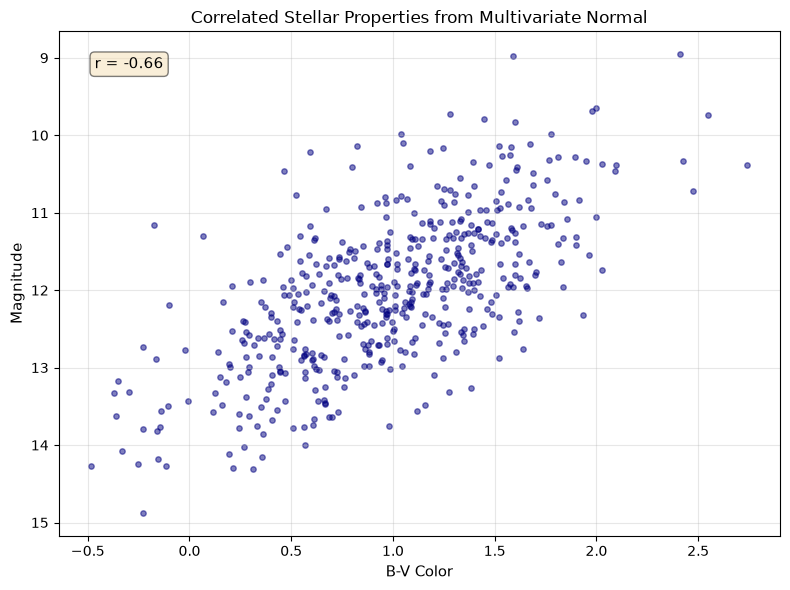
Multivariate normal distribution showing correlated stellar properties. The elliptical shape reveals the negative correlation between magnitude and color.
Random Sampling Techniques
Weighted Random Choice
Use for selecting objects from catalogs with known probability distributions:
# Random choice: selecting objects from catalogs
rng = np.random.default_rng(42)
star_types = np.array(['O', 'B', 'A', 'F', 'G', 'K', 'M'])
# Probabilities based on stellar statistics
probs = np.array([0.00003, 0.0013, 0.006, 0.03, 0.076, 0.121, 0.765])
probs = probs / probs.sum()  # Ensure normalization

n_sample = 1000
sampled_types = rng.choice(star_types, n_sample, p=probs)

# Count occurrences
unique, counts = np.unique(sampled_types, return_counts=True)
for star_type, count in zip(unique, counts):
    print(f"Type {star_type}: {count/n_sample*100:.1f}%")
Type A: 0.7%
Type B: 0.1%
Type F: 2.9%
Type G: 7.7%
Type K: 13.0%
Type M: 75.6%
Bootstrap Resampling
Use for estimating uncertainties when you don’t know the underlying distribution:
# Random permutation: bootstrap resampling
rng = np.random.default_rng(42)
# Original dataset
data = np.array([23.5, 24.1, 23.8, 24.3, 23.9])

# Bootstrap resampling for error estimation
n_bootstrap = 1000
bootstrap_means = []

for i in range(n_bootstrap):
    # Resample with replacement
    resampled = rng.choice(data, len(data), replace=True)
    bootstrap_means.append(resampled.mean())

bootstrap_means = np.array(bootstrap_means)
print(f"Original mean: {data.mean():.2f}")
print(f"Bootstrap mean: {bootstrap_means.mean():.2f}")
print(f"Bootstrap std error: {bootstrap_means.std():.3f}")

# Shuffle for randomization tests
shuffled = rng.permutation(data)
print(f"Original: {data}")
print(f"Shuffled: {shuffled}")
Original mean: 23.92
Bootstrap mean: 23.91
Bootstrap std error: 0.124
Original: [23.5 24.1 23.8 24.3 23.9]
Shuffled: [24.1 23.5 24.3 23.9 23.8]
🌟 Why This Matters: Monte Carlo Markov Chain (MCMC) in Cosmology
The random number generation you’re learning powers one of modern cosmology’s most important techniques: MCMC sampling for parameter estimation. When analyzing the cosmic microwave background or galaxy surveys, we need to explore vast parameter spaces to find the best-fit cosmological model.
Astro example — the same Monte Carlo ideas show up in ecology, materials science, and Bayesian machine learning.
MCMC uses random walks through parameter space, with each step drawn from distributions like those above. Missions such as Planck used these methods to place tight constraints on the universe’s age, composition, and expansion history.
Your ability to generate and manipulate random numbers with NumPy is the foundation for these universe-spanning discoveries.
7.4 Array Operations: Vectorization Powers
The true power of NumPy lies in vectorized operations – performing calculations on entire arrays without writing loops:
# Basic arithmetic operates element-wise
a = np.array([1, 2, 3, 4])
b = np.array([10, 20, 30, 40])

print(f"a + b = {a + b}")      # Element-wise addition
print(f"a * b = {a * b}")      # Element-wise multiplication
print(f"a ** 2 = {a ** 2}")    # Element-wise power
print(f"b / a = {b / a}")      # Element-wise division
print(f"b // a = {b // a}")    # Element-wise floor division
print(f"b % a = {b % a}")      # Element-wise modulo

# Matrix multiplication uses @ operator
c = np.array([[1, 2], [3, 4]])
d = np.array([[5, 6], [7, 8]])
print(f"\nMatrix multiplication (c @ d):\n{c @ d}")
# Alternative: np.dot(c, d)
print(f"Using np.dot:\n{np.dot(c, d)}")

# Compare with list approach (verbose and slow)
a_list = [1, 2, 3, 4]
b_list = [10, 20, 30, 40]
result_list = []
for i in range(len(a_list)):
    result_list.append(a_list[i] + b_list[i])
print(f"\nList addition: {result_list}")  # Same result, more code!
Universal Functions (ufuncs): Optimized Operations
NumPy’s universal functions operate element-wise on arrays with optimized C code:
# Trigonometric functions for coordinate transformations
angles_deg = np.array([0, 30, 45, 60, 90])
angles_rad = np.deg2rad(angles_deg)  # Convert to radians

sines = np.sin(angles_rad)
cosines = np.cos(angles_rad)

print(f"Angles (deg): {angles_deg}")
print(f"sin(theta): {sines}")
print(f"cos(theta): {cosines}")
print(f"sin^2(theta) + cos^2(theta): {sines**2 + cosines**2}")  # Should all be 1!
# Exponential and logarithm for magnitude scales
magnitudes = np.array([0, 1, 2, 5, 10])
flux_ratios = 10**(-magnitudes/2.5) # Pogson's equation
print(f"\nMagnitudes: {magnitudes}")
print(f"Flux ratios: {flux_ratios}")
# Verify: magnitude difference = -2.5 * log10(flux ratio)
recovered_mags = -2.5 * np.log10(flux_ratios)
print(f"Recovered magnitudes: {recovered_mags}")
# Floating point comparison - use allclose for safety
print(f"Magnitudes match: {np.allclose(magnitudes, recovered_mags)}")Array Methods: Built-in Analysis
Arrays come with methods for common statistical operations:
# Create sample data: Gaussian with outliers
rng = np.random.default_rng(42)
data = rng.normal(100, 15, 1000)  # Normal dist: mean=100, std=15
data[::100] = 200  # Add outliers every 100th point

# Statistical methods
print(f"Mean: {data.mean():.2f}")
print(f"Median: {np.median(data):.2f}")  # More robust to outliers
print(f"Std dev (population): {data.std():.2f}")
print(f"Std dev (sample, ddof=1): {data.std(ddof=1):.2f}")
print(f"Min: {data.min():.2f}, Max: {data.max():.2f}")

# Find outliers
outliers = data > 150
n_outliers = outliers.sum()  # True counts as 1
print(f"Number of outliers (>150): {n_outliers}")

# Clean data by filtering
clean_data = data[~outliers]  # ~ means NOT
print(f"Clean mean: {clean_data.mean():.2f}")
print(f"Clean std: {clean_data.std():.2f}")

# Additional useful statistics
print(f"\nPercentiles:")
print(f"  25th: {np.percentile(data, 25):.2f}")
print(f"  75th: {np.percentile(data, 75):.2f}")
print(f" 95th: {np.percentile(data, 95):.2f}")7.5 Indexing and Slicing: Data Selection Mastery
NumPy’s indexing extends Python’s list indexing with powerful new capabilities:
# 1D indexing (like lists but more powerful)
spectrum = np.array([1.0, 1.2, 1.5, 1.3, 1.1, 0.9, 0.8])
print(f"Full spectrum: {spectrum}")
print(f"First element: {spectrum[0]}")
print(f"Last element: {spectrum[-1]}")  # Negative indexing works!
print(f"Middle section: {spectrum[2:5]}")

# Fancy indexing - select multiple specific indices
important_indices = [0, 2, 4, 6]
selected = spectrum[important_indices]
print(f"Selected wavelengths: {selected}")
# 2D indexing - like accessing matrix elements
image = np.array([[10, 20, 30],
[40, 50, 60],
[70, 80, 90]])
print(f"2D array:\n{image}")
print(f"Element at row 1, col 2: {image[1, 2]}") # Note: comma notation!
print(f"Entire row 1: {image[1, :]}")
print(f"Entire column 2: {image[:, 2]}")
print(f"Sub-image: \n{image[0:2, 1:3]}")Answer
image has shape (3, 3). Both image[1, :] and image[:, 2] select one axis while leaving the other, so each has shape (3,): each is a one-dimensional array of three values. The row/column distinction came from the selection, not from a retained dimension. Use image[1:2, :] or image[:, 2:3] when you need to keep a two-dimensional row or column.
Boolean Masking: The Power Tool
Boolean masking is one of NumPy’s most powerful features for data filtering:
# Stellar catalog example
stars_mag = np.array([8.2, 12.5, 6.1, 15.3, 9.7, 11.2, 5.5])
stars_color = np.array([0.5, 1.2, 0.3, 1.8, 0.7, 1.0, 0.2])  # B-V color

# Create boolean masks
bright_mask = stars_mag < 10  # True where magnitude < 10
blue_mask = stars_color < 0.6  # True where B-V < 0.6 (blue stars)

print(f"Bright stars mask: {bright_mask}")
print(f"Bright star magnitudes: {stars_mag[bright_mask]}")

# Combine conditions with & (not 'and'), | (not 'or')
bright_and_blue = (stars_mag < 10) & (stars_color < 0.6)
print(f"Bright AND blue: {stars_mag[bright_and_blue]}")

# Count matching objects
n_bright = bright_mask.sum()  # True = 1, False = 0
print(f"Number of bright stars: {n_bright}")
Essential Array Functions
# where: conditional operations and finding indices
data = np.array([1, 5, 3, 8, 2, 9, 4])
high_indices = np.where(data > 5)[0]  # Returns tuple, we want first element
print(f"Indices where data > 5: {high_indices}")
print(f"Values at those indices: {data[high_indices]}")

# Conditional replacement
clipped = np.where(data > 5, 5, data)  # Clip values above 5
print(f"Clipped data: {clipped}")

# clip: cleaner way to bound values
clipped_better = np.clip(data, 2, 8)  # Clip to range [2, 8]
print(f"Clipped with np.clip: {clipped_better}")
# unique: find unique values in catalogs
star_types = np.array(['G', 'K', 'M', 'G', 'K', 'G', 'M', 'M', 'K'])
unique_types, counts = np.unique(star_types, return_counts=True)
print(f"Unique star types: {unique_types}")
print(f"Counts: {counts}")
# histogram: bin data for analysis
rng = np.random.default_rng(42)
magnitudes = rng.normal(12, 2, 1000)
hist, bins = np.histogram(magnitudes, bins=20)
print(f"Histogram has {len(hist)} bins")
print(f"Bin edges from {bins[0]:.1f} to {bins[-1]:.1f}")
print(f"Peak bin has {hist.max()} stars")
# Check for NaN and Inf values
test_array = np.array([1.0, np.nan, 3.0, np.inf, 5.0])
print(f"\nNaN check: {np.isnan(test_array)}")
print(f"Inf check: {np.isinf(test_array)}")
print(f"Finite check: {np.isfinite(test_array)}")Handling Missing Data: NaN Patterns
Real scientific data is messy. Telescope observations have bad pixels, surveys have non-detections, and data pipelines occasionally produce invalid values. NumPy’s np.nan (Not a Number) can represent a missing or invalid floating-point value, but it does not record why the value is absent. Preserve quality flags and the data product’s missingness convention alongside the array.
Detecting NaN Values
# Create data with missing values (common in astronomical catalogs)
magnitudes = np.array([12.5, np.nan, 14.2, np.nan, 11.8, 15.3])
print(f"Data: {magnitudes}")
print(f"Is NaN: {np.isnan(magnitudes)}")
print(f"Number of NaN values: {np.isnan(magnitudes).sum()}")
print(f"Any NaN present: {np.any(np.isnan(magnitudes))}")
Data: [12.5 nan 14.2 nan 11.8 15.3]
Is NaN: [False True False True False False]
Number of NaN values: 2
Any NaN present: True
Strategy 1: Filter Out NaN Values
For a statistic explicitly defined over valid measurements, you can select those measurements. This changes the population being summarized, so do not silently use it when missingness may be informative:
# Filter approach: remove NaN values
magnitudes = np.array([12.5, np.nan, 14.2, np.nan, 11.8, 15.3])

# Method 1: Boolean masking
clean_data = magnitudes[~np.isnan(magnitudes)]
print(f"Original length: {len(magnitudes)}")
print(f"Clean length: {len(clean_data)}")
print(f"Clean mean: {clean_data.mean():.2f}")

# Method 2: Using np.compress
clean_data2 = np.compress(~np.isnan(magnitudes), magnitudes)
print(f"Using compress: {clean_data2}")
Original length: 6
Clean length: 4
Clean mean: 13.45
Using compress: [12.5 14.2 11.8 15.3]
Strategy 2: Use NaN-Safe Functions
NumPy provides nan-prefixed functions that ignore NaN values. This is concise, but it has the same population-selection consequence as filtering:
# NaN-safe functions
magnitudes = np.array([12.5, np.nan, 14.2, np.nan, 11.8, 15.3])

print("Standard functions (corrupted by NaN):")
print(f"  np.mean(): {np.mean(magnitudes)}")
print(f"  np.std(): {np.std(magnitudes)}")
print(f"  np.sum(): {np.sum(magnitudes)}")

print("\nNaN-safe functions (ignore NaN):")
print(f"  np.nanmean(): {np.nanmean(magnitudes):.2f}")
print(f"  np.nanstd(): {np.nanstd(magnitudes):.2f}")
print(f"  np.nansum(): {np.nansum(magnitudes):.2f}")
print(f"  np.nanmin(): {np.nanmin(magnitudes):.2f}")
print(f"  np.nanmax(): {np.nanmax(magnitudes):.2f}")
print(f"  np.nanmedian(): {np.nanmedian(magnitudes):.2f}")
Standard functions (corrupted by NaN):
np.mean(): nan
np.std(): nan
np.sum(): nan
NaN-safe functions (ignore NaN):
np.nanmean(): 13.45
np.nanstd(): 1.38
np.nansum(): 53.80
np.nanmin(): 11.80
np.nanmax(): 15.30
np.nanmedian(): 13.35
Strategy 3: Replace NaN Values
Filling is a modeling choice, not generic data cleaning. A detection limit, imputation model, or finite sentinel must be compatible with the downstream algorithm and be documented:
# Replace NaN with specific values
magnitudes = np.array([12.5, np.nan, 14.2, np.nan, 11.8, 15.3])

# A *declared* detection limit can be carried as a separate value and flag.
detection_limit_mag = 99.99
is_missing = np.isnan(magnitudes)
filled_for_display = np.where(is_missing, detection_limit_mag, magnitudes)
print(f"Display values with a declared limit: {filled_for_display}")

# Replace with the mean of valid values
mean_val = np.nanmean(magnitudes)
filled_mean = np.where(np.isnan(magnitudes), mean_val, magnitudes)
print(f"Filled with mean ({mean_val:.2f}): {filled_mean}")

# `nan_to_num` is appropriate only when these finite replacements have a
# documented meaning for the next computation.
data_with_inf = np.array([1.0, np.nan, np.inf, -np.inf, 5.0])
finite_for_display = np.nan_to_num(data_with_inf, nan=-999.0, posinf=999.0, neginf=-999.0)
print(f"Explicit display sentinels: {finite_for_display}")
Display values with a declared limit: [12.5 99.99 14.2 99.99 11.8 15.3 ]
Filled with mean (13.45): [12.5 13.45 14.2 13.45 11.8 15.3 ]
Explicit display sentinels: [ 1. -999. 999. -999. 5.]
Strategy 4: Interpolate Over NaN
For a time series, interpolation is defensible only when a stated local continuity model is appropriate for the gap:
# Linear interpolation over NaN values
time = np.array([0, 1, 2, 3, 4, 5])
flux = np.array([1.0, 1.2, np.nan, np.nan, 1.1, 0.9])

# Find valid and invalid indices
valid_mask = ~np.isnan(flux)
valid_time = time[valid_mask]
valid_flux = flux[valid_mask]

# Interpolate at all time points
interpolated_flux = np.interp(time, valid_time, valid_flux)
print(f"Original: {flux}")
print(f"Interpolated: {interpolated_flux}")
Original: [1. 1.2 nan nan 1.1 0.9]
Interpolated: [1. 1.2 1.16666667 1.13333333 1.1 0.9 ]
Answer
Use np.nanmean() or filter first if the requested statistic is explicitly the mean of detected sources:
# Both approaches work
mean_flux = np.nanmean(flux_data)
# or
detected = flux_data[~np.isnan(flux_data)]
mean_flux = detected.mean()
The first is more concise; the second is clearer about intent and lets you reuse the filtered array.
🌟 Why This Matters: Finding Exoplanets with Boolean Masking
The Kepler Space Telescope discovered thousands of exoplanets by monitoring the brightness of many stars over long time spans. Finding planets in this data required sophisticated boolean masking with NumPy.
Astro example — the same masking patterns are used in climate data, microscopy, and quality control.
When a planet transits its star, the brightness drops by a small amount, but the data is noisy, with stellar flares, cosmic rays, and instrumental effects. Here is a simplified candidate flagger, not a validated detection pipeline:
# Simulated light curve data
rng = np.random.default_rng(42)
time = np.linspace(0, 30, 1000)  # 30 days
flux = np.ones_like(time) + rng.normal(0, 0.001, 1000)  # Noise

# Add transits every 3.5 days (period), 0.1 day duration, 1% deep
period, duration, depth = 3.5, 0.1, 0.01
in_transit = ((time % period) < duration)
flux[in_transit] -= depth

# Candidate flagging using boolean masking
median_flux = np.median(flux)
threshold = median_flux - 3 * flux.std()  # 3-sigma detection
transit_candidates = flux < threshold

# Count entries into contiguous candidate runs, not samples below threshold.
candidate_starts = np.flatnonzero(
    transit_candidates & np.r_[True, ~transit_candidates[:-1]]
)

print(f"Flagged {len(candidate_starts)} candidate events")7.6 Broadcasting: NumPy’s Secret Superpower
Broadcasting allows NumPy to perform operations on arrays of different shapes, eliminating the need for explicit loops or array duplication:
# Simple broadcasting: scalar with array
arr = np.array([1, 2, 3, 4])
result = arr + 10  # 10 is "broadcast" to [10, 10, 10, 10]
print(f"Array + scalar: {result}")

# Row vector + column vector = matrix
row = np.array([[1, 2, 3]])      # Shape (1, 3)
col = np.array([[10], [20], [30]])  # Shape (3, 1)
matrix = row + col  # Broadcasting creates (3, 3) result
print(f"Row shape: {row.shape}")
print(f"Column shape: {col.shape}")
print(f"Result:\n{matrix}")
print(f"Result shape: {matrix.shape}")
Broadcasting Rules Visualization
Broadcasting follows simple rules:
Arrays are compatible if dimensions are equal or one is 1
Missing dimensions are treated as 1
Arrays are stretched along dimensions of size 1
Text representation of broadcasting rules:

Array A: Shape (3, 1)    Array B: Shape (1, 4)
         v                        v
   [10]  ───┐              [1, 2, 3, 4]
   [20]  ───┼── (+) ──────────────┘
   [30]  ───┘
         v
   Result: Shape (3, 4)
   [[11, 12, 13, 14],
    [21, 22, 23, 24],
    [31, 32, 33, 34]]

Rule Check:
- Dimension 0: 3 vs 1 -> Compatible (1 broadcasts)
- Dimension 1: 1 vs 4 -> Compatible (1 broadcasts)
- Result shape: (3, 4)
Shape Tools: (n,), (1, n), and (n, 1)
The same values can represent different shapes, and broadcasting depends on shape, not just size:
a = np.array([1, 2, 3])      # Shape (3,)
row = a[np.newaxis, :]       # Shape (1, 3)
col = a[:, np.newaxis]       # Shape (3, 1)

print(a.shape, row.shape, col.shape)
If you want an operation to broadcast across rows or columns, use np.newaxis (or None) to add the dimension you need.
Answer
a[np.newaxis, :] is a row with shape (1, 3); it broadcasts down rows when combined with a matrix whose final dimension is 3. a[:, np.newaxis] is a column with shape (3, 1); it broadcasts across columns. The values are the same, but the axis you add gives them different roles.
# Practical example: Normalize each row of a matrix
data = np.array([[1, 2, 3],
                 [4, 5, 6],
                 [7, 8, 9]], dtype=float)

# Calculate row means and keep the dimension for broadcasting
row_means = data.mean(axis=1, keepdims=True)  # Shape (3, 1)
print(f"Row means shape: {row_means.shape}")

# With keepdims=True, broadcasting works without reshape
normalized = data - row_means  # Broadcasting!
print(f"Normalized data:\n{normalized}")
print(f"New row means: {normalized.mean(axis=1)}")  # Should be ~0
Real-World Broadcasting: CCD Image Calibration
# Flat-field correction for CCD images
rng = np.random.default_rng(42)

# Simulate a scene observed through a non-uniform detector response.
scene_level_e = 1000  # electrons per pixel before the flat-field response
flat_field = np.ones((100, 100))
flat_field[:, :50] = 0.9  # Left half less sensitive
dark_current_e = np.full((100, 100), 50)  # Uniform dark current in electrons
scene_signal_e = rng.poisson(scene_level_e * flat_field)
raw_image = scene_signal_e + dark_current_e

# Subtract the measured dark level, then divide by the relative sensitivity.
calibrated = (raw_image - dark_current_e) / flat_field

print(f"Raw image mean: {raw_image.mean():.1f}")
print(f"Input scene level: {scene_level_e:.1f} electrons")
print(f"Corrected left half: {calibrated[:, :50].mean():.1f} electrons")
print(f"Corrected right half: {calibrated[:, 50:].mean():.1f} electrons")7.7 Array Manipulation: Reshaping Your Data
NumPy provides powerful tools for reorganizing array data:
# Reshape: Change dimensions without changing data
data = np.arange(12)
print(f"Original: {data}")

# Reshape to 2D
matrix = data.reshape(3, 4)
print(f"As 3x4 matrix:\n{matrix}")

# Reshape to 3D
cube = data.reshape(2, 2, 3)
print(f"As 2x2x3 cube:\n{cube}")

# Use -1 to infer dimension
auto_reshape = data.reshape(3, -1)  # NumPy figures out the 4
print(f"Auto-reshape to 3x?:\n{auto_reshape}")

# Flatten back to 1D
flattened = matrix.flatten()
print(f"Flattened: {flattened}")
Stacking and Splitting Arrays
Combining and separating arrays is common in data analysis:
# Stacking arrays
a = np.array([1, 2, 3])
b = np.array([4, 5, 6])
c = np.array([7, 8, 9])

# Vertical stack (row-wise)
vstacked = np.vstack([a, b, c])
print(f"Vertical stack:\n{vstacked}")

# Horizontal stack (column-wise)
hstacked = np.hstack([a, b, c])
print(f"Horizontal stack: {hstacked}")

# Concatenate (general purpose)
concat_axis0 = np.concatenate([a, b, c])  # Default axis=0
print(f"Concatenated: {concat_axis0}")

# Stack as columns
column_stack = np.column_stack([a, b, c])
print(f"Column stack:\n{column_stack}")
Transpose and Axis Manipulation for Coordinate Systems
# Transpose swaps axes - useful for coordinate transformations
# Example: RA/Dec coordinates to X/Y projections
ra_dec = np.array([[10.5, -25.3],   # Star 1: RA, Dec
                    [15.2, -30.1],   # Star 2: RA, Dec
                    [20.8, -22.7]])  # Star 3: RA, Dec

# Transpose to get all RAs and all Decs
coords_transposed = ra_dec.T
print(f"Original (each row is a star):\n{ra_dec}")
print(f"Transposed (row 0 = all RAs, row 1 = all Decs):\n{coords_transposed}")

all_ra = coords_transposed[0]
all_dec = coords_transposed[1]
print(f"All RA values: {all_ra}")
print(f"All Dec values: {all_dec}")Deep Dive: Numerical Grids and Sampled Signals
The following tools are useful in particular scientific contexts. They are not part of the Chapter 7 first-use core; introduce their assumptions explicitly before relying on them for an inference.
7.8 Essential Scientific Functions
NumPy provides specialized functions crucial for scientific computing:
Meshgrid: Creating Coordinate Grids
The meshgrid function is fundamental for numerical simulations and 2D/3D function evaluation. When you need to evaluate a function f(x,y) at every point on a 2D grid, you could use nested loops – but that’s slow and cumbersome. Meshgrid creates coordinate matrices that enable vectorized evaluation.
Mathematical Foundation: Given vectors x = [, , ..., ] and y = [, , ..., ], meshgrid creates two matrices X and Y where:
for all (x-coordinates repeated along rows)
for all (y-coordinates repeated along columns)
This creates a rectangular grid of (x,y) coordinate pairs covering all combinations.
Why is this powerful? Any function f(x,y) can now be evaluated at all grid points simultaneously using vectorized operations, essential for:
Solving partial differential equations (PDEs)
Creating potential fields for N-body simulations
Generating synthetic telescope images
Computing 2D Fourier transforms
Visualizing mathematical surfaces
# Basic meshgrid demonstration
x = np.linspace(-2, 2, 5)  # 5 x-coordinates
y = np.linspace(-1, 1, 3)  # 3 y-coordinates
X, Y = np.meshgrid(x, y)

print(f"Original x: {x}")
print(f"Original y: {y}")
print(f"\nX coordinates (shape {X.shape}):\n{X}")
print(f"\nY coordinates (shape {Y.shape}):\n{Y}")

# Each (X[i,j], Y[i,j]) gives a coordinate pair
print(f"\nCoordinate at row 1, col 2: ({X[1,2]:.1f}, {Y[1,2]:.1f})")

# Evaluate f(x,y) = x^2 + y^2 at every grid point
Z = X**2 + Y**2  # No loops needed!
print(f"\nFunction values:\n{Z}")
# Numerical simulation example: a softened gravitational potential field
# This is a 2D teaching model in normalized units, not an N-body integrator.
masses = [1.0, 0.5, 0.3] # Solar masses
positions = [(0, 0), (3, 2), (-2, 1)] # AU
# Create fine grid for field calculation
x_grid = np.linspace(-5, 5, 50)
y_grid = np.linspace(-5, 5, 50)
X_field, Y_field = np.meshgrid(x_grid, y_grid)
# Calculate gravitational potential at each grid point
G = 1 # Normalized units
potential = np.zeros_like(X_field)
for mass, (px, py) in zip(masses, positions):
# Distance from each grid point to this mass
R = np.sqrt((X_field - px)**2 + (Y_field - py)**2)
# Plummer-style softening avoids the point-mass singularity.
softening_au = 0.1
R_soft = np.sqrt(R**2 + softening_au**2)
# Add contribution to the softened potential.
potential += -G * mass / R_soft
print(f"Potential field shape: {potential.shape}")
print(f"Min potential: {potential.min():.2f}, Max: {potential.max():.2f}")
# `meshgrid(x, y)` gives axis 0 = y and axis 1 = x. `gradient` returns
# derivatives in axis order, so name them before converting to force components.
dphi_dy, dphi_dx = np.gradient(
potential, y_grid[1] - y_grid[0], x_grid[1] - x_grid[0]
)
Fy, Fx = -dphi_dy, -dphi_dx
force_magnitude = np.sqrt(Fx**2 + Fy**2)
print(f"Max force magnitude: {force_magnitude.max():.2f}")# Common use: creating synthetic star images
x_pixels = np.linspace(0, 10, 100)
y_pixels = np.linspace(0, 10, 100)
X_img, Y_img = np.meshgrid(x_pixels, y_pixels)
# Create 2D Gaussian (like a star PSF)
sigma = 2.0
star_x, star_y = 5.0, 5.0 # Star position
psf = np.exp(-((X_img - star_x)**2 + (Y_img - star_y)**2) / (2 * sigma**2))
print(f"PSF shape: {psf.shape}, peak: {psf.max():.3f}")
# 3D meshgrid for volume simulations
x_3d = np.linspace(-1, 1, 10)
y_3d = np.linspace(-1, 1, 10)
z_3d = np.linspace(-1, 1, 10)
X_3d, Y_3d, Z_3d = np.meshgrid(x_3d, y_3d, z_3d)
print(f"\n3D grid shape: {X_3d.shape}") # (10, 10, 10)
# Evaluate 3D density field rho(x,y,z) = exp(-r^2)
density = np.exp(-(X_3d**2 + Y_3d**2 + Z_3d**2))
cell_volume = (x_3d[1] - x_3d[0]) * (y_3d[1] - y_3d[0]) * (z_3d[1] - z_3d[0])
print(f"Approximate integrated density: {(density.sum() * cell_volume):.2f}")Numerical Differentiation and Integration
# Check both approximations first with a smooth signal whose answer is known.
time_s = np.linspace(0, 10, 100)  # seconds
flux = np.sin(time_s)  # arbitrary flux units

# `gradient` approximates d(flux)/dt at sampled points.
flux_gradient = np.gradient(flux, time_s)
exact_gradient = np.cos(time_s)
print(f"Maximum derivative error: {np.max(np.abs(flux_gradient - exact_gradient)):.3e}")

# `trapezoid` approximates the integral of flux over time.
integrated_flux = np.trapezoid(flux, x=time_s)
exact_integral = 1 - np.cos(10)
print(f"Integrated flux: {integrated_flux:.4f}")
print(f"Exact integral: {exact_integral:.4f}")Interpolation with interp
This example evaluates only within the measured wavelength range, which is the
usual interpolation case. The input wavelengths must be increasing; by default,
np.interp returns the nearest endpoint value outside that range rather than a
physical extrapolation. Choose and document an extrapolation model explicitly
when a calculation needs values beyond the measurements.
# Linear interpolation - crucial for spectra, light curves
wavelengths_measured = np.array([400, 500, 600, 700])  # nm
flux_measured = np.array([1.0, 1.5, 1.2, 0.8])

# Interpolate to finer grid
wavelengths_fine = np.linspace(400, 700, 31)
flux_interpolated = np.interp(wavelengths_fine,
                              wavelengths_measured,
                              flux_measured)

print(f"Original: {len(wavelengths_measured)} points")
print(f"Interpolated: {len(wavelengths_fine)} points")
print(f"Flux at 550 nm: {np.interp(550, wavelengths_measured, flux_measured):.3f}")
Fourier Transforms: Frequency Analysis
The Fast Fourier Transform (FFT) is one of the most important algorithms in computational science, converting signals from the time domain to the frequency domain. This reveals periodic patterns hidden in noisy data – essential for finding pulsars, detecting exoplanets, and analyzing gravitational waves.
Mathematical Foundation: The Discrete Fourier Transform (DFT) of a sequence x[n] with N samples is:
where:
x[n] is the input signal at time sample n
X[k] is the frequency component at frequency k
k ranges from 0 to N-1; the physical bin ordering depends on the transform helper used
The FFT algorithm computes this in operations instead of , making it practical for large datasets.
Units and assumptions: N, n, and k are unitless indices. The physical units of frequency come from your sample spacing. If your spacing d is in seconds, np.fft.fftfreq(..., d) returns frequencies in Hz; if d is in days, you get cycles per day. The FFT assumes uniform sampling; for uneven sampling, use methods like Lomb–Scargle.
Physical Interpretation:
Magnitude |X[k]|: the unnormalized coefficient magnitude; it scales with the number of samples and is not automatically a physical amplitude
Phase : The phase shift of that frequency component
Power : an unnormalized spectral-power quantity; its physical units and relation to energy require an explicit normalization convention
Frequency bins: corresponds to frequency
np.fft.fftfreq orders bins as zero frequency, positive frequencies, then
negative frequencies. For a real-valued signal, use np.fft.rfft with
np.fft.rfftfreq when you need only the non-negative-frequency half; this
matches the transform’s Hermitian symmetry. Both choices still require a
uniform sample spacing and an explicit interpretation of units.
NumPy’s forward FFT is unnormalized. For this unwindowed, real, bin-centered
teaching signal, a single-sided amplitude estimate is abs(rfft_result) / N,
with interior positive-frequency bins doubled. Do not double the DC bin or,
when N is even, the Nyquist bin. Windowing, non-bin-centered frequencies,
and noise change that simple interpretation; record the normalization before
calling a spectrum an amplitude, energy, or power measurement.
import numpy as np
import matplotlib.pyplot as plt

# Create a signal with multiple frequencies on a uniform grid.
sampling_rate = 500  # Hz (samples per second)
n_samples = 500
t = np.arange(n_samples) / sampling_rate  # 1 second, endpoint excluded

# Build composite signal
rng = np.random.default_rng(42)
signal = np.sin(2 * np.pi * 5 * t)  # 5 Hz component
signal += 0.5 * np.sin(2 * np.pi * 10 * t)  # 10 Hz component
signal += 0.3 * np.sin(2 * np.pi * 50 * t)  # 50 Hz component
signal += 0.2 * rng.normal(size=t.shape)  # Noise

# `rfft` and `rfftfreq` retain the non-negative frequencies for this real signal.
spectrum = np.fft.rfft(signal)
freqs = np.fft.rfftfreq(n_samples, d=1 / sampling_rate)

# One-sided amplitudes: double interior bins, but not DC or the Nyquist bin.
single_sided_amplitude = np.abs(spectrum) / n_samples
if n_samples % 2 == 0:
    single_sided_amplitude[1:-1] *= 2  # Nyquist bin is last; leave it alone.
else:
    single_sided_amplitude[1:] *= 2

# The three largest non-DC bins are only a controlled-example summary.
peak_indices = np.argsort(single_sided_amplitude[1:])[-3:] + 1
peak_freqs = np.sort(freqs[peak_indices])

print(f"Sampling rate: {sampling_rate} Hz")
print(f"Frequency resolution: {freqs[1]-freqs[0]:.2f} Hz")
print(f"Nyquist frequency: {sampling_rate/2} Hz")
print(f"Three largest non-DC bins: {peak_freqs} Hz")
Sampling rate: 500 Hz
Frequency resolution: 1.00 Hz
Nyquist frequency: 250.0 Hz
Three largest non-DC bins: [ 5. 10. 50.] Hz
FFT reveals hidden frequencies in a composite signal
Visualizing the FFT: Time Domain vs Frequency Domain
The power of the FFT becomes clear when visualized—patterns invisible in the time domain jump out in the frequency domain:
import numpy as np
import matplotlib.pyplot as plt

# Recreate the signal on the same uniform grid.
sampling_rate = 500
n_samples = 500
t = np.arange(n_samples) / sampling_rate
rng = np.random.default_rng(42)
signal = np.sin(2 * np.pi * 5 * t) + 0.5 * np.sin(2 * np.pi * 10 * t)
signal += 0.3 * np.sin(2 * np.pi * 50 * t) + 0.2 * rng.normal(size=t.shape)

# Compute the non-negative-frequency spectrum for the real signal.
spectrum = np.fft.rfft(signal)
freqs = np.fft.rfftfreq(n_samples, d=1 / sampling_rate)
power = np.abs(spectrum)**2

# Create visualization
fig, axes = plt.subplots(1, 2, figsize=(12, 4))

# Time domain
axes[0].plot(t, signal, 'b-', linewidth=0.8, alpha=0.8)
axes[0].set_xlabel('Time (seconds)', fontsize=11)
axes[0].set_ylabel('Amplitude', fontsize=11)
axes[0].set_title('Time Domain: Signal looks complex/noisy', fontsize=12)
axes[0].set_xlim(0, 0.5)  # Show first half second
axes[0].grid(True, alpha=0.3)

# Frequency domain
axes[1].semilogy(freqs[1:], power[1:], 'r-', linewidth=0.8)
axes[1].axvline(x=5, color='green', linestyle='--', alpha=0.7, label='5 Hz')
axes[1].axvline(x=10, color='green', linestyle='--', alpha=0.7, label='10 Hz')
axes[1].axvline(x=50, color='green', linestyle='--', alpha=0.7, label='50 Hz')
axes[1].set_xlabel('Frequency (Hz)', fontsize=11)
axes[1].set_ylabel(r'Unnormalized $|X[k]|^2$ (log scale)', fontsize=11)
axes[1].set_title('Frequency Domain: injected components are visible', fontsize=12)
axes[1].set_xlim(0, 100)
axes[1].legend(loc='upper right')
axes[1].grid(True, alpha=0.3)

plt.tight_layout()
plt.show()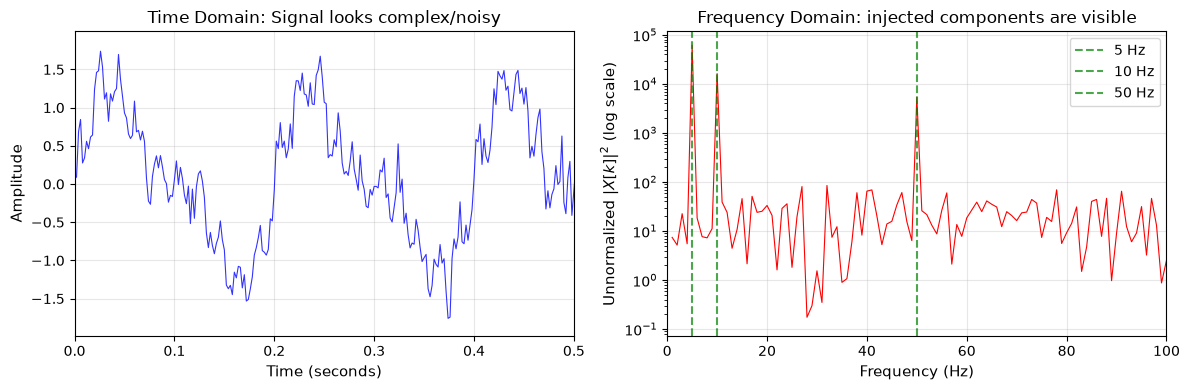
Left: Composite signal looks noisy in time domain. Right: the unnormalized spectrum makes the injected frequency components visible; it is not yet a calibrated power measurement.
import numpy as np
import matplotlib.pyplot as plt

# Practical example: Finding periodic signal in noisy data
# Simulate exoplanet transit light curve with periodic dips
time = np.linspace(0, 30, 3000)  # 30 days of observations
period = 3.456  # Planet orbital period in days
transit_duration = 0.15  # days

# Create light curve with transits
flux = np.ones_like(time)
phase = (time % period) / period
in_transit = phase < (transit_duration / period)
flux[in_transit] *= 0.99  # 1% transit depth

# Add realistic noise
rng = np.random.default_rng(42)
flux += rng.normal(0, 0.002, len(time))  # 0.2% noise

# FFT as a first-look periodicity diagnostic
fft_flux = np.fft.rfft(flux - flux.mean())  # Remove DC component
freqs_flux = np.fft.rfftfreq(len(time), time[1] - time[0])  # Frequencies in 1/day

# Power spectrum
power_flux = np.abs(fft_flux)**2

# Look for a dominant Fourier bin in a stated range (periods from 2 to 15 days).
# The box-shaped transit also creates harmonics, so this is not a transit search.
freq_mask = (freqs_flux > 0.07) & (freqs_flux < 0.5)  # Periods ~2-14 days
peak_freq = freqs_flux[freq_mask][np.argmax(power_flux[freq_mask])]
fft_period_estimate = 1 / peak_freq

print(f"True period: {period:.3f} days")
print(f"Nearest dominant Fourier-bin period: {fft_period_estimate:.3f} days")
print(f"Fourier-bin resolution: {freqs_flux[1]:.3f} cycles/day")

# Visualize the transit detection
fig, axes = plt.subplots(2, 2, figsize=(12, 8))

# Raw light curve
axes[0, 0].plot(time, flux, 'k.', markersize=1, alpha=0.5)
axes[0, 0].set_xlabel('Time (days)', fontsize=11)
axes[0, 0].set_ylabel('Relative Flux', fontsize=11)
axes[0, 0].set_title('Raw Light Curve (transits barely visible)', fontsize=12)
axes[0, 0].set_ylim(0.98, 1.02)
axes[0, 0].grid(True, alpha=0.3)

# Zoomed view showing transits
axes[0, 1].plot(time, flux, 'k.', markersize=2, alpha=0.5)
axes[0, 1].set_xlabel('Time (days)', fontsize=11)
axes[0, 1].set_ylabel('Relative Flux', fontsize=11)
axes[0, 1].set_title('Zoomed: First 10 days', fontsize=12)
axes[0, 1].set_xlim(0, 10)
axes[0, 1].set_ylim(0.98, 1.02)
axes[0, 1].axhline(y=0.99, color='red', linestyle='--', alpha=0.5, label='Transit depth')
axes[0, 1].legend()
axes[0, 1].grid(True, alpha=0.3)

# Power spectrum
pos_freq_mask = freqs_flux > 0
axes[1, 0].semilogy(1/freqs_flux[pos_freq_mask], power_flux[pos_freq_mask], 'b-', linewidth=0.5)
axes[1, 0].axvline(x=period, color='red', linestyle='--', linewidth=2, label=f'True P = {period:.3f} d')
axes[1, 0].axvline(x=fft_period_estimate, color='green', linestyle=':', linewidth=2, label=f'FFT-bin P = {fft_period_estimate:.3f} d')
axes[1, 0].set_xlabel('Period (days)', fontsize=11)
axes[1, 0].set_ylabel('Power', fontsize=11)
axes[1, 0].set_title('Power Spectrum: first-look Fourier diagnostic', fontsize=12)
axes[1, 0].set_xlim(0.5, 10)
axes[1, 0].legend()
axes[1, 0].grid(True, alpha=0.3)

# Phase-folded light curve
phase_fold = (time % fft_period_estimate) / fft_period_estimate
axes[1, 1].plot(phase_fold, flux, 'b.', markersize=1, alpha=0.3)
axes[1, 1].set_xlabel('Phase', fontsize=11)
axes[1, 1].set_ylabel('Relative Flux', fontsize=11)
axes[1, 1].set_title(f'Phase-folded at FFT-bin P = {fft_period_estimate:.3f} days', fontsize=12)
axes[1, 1].set_ylim(0.98, 1.02)
axes[1, 1].grid(True, alpha=0.3)

plt.tight_layout()
plt.show()
True period: 3.456 days
Nearest dominant Fourier-bin period: 3.334 days
Fourier-bin resolution: 0.033 cycles/day
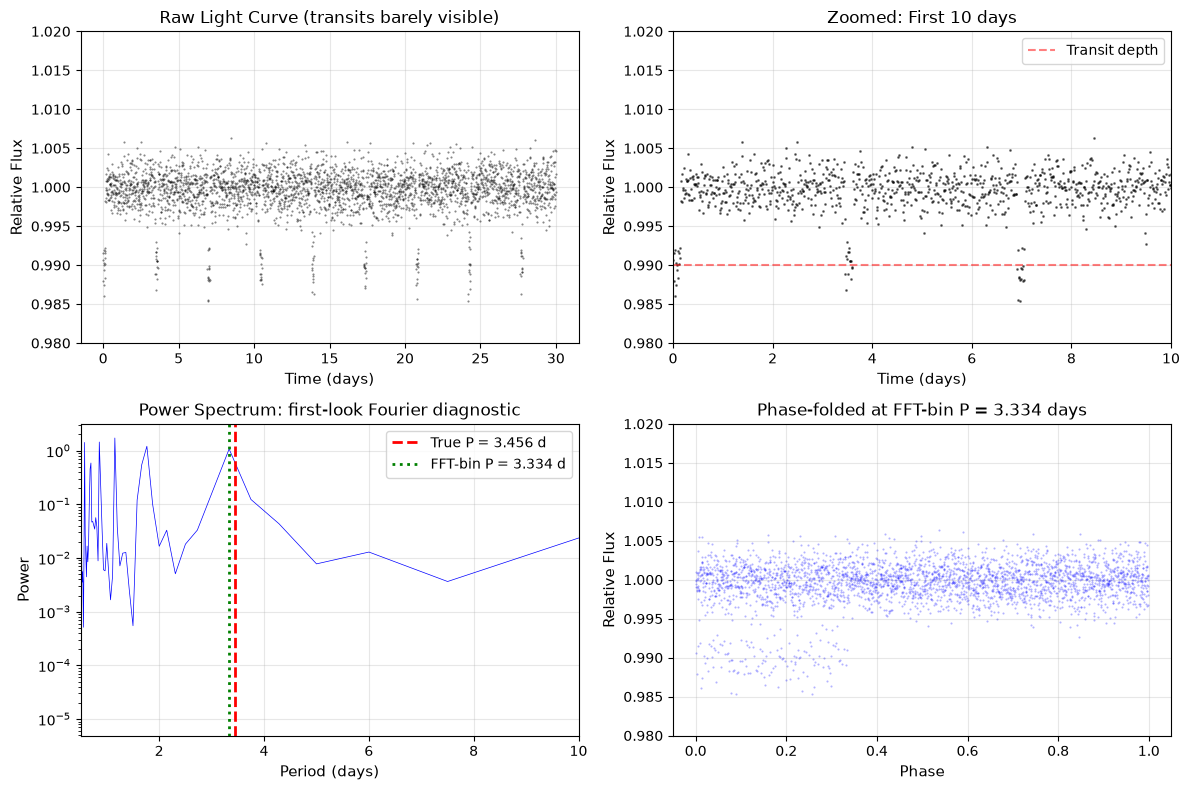
A first-look FFT period estimate for a synthetic transit-like light curve
Reality check: FFTs are excellent for sinusoidal signals, but transit light curves are boxy and generate strong harmonics. In practice, astronomers often use Box Least Squares (BLS) for transit searches and Lomb–Scargle periodograms for unevenly sampled data. You do not need those methods yet — just know that FFT is a first look, not the final word.
💡 Advanced: Window Functions and Spectral Leakage
When your signal doesn’t fit perfectly within your sampling window (which is almost always!), the FFT produces spectral leakage — power spreads to neighboring frequencies, creating artificial peaks.
Window functions reduce this leakage by tapering the signal edges. Common choices include:
Hanning (
np.hanning(N)): Good general-purpose choice, reduces leakage significantlyHamming (
np.hamming(N)): Similar to Hanning, slightly different sidelobe structureBlackman (
np.blackman(N)): Best sidelobe suppression, wider main lobe
# Apply a window function before FFT
window = np.hanning(len(signal))
windowed_signal = signal * window
fft_windowed = np.fft.fft(windowed_signal)
Window functions are a specialized signal-processing tool. Use one only after checking how it changes resolution, leakage, and the interpretation of any amplitudes.
Answer
The Nyquist frequency doubles because it is half the sampling rate. The frequency-bin spacing also doubles: with fixed N, the observation duration halves when samples are taken twice as quickly, and the bin spacing is sampling_rate / N. Higher sampling rate extends the frequency range but does not by itself improve the ability to distinguish close frequencies.
Deep Dive: Covariance, Correlation, and Synthetic Relationships
Correlation is an exploratory summary, not a causal explanation or a substitute for measurement-error and selection-effect modeling. Chapter 13 returns to these tools in an exploratory-data-analysis setting.
Covariance and Correlation
Covariance and correlation measure how two variables change together – crucial for understanding relationships in astronomical data like the color-magnitude diagram, period-luminosity relations, or Tully-Fisher correlations.
Mathematical Definitions:
Covariance between variables and :
where:
is the expected value (mean)
, (or , ) are the means of and
is the number of data points
Interpretation:
Positive covariance: Variables tend to increase together
Negative covariance: When one increases, the other tends to decrease
Zero covariance: No linear relationship (but there could be nonlinear relationships!)
Problem with covariance: It depends on multiplicative changes of units. Converting Kelvin to Celsius adds a constant and therefore leaves covariance with luminosity unchanged; converting metres to centimetres rescales covariance. The units of covariance are the units of multiplied by the units of , which makes raw covariance hard to compare across differently scaled variables.
For sample covariance, you often divide by instead of ; np.cov uses the convention by default.
Correlation coefficient (Pearson’s ) solves this by normalizing:
Where and are the standard deviations. This gives:
always
: Perfect positive linear correlation
: Perfect negative linear correlation
: No linear correlation
There is no universal cutoff for “strong” or “weak.” Interpret an observed value using the measurement uncertainties, sample size, selection process, scientific context, and the plausible relationship—not a threshold alone.
Covariance Matrix:
For multiple variables, we organize covariances into a matrix:
       X    Y    Z
   X  Var(X) Cov(X,Y) Cov(X,Z)
   Y  Cov(Y,X) Var(Y) Cov(Y,Z)
   Z  Cov(Z,X) Cov(Z,Y) Var(Z)
The diagonal contains variances (a variable’s covariance with itself), and the matrix is symmetric ().
# Calculate covariance and correlation between datasets
# Simulate a deliberately simplified stellar-property relationship.
rng = np.random.default_rng(42)
n_stars = 100
temperature = rng.normal(5800, 500, n_stars)  # Kelvin
# This toy model includes both radius and temperature: L proportional to R^2 T^4.
# It is not a population model for real stars.
radius = rng.normal(1.0, 0.12, n_stars)  # Solar radii, synthetic
luminosity_true = radius**2 * (temperature / 5800)**4
luminosity = luminosity_true + rng.normal(0, 0.1, n_stars)

# Manual calculation to understand the math
temp_mean = temperature.mean()
lum_mean = luminosity.mean()
temp_centered = temperature - temp_mean
lum_centered = luminosity - lum_mean

# Sample covariance: divide by n - 1, matching np.cov's default.
covariance_manual = (temp_centered * lum_centered).sum() / (n_stars - 1)
print(f"Manual covariance: {covariance_manual:.6f}")

# Standard deviations
temp_std = temperature.std(ddof=1)
lum_std = luminosity.std(ddof=1)

# Correlation coefficient
correlation_manual = covariance_manual / (temp_std * lum_std)
print(f"Manual correlation: {correlation_manual:.3f}")

# Using NumPy functions
# Covariance matrix
cov_matrix = np.cov(temperature, luminosity)
print(f"\nCovariance matrix:\n{cov_matrix}")
print(f"Temperature variance: {cov_matrix[0,0]:.1f}")
print(f"Luminosity variance: {cov_matrix[1,1]:.6f}")
print(f"Temp-Lum covariance: {cov_matrix[0,1]:.6f}")

# Correlation coefficient
corr_matrix = np.corrcoef(temperature, luminosity)
print(f"\nCorrelation matrix:\n{corr_matrix}")
print(f"Correlation coefficient: {corr_matrix[0,1]:.3f}")

print("This correlation is a property of the stated synthetic model and noise draw.")
# Multiple variables: complete covariance analysis
# Add more deliberately synthetic variables.
rng = np.random.default_rng(42)
mass = rng.normal(1, 0.3, n_stars) # Solar masses
# Radius correlates with mass (mass-radius relation)
radius = mass**0.8 + rng.normal(0, 0.05, n_stars)
# Age is generated independently here; that is a code choice, not an astrophysical claim.
age = rng.uniform(1, 10, n_stars) # Gyr, independent in this toy sample
# Stack all variables
data = np.vstack([temperature, luminosity, mass, radius, age])
# Full covariance matrix
full_cov = np.cov(data)
print("Full covariance matrix shape:", full_cov.shape)
# Full correlation matrix (easier to interpret)
full_corr = np.corrcoef(data)
labels = ['Temp', 'Lum', 'Mass', 'Radius', 'Age']
print("\nCorrelation matrix:")
print(" ", " ".join(f"{l:>7}" for l in labels))
for i, label in enumerate(labels):
print(f"{label:>7}", " ".join(f"{full_corr[i,j]:7.3f}" for j in range(5)))
print("\nPairs above an illustrative display threshold (|r| > 0.5; not a strength test):")
for i in range(5):
for j in range(i+1, 5):
if abs(full_corr[i,j]) > 0.5:
print(f" {labels[i]}-{labels[j]}: {full_corr[i,j]:.3f}")# Cross-correlation for time series alignment
# Useful for aligning light curves or spectra
signal1 = np.sin(np.linspace(0, 10, 100))
signal2 = np.sin(np.linspace(0, 10, 100) + 1) # Phase shifted
# Cross-correlation finds the shift
correlation = np.correlate(signal1, signal2, mode='same')
lag = np.argmax(correlation) - len(correlation)//2
print(f"Maximum correlation at lag: {lag} samples")
# This tells us signal2 is shifted relative to signal1🌟 Why This Matters: The Vera Rubin Observatory’s Data Challenge
The Vera C. Rubin Observatory’s Legacy Survey of Space and Time has begun issuing alerts from its first survey data. Its alert stream can reach millions of alerts per night, processed through an ecosystem of pipelines and brokers—not through NumPy alone.
Astro example — the same memory and throughput issues appear in satellite imaging, genomics, and materials characterization.
Memory Requirements: Python lists store objects with large overhead, while NumPy stores contiguous numeric buffers. For large images with millions of pixels, lists can be orders of magnitude larger than arrays.
Processing Speed: Detecting moving asteroids requires comparing images pixel-by-pixel. Vectorized array operations are one useful building block, alongside specialized algorithms, databases, distributed services, and hardware-aware systems.
Real-time Alerts: Array-oriented numerical work helps make rapid detection and alerting practical within this larger workflow.
NumPy’s memory model and array operations are foundational skills for understanding that workflow, even though a scientific alert system requires much more than one library.
Deep Dive: Measuring Array Performance and Memory
7.9 Performance and Memory Considerations
Understanding NumPy’s performance characteristics helps write efficient code:
import time
import numpy as np

# Compare performance: loops vs vectorization
size = 100000
rng = np.random.default_rng(42)
a = rng.standard_normal(size)
b = rng.standard_normal(size)

# Method 1: Python loop
start = time.perf_counter()
result_loop = []
for i in range(size):
    result_loop.append(a[i] * b[i] + a[i]**2)
loop_time = time.perf_counter() - start

# Method 2: NumPy vectorization
start = time.perf_counter()
result_vector = a * b + a**2
vector_time = time.perf_counter() - start

assert np.allclose(result_loop, result_vector)
print(f"Loop time: {loop_time*1000:.2f} ms")
print(f"Vector time: {vector_time*1000:.2f} ms")
print(f"Speedup: {loop_time/vector_time:.1f}x")
The vectorized expression is usually clearer here and often faster, but its actual timing depends on allocation, memory bandwidth, and your local numerical stack. Treat the printout as a measurement to inspect, not as a promised result.
# Memory usage comparison
array_float64 = np.ones(1000000, dtype=np.float64)
array_float32 = np.ones(1000000, dtype=np.float32)
array_float16 = np.ones(1000000, dtype=np.float16)

print(f"Memory usage for 1 million elements:")
print(f"float64: {array_float64.nbytes / 1e6:.1f} MB")
print(f"float32: {array_float32.nbytes / 1e6:.1f} MB")
print(f"float16: {array_float16.nbytes / 1e6:.1f} MB")
Performance Comparison Table
Let’s create concrete performance benchmarks you can run on your system:
"""
Performance comparison: Lists vs NumPy
Run these on your machine - results vary by hardware!
"""
import time
import numpy as np

def benchmark_operation(name, list_func, numpy_func, size=100000):
    """Benchmark a single operation."""
    # Setup data
    list_data = list(range(size))
    numpy_data = np.arange(size, dtype=float)

    # Warm up once, then retain the best of several local timings.
    list_func(list_data)
    numpy_func(numpy_data)
    list_times = []
    numpy_times = []
    for _ in range(5):
        start = time.perf_counter()
        list_result = list_func(list_data)
        list_times.append(time.perf_counter() - start)

        start = time.perf_counter()
        numpy_result = numpy_func(numpy_data)
        numpy_times.append(time.perf_counter() - start)

    # This comparison is meaningful only if both implementations agree.
    assert np.allclose(list_result, numpy_result)
    list_time = min(list_times)
    numpy_time = min(numpy_times)

    speedup = list_time / numpy_time
    return list_time * 1000, numpy_time * 1000, speedup

# Define operations to benchmark
operations = {
    "Element-wise square": (
        lambda x: [i**2 for i in x],
        lambda x: x**2
    ),
    "Sum all elements": (
        lambda x: sum(x),
        lambda x: x.sum()
    ),
    "Element-wise sqrt": (
        lambda x: [i**0.5 for i in x],
        lambda x: np.sqrt(x)
    ),
    "Find maximum": (
        lambda x: max(x),
        lambda x: x.max()
    )
}

print("Performance Comparison (100,000 elements):")
print("-" * 60)
print(f"{'Operation':<20} {'List (ms)':<12} {'NumPy (ms)':<12} {'Speedup':<10}")
print("-" * 60)

for name, (list_op, numpy_op) in operations.items():
    list_ms, numpy_ms, speedup = benchmark_operation(name, list_op, numpy_op)
    print(f"{name:<20} {list_ms:<12.2f} {numpy_ms:<12.3f} {speedup:<10.1f}x")
import time
import numpy as np
# Matrix multiplication comparison (smaller size due to O(n^3) complexity)
def matrix_multiply_lists(A, B):
"""Matrix multiplication with nested lists."""
n = len(A)
C = [[0]*n for _ in range(n)]
for i in range(n):
for j in range(n):
for k in range(n):
C[i][j] += A[i][k] * B[k][j]
return C
# Create test matrices
n = 100 # 100x100 matrices
A_list = [[float(i+j) for j in range(n)] for i in range(n)]
B_list = [[float(i-j) for j in range(n)] for i in range(n)]
A_numpy = np.array(A_list)
B_numpy = np.array(B_list)
# Benchmark matrix multiplication
start = time.perf_counter()
C_list = matrix_multiply_lists(A_list, B_list)
list_matmul_time = time.perf_counter() - start
start = time.perf_counter()
C_numpy = A_numpy @ B_numpy
numpy_matmul_time = time.perf_counter() - start
assert np.allclose(C_list, C_numpy)
print(f"\nMatrix Multiplication (100x100):")
print(f" Nested loops: {list_matmul_time*1000:.1f} ms")
print(f" NumPy (@): {numpy_matmul_time*1000:.3f} ms")
print(f" Speedup: {list_matmul_time/numpy_matmul_time:.0f}x")NumPy Gotchas: Top 5 Student Mistakes
Main Takeaways
You’ve just acquired the fundamental tool that transforms Python into a scientific computing powerhouse. NumPy isn’t just a faster way to work with numbers – it’s a different way of thinking about computation. Instead of writing loops that process elements one at a time, you now express mathematical operations on entire datasets at once. This vectorized thinking mirrors how we conceptualize scientific problems: we don’t think about individual photons hitting individual pixels; we think about images, spectra, and light curves as coherent wholes. NumPy lets you write code that matches this conceptual model, making your programs both faster and more readable.
The performance gains you’ve witnessed aren’t just convenient; they’re transformative. Calculations that would be sluggish with Python lists can become fast with NumPy arrays. This speed isn’t achieved through complex optimization tricks but through NumPy’s elegant design: contiguous memory storage, vectorized operations that call optimized compiled routines, and broadcasting that eliminates redundant data copying. The same ideas that make your homework scripts faster also power large‑scale data analysis workflows at observatories and laboratories worldwide.
Beyond performance, NumPy provides a vocabulary for scientific computing that’s consistent across the entire Python ecosystem. The array indexing, broadcasting rules, and ufuncs you’ve learned aren’t just NumPy features – they’re the standard interface for numerical computation in Python. When you move on to using SciPy for optimization, Matplotlib for visualization, or Pandas for data analysis, you’ll find they all speak NumPy’s language. This consistency means the effort you’ve invested in understanding NumPy pays dividends across every scientific Python library you’ll ever use. You’ve learned to leverage views for memory efficiency, use boolean masking for sophisticated data filtering, and apply broadcasting to solve complex problems elegantly. These aren’t just programming techniques; they’re computational thinking patterns that will shape how you approach every numerical problem.
Random generators let you create controlled synthetic data, but a simulation is only as defensible as its stated distributional assumptions and seed record.
Looking ahead, NumPy arrays will be the primary data structure for the rest of your scientific computing journey. Every image you process, every spectrum you analyze, every simulation you run will flow through NumPy arrays. You now have the tools to use NumPy for arrays and the math module for scalar-only tasks when appropriate. The concepts you’ve mastered – vectorization, broadcasting, boolean masking – aren’t just NumPy features; they’re the foundation of modern computational science. You’re no longer limited by Python’s native capabilities; you have access to the same computational power that enables large‑scale data analysis across many scientific fields. In the next chapter, you’ll see how NumPy arrays become the canvas for scientific visualization with Matplotlib, where every plot, image, and diagram starts with the arrays you now know how to create and manipulate.
Answer
The row means should have shape (n_rows, 1), one value for each row with a length-one column axis. Compute them with data.mean(axis=1, keepdims=True), then data - row_means broadcasts that value across every column in its row.
Definitions
Array: NumPy’s fundamental data structure, a grid of values all of the same type, indexed by a tuple of integers.
Boolean Masking: Using an array of boolean values to select elements from another array that meet certain conditions.
Broadcasting: NumPy’s mechanism for performing operations on arrays of different shapes by automatically expanding dimensions according to specific rules.
CGS Units: Centimeter-Gram-Second unit system, traditionally used in astronomy and astrophysics for convenient scaling.
Contiguous Memory: Data stored in adjacent memory locations, enabling fast access and efficient cache utilization.
Copy: A new array with its own data, independent of the original array’s memory.
dtype: The data type of array elements, determining memory usage and numerical precision (e.g., float64, int32).
Monte Carlo: A computational technique using random sampling to solve problems that might be deterministic in principle.
ndarray: NumPy’s n-dimensional array object, the core data structure for numerical computation.
NumPy: Numerical Python, the fundamental package for scientific computing providing support for arrays and mathematical functions.
Shape: The dimensions of an array, given as a tuple indicating the size along each axis.
ufunc: Universal function, a NumPy function that operates element-wise on arrays, supporting broadcasting and type casting.
Universal Functions: NumPy functions that operate element-wise on arrays, supporting broadcasting and type casting.
Vectorization: Performing operations on entire arrays at once rather than using explicit loops, leveraging optimized C code.
View: A new array object that shares data with the original array, saving memory but linking modifications.
Key Takeaways
✔ NumPy arrays are often much faster than Python lists for numerical operations by using contiguous memory and calling optimized compiled routines
✔ Vectorization eliminates explicit loops by operating on entire arrays at once, making code both faster and more readable
✔ NumPy covers most math operations and adds array support – use np.sin() for arrays, and math for scalar-only work when appropriate
✔ Broadcasting enables operations on different-shaped arrays by automatically expanding dimensions, eliminating data duplication
✔ Boolean masking provides powerful data filtering using conditions to select array elements, essential for data analysis
✔ Essential creation functions like linspace, logspace, and meshgrid are workhorses for scientific computing
✔ Random number generation from various distributions (uniform, normal, Poisson) enables Monte Carlo simulations
✔ Memory layout matters – row-major vs column-major ordering can change performance
✔ Views share memory while copies are independent – understanding this prevents unexpected data modifications
✔ Array methods provide built-in analysis – .mean(), .std(), .max() operate efficiently along specified axes
✔ NumPy is the foundation of scientific Python – every major package (SciPy, Matplotlib, Pandas) builds on NumPy arrays
Reference: Array Operations and Numerical Utilities
Array Creation Functions
| Function | Purpose | Example |
|---|---|---|
np.array() | Create from list | np.array([1, 2, 3]) |
np.zeros() | Initialize with 0s | np.zeros((3, 4)) |
np.ones() | Initialize with 1s | np.ones((2, 3)) |
np.empty() | Uninitialized (fast) | np.empty(5) |
np.full() | Fill with value | np.full((3, 3), 7) |
np.eye() | Identity matrix | np.eye(4) |
np.arange() | Like Python’s range | np.arange(0, 10, 2) |
np.linspace() | N evenly spaced | np.linspace(0, 1, 11) |
np.logspace() | Log-spaced values | np.logspace(0, 3, 4) |
np.meshgrid() | 2D coordinate grids | np.meshgrid(x, y) |
Essential Array Operations
| Operation | Description | Example |
|---|---|---|
+, -, *, / | Element-wise arithmetic | a + b |
** | Element-wise power | a ** 2 |
// | Floor division | a // 2 |
% | Modulo | a % 3 |
@ | Matrix multiplication | a @ b |
np.dot() | Dot product | np.dot(a, b) |
==, !=, <, > | Element-wise comparison | a > 5 |
| `&, | , ~` | Boolean operations |
.T | Transpose | matrix.T |
.reshape() | Change dimensions | arr.reshape(3, 4) |
.flatten() | Convert to 1D | matrix.flatten() |
Statistical Methods
| Method | Description | Example |
|---|---|---|
.mean() | Average | arr.mean() or arr.mean(axis=0) |
.std() | Standard deviation | arr.std() |
.min()/.max() | Extrema | arr.min() |
.sum() | Sum elements | arr.sum() |
.cumsum() | Cumulative sum | arr.cumsum() |
.argmin()/.argmax() | Index of extrema | arr.argmax() |
np.median() | Median value | np.median(arr) |
np.percentile() | Percentiles | np.percentile(arr, 95) |
np.cov() | Covariance matrix | np.cov(x, y) |
np.corrcoef() | Correlation coefficient | np.corrcoef(x, y) |
np.histogram() | Compute histogram | np.histogram(data, bins=20) |
Random Number Functions
Assume rng = np.random.default_rng(42) for the examples below.
| Function | Distribution | Example |
|---|---|---|
rng.uniform() | Uniform | rng.uniform(0, 1, 1000) |
rng.random() | Uniform [0,1) | rng.random(100) |
rng.normal() | Gaussian/Normal | rng.normal(0, 1, 1000) |
rng.standard_normal() | Standard normal | rng.standard_normal(100) |
rng.poisson() | Poisson | rng.poisson(100, 1000) |
rng.exponential() | Exponential | rng.exponential(1.0, 1000) |
rng.choice() | Random selection | rng.choice(arr, 10) |
rng.permutation() | Shuffle array | rng.permutation(arr) |
np.random.default_rng() | Create generator | rng = np.random.default_rng(42) |
rng.multivariate_normal() | Multivariate normal | rng.multivariate_normal(mean, cov, n) |
Common NumPy Functions
| Function | Purpose | Math Equivalent |
|---|---|---|
np.sin() | Sine | math.sin() |
np.cos() | Cosine | math.cos() |
np.exp() | Exponential | math.exp() |
np.log() | Natural log | math.log() |
np.log10() | Base-10 log | math.log10() |
np.sqrt() | Square root | math.sqrt() |
np.abs() | Absolute value | abs() |
np.round() | Round to integer | round() |
np.where() | Conditional selection | N/A |
np.clip() | Bound values | N/A |
np.unique() | Find unique values | set() |
np.concatenate() | Join arrays | + for lists |
np.gradient() | Numerical derivative | N/A |
np.interp() | Linear interpolation | N/A |
np.allclose() | Float comparison | N/A |
np.isnan() | Check for NaN | N/A |
np.isinf() | Check for infinity | N/A |
np.isfinite() | Check for finite | N/A |
np.correlate() | Cross-correlation | N/A |
Memory and Performance Reference
| Operation | Returns View | Returns Copy |
|---|---|---|
Basic slicing arr[2:8] | ✓ | |
Fancy indexing arr[[1,3,5]] | ✓ | |
Boolean masking arr[arr>5] | ✓ | |
.reshape() | When possible | May copy for non-contiguous input |
.flatten() | ✓ | |
.ravel() | ✓ (usually) | |
.T or .transpose() | ✓ | |
Arithmetic arr + 1 | ✓ | |
.copy() | ✓ |
References
Harris, C. R., et al. (2020). Array programming with NumPy. Nature, 585(7825), 357-362.
van der Walt, S., Colbert, S. C., & Varoquaux, G. (2011). The NumPy array: a structure for efficient numerical computation. Computing in Science & Engineering, 13(2), 22-30.
Oliphant, T. E. (2006). A guide to NumPy. USA: Trelgol Publishing.
VanderPlas, J. (2016). Python Data Science Handbook. O’Reilly Media.
Johansson, R. (2019). Numerical Python: Scientific Computing and Data Science Applications with Numpy, SciPy and Matplotlib (2nd ed.). Apress.
Next Chapter Preview
In Chapter 8: Matplotlib and Visual Evidence, you’ll transform the NumPy arrays you’ve mastered into publication-quality visualizations. You’ll create everything from simple line plots to multi-panel figures, with axis labels, units, uncertainty-aware choices, and color scales that make a claim inspectable. The same array operations you used here—slicing for a focused view, masking to identify a population, and meshgrid for coordinate fields—become foundations for clear scientific graphics. NumPy handles the numerical representation; Matplotlib helps you show what that representation can and cannot support.