Learning objectives
By the end of this chapter, you will be able to:
(1) Write and interpret an arithmetic calculation with explicit grouping, units-aware names, and a dimensional check.
(2) Explain why floating-point results are finite approximations and identify when exact equality is—and is not—the intended contract.
(3) Choose and justify an absolute tolerance, relative tolerance, or both for a stated numerical claim.
(4) Diagnose cancellation, overflow, underflow, and non-finite values; choose an appropriate stable representation or test.
(5) State what a numerical check establishes and what still requires a scientific model, uncertainty analysis, or independent validation.
Prerequisites
Why this chapter matters
Now that you can identify the computational environment that ran your code, it’s time to use Python as a scientific calculator. But this chapter goes far beyond simple arithmetic: a numerical result can look precise while still being an inappropriate representation, comparison, or scientific conclusion.
You’ll learn why spacecraft have crashed, why some calculations fail catastrophically, and how to write code that handles extreme scales — from the quantum level at 10-35 meters to the cosmological scale at 1026 meters. The floating-point precision issues we explore here aren’t academic exercises; they’re the source of real bugs that have corrupted simulations, invalidated published results, and caused navigation errors costing hundreds of millions of dollars.
These fundamentals build numerical intuition: the habit of asking what a calculation supports before treating its output as evidence. Every simulation, dataset, and statistical test later in the course relies on that habit.
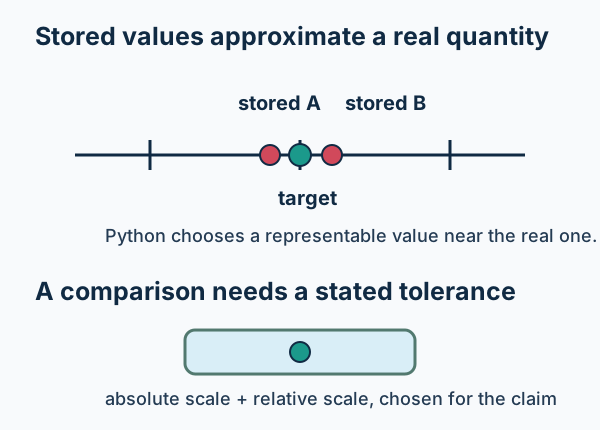
Figure 1:Floating-point values are finite representations. A useful comparison states the scale and tolerance that make two values close enough for the claim at hand.
What to notice: a tolerance is part of the question, not a universal repair for numbers that differ. The right choice depends on units, measurement resolution, and the consequence of calling two results equivalent.
Try this chapter
Browser Python lab · Numerical Claim Inspector: vary a small angle and a stated measurement resolution, then decide which numerical claim is warranted. The activity is optional; the static cancellation and comparison examples below remain complete without browser Python.
Return to the Part I guide when choosing a first-reading route.
2.1 Core: make an arithmetic calculation legible
Open a Python cell in VS Code, or an optional ipython session, and start with
the basics. Python handles arithmetic operations naturally, but there are
subtleties that matter for scientific work:
# Basic arithmetic - but watch the precision!
print(f"2 + 2 = {2 + 2}")
print(f"10 / 3 = {10 / 3}")  # Division always gives a float
print(f"2 ** 10 = {2 ** 10}")  # Exponentiation - the power operator
2 + 2 = 4
10 / 3 = 3.3333333333333335
2 ** 10 = 1024
Notice that 10 / 3 gives us 3.3333333333333335 — not exactly 1/3! This tiny imprecision at the end might seem trivial, but it’s your first glimpse into a fundamental challenge of computational science.
Operator precedence and dimensions: a source of real bugs
Python follows PEMDAS (Parentheses, Exponents, Multiplication/Division, Addition/Subtraction), but relying on memorized rules causes expensive errors. Let’s see this with a real calculation:
# Calculate orbital velocity: v = sqrt(GM/r)
# Using SI units
# (Constants are rounded for pedagogy; for research, prefer astropy.constants.)
G = 6.67e-11   # Gravitational constant (m^3 kg^-1 s^-2)
M = 1.989e30  # Solar mass (kg)
r = 1.496e11  # 1 AU (m)

# WRONG - grouping error. This expression is not even a velocity:
# (G M) / sqrt(r) has units m^(5/2) / s^2.
expression_wrong = G * M / r ** 0.5
print(f"Wrong expression: {expression_wrong:.2e} m^(5/2)/s^2 (not a velocity)")

# CORRECT - parentheses clarify intent
v_right = (G * M / r) ** 0.5
print(f"Correct velocity: {v_right:.2e} m/s")
print(f"That's {v_right/1e3:.1f} km/s - Earth's orbital speed!")

# Parentheses make the equation and the units inspectable.
Wrong expression: 3.43e+14 m^(5/2)/s^2 (not a velocity)
Correct velocity: 2.98e+04 m/s
That's 29.8 km/s - Earth's orbital speed!
The wrong version calculated instead of . The numerical magnitude is alarming, but the more decisive diagnostic comes first: its dimensions are not velocity. A physically meaningful variable name and a dimensional check can catch this mistake before comparison with a known orbital speed.
One more precedence pitfall worth memorizing: exponentiation is right-associative.
print(f"2**3**2 = {2**3**2}  (this is 2**(3**2), not (2**3)**2)")
print(f"(2**3)**2 = {(2**3)**2}")
2**3**2 = 512 (this is 2**(3**2), not (2**3)**2)
(2**3)**2 = 64
Check Your Understanding
Before running this code, predict the result of: -2**2 + 3*4//2
Work through it step by step:
First, identify the operations: negation, exponentiation, multiplication, floor division, addition
Apply PEMDAS rules (remember: exponentiation before negation!)
Write your predicted answer
Solution:
Let’s work through -2**2 + 3*4//2 step by step:
Exponentiation first:
2**2 = 4Then negation:
-4(the negative applies after exponentiation!)Multiplication:
3*4 = 12Floor division:
12//2 = 6Finally addition:
-4 + 6 = 2
The result is 2. The tricky part is that -2**2 equals -4, not 4! Python interprets this as -(2**2), not (-2)**2. This subtle precedence rule has caused real bugs in calculations.
Complete Arithmetic Operators
Python provides operators beyond basic arithmetic that prove essential for scientific calculations:
# Integer division - useful for time calculations
days = 17
weeks = days // 7  # Floor division
remaining_days = days % 7  # Modulo (remainder)
print(f"{days} days = {weeks} weeks and {remaining_days} days")

# Warning: Floor division rounds toward negative infinity!
print(f"17 // 3 = {17 // 3}")    # Result: 5
print(f"-17 // 3 = {-17 // 3}")  # Result: -6, not -5!

# This catches many people by surprise
print("\nBe careful with negative values:")
print(f"int(-17/3) = {int(-17/3)} (truncates toward zero)")
print(f"-17 // 3 = {-17 // 3} (floors toward -infinity)")
17 days = 2 weeks and 3 days
17 // 3 = 5
-17 // 3 = -6
Be careful with negative values:
int(-17/3) = -5 (truncates toward zero)
-17 // 3 = -6 (floors toward -infinity)
2.2 Core: finite representation and numerical agreement
Here’s where your journey gets interesting! You’re about to peek behind the curtain and see how computers really think about numbers. This knowledge is your superpower — it’s what lets you calculate trajectories with precision.
Integers: Arbitrary Precision Power
Unlike many languages, Python integers have unlimited precision — a huge advantage when dealing with enormous numbers:
# Number of atoms in the observable universe (approximate)
atoms_in_universe = 10 ** 80
print(f"Atoms in universe: {atoms_in_universe}")

# Python handles it perfectly!
atoms_squared = atoms_in_universe ** 2
print(f"Can even square it: {atoms_squared}")

# Memory usage scales with size
import sys
print(f"\nMemory usage comparison:")
print(f"Small integer (42) uses: {sys.getsizeof(42)} bytes")
print(f"Universe atoms uses: {sys.getsizeof(atoms_in_universe)} bytes")
print(f"Atoms squared uses: {sys.getsizeof(atoms_squared)} bytes")
Atoms in universe: 100000000000000000000000000000000000000000000000000000000000000000000000000000000
Can even square it: 10000000000000000000000000000000000000000000000000000000000000000000000000000000000000000000000000000000000000000000000000000000000000000000000000000000000000000
Memory usage comparison:
Small integer (42) uses: 28 bytes
Universe atoms uses: 60 bytes
Atoms squared uses: 96 bytes
This arbitrary precision is wonderful but comes with a cost — Python integers use more memory (and can be slower) than fixed-size integers in compiled languages. This is why specialized numerical libraries become essential for large datasets.
Floating-Point Numbers: The Heart of Numerical Computing
This is it — the concept that separates casual programmers from computational scientists! Don’t worry if this seems complex at first; every professional scientist had to learn these same lessons.
On the usual CPython platforms, a Python float is an IEEE 754 binary64 value:
64 bits split into sign (1 bit), exponent (11 bits), and a fraction field
(52 stored bits). For normal (non-subnormal) numbers there is an implicit
leading 1, so you get about 53 bits of significand precision (roughly
15–16 decimal digits). Inspect sys.float_info on an unfamiliar platform
rather than assuming an implementation detail.
Understanding Bits and Precision
Before diving into floating-point challenges, let’s understand the fundamental unit of computer memory: the bit. A bit (binary digit) can store exactly one of two values: 0 or 1. Think of it as a light switch—either on or off. Everything your computer does ultimately reduces to manipulating billions of these tiny switches.
Groups of bits form larger units:
8 bits = 1 byte (can represent 256 different values: 28)
32 bits = 4 bytes (can represent ~4.3 billion values: 232)
64 bits = 8 bytes (can represent ~18 quintillion values: 264)
Single vs Double Precision: The 32-bit vs 64-bit Choice
Floating-point numbers come in two main flavors:
import numpy as np
import sys

# Python's default float is 64-bit (double precision)
regular_float = 3.14159265358979323846
print(f"Python float: {sys.getsizeof(regular_float)} bytes")
print(f"Precision: {regular_float}")

# NumPy lets us choose 32-bit (single precision)
single_precision = np.float32(3.14159265358979323846)
double_precision = np.float64(3.14159265358979323846)

print(f"\n32-bit representation: {single_precision}")
print(f"64-bit representation: {double_precision}")
print(f"Lost digits in 32-bit: {double_precision - single_precision:.10e}")

# Where do those bits go?
print("\nIEEE 754 Standard bit allocation:")
print("32-bit: 1 sign + 8 exponent + 23 fraction bits")
print("64-bit: 1 sign + 11 exponent + 52 fraction bits")
Python float: 24 bytes
Precision: 3.141592653589793
32-bit representation: 3.1415927410125732
64-bit representation: 3.141592653589793
Lost digits in 32-bit: -8.7422780126e-08
IEEE 754 Standard bit allocation:
32-bit: 1 sign + 8 exponent + 23 fraction bits
64-bit: 1 sign + 11 exponent + 52 fraction bits
The trade-offs are crucial for scientific computing:
| Aspect | 32-bit (float32) | 64-bit (float64) |
|---|---|---|
| Precision | ~7 decimal digits | ~15 decimal digits |
| Largest finite magnitude | about | about |
| Memory | 4 bytes | 8 bytes |
| Performance | Hardware- and workload-dependent; may reduce memory use and help on supported accelerators | Hardware- and workload-dependent; often chosen when its additional precision is required |
| Common use | Graphics and some machine-learning workloads | Many scientific calculations with a demanding error budget |
If you want the actual limits (min/max/eps) instead of memorizing them, use numpy.finfo:
import numpy as np
print(np.finfo(np.float32))
print(np.finfo(np.float64))
Machine parameters for float32
---------------------------------------------------------------
precision = 6 resolution = 1e-06
machep = -23 eps = 1.1920929e-07
negep = -24 epsneg = 5.9604645e-08
minexp = -126 tiny = 1.1754944e-38
maxexp = 128 max = 3.4028235e+38
nexp = 8 min = -max
smallest_normal = 1.1754944e-38 smallest_subnormal = 1e-45
---------------------------------------------------------------
Machine parameters for float64
---------------------------------------------------------------
precision = 15 resolution = 1e-15
machep = -52 eps = 2.220446049250313e-16
negep = -53 epsneg = 1.1102230246251565e-16
minexp = -1022 tiny = 2.2250738585072014e-308
maxexp = 1024 max = 1.7976931348623157e+308
nexp = 11 min = -max
smallest_normal = 2.2250738585072014e-308 smallest_subnormal = 5e-324
---------------------------------------------------------------
Python’s ordinary float is typically binary64. Array libraries may offer—or
default to—other dtypes; for example, JAX commonly runs with 64-bit values
disabled unless its configuration enables them. Always inspect the precision
your calculation is actually using. Choose a dtype from the error and range
your calculation can tolerate, then measure performance on the hardware and
workload you actually plan to use.
Why 0.1 + 0.2 0.3
Now that you understand bits and precision, let’s see why even 64-bit floats can’t exactly represent simple decimals.
# The famous example that confuses beginners
result = 0.1 + 0.2
print(f"0.1 + 0.2 = {result}")
print(f"0.1 + 0.2 == 0.3? {result == 0.3}")
print(f"Actual stored value: {result:.17f}")

# Let's see what's really stored
from decimal import Decimal
print(f"\nWhat Python actually stores:")
print(f'As exact decimals (from strings): {Decimal("0.1")}, {Decimal("0.2")}, {Decimal("0.3")}')

# Warning: Decimal(0.1) converts the already-approximated *float* into Decimal.
print(f"From floats (captures float approximation): {Decimal(0.1)}")

# Peek at the exact float representation (hex is exact)
print(f"0.1 as float hex: {(0.1).hex()}")
0.1 + 0.2 = 0.30000000000000004
0.1 + 0.2 == 0.3? False
Actual stored value: 0.30000000000000004
What Python actually stores:
As exact decimals (from strings): 0.1, 0.2, 0.3
From floats (captures float approximation): 0.1000000000000000055511151231257827021181583404541015625
0.1 as float hex: 0x1.999999999999ap-4
Why does this happen? Just as 1/3 cannot be exactly represented in decimal (), 1/10 cannot be exactly represented in binary. The lesson is not that every small rounding difference causes a failure; it is that a calculation needs a comparison rule connected to the decision being made.
Check Your Understanding
Will this return True or False? Think carefully before testing:
result = 0.1 * 3 == 0.3Make your prediction, then test it. What do you think causes the result?
Solution:
This returns False! Here’s why:
print(f"0.1 * 3 = {0.1 * 3:.17f}")
print(f"0.3 =     {0.3:.17f}")
0.1 * 3 = 0.30000000000000004
0.3 = 0.29999999999999999
You’ll see that 0.1 * 3 gives approximately 0.30000000000000004, while 0.3 is approximately 0.29999999999999999. They’re different by about — tiny but not zero!
This is not a quirk—it follows from finite binary representation. Use
math.isclose() only after deciding what numerical
agreement means for the quantity and claim at hand.
Deep Dive: machine epsilon and local spacing
Ready for something mind-blowing? Your computer literally cannot tell the difference between some numbers that are mathematically different! This isn’t a flaw — it’s a fundamental property of finite systems.
import sys

# Machine epsilon - the fundamental precision limit
epsilon = sys.float_info.epsilon
print(f"Machine epsilon: {epsilon}")
print(f"That's about {epsilon:.2e}")

# Epsilon is a *relative* spacing near 1.0: numbers closer than ~epsilon to 1.0 cannot be distinguished
test1 = 1.0 + epsilon/2
test2 = 1.0 + epsilon

print(f"\nCan Python tell these apart from 1.0?")
print(f"1.0 + epsilon/2 = {test1}, equals 1.0? {test1 == 1.0}")
print(f"1.0 + epsilon   = {test2}, equals 1.0? {test2 == 1.0}")

# This affects scientific calculations
distance_m = 1.496e11  # 1 AU in meters
tiny_change = distance_m * epsilon
print(f"\nAt 1 AU distance ({distance_m:.2e} m):")
print(f"A representative binary64 spacing at this scale is about {tiny_change:.2e} m")
print(f"That's about {tiny_change*1e6:.1f} micrometres (~{tiny_change*1e3:.3f} mm)")
Machine epsilon: 2.220446049250313e-16
That's about 2.22e-16
Can Python tell these apart from 1.0?
1.0 + epsilon/2 = 1.0, equals 1.0? True
1.0 + epsilon = 1.0000000000000002, equals 1.0? False
At 1 AU distance (1.50e+11 m):
A representative binary64 spacing at this scale is about 3.32e-05 m
That's about 33.2 micrometres (~0.033 mm)
The More You Know: The Patriot Missile Timing Disaster
On February 25, 1991, an American Patriot missile battery in Dhahran, Saudi Arabia, failed to intercept an incoming Iraqi Scud missile. The Scud struck an Army barracks, killing 28 soldiers and injuring 98 others. The cause? A tiny numerical error that accumulated over time.
The Patriot’s targeting system tracked time using a 24-bit fixed point register, counting in tenths of seconds. However, 1/10 has no exact binary representation—in 24-bit precision, the stored value was actually 0.099999904632568359375, creating an error of approximately 0.000000095 seconds per tenth of a second.
After running continuously for 100 hours (3,600,000 tenth-second increments), this microscopic error had grown to:
Timing error: 0.34 seconds
Range gate error: ~687 meters (Scud velocity 2,000 m/s)
The Patriot radar system looked in the wrong section of sky and never detected the incoming missile.
The lesson for scientific computing: Even “negligible” rounding errors become significant when accumulated over many iterations. Whether you’re integrating orbits over millions of timesteps or tracking particles in a simulation, always consider:
How errors propagate through iterations
Whether your precision is adequate for the timescales involved
The difference between relative and absolute error tolerances
[Source: GAO Report IMTEC-92-26]
2.3 Core: choose a comparison that matches a claim
For values produced by a calculation, do not assume == expresses the
scientific comparison you intend. Use a tolerance chosen for the quantity and
claim. Exact equality remains appropriate when exactness is explicitly part of
the contract.
Stage 1: name the claim and its scale.
# The problem with direct comparison
expected_offset_m_s = 0.0
measured_offset_m_s = 0.0001  # A computed residual, in m/s

print(f"Expected offset: {expected_offset_m_s} m/s")
print(f"Measured offset: {measured_offset_m_s:.2e} m/s")
print(f"Exactly equal? {measured_offset_m_s == expected_offset_m_s}")
print("The relevant question is whether this residual is resolvable for this measurement.")
Expected offset: 0.0 m/s
Measured offset: 1.00e-04 m/s
Exactly equal? False
The relevant question is whether this residual is resolvable for this measurement.
Stage 2: an absolute tolerance near zero.
import math

measurement_resolution_m_s = 0.001

# Near zero, state a tolerance in the measurement's units and turn off the
# default relative tolerance so this line demonstrates the intended rule.
print(math.isclose(
    measured_offset_m_s,
    expected_offset_m_s,
    rel_tol=0.0,
    abs_tol=measurement_resolution_m_s,
))
True
Stage 3: a relative tolerance for a scale-dependent quantity.
predicted_flux = 2.00e-14
measured_flux = 2.03e-14
fractional_precision = 0.02  # 2%; supplied by this illustrative measurement contract

print(math.isclose(measured_flux, predicted_flux, rel_tol=fractional_precision, abs_tol=0.0))

# Use both tolerances only when both an absolute resolution and a fractional
# requirement are independently meaningful. For arrays, use numpy.isclose/allclose.
True
Debug This! Distance Calculator
A programmer’s distance calculation code produces inconsistent results:
def calculate_distance(parallax_mas):
    """
    Calculate distance from parallax.
    Parallax in milliarcseconds, returns parsecs.
    """
    # Distance in parsecs = 1000 / parallax_in_mas
    distance_pc = 1000.0 / parallax_mas

    return distance_pc

# Test with known value
parallax = 768.5  # milliarcseconds
d_pc = calculate_distance(parallax)

print(f"Distance: {d_pc} pc")

# Verify with known value
known_distance = 1.301  # parsecs
if d_pc == known_distance:
    print("✓ Calculation verified!")
else:
    print("✗ Calculation mismatch!")

# Why does verification always fail even when values look identical?
This reciprocal is a useful high-signal-to-noise geometric point estimate, not a general distance-inference procedure. Parallax uncertainties, selection effects, and negative measured parallaxes require an uncertainty-aware model; do not silently invert every catalogued parallax.
Find and fix the three problems. Think about:
The verification method
The reference value (rounding / significant digits)
Which conclusion the reciprocal can and cannot support
Solution:
Three bugs found:
Problem 1: The comparison does not state a tolerance contract.
# Exact equality is not the intended contract here.
if d_pc == known_distance:

# A display rounded to 0.001 pc justifies only this display-level check.
if math.isclose(d_pc, known_distance, rel_tol=0.0, abs_tol=0.0005):
Problem 2: The reference value is rounded.
# The "known" value is rounded (insufficient significant digits)
print(f"Actual value: {d_pc:.12f}")  # 1000/768.5 approx 1.301236174365
Problem 3: A geometric reciprocal is not a general distance inference.
def parallax_point_estimate_pc(parallax_mas):
    """Geometric point estimate for a positive, high-signal-to-noise parallax."""
    if parallax_mas <= 0:
        raise ValueError(f"Parallax must be positive: {parallax_mas}")
    return 1000.0 / parallax_mas
Negative parallaxes and low-signal-to-noise measurements are not repaired by an
arbitrary cutoff such as 0.1 mas. They require an uncertainty-aware inference
model. For small fractional uncertainty, propagation gives
; that approximation and its regime must
be recorded beside any claim about distance.
A bounded verification:
import math

one_parsec = parallax_point_estimate_pc(1000.0)
assert math.isclose(one_parsec, 1.0, rel_tol=0.0, abs_tol=1e-12)

print("✓ The reciprocal passes the constructed 1000 mas → 1 pc check.")
Key lesson: Choose a tolerance because the quantity, units, uncertainty, or decision supplies one. A passing numerical comparison tests that stated contract; it does not validate the underlying distance model.
2.4 Core: numerical hazards in scientific computing
You’ve mastered how Python stores numbers — now let’s see these concepts in action with real scientific calculations! This is where things get exciting: you’re about to learn the techniques that enable precision in spacecraft navigation, sensitive instruments, and scientific simulations.
Catastrophic Cancellation: When Subtraction Destroys Precision
Catastrophic cancellation happens when you subtract nearly equal numbers, eliminating most significant digits and leaving only a few unreliable digits behind.
Stage 1: The Problem
import math

# Computing 1 - cos(x) for small x (common in calculations)
x = 1e-8  # Small angle in radians

# Direct computation - catastrophic cancellation!
cos_x = math.cos(x)
result_bad = 1 - cos_x
print(f"Direct: 1 - cos({x}) = {result_bad}")
print(f"This result is completely wrong!")
Direct: 1 - cos(1e-08) = 0.0
This result is completely wrong!
Stage 2: Understanding Why
# Let's see what's happening
print(f"cos({x}) = {cos_x:.20f}")
print(f"1.0 =      1.00000000000000000000")
print("At this scale, float64 cannot represent the difference between cos(x) and 1.0,")
print("so cos(x) rounds to exactly 1.0 and 1 - cos(x) becomes 0.0.")

# The leading small-angle approximation is useful for scale, but it is not the
# exact value of 1 - cos(x).
small_angle_approximation = x**2 / 2
print(f"\nSmall-angle approximation: {small_angle_approximation:.6e}")
print(f"Our result: {result_bad:.6e}")
print(f"Loss relative to the small-angle scale: {abs(result_bad - small_angle_approximation)/small_angle_approximation:.1%}")
cos(1e-08) = 1.00000000000000000000
1.0 = 1.00000000000000000000
At this scale, float64 cannot represent the difference between cos(x) and 1.0,
so cos(x) rounds to exactly 1.0 and 1 - cos(x) becomes 0.0.
Small-angle approximation: 5.000000e-17
Our result: 0.000000e+00
Loss relative to the small-angle scale: 100.0%
Stage 3: The Solution
# Better: use mathematical identity
# 1 - cos(x) = 2sin^2(x/2)
result_good = 2 * math.sin(x/2) ** 2
print(f"Using identity: {result_good:.6e}")
print(f"Small-angle approximation: {small_angle_approximation:.6e}")
print("The identity is algebraically equivalent to 1 - cos(x), but avoids the subtraction.")

# This preserves precision for small angles
Using identity: 5.000000e-17
Small-angle approximation: 5.000000e-17
The identity is algebraically equivalent to 1 - cos(x), but avoids the subtraction.
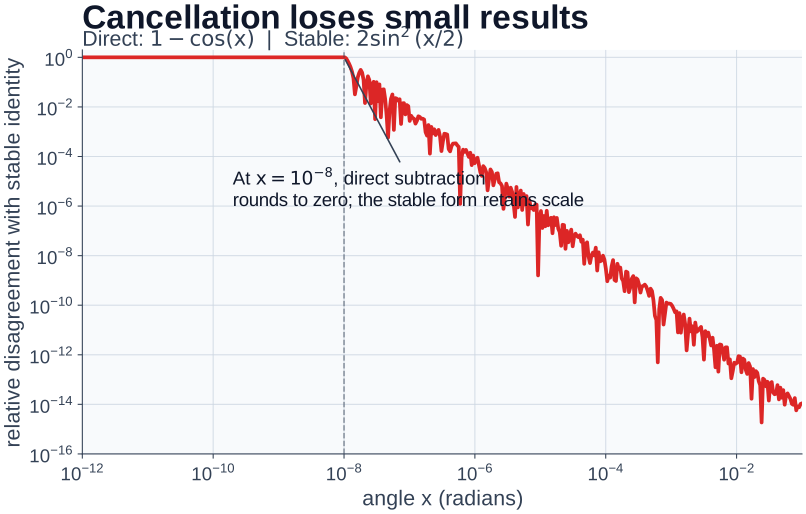
Figure 2:The direct and stable expressions are algebraically equivalent, but their finite-precision computations disagree sharply for very small angles.
What to notice: this is a Python-produced plot, not a new plotting interface to learn yet. Its vertical axis is disagreement with the stable identity—not an external measure of physical correctness. Chapter 8 returns to the craft of making, labeling, and evaluating plots like this one.
Overflow and Underflow in Extreme Scales
Get ready to work with numbers that break normal intuition! Science deals with scales that push Python to its limits.
Stage 1: The Overflow Problem
import math
import numpy as np

print("float64 max:", np.finfo(np.float64).max)

# Overflow can appear in exponential-like growth.
try:
    math.exp(1000)
except OverflowError as e:
    print("Overflow from math.exp(1000):", e)

# Scalar Python operations and array-library operations can signal overflow
# differently; inspect the API you are actually using.
try:
    y = 10.0**400
    print("10.0**400 =", y)
    print("Is finite?", math.isfinite(y))
except OverflowError as e:
    print("10.0**400 raised OverflowError:", e)
    print("This scalar Python operation raises instead of returning inf")
float64 max: 1.7976931348623157e+308
Overflow from math.exp(1000): math range error
10.0**400 raised OverflowError: (34, 'Numerical result out of range')
This scalar Python operation raises instead of returning inf
Stage 2: The Solution - Working in Log Space
import math

# When direct calculation fails (or returns inf), work in log space.
log10_exp_1000 = 1000 / math.log(10)  # log10(exp(1000))
print(f"exp(1000) approx 10^{log10_exp_1000:.1f}")

# A deliberately crude scale estimate: assume every star has solar luminosity.
# It illustrates products in log space; it is not an estimate of the observed
# luminosity of the Universe.
L_sun = 3.828e26  # Solar luminosity (W)
n_stars_galaxy = 1e11  # Stars in a galaxy
n_galaxies = 2e12  # Galaxies in observable universe

log_L_sun = math.log10(L_sun)
log_n_stars = math.log10(n_stars_galaxy)
log_n_galaxies = math.log10(n_galaxies)

# Add logarithms instead of multiplying
log_L_universe = log_L_sun + log_n_stars + log_n_galaxies

print(f"Universe luminosity: 10^{log_L_universe:.1f} W")
print(f"Under the stated toy assumption: 10^{log_L_universe:.1f} W")
exp(1000) approx 10^434.3
Universe luminosity: 10^49.9 W
Under the stated toy assumption: 10^49.9 W
Core check: investigate a numerical claim
An analysis note reports: “The computed offset is 10-4 m/s, therefore the instrument has no measurable bias.” The calculation used binary64 values; the instrument resolution is 10-3 m/s; and no uncertainty model, calibration record, or independent standard is supplied.
Check Your Understanding
Before reading the answer, write down:
Which statement is supported by the stated numerical comparison?
Which tolerance belongs in that comparison, and why?
What additional evidence would be needed before claiming that the instrument has no bias?
Answer. The calculation supports the limited statement that the reported offset is within the stated 10-3 m/s resolution, assuming that resolution is the relevant acceptance criterion. An absolute tolerance is appropriate because the comparison is to zero in m/s. It does not establish that the instrument has no bias: that needs a calibration model, uncertainty budget, and comparison against an appropriate standard. Numerical agreement and scientific validation are related but different claims.
Reference: numerical guard patterns
Defensive programming is not a catalog of universal numeric bounds. A useful
guard names the quantity and units, the numerical failure it prevents, and the
consequence of failure. For example, a positive mass can be checked before a
square root because the physical model requires it; a near-zero denominator
requires a threshold justified by the scale of the numerator and the decision
the quotient supports. An arbitrary max_exp=100 is not validation.
The durable pattern is state a model-specific expectation → test it → record what happened → decide whether the result is usable. Later chapters develop convergence, bounded iteration, and test design with concrete numerical models.
Deep Dive: complex numbers for wave physics
Welcome to one of the most elegant corners of mathematics! Complex numbers might sound intimidating, but they’re actually your gateway to understanding wave physics, signal processing, and Fourier analysis. Python handles complex numbers as naturally as integers.
# Complex numbers in Python use 'j' for the imaginary unit
z = 3 + 4j
print(f"Complex number: {z}")
print(f"Real part: {z.real}")
print(f"Imaginary part: {z.imag}")
print(f"Magnitude: {abs(z)}")

# Euler's formula - the most beautiful equation in mathematics
import math
import cmath
euler = cmath.exp(1j * cmath.pi)
print(f"\ne^(ipi) = {euler.real:.0f}")
print(f"Tiny imaginary part {euler.imag:.2e} is just rounding error")

# Phase calculation (useful for wave interference)
phase = cmath.phase(z)
print(f"\nPhase of {z}: {phase:.3f} radians")
print(f"That's {math.degrees(phase):.1f} degrees")
Complex number: (3+4j)
Real part: 3.0
Imaginary part: 4.0
Magnitude: 5.0
e^(ipi) = -1
Tiny imaginary part 1.22e-16 is just rounding error
Phase of (3+4j): 0.927 radians
That's 53.1 degrees
Guardrail: most functions in math do not accept complex numbers. If you might have complex values, use cmath (or NumPy’s complex-aware functions).
Complex numbers aren’t just mathematical abstractions — they’re essential for:
Fourier transforms (spectral analysis)
Quantum mechanics (wave functions)
Signal processing (interferometry)
Why This Matters: Fourier Transforms Reveal Hidden Periods
Complex numbers aren’t just mathematical elegance—they’re essential for discovering patterns in data! The Fourier transform, which relies entirely on complex exponentials, transforms time-series measurements into frequency space, revealing hidden periodicities.
Real Research Application:
Finding periodic signals in noisy data requires Fourier analysis:
# Simplified signal detection
import numpy as np

# Time series: signal over time
time = np.linspace(0, 100, 10000)  # 100 units
# Hidden signal: 3.5 unit period, small amplitude
signal = 1.0 - 0.0001 * np.cos(2*np.pi*time/3.5)
# Add noise
rng = np.random.default_rng(42)
noise = rng.normal(0, 0.0005, len(time))
data = signal + noise

# Fourier transform uses complex exponentials
frequencies = np.fft.fftfreq(len(time), time[1]-time[0])
fft = np.fft.fft(data - np.mean(data))
power = np.abs(fft)**2  # Complex magnitude squared

# Peak in power spectrum reveals hidden period!
peak_idx = np.argmax(power[1:len(power)//2]) + 1
detected_period = 1/frequencies[peak_idx]
print(f"Detected period: {detected_period:.2f}")
Every periodogram you’ll ever compute—whether finding oscillation modes, orbital periods, or rotation rates—depends on complex arithmetic.
The bottom line: Complex arithmetic gives a compact representation for amplitude and phase. Later chapters return to arrays, sampling, and evidence needed for a defensible time-series claim.
Reference: values, types, and scientific output
Now that you understand how Python represents numbers, let’s see how it manages them! Variables in Python are names that refer to objects, not containers that hold values. This distinction matters:
# Variables are references, not containers
stellar_mass = 1.989e30  # Solar mass in kg
solar_mass = stellar_mass  # Both names refer to the SAME number

print(f"stellar_mass: {stellar_mass:.2e} kg")
print(f"solar_mass: {solar_mass:.2e} kg")
print(f"Same object? {stellar_mass is solar_mass}")

# Warning: `is` checks object identity, not numeric equality. Don't use it for comparisons!
print(f"Numerically equal? {stellar_mass == solar_mass}")

# But numbers are immutable, so this is safe
stellar_mass = stellar_mass * 2  # Creates NEW number
print(f"\nAfter doubling stellar_mass:")
print(f"stellar_mass: {stellar_mass:.2e} kg")
print(f"solar_mass (unchanged): {solar_mass:.2e} kg")
stellar_mass: 1.99e+30 kg
solar_mass: 1.99e+30 kg
Same object? True
Numerically equal? True
After doubling stellar_mass:
stellar_mass: 3.98e+30 kg
solar_mass (unchanged): 1.99e+30 kg
Python is dynamically typed — variables can refer to any type of object:
# Dynamic typing in action
observation = 42  # Integer
print(f"Type: {type(observation).__name__}, Value: {observation}")

observation = 42.0  # Now a float
print(f"Type: {type(observation).__name__}, Value: {observation}")

observation = "42 measurements"  # Now a string
print(f"Type: {type(observation).__name__}, Value: {observation}")

# This flexibility is powerful but requires discipline
# In scientific code, changing types unexpectedly is usually a bug!
Type: int, Value: 42
Type: float, Value: 42.0
Type: str, Value: 42 measurements
Strings and scientific output formatting
Clear output formatting is not just aesthetics—it is scientific communication. Formatting makes a value readable, but it cannot create precision absent from the measurement, calculation, or uncertainty record.
# Basic f-string formatting
star_name = "Betelgeuse"
distance_ly = 400
luminosity = 1.2e5  # Solar luminosities

print(f"{star_name} is {distance_ly} light-years away")
print(f"Luminosity: {luminosity:.2e} Lsun")
Betelgeuse is 400 light-years away
Luminosity: 1.20e+05 Lsun
Format specifications for scientific data
F-strings support sophisticated formatting perfect for scientific output:
# Comprehensive formatting examples
value = 1234.56789

print(f"Fixed-point (2 decimals): {value:.2f}")
print(f"Scientific notation: {value:.2e}")
print(f"Width 10, 2 decimals: {value:10.2f}")
print(f"Thousands separator: {value:,.0f}")

# Create a formatted table of data
stars = [
    ("Sirius", -1.46, 8.6),
    ("Canopus", -0.74, 310),
    ("Arcturus", -0.05, 37),
]

print(f"\n{'Star':<10} {'Magnitude':>10} {'Distance (ly)':>15}")
print("-" * 37)
for name, mag, dist in stars:
    print(f"{name:<10} {mag:>10.2f} {dist:>15.1f}")
Fixed-point (2 decimals): 1234.57
Scientific notation: 1.23e+03
Width 10, 2 decimals: 1234.57
Thousands separator: 1,235
Star Magnitude Distance (ly)
-------------------------------------
Sirius -1.46 8.6
Canopus -0.74 310.0
Arcturus -0.05 37.0
Check Your Understanding
What will this print?
redshift = 0.00123456
print(f"z = {redshift:.2e}")
Predict the format before running it.
Solution:
This prints: z = 1.23e-03
The .2e format specifier means:
Use scientific notation (e)
Show 2 digits after the decimal point
Python automatically handles the exponent
So 0.00123456 becomes 1.23 10-3, displayed as 1.23e-03.
Type system and conversions
Python’s type system strikes a perfect balance — flexible enough for rapid exploration but strong enough to catch errors. Understanding types and conversions is crucial for handling data from any source.
# Type checking
value = 3.14159
print(f"Type of {value}: {type(value).__name__}")
print(f"Is it a float? {isinstance(value, float)}")

# Type conversion
text = "2.718"
number = float(text)
print(f"\nConverted '{text}' to {number}")

# Dangerous conversion - truncation!
print(f"\nint(3.9) = {int(3.9)}")  # Truncates, doesn't round!
print(f"round(3.9) = {round(3.9)}")  # Use this for rounding
Type of 3.14159: float
Is it a float? True
Converted '2.718' to 2.718
int(3.9) = 3
round(3.9) = 4
Check Your Understanding
What happens when you convert -3.7 to an integer? Predict the result:
a) -4 (rounds to nearest integer) b) -3 (truncates toward zero) c) -3 (floors toward negative infinity) d) Error
Solution:
The answer is b) -3 (truncates toward zero).
Python’s int() truncates toward zero, not toward negative infinity like floor division!
print(f"int(-3.7) = {int(-3.7)}")    # Gives -3 (toward zero)
print(f"-3.7 // 1 = {-3.7 // 1}")    # Gives -4.0 (toward -infinity)
int(-3.7) = -3
-3.7 // 1 = -4.0
This inconsistency has caused numerous bugs in calculations where negative values represent positions before an epoch.
Selected math tools
Here comes the fun part — Python’s math module transforms your computer into a scientific calculator more powerful than anything that existed when we sent humans to the Moon!
import math

# Fundamental constants
print(f"pi = {math.pi}")
print(f"e = {math.e}")
print(f"tau = {math.tau}")  # tau = 2pi, useful for circular motion

# Trigonometry (always in radians!)
angle_degrees = 30
angle_radians = math.radians(angle_degrees)
print(f"\nsin(30 deg) = {math.sin(angle_radians):.4f}")
print(f"cos(30 deg) = {math.cos(angle_radians):.4f}")

# Logarithms for magnitude calculations
flux_ratio = 100
magnitude_diff = 2.5 * math.log10(flux_ratio)
print(f"\nFlux ratio {flux_ratio} = {magnitude_diff:.1f} magnitudes")

# Special functions
print(f"\nGamma(5) = {math.gamma(5)} = 4!")
print(f"Error function: erf(1) = {math.erf(1):.4f}")

# Numerically stable helpers: use an input that makes the difference visible.
x = 1e-16
print(f"\nexp(x)-1 naive: {math.exp(x) - 1:.18e}")
print(f"expm1(x) stable: {math.expm1(x):.18e}")

y = 1e-16
print(f"log(1+y) naive: {math.log(1 + y):.18e}")
print(f"log1p(y) stable: {math.log1p(y):.18e}")

# Stable vector magnitude (avoids overflow/underflow in sqrt(x**2 + y**2))
print(f"\nhypot(3,4) = {math.hypot(3, 4)}")

# math.fsum documents an accurate summation strategy. Modern Python versions
# may also compensate sum() for short sequences, so agreement here is not a
# proof that their numerical contracts are identical.
vals = [1e16, 1.0, -1e16]
print(f"sum(vals) = {sum(vals)}")
print(f"math.fsum(vals) = {math.fsum(vals)}")
pi = 3.141592653589793
e = 2.718281828459045
tau = 6.283185307179586
sin(30 deg) = 0.5000
cos(30 deg) = 0.8660
Flux ratio 100 = 5.0 magnitudes
Gamma(5) = 24.0 = 4!
Error function: erf(1) = 0.8427
exp(x)-1 naive: 0.000000000000000000e+00
expm1(x) stable: 9.999999999999999791e-17
log(1+y) naive: 0.000000000000000000e+00
log1p(y) stable: 9.999999999999999791e-17
hypot(3,4) = 5.0
sum(vals) = 1.0
math.fsum(vals) = 1.0
Remember: trigonometric functions use radians, not degrees! This is a constant source of bugs in scientific code.
Reference preview: from a checked calculation to reusable code
Congratulations! You’ve been exploring Python interactively, testing ideas and learning how numbers behave. Now let’s transform your interactive explorations into a reusable script:
The function below names its input unit, rejects an unphysical mass, and keeps one analytic scaling check beside the calculation. Those are the parts worth carrying from an interactive calculation into a reusable reference.
#!/usr/bin/env python
"""
schwarzschild_radius.py
Calculate Schwarzschild radius with proper numerical handling.

Constants below are rounded for pedagogy. For high-precision work, use a
consistent constants set (e.g., CODATA via astropy.constants).
"""

import math

def schwarzschild_radius_checked(mass_kg):
    """Calculate a Schwarzschild radius for a positive mass in kg."""
    G = 6.67e-11
    c = 2.998e8

    if mass_kg <= 0:
        raise ValueError("mass_kg must be positive")

    return 2 * G * mass_kg / c**2

# This calculation is linear in mass. A scaling check is meaningful here;
# a generic log-space branch is not needed for astrophysically plausible masses.
if __name__ == "__main__":
    test_masses = {
        "Earth": 5.972e24,
        "Sun": 1.989e30,
        "Sgr A*": 8.2e36,
    }

    for name, mass in test_masses.items():
        rs = schwarzschild_radius_checked(mass)
        print(f"{name}: Rs = {rs:.2e} m ({rs/1e3:.2f} km)")

    sun_radius_m = schwarzschild_radius_checked(test_masses["Sun"])
    twice_sun_radius_m = schwarzschild_radius_checked(2 * test_masses["Sun"])
    assert math.isclose(twice_sun_radius_m, 2 * sun_radius_m, rel_tol=1e-15)
Closing reflection
You’ve built a foundation for numerical computing. The seemingly simple act of adding two numbers opens questions about representation, units, scale, and evidence. Floating-point arithmetic is not broken—it is approximate by design. The important habit is to connect that approximation to the particular claim a calculation is meant to support.
Defensive numerical work is not a collection of magic bounds. A domain check, finite-value test, stable representation, or convergence rule earns trust only when its threshold and consequence are justified by the model, instrument, or decision. Working in log space is often useful for products spanning extreme scales; it is not a universal replacement for ordinary arithmetic.
When 0.1 + 0.2 is not exactly 0.3, the lesson is not “never trust floats.”
It is to choose a comparison rule and test that fit the quantity at hand. When
you calculate values over many orders of magnitude, ask whether the
representation can overflow. When you subtract nearly equal values, look for
an equivalent stable form. These are habits of numerical judgment.
Reference: quick return checklist
✓ Floating-point arithmetic is approximate by design — use a claim-appropriate tolerance for computed quantities; use == only when exact equality is the stated contract
✓ Machine epsilon (~2.2e-16) describes local binary64 spacing near 1.0; use an appropriate local scale or math.ulp for a specific value
✓ Catastrophic cancellation occurs when subtracting nearly equal numbers — use mathematical identities
✓ Work in log space to handle extreme scales without overflow/underflow
✓ Python integers have unlimited precision but use more memory than floats
✓ Variables are references to objects, not containers holding values
✓ A numerical guard needs a model-specific reason: quantity, units, failure mode, and consequence
✓ F-strings provide powerful formatting for scientific output
✓ Complex numbers are essential for wave physics and spectral analysis
✓ Always use radians with trigonometric functions
✓ Type conversion can lose information — always validate
Reference: quick tables
Math Module Functions
Read a call as module.function(arguments): the function’s documentation
defines accepted argument types, units or domains, return value, and failure
behavior. For example, math.isclose(a, b, *, rel_tol=..., abs_tol=...) takes
two values plus explicitly named tolerances and returns a Boolean; it does not
establish scientific validity on its own.
Mathematical Constants
import mathmath.pi- (3.14159...)math.e- Euler’s number (2.71828...)math.tau- = 2 (6.28318...)
Arithmetic Functions
math.sqrt(x)- Square rootmath.log(x)- Natural logarithmmath.log1p(x)-log(1+x)accurate for smallxmath.log10(x)- Base-10 logarithmmath.exp(x)- Exponential (e^x)math.expm1(x)-exp(x)-1accurate for smallxmath.hypot(x, y)- Stablesqrt(x^2 + y^2)math.fsum(iterable)- Stable summation of many floats
Trigonometric Functions (use radians!)
math.sin(x),math.cos(x),math.tan(x)- Basic trigmath.radians(degrees)- Convert degrees to radiansmath.degrees(radians)- Convert radians to degrees
Special Functions
math.gamma(x)- Gamma functionmath.erf(x)- Error functionmath.isclose(a, b, rel_tol=..., abs_tol=...)- Compare using tolerances you justify for the quantity and claimmath.isfinite(x)- Check if finite (not inf or nan)math.isnan(x)- Check if Not-a-Number
F-String Format Specifiers
| Format | Meaning | Example | Result |
|---|---|---|---|
:.2f | Fixed decimal | f"{3.14159:.2f}" | 3.14 |
:.2e | Scientific notation | f"{1234:.2e}" | 1.23e+03 |
:10.2f | Width and decimals | f"{3.14:10.2f}" | 3.14 |
:,.0f | Thousands separator | f"{1234567:,.0f}" | 1,234,567 |
:<10 | Left align | f"{'test':<10}" | test |
:>10 | Right align | f"{'test':>10}" | test |
:^10 | Center align | f"{'test':^10}" | test |
Type Checking and Conversion
| Function | Purpose | Example |
|---|---|---|
type(x) | Get object type | type(3.14) <class 'float'> |
isinstance(x, type) | Check type | isinstance(3.14, float) True |
float(x) | Convert to float | float("3.14") 3.14 |
int(x) | Convert to int (truncates!) | int(3.9) 3 |
complex(r, i) | Create complex | complex(3, 4) (3+4j) |
round(x, n) | Round to n decimals | round(3.14159, 2) 3.14 |
Next Chapter Preview
Armed with a deep understanding of Python’s numeric types and the perils of floating-point arithmetic, you’re ready for Chapter 3: Control Flow & Logic. You’ll learn to make your code dynamic with if-statements and loops, building algorithms that can adapt to data and iterate until convergence. The numerical foundations from this chapter become essential when you’re checking whether a calculation has converged, comparing values within tolerance, or detecting numerical instabilities in your simulations. Get ready to transform static calculations into intelligent algorithms that can make decisions and repeat tasks — the essence of computational thinking.