Learning objectives
By the end of this chapter, you will be able to:
(1) Design a function contract that names inputs, units, outputs, valid domain, failure behavior, and side effects.
(2) Choose positional, keyword, default, and keyword-only parameters so a scientific call communicates its intent.
(3) Diagnose mutable-default and scope bugs, then make state ownership explicit.
(4) Organize related public functions in an importable module with documentation,
pytesttests, and lightweight type annotations.(5) Distinguish a local timing or cache result from a general performance claim.
Prerequisites
Why this chapter matters
Functions are the fundamental building blocks of organized code. Without functions, you’d be copying and pasting the same code repeatedly, making bugs harder to fix and improvements impossible to maintain. But functions are more than just a way to avoid repetition—they’re how we create abstractions, manage complexity, and build reliable software. Whether you’re calculating statistical measures, simulating star cluster dynamics, or processing multi-wavelength observational data, every computational project starts with well-designed functions.
This chapter teaches you to think about functions as contracts between different parts of your code. When you write a function that calculates energy or performs numerical integration, you’re creating a promise: given valid input, the function will reliably return the correct output. This contract mindset helps you write functions that others (including future you) can trust and use effectively. You’ll learn how to choose between positional and keyword arguments, when to use default values, and how to design interfaces that are both flexible and clear.
We’ll explore Python’s scope rules, which determine where variables can be accessed, and learn how seemingly simple concepts like default arguments can create subtle ownership bugs that contaminate calls meant to be independent. You’ll discover how Python’s flexible parameter system enables powerful interfaces, and how functional programming concepts help make state explicit for modern scientific frameworks. By the end, you’ll be organizing your code into modules that can be shared, tested, and maintained professionally—essential skills for collaborative scientific research.
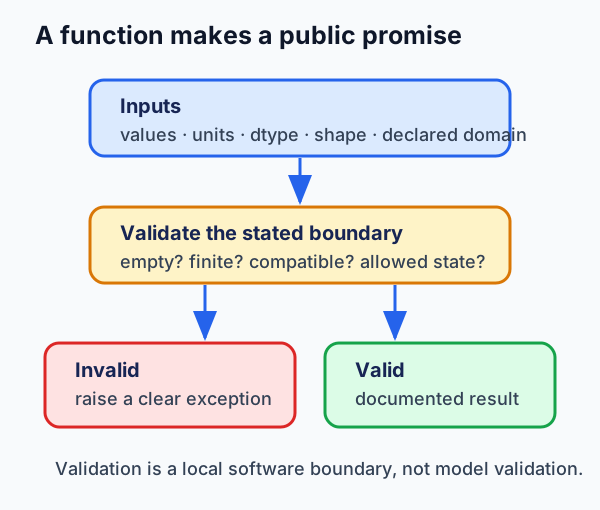
Figure 1:A scientific function makes its promises inspectable: what inputs it accepts, which failures it rejects, and what the returned value means.
What to notice: validation can establish a local software boundary, such as a nonempty sequence or compatible units. It does not certify the scientific model that supplied the inputs.
For a first reading, follow this route:
For a return visit, use the closures and functional-interface Deep Dive, the benchmark and cache Deep Dive, or the Reference.
Try this chapter
Browser Python lab · Function Contract Inspector: predict whether a call satisfies a public contract, then observe the difference between a fresh result, a shared mutable default, and an explicit ownership check. The activity is optional; the static examples below remain complete without browser Python.
5.1 Defining Functions: The Basics
A function encapsulates a piece of logic that transforms inputs into outputs. Think of a function as a machine: you feed it raw materials (inputs), it performs some process (the function body), and it produces a product (output). In scientific computing, a function might calculate statistical measures, integrate equations, or transform data — each function performs one clear task that can be tested and trusted.
Your First Function
Let’s start with something every scientist needs — calculating mean and standard deviation:
import math

def calculate_mean(values):
    """
    Calculate the arithmetic mean of a list of values.

    This is our first function - notice the structure!
    """
    # Explicit validation: raise an error for invalid input
    if len(values) == 0:
        raise ValueError("Cannot calculate mean of empty list")

    total = math.fsum(values)  # more numerically stable than sum for mixed magnitudes
    count = len(values)
    mean = total / count
    return mean

# Using the function
measurements = [23.5, 24.1, 23.8, 24.3, 23.9]
avg = calculate_mean(measurements)
print(f"Mean temperature: {avg:.2f} degC")

# The validation would raise an error with empty list:
# empty_mean = calculate_mean([])
# ValueError: Cannot calculate mean of empty list
Mean temperature: 23.92 degC
Let’s break down exactly how this works:
defkeyword: Tells Python we’re defining a function.Function name (
calculate_mean): Follows snake_case convention, describes what it does.Parameters (
values): Variables that receive values when function is called.Docstring: Brief description of what the function does. Include one for public, reused, or non-obvious functions.
Function body: Indented code that does the actual work.
returnstatement: Sends a value back to whoever called the function.
When Python executes calculate_mean(measurements), it creates a temporary namespace where values = [23.5, 24.1, ...], runs the function body, and returns the result.
Functions Without Return Values
Not all functions return values. Some perform actions like printing results or saving data:
def report_statistics(data, name="Dataset"):
    """Report basic statistics without returning values."""
    if len(data) == 0:
        raise ValueError("report_statistics() requires at least one value")
    mean = sum(data) / len(data)
    minimum = min(data)
    maximum = max(data)

    print(f"Statistics for {name}:")
    print(f"  Mean: {mean:.3f}")
    print(f"  Range: [{minimum:.3f}, {maximum:.3f}]")
    # No return statement - returns None implicitly

# Report some calculations
temperatures = [20.1, 21.5, 19.8, 22.3, 20.9]
report_statistics(temperatures, "Temperature ( degC)")
Statistics for Temperature ( degC):
Mean: 20.920
Range: [19.800, 22.300]
Returning Multiple Values
Python functions can return multiple values using tuples — perfect for calculations that produce related results:
import math

def analyze_data(values, ddof=0):
    """
    Calculate multiple statistics at once.

    Returns:
        mean, std_dev, min_val, max_val
    """
    n = len(values)
    if n == 0:
        raise ValueError("Cannot analyze empty list")

    mean = math.fsum(values) / n

    # Calculate standard deviation
    # ddof=0 gives population variance (divide by n)
    # ddof=1 gives sample variance (divide by n-1)
    if n - ddof <= 0:
        raise ValueError(f"Need n > ddof for variance (n={n}, ddof={ddof})")
    variance = math.fsum((x - mean)**2 for x in values) / (n - ddof)
    std_dev = variance ** 0.5

    return mean, std_dev, min(values), max(values)

# Analyze experimental data
data = [9.8, 10.1, 9.9, 10.2, 9.7, 10.0]
mean, std, min_val, max_val = analyze_data(data)

print(f"Mean: {mean:.3f}")
print(f"Std Dev: {std:.3f}")
print(f"Range: [{min_val}, {max_val}]")
Mean: 9.950
Std Dev: 0.171
Range: [9.7, 10.2]
Kinetic Energy in CGS Units
Now let’s calculate kinetic energy using CGS units (centimeters, grams, seconds):
def kinetic_energy_cgs(mass_g, velocity_cms):
    """
    Calculate kinetic energy in ergs.

    Parameters:
        mass_g: mass in grams
        velocity_cms: velocity in cm/s

    Returns:
        energy in ergs (g*cm^2/s^2)
    """
    import math

    if not (math.isfinite(mass_g) and math.isfinite(velocity_cms)):
        raise ValueError("mass_g and velocity_cms must be finite")
    if mass_g < 0:
        raise ValueError(f"mass_g must be nonnegative, got {mass_g}")
    energy_ergs = 0.5 * mass_g * velocity_cms**2
    return energy_ergs

# Example: electron moving at 1% speed of light
electron_mass = 9.109e-28  # grams
c_light = 2.998e10  # speed of light in cm/s
electron_velocity = 0.01 * c_light  # 1% of c
ke = kinetic_energy_cgs(electron_mass, electron_velocity)

print(f"Electron kinetic energy: {ke:.2e} ergs")
print(f"In eV: {ke/1.602e-12:.2f} eV")  # 1 eV = 1.602e-12 ergs
Electron kinetic energy: 4.09e-11 ergs
In eV: 25.55 eV
The Design Process: From Problem to Function
Before writing any function, design it first. This prevents the common mistake of coding yourself into a corner:
"""
DESIGN: Function to validate numerical calculation

PURPOSE: Ensure numerical results are physically reasonable
INPUT: value, expected_range
OUTPUT: boolean (True if valid)
PROCESS:
    - Check if value is finite
    - Check if value is within range
"""

def validate_result(value, min_val=None, max_val=None):
    """
    Validate a numerical result is reasonable.

    Simple validation - we'll expand this pattern later!
    """
    import math

    if min_val is not None and max_val is not None and min_val > max_val:
        raise ValueError("min_val must not exceed max_val")

    # Check if finite
    if not math.isfinite(value):
        return False

    # Check bounds if provided
    if min_val is not None and value < min_val:
        return False
    if max_val is not None and value > max_val:
        return False

    return True

# Test validation
energy = kinetic_energy_cgs(1.0, 100.0)
print(f"Energy = {energy} ergs")
print(f"Valid (positive)? {validate_result(energy, min_val=0)}")
print(f"Valid (in range)? {validate_result(energy, 0, 10000)}")
Energy = 5000.0 ergs
Valid (positive)? True
Valid (in range)? True
🌟 Why This Matters: The Therac-25 Radiation Overdose Disasters
Between 1985 and 1987, the Therac-25 radiation therapy machine was involved in at least six known accidents involving massive radiation overdoses, with resultant deaths and serious injuries.
The investigation identified race conditions, unsafe state transitions, poor error reporting, and inadequate system engineering. The machine could be configured in low-power electron-beam mode or high-power X-ray mode with a metal target; rapid operator edits could leave the software and hardware state inconsistent. The pseudocode below is a classroom sketch of an incompatible state, not a reconstruction of the device software.
# PSEUDOCODE: set_mode, set_power, target_in_place, and ELECTRON_MAX are
# placeholders. This is intentionally not runnable Python.
def configure_beam(mode, power_level):
    # FATAL FLAW: No validation that configuration is complete
    # Race condition: if operator types fast, these can be inconsistent
    set_mode(mode)        # Could be "electron" mode
    set_power(power_level)  # Could be set to X-ray power level!
    # No check that mode and power are compatible

# What it should have been:
def configure_beam_safe(mode, power_level):
    # Validate configuration before allowing beam
    if mode == "electron" and power_level > ELECTRON_MAX:
        raise ValueError("Power too high for electron mode!")
    if mode == "xray" and not target_in_place():
        raise ValueError("X-ray mode requires target!")
    # Only proceed if validation passes
    set_mode(mode)
    set_power(power_level)
The lesson is narrower than “a single validator prevents disasters.” Local input checks are useful, but they do not establish concurrency safety, hardware interlocks, system-level requirements, or safe operation. In safety-critical systems those concerns require independent engineering and verification beyond a single function contract.
Source: Leveson and Turner’s primary investigation of the Therac-25 accidents.
5.2 Calls That Communicate Intent
Python provides flexible ways to handle function parameters. Understanding the distinction between positional arguments, keyword arguments, and default values is crucial for designing clear, flexible interfaces. Let’s explore this flexibility through progressive examples.
Positional vs Keyword Arguments
def escape_velocity(mass_g, radius_cm):
    """
    Calculate escape velocity from a spherical body.

    Parameters:
        mass_g: mass of the body in grams
        radius_cm: radius of the body in cm

    Returns:
        escape velocity in cm/s
    """
    if mass_g < 0:
        raise ValueError("mass_g must be nonnegative")
    if radius_cm <= 0:
        raise ValueError("radius_cm must be positive")
    G = 6.674e-8  # gravitational constant in cm^3/(g*s^2)
    v_escape = (2 * G * mass_g / radius_cm) ** 0.5
    return v_escape

# Earth parameters
earth_mass = 5.972e27    # grams
earth_radius = 6.371e8   # cm

# Correct calculation
v_correct = escape_velocity(earth_mass, earth_radius)

# WRONG: Arguments reversed
v_wrong = escape_velocity(earth_radius, earth_mass)

print(f"Correct escape velocity: {v_correct:.2e} cm/s = {v_correct/1e5:.1f} km/s")
print(f"Wrong (args reversed): {v_wrong:.2e} cm/s")
print("Python accepts the reversed call because both inputs are numbers;")
print("the result is physically meaningless because their units were swapped.")

# Keywords make intent clear
v_safe = escape_velocity(radius_cm=earth_radius, mass_g=earth_mass)
print(f"\nWith keywords: {v_safe:.2e} cm/s")
Correct escape velocity: 1.12e+06 cm/s = 11.2 km/s
Wrong (args reversed): 1.19e-13 cm/s
Python accepts the reversed call because both inputs are numbers;
the result is physically meaningless because their units were swapped.
With keywords: 1.12e+06 cm/s
Default Arguments Make Functions Flexible
Default arguments let users omit parameters when standard values suffice:
def simulate_decay(initial_atoms, half_life_years=5730, time_years=0):
    """
    Simulate radioactive decay.

    Parameters:
        initial_atoms: starting number of atoms
        half_life_years: half-life in years (default: C-14 = 5730)
        time_years: elapsed time in years (default: 0)
    """
    import math
    if initial_atoms < 0:
        raise ValueError("initial_atoms must be nonnegative")
    if half_life_years <= 0:
        raise ValueError("half_life_years must be positive")
    if time_years < 0:
        raise ValueError("time_years must be nonnegative in this forward-time model")
    remaining = initial_atoms * (0.5 ** (time_years / half_life_years))
    return remaining

# Different usage patterns
n0 = 1000000  # One million atoms

# Use all defaults (returns initial count)
print(f"At t=0: {simulate_decay(n0):.0f} atoms")

# Override just time (uses default half-life for C-14)
print(f"After 5730 years: {simulate_decay(n0, time_years=5730):.0f} atoms")

# Override all parameters (U-238 example)
print(f"U-238 after 1 billion years: {simulate_decay(n0, 4.5e9, 1e9):.0f} atoms")
At t=0: 1000000 atoms
After 5730 years: 500000 atoms
U-238 after 1 billion years: 857244 atoms
The Mutable Default Trap
Here’s a common bug that can quietly contaminate a scientific analysis:
# THE TRAP - DON'T DO THIS!
def add_measurement_buggy(value, data=[]):
    """BUGGY VERSION - default list is shared!"""
    data.append(value)
    return data

# Watch the disaster unfold
day1 = add_measurement_buggy(23.5)
print(f"Day 1: {day1}")

day2 = add_measurement_buggy(24.1)  # Surprise!
print(f"Day 2: {day2}")  # Contains BOTH days!

print(f"Same list? {day1 is day2}")  # True - it's the same object!
Day 1: [23.5]
Day 2: [23.5, 24.1]
Same list? True
Here’s the correct pattern:
def add_measurement_fixed(value, data=None):
    """CORRECT VERSION - new list each time if needed."""
    if data is None:
        data = []  # Create new list when not provided
    data.append(value)
    return data

# Now it works correctly
day1 = add_measurement_fixed(23.5)
day2 = add_measurement_fixed(24.1)
print(f"Day 1: {day1}")
print(f"Day 2: {day2}")  # Separate lists!

# Can still provide existing list
combined = []
add_measurement_fixed(23.5, combined)
add_measurement_fixed(24.1, combined)
print(f"Combined: {combined}")
Day 1: [23.5]
Day 2: [24.1]
Combined: [23.5, 24.1]
Variable Arguments (*args and **kwargs)
def calculate_statistics(*values, method='all'):
    """
    Calculate statistics for any number of values.

    *args collects positional arguments into a tuple.
    """
    if not values:
        return None

    n = len(values)
    mean = sum(values) / n

    if method == 'mean':
        return mean

    # Calculate variance and std dev
    variance = sum((x - mean)**2 for x in values) / n
    std_dev = variance ** 0.5

    if method == 'all':
        return {
            'n': n,
            'mean': mean,
            'std': std_dev,
            'min': min(values),
            'max': max(values)
        }

# Works with any number of arguments!
print(calculate_statistics(1, 2, 3, 4, 5))
print(f"Mean only: {calculate_statistics(2.5, 3.7, 1.2, method='mean'):.2f}")
{'n': 5, 'mean': 3.0, 'std': 1.4142135623730951, 'min': 1, 'max': 5}
Mean only: 2.47
def run_experiment(name, **parameters):
    """
    Run experiment with flexible parameters.

    **kwargs collects keyword arguments into a dictionary.
    """
    print(f"=== Experiment: {name} ===")

    # Default parameters in CGS units
    defaults = {
        'temperature_k': 293.15,       # Kelvin
        'pressure_dynes_cm2': 1.01325e6,  # 1 atm in dynes/cm^2
        'trials': 10
    }

    # Update with user parameters
    config = defaults.copy()
    config.update(parameters)

    print("Configuration:")
    for key, value in config.items():
        print(f"  {key}: {value}")

    return f"Completed {config['trials']} trials"

# Simple call
result = run_experiment("Test A")

# Complex call with many options
result = run_experiment(
    "Test B",
    temperature_k=350,
    pressure_dynes_cm2=2e6,
    trials=50,
    catalyst="Platinum"
)
=== Experiment: Test A ===
Configuration:
temperature_k: 293.15
pressure_dynes_cm2: 1013250.0
trials: 10
=== Experiment: Test B ===
Configuration:
temperature_k: 350
pressure_dynes_cm2: 2000000.0
trials: 50
catalyst: Platinum
Reference: parameter-order rules
Python enforces specific rules about parameter order in function definitions. These rules exist to make functions clearer and prevent ambiguous calls. Let’s build up from simple to complex.
Basic Rule: Required Before Optional
The fundamental rule is that parameters with defaults must come after parameters without defaults:
# WRONG - SyntaxError!
# def bad_function(x=10, y):  # Can't have required after optional
#     pass

# CORRECT - Required parameters first, then optional
def good_function(x, y=10):
    """Required 'x' must come before optional 'y'."""
    return x + y

# Usage
print(good_function(5))      # x=5, y=10 (default)
print(good_function(5, 20))  # x=5, y=20 (override)
15
25
The Complete Parameter Order
Python supports different parameter types that must appear in a specific order. Here’s the complete hierarchy:
| Order | Type | Syntax Example | How to Call |
|---|---|---|---|
| 1 | Positional-only | def f(x, y, /): | Must use position: f(1, 2) |
| 2 | Standard | def f(a, b): | Position or keyword: f(1, 2) or f(a=1, b=2) |
| 3 | Default values | def f(x=10): | Optional: f() or f(5) |
| 4 | *args | def f(*args): | Collects extras: f(1, 2, 3) args=(1,2,3) |
| 5 | Keyword-only (required) | def f(*, x): | Must use name: f(x=5) (required) |
| 6 | Keyword-only with default | def f(*, x=10): | Optional keyword: f() or f(x=5) |
| 7 | **kwargs | def f(**kwargs): | Collects extra keywords: f(a=1, b=2) |
You rarely need all types in one function. Here are practical examples showing common combinations:
# Example 1: Mixing positional-only and keyword-only (Python 3.8+)
def divide(numerator, denominator, /, *, precision=2):
    """
    numerator, denominator: must be positional
    precision: must be keyword
    """
    result = numerator / denominator
    return round(result, precision)

print(divide(10, 3))                    # Uses default precision
print(divide(10, 3, precision=4))       # Specifies precision
# divide(numerator=10, denominator=3)   # ERROR! Must be positional

# Example 2: Flexible argument collection
def process(*data_points, normalize=True, **options):
    """
    data_points: any number of positional args
    normalize: keyword-only parameter
    options: any extra keyword arguments
    """
    print(f"Processing {len(data_points)} points")
    print(f"Normalize: {normalize}")
    print(f"Options: {options}")

process(1, 2, 3, 4, normalize=False, threshold=0.5, verbose=True)
3.33
3.3333
Processing 4 points
Normalize: False
Options: {'threshold': 0.5, 'verbose': True}
Understanding Keyword-Only Parameters
Any parameter that comes AFTER *args (or a bare *) can ONLY be passed using its name. This feature makes function calls self-documenting:
# Without keyword-only: unclear what True and False mean
def process_data_unclear(data, normalize, remove_outliers):
    """What do the boolean parameters mean at the call site?"""
    pass

# Call is confusing:
# process_data_unclear(measurements, True, False)  # What's True? What's False?

# With keyword-only: self-documenting
def process_data_clear(data, *, normalize=True, remove_outliers=False):
    """The * forces callers to name the boolean parameters."""
    if normalize:
        # Normalize the data...
        pass
    if remove_outliers:
        # Remove outliers...
        pass

# Call is clear:
# process_data_clear(measurements, normalize=True, remove_outliers=False)
Common Patterns You’ll Use
# Pattern 1: Simple function with defaults
def calculate_interest(principal, rate=0.05, years=1):
    """Most common pattern - some required, some optional."""
    return principal * (1 + rate) ** years

# Pattern 2: Collecting variable arguments
def average(*numbers):
    """Accept any number of arguments."""
    if not numbers:
        return 0
    return sum(numbers) / len(numbers)

print(f"Average of 2, 4, 6, 8: {average(2, 4, 6, 8)}")

# Pattern 3: Force clarity with keyword-only
def create_particle(mass, velocity, *, charge=0, spin=0.5):
    """Mass and velocity are required, charge and spin must be named."""
    return {
        'mass': mass,
        'velocity': velocity,
        'charge': charge,
        'spin': spin
    }

# Clear what each parameter means:
electron = create_particle(9.109e-28, 1e6, charge=-1.602e-19, spin=0.5)

# Pattern 4: Flexible keyword arguments
def plot(x, y, **options):
    """Accept x, y, and any number of plot options."""
    print(f"Plotting {len(x)} points")
    for key, value in options.items():
        print(f"  {key}: {value}")

plot([1, 2, 3], [2, 4, 6], color='red', linewidth=2, marker='o')
Average of 2, 4, 6, 8: 5.0
Plotting 3 points
color: red
linewidth: 2
marker: o
Understanding the Special Markers
Python uses two special markers to control how arguments can be passed:
# The / marker (Python 3.8+): everything before is positional-only
def divide_pos_only(dividend, divisor, /):
    """Both arguments MUST be passed positionally."""
    return dividend / divisor

print(divide_pos_only(10, 2))           # Works
# print(divide_pos_only(dividend=10, divisor=2))  # ERROR! Can't use keywords

# The * marker: everything after is keyword-only
def configure(name, *, debug=False, verbose=False):
    """name can be positional or keyword, others must be keyword."""
    print(f"Configuring {name}")
    if debug:
        print("  Debug mode enabled")
    if verbose:
        print("  Verbose output enabled")

configure("MyApp", debug=True)  # Must name debug
# configure("MyApp", True)  # ERROR! Can't pass debug positionally
5.0
Configuring MyApp
Debug mode enabled
5.3 Scope and Explicit State
Understanding scope—where variables can be accessed—is crucial for writing bug-free code. Python’s scope rules determine which variables are visible at any point in your program. Without understanding scope, you’ll encounter confusing bugs where variables don’t have the values you expect, or worse, where changing a variable in one place mysteriously affects code elsewhere.
The LEGB Rule
Python resolves variable names using the LEGB rule, searching in this order:
Local: Inside the current function
Enclosing: In the enclosing function (for nested functions)
Global: At the top level of the module
Built-in: In the built-in namespace (print, len, etc.)
# Demonstrating LEGB with scientific context
speed_of_light = 2.998e10  # Global scope (cm/s in CGS)

def calculate_energy():
    # Enclosing scope
    rest_mass = 9.109e-28  # electron mass in grams

    def relativistic_factor(velocity_cms):
        # Local scope
        c = speed_of_light  # Accesses global (cm/s)
        beta = velocity_cms / c

        # Local calculation
        import math
        if beta >= 1:
            return float('inf')  # Cannot exceed speed of light
        gamma = 1 / math.sqrt(1 - beta**2)

        print(f"  Inside relativistic: beta = {beta:.3f}, gamma = {gamma:.3f}")
        return gamma

    # Use inner function
    v = 0.5 * speed_of_light  # Half light speed (cm/s)
    gamma = relativistic_factor(v)

    # Calculate relativistic energy (E = gammamc^2)
    energy_ergs = rest_mass * speed_of_light**2 * gamma
    print(f"Inside calculate: E = {energy_ergs:.2e} ergs")
    return energy_ergs

result = calculate_energy()
print(f"Global scope: c = {speed_of_light:.2e} cm/s")
print(f"Final energy: {result:.2e} ergs = {result/1.602e-12:.2f} eV")
Inside relativistic: beta = 0.500, gamma = 1.155
Inside calculate: E = 9.45e-07 ergs
Global scope: c = 3.00e+10 cm/s
Final energy: 9.45e-07 ergs = 590120.65 eV
The UnboundLocalError Trap
counter = 0  # Global

def increment_wrong():
    """This will crash - Python sees assignment and assumes local!"""
    # counter += 1  # UnboundLocalError!
    print("Uncomment the line above to see the error")

def increment_with_global():
    """Explicitly use global variable."""
    global counter
    counter += 1
    return counter

def increment_better(current_count):
    """Best approach - avoid global state entirely."""
    return current_count + 1

# Test the better approach
count = 0
count = increment_better(count)
count = increment_better(count)
print(f"Count: {count}")

# Global approach (generally avoid)
increment_with_global()
increment_with_global()
print(f"Global counter: {counter}")
Count: 2
Global counter: 2
Deep Dive: Closures, Higher-Order Functions, and Functional Interfaces
Closures: Functions That Remember
def create_integrator(method='rectangle'):
    """
    Factory function that creates specialized integrators.

    The returned function 'remembers' either the ``rectangle`` or ``midpoint``
    method.
    """
    if method not in {'rectangle', 'midpoint'}:
        raise ValueError("method must be 'rectangle' or 'midpoint'")

    def integrate(func, a, b, n=100):
        """Numerically integrate func from a to b using a positive integer n."""
        if not isinstance(n, int) or isinstance(n, bool) or n < 1:
            raise ValueError("n must be a positive integer")
        dx = (b - a) / n
        total = 0

        if method == 'rectangle':
            # Left rectangle rule
            for i in range(n):
                x = a + i * dx
                total += func(x) * dx

        elif method == 'midpoint':
            # Midpoint rule (more accurate)
            for i in range(n):
                x = a + (i + 0.5) * dx
                total += func(x) * dx

        return total

    # Return the customized function
    return integrate

# Create specialized integrators
rect_integrate = create_integrator('rectangle')
mid_integrate = create_integrator('midpoint')

# Test with x^2 from 0 to 1 (exact answer = 1/3)
def f(x):
    return x**2

rect_result = rect_integrate(f, 0, 1, 100)
mid_result = mid_integrate(f, 0, 1, 100)
exact = 1/3

print(f"Rectangle rule: {rect_result:.6f}")
print(f"Midpoint rule:  {mid_result:.6f}")
print(f"Exact:          {exact:.6f}")
print(f"Rectangle error: {abs(rect_result-exact):.6f}")
print(f"Midpoint error:  {abs(mid_result-exact):.6f}")
Rectangle rule: 0.328350
Midpoint rule: 0.333325
Exact: 0.333333
Rectangle error: 0.004983
Midpoint error: 0.000008
Functional Programming Elements
Python supports functional programming—a style that treats computation as the evaluation of mathematical functions. These concepts are essential for modern scientific frameworks like JAX and lead to cleaner, more testable code.
Lambda Functions
Lambda functions are small, anonymous functions defined inline:
# Traditional function
def square(x):
    return x**2

# Equivalent lambda
square_lambda = lambda x: x**2

print(f"Traditional: {square(5)}")
print(f"Lambda: {square_lambda(5)}")

# Lambdas shine for sorting and filtering
data_points = [
    {'x': 1.5, 'y': 2.3, 'error': 0.1},
    {'x': 2.1, 'y': 4.7, 'error': 0.05},
    {'x': 0.8, 'y': 1.2, 'error': 0.2},
]

# Sort by x value
by_x = sorted(data_points, key=lambda p: p['x'])
print("\nSorted by x:")
for p in by_x:
    print(f"  x={p['x']}, y={p['y']}")

# Sort by relative error (error/y)
by_rel_error = sorted(data_points, key=lambda p: p['error']/p['y'])
print("\nSorted by relative error:")
for p in by_rel_error:
    rel_err = p['error']/p['y'] * 100
    print(f"  x={p['x']}, relative error={rel_err:.1f}%")
Traditional: 25
Lambda: 25
Sorted by x:
x=0.8, y=1.2
x=1.5, y=2.3
x=2.1, y=4.7
Sorted by relative error:
x=2.1, relative error=1.1%
x=1.5, relative error=4.3%
x=0.8, relative error=16.7%
Map, Filter, and Reduce
These functional tools transform how you process data:
import math
from functools import reduce

# Sample measurements in CGS units
measurements_cms = [981, 979, 983, 9900, 980, 982, 978]  # cm/s^2 (g values)

# FILTER: Remove outliers
mean_estimate = 980  # cm/s^2
tolerance = 10  # cm/s^2

good_data = list(filter(
    lambda x: abs(x - mean_estimate) < tolerance,
    measurements_cms
))

print(f"Original: {measurements_cms}")
print(f"Filtered: {good_data}")
print(f"Removed {len(measurements_cms) - len(good_data)} outliers")

# MAP: Apply calibration factor
calibration = 1.002  # 0.2% correction
calibrated = list(map(lambda x: x * calibration, good_data))
print(f"Calibrated: {[f'{x:.1f}' for x in calibrated]}")

# REDUCE: Calculate mean
# Guard clause: filtering might remove everything
if not calibrated:
    raise ValueError("No data left after filtering; cannot compute mean")

# In real code, prefer math.fsum(...) or sum(...) over reduce(...)
total = reduce(lambda a, b: a + b, calibrated, 0.0)
mean = total / len(calibrated)
print(f"Final mean: {mean:.1f} cm/s^2")

# In array frameworks such as JAX, transformations act most predictably on
# functions whose inputs and outputs make state explicit. Python's built-in
# map() does not itself promise GPU execution or parallelism.
Original: [981, 979, 983, 9900, 980, 982, 978]
Filtered: [981, 979, 983, 980, 982, 978]
Removed 1 outliers
Calibrated: ['983.0', '981.0', '985.0', '982.0', '984.0', '980.0']
Final mean: 982.5 cm/s^2
Functions as First-Class Objects
In Python, functions are objects you can pass around:
def apply_operator(data, operator_func):
    """
    Apply any operation to data.

    operator_func determines the transformation.
    """
    return [operator_func(x) for x in data]

# Define different operations
def grams_to_kilograms(g):
    """Convert grams to kilograms."""
    return g / 1000.0

def dynes_to_newtons(dynes):
    """Convert dynes to Newtons (1 N = 10^5 dynes)."""
    return dynes / 1e5

def normalize(x, mean=0, std=1):
    """Standardize value."""
    return (x - mean) / std

# Use different operations
masses_g = [100, 200, 300, 400]  # grams
masses_kg = apply_operator(masses_g, grams_to_kilograms)
print(f"Grams: {masses_g}")
print(f"Kilograms: {masses_kg}")

forces_dynes = [1e5, 2e5, 3e5, 4e5]  # dynes
forces_n = apply_operator(forces_dynes, dynes_to_newtons)
print(f"\nDynes: {forces_dynes}")
print(f"Newtons: {forces_n}")

# Create custom normalizer with closure
values = [2, 4, 6, 8, 10]
mean = sum(values) / len(values)
std = (sum((x - mean)**2 for x in values) / len(values)) ** 0.5

normalizer = lambda x: normalize(x, mean, std)
normalized = apply_operator(values, normalizer)
print(f"\nOriginal: {values}")
print(f"Normalized: {[f'{x:.2f}' for x in normalized]}")
Grams: [100, 200, 300, 400]
Kilograms: [0.1, 0.2, 0.3, 0.4]
Dynes: [100000.0, 200000.0, 300000.0, 400000.0]
Newtons: [1.0, 2.0, 3.0, 4.0]
Original: [2, 4, 6, 8, 10]
Normalized: ['-1.41', '-0.71', '0.00', '0.71', '1.41']
5.4 Modules as Reusable Scientific Boundaries
As your analysis grows from scripts to projects, organization becomes critical. Modules let you organize related functions together and reuse them across projects.
Creating Your First Module
Save this as statistics_tools.py in your current directory:
"""
statistics_tools.py - Basic statistical calculations.

This module provides fundamental statistical functions.
"""

import math

def mean(data):
    """Arithmetic mean (uses math.fsum for better numerical stability)."""
    if len(data) == 0:
        raise ValueError("mean() requires at least one value")
    return math.fsum(data) / len(data)

def variance(data, ddof=0):
    """
    Variance with optional degrees of freedom adjustment.

    ddof=0 gives population variance (divide by n).
    ddof=1 gives sample variance (divide by n-1).
    """
    n = len(data)
    if n - ddof <= 0:
        raise ValueError(f"variance() requires n > ddof (n={n}, ddof={ddof})")
    m = mean(data)
    return math.fsum((x - m)**2 for x in data) / (n - ddof)

def std_dev(data, ddof=0):
    """Standard deviation corresponding to variance(ddof=...)."""
    return math.sqrt(variance(data, ddof=ddof))

def std_error(data):
    """Standard error of the mean (uses sample std: ddof=1)."""
    return std_dev(data, ddof=1) / math.sqrt(len(data))

if __name__ == "__main__":
    test_data = [1, 2, 3, 4, 5]
    print(f"Test mean: {mean(test_data)}")
    print(f"Test sample std dev: {std_dev(test_data, ddof=1):.3f}")
Using Your Module
# Different import methods

# Method 1: Import entire module
import statistics_tools

data = [10, 12, 11, 13, 10, 11, 12]
m = statistics_tools.mean(data)
s = statistics_tools.std_dev(data)
print(f"Method 1 - Mean: {m:.2f}, Std: {s:.2f}")

# Method 2: Import specific functions
from statistics_tools import mean, std_error

se = std_error(data)
print(f"Method 2 - Standard error: {se:.3f}")

# Method 3: Import with alias
import statistics_tools as stats

var = stats.variance(data)
print(f"Method 3 - Variance: {var:.3f}")Building a Physics Module
Let’s create a small module-organization sketch for physics calculations. Its
named CGS quantities and import boundary are the lesson here; it intentionally
does not add complete finite-value and physical-domain checks to every public
function. Use kinetic_energy_cgs above as the contract pattern to apply
before relying on a calculation in an analysis.
"""
physics_cgs.py - Physics calculations in CGS units.

All calculations use CGS (centimeter-gram-second) units.
"""

# Physical constants in CGS
SPEED_OF_LIGHT = 2.998e10      # cm/s
PLANCK_CONSTANT = 6.626e-27    # erg*s
BOLTZMANN = 1.381e-16          # erg/K
ELECTRON_MASS = 9.109e-28      # g
PROTON_MASS = 1.673e-24        # g
GRAVITATIONAL_CONSTANT = 6.674e-8  # cm^3/(g*s^2)

def kinetic_energy(mass_g, velocity_cms):
    """KE = (1/2) m v^2 in ergs."""
    return 0.5 * mass_g * velocity_cms**2

def momentum(mass_g, velocity_cms):
    """p = mv in g*cm/s."""
    return mass_g * velocity_cms

def de_broglie_wavelength(mass_g, velocity_cms):
    """lambda = h/p in cm."""
    p = momentum(mass_g, velocity_cms)
    return PLANCK_CONSTANT / p if p != 0 else float('inf')

def thermal_velocity(temp_k, mass_g):
    """RMS thermal velocity in cm/s."""
    import math
    return math.sqrt(3 * BOLTZMANN * temp_k / mass_g)

def photon_energy(wavelength_cm):
    """E = hc/lambda in ergs."""
    return PLANCK_CONSTANT * SPEED_OF_LIGHT / wavelength_cm

def gravitational_force(m1_g, m2_g, distance_cm):
    """F = Gm_1m_2/r^2 in dynes."""
    if distance_cm == 0:
        return float('inf')
    return GRAVITATIONAL_CONSTANT * m1_g * m2_g / distance_cm**2

class Particle:
    """Preview of Chapter 6: a simple particle with physics methods."""

    def __init__(self, mass_g, velocity_cms):
        self.mass = mass_g
        self.velocity = velocity_cms

    def kinetic_energy(self):
        return kinetic_energy(self.mass, self.velocity)

    def wavelength(self):
        return de_broglie_wavelength(self.mass, self.velocity)

if __name__ == "__main__":
    # Tiny smoke test
    v_electron = 0.01 * SPEED_OF_LIGHT  # cm/s
    ke = kinetic_energy(ELECTRON_MASS, v_electron)
    wavelength = de_broglie_wavelength(ELECTRON_MASS, v_electron)
    print(f"KE={ke:.2e} ergs, lambda={wavelength:.2e} cm")
After saving that as physics_cgs.py, you can import and use it:
import physics_cgs

v_electron = 0.01 * physics_cgs.SPEED_OF_LIGHT  # cm/s
ke = physics_cgs.kinetic_energy(physics_cgs.ELECTRON_MASS, v_electron)
wavelength = physics_cgs.de_broglie_wavelength(physics_cgs.ELECTRON_MASS, v_electron)

print(f"Electron at 1% c:")
print(f"  Velocity = {v_electron:.2e} cm/s")
print(f"  KE = {ke:.2e} ergs")
print(f"  de Broglie lambda = {wavelength:.2e} cm")
Import Best Practices
# GOOD: Clear, explicit imports
import numpy as np
from pathlib import Path
from math import sin, cos, pi

# BAD: Wildcard imports pollute namespace
# from numpy import *  # Adds 600+ names!
# from math import *   # Conflicts with numpy!

# Example of namespace collision
import math
import cmath  # Complex math module (introduced in Chapter 2)

# Clear which log we're using
real_log = math.log(10)      # Natural log of real number
complex_log = cmath.log(-1)   # Can handle complex numbers

print(f"math.log(10) = {real_log:.3f}")
print(f"cmath.log(-1) = {complex_log}")  # Returns complex number

# If we had used 'from math import *':
# log(10) # Which log? math or cmath? Unclear!🌟 The More You Know: How Modular Code Detected Gravitational Waves
On September 14, 2015, at 09:50:45 UTC, the Laser Interferometer Gravitational-Wave Observatory (LIGO) observed GW150914, the first direct detection of gravitational waves. The 2017 Nobel Prize recognized decisive contributions to the LIGO detector and that observation.
No single program established the discovery. LIGO combined prompt searches, detector-characterization work, and independently developed matched-filter pipelines, including PyCBC and GstLAL. A schematic signal-analysis workflow can still show why clear function boundaries help a collaboration inspect and compare its work:
# SCHEMATIC: this is not source code from the LIGO analyses.
def calibrate_strain(raw_data, calibration_data):
    """Convert detector output to strain."""
    # Complex calibration involving transfer functions

def remove_lines(strain_data, line_frequencies):
    """Remove power line interference and harmonics."""
    # Notch filters at 60Hz, 120Hz, etc.

def whiten_data(strain, psd):
    """Normalize frequency response."""
    # Spectral whitening for uniform sensitivity

def matched_filter(data, template_bank):
    """Search for gravitational wave patterns."""
    # Cross-correlation with theoretical waveforms
Prompt searches reported the candidate within three minutes. The broader verification required independent methods, data-quality studies, and sustained scientific review. Clear boundaries between stages make it easier to:
Test a stage with simulated signals and controlled inputs
Compare independent analysis pipelines
Substitute an alternative algorithm without rewriting the entire workflow
Communicate what a result does—and does not—depend on
Modular code does not, by itself, prove a discovery. It makes the evidence more inspectable: other people can trace stages, challenge assumptions, and compare results from independent methods. That is the connection to this chapter.
Sources: LIGO’s GW150914 analysis summary, which describes the independent pipelines, and the 2017 Nobel Prize press release.
🌟 The More You Know: The Ariane 5 Range-Conversion Failure
On June 4, 1996, Ariane 5’s maiden flight failed about 37 seconds after the main-engine ignition sequence began—about 30 seconds after lift-off. The launcher veered off course, broke apart, and its automatic destruct system was triggered; it was carrying four Cluster satellites.
One cause was a conversion in the inertial reference system that had been
reused from Ariane 4. A 64-bit floating-point result named BH, a horizontal
bias/alignment quantity related to horizontal velocity, was converted to a
16-bit signed integer. Ariane 5’s flight domain exceeded the old assumed range.
This executable Python models only the range precondition. It is not the original Ada code or a model of the flight-control system; Python integers do not themselves overflow at 16 bits.
def checked_int16(value):
    """Return value only when it is representable by a signed 16-bit field."""
    max_int16 = 32_767
    min_int16 = -32_768

    if not min_int16 <= value <= max_int16:
        raise OverflowError(f"{value} is outside the signed 16-bit range")

    return int(value)
In Ariane 5, the exception occurred in both the primary and backup systems, which ran identical software. The flight computer received diagnostic data in place of attitude information and interpreted it as flight data, commanding a violent correction. The resulting aerodynamic loads caused breakup and the automatic destruct sequence. Raising an exception is therefore not enough in a safety-critical system: the surrounding system must enter a qualified safe state and handle failures independently.
The investigation revealed four critical lessons about function design:
Always validate input ranges, especially when converting between data types
Never assume code reuse is safe without checking new operating conditions
Design for graceful degradation rather than complete failure
Test with realistic data ranges that match actual operating conditions
The lesson is narrower than “a single validator prevents disasters.” Local input checks are useful, but they do not establish concurrency safety, hardware interlocks, system-level requirements, or safe operation. In safety-critical systems those concerns require independent engineering and verification beyond a single function contract.
Source: ESA’s Inquiry Board summary.
5.5 Documentation, Tests, and Public Type Hints
Good documentation and testing make your functions trustworthy and reusable. Professional scientific code requires both to ensure reproducibility and reliability.
Documentation Levels
def integrate_trapezoid(x_values, y_values):
    """
    Integrate using the trapezoidal rule.

    Parameters
    ----------
    x_values : list or array
        X coordinates of data points (strictly increasing)
    y_values : list or array
        Y coordinates of data points

    Returns
    -------
    float
        Approximate integral of y with respect to x

    Examples
    --------
    >>> x = [0, 1, 2]
    >>> y = [0, 1, 4]  # y = x^2
    >>> integrate_trapezoid(x, y)
    3.0

    With only these two intervals, `3.0` is the trapezoidal *approximation*.
    The exact integral of $x^2$ from 0 to 2 is $8/3 \approx 2.667$.

    Notes
    -----
    Uses the composite trapezoidal rule:
    Integral y dx approx sum(y[i] + y[i+1])/2 * (x[i+1] - x[i])

    More accurate for smooth functions with
    many points.
    """
    if len(x_values) != len(y_values):
        raise ValueError("x and y must have same length")
    if len(x_values) < 2:
        raise ValueError("trapezoid integration requires at least two points")
    if any(right <= left for left, right in zip(x_values, x_values[1:])):
        raise ValueError("x_values must be strictly increasing")

    integral = 0.0
    for i in range(len(x_values) - 1):
        dx = x_values[i + 1] - x_values[i]
        avg_y = (y_values[i] + y_values[i + 1]) / 2
        integral += avg_y * dx

    return integral

# Test the function
x = [0, 0.5, 1.0, 1.5, 2.0]
y = [0, 0.25, 1.0, 2.25, 4.0]  # y = x^2
result = integrate_trapezoid(x, y)
print(f"Integral of x^2 from 0 to 2: {result:.3f}")
print(f"Exact answer: {8/3:.3f}")
print(f"Error: {abs(result - 8/3):.3f}")
Integral of x^2 from 0 to 2: 2.750
Exact answer: 2.667
Error: 0.083
Testing Your Functions
The assertions below are a compact executable check of named boundary cases. They are not a claim that one script proves a numerical method correct; later chapters develop broader testing and validation practice.
def quadratic_formula(a, b, c):
    """
    Solve quadratic equation ax^2 + bx + c = 0.

    Returns:
        tuple: (root1, root2) or (None, None) if no real roots
    """
    import math

    if a == 0:
        raise ValueError("Not a quadratic: a must be nonzero")

    # Calculate discriminant
    discriminant = b**2 - 4*a*c

    # Check if real roots exist
    if discriminant < 0:
        return None, None

    sqrt_disc = math.sqrt(discriminant)
    if discriminant == 0:
        root = -b / (2 * a)
        return root, root

    # Numerically stable quadratic formula:
    # Avoids catastrophic cancellation when |b| is large.
    q = -0.5 * (b + math.copysign(sqrt_disc, b))
    root1 = q / a
    root2 = c / q
    return root1, root2

def test_quadratic():
    """Test quadratic formula solver."""
    import math

    # Test 1: Simple case (x^2 - 5x + 6 = 0)
    # Roots should be 2 and 3
    r1, r2 = quadratic_formula(1, -5, 6)
    roots = sorted([r1, r2])
    assert math.isclose(roots[0], 2.0, rel_tol=0.0, abs_tol=1e-10)
    assert math.isclose(roots[1], 3.0, rel_tol=0.0, abs_tol=1e-10)
    for r in (r1, r2):
        assert math.isclose(1 * r * r + (-5) * r + 6, 0.0, rel_tol=0.0, abs_tol=1e-9)
    print("Test 1: Simple roots - PASSED")

    # Test 2: No real roots (x^2 + 1 = 0)
    r1, r2 = quadratic_formula(1, 0, 1)
    assert r1 is None and r2 is None
    print("Test 2: No real roots - PASSED")

    # Test 3: Single root (x^2 - 2x + 1 = 0)
    # Root should be 1 (twice)
    r1, r2 = quadratic_formula(1, -2, 1)
    assert math.isclose(r1, 1.0, rel_tol=0.0, abs_tol=1e-10)
    assert math.isclose(r2, 1.0, rel_tol=0.0, abs_tol=1e-10)
    print("Test 3: Repeated root - PASSED")

    print("All tests passed!")

# Run tests
test_quadratic()
Test 1: Simple roots - PASSED
Test 2: No real roots - PASSED
Test 3: Repeated root - PASSED
All tests passed!
Introduction to Type Hints (Optional Enhancement)
Python supports type hints to document expected types:
def kinetic_energy_typed(mass_g: float, velocity_cms: float) -> float:
    """
    Calculate kinetic energy with type hints.

    The ': float' annotations indicate expected types.
    The '-> float' indicates the return type.
    These are documentation only - Python doesn't enforce them!
    """
    return 0.5 * mass_g * velocity_cms**2

# Type hints help IDEs provide better autocomplete and catch potential errors
energy: float = kinetic_energy_typed(9.109e-28, 3e9)
print(f"Energy: {energy:.2e} ergs")

# Python does not check annotations before entering the function. Integers are
# accepted where floats are annotated in the usual numeric type relationship:
energy2 = kinetic_energy_typed(1, 100)  # Still works!
print(f"Integer inputs are accepted: {energy2} ergs")

# For more complex types, import from typing module
from typing import List, Tuple, Optional

def analyze_data_typed(values: List[float]) -> Tuple[float, float, Optional[float]]:
    """
    Analyze data with complex type hints.

    List[float] means a list of floats
    Tuple[float, float, Optional[float]] means it returns
    a tuple with two floats and maybe a third float (or None)
    """
    if not values:
        return 0.0, 0.0, None

    n = len(values)
    mean = sum(values) / n
    variance = sum((x - mean)**2 for x in values) / n
    std_dev = variance ** 0.5

    sorted_vals = sorted(values)
    median = sorted_vals[n // 2] if n % 2 == 1 else (sorted_vals[n//2-1] + sorted_vals[n//2]) / 2

    return mean, std_dev, median

# The IDE now knows exactly what types are returned
mean_val, std_val, median_val = analyze_data_typed([1.0, 2.0, 3.0, 4.0, 5.0])
print(f"Mean: {mean_val:.1f}, Std: {std_val:.2f}, Median: {median_val:.1f}")
Energy: 4.10e-09 ergs
Integer inputs are accepted: 5000.0 ergs
Mean: 3.0, Std: 1.41, Median: 3.0
5.6 Writing Reusable Scientific Python
A notebook is useful for exploration, figures, and interpretation. It is a poor place for the only copy of a calculation that you need to import, test, revise, or reuse in a different analysis. When a calculation becomes part of a result, give it a small public boundary in a module.
This does not require a package or a framework. Start with one module, one test file, and an analysis notebook that imports the module:
spectral-analysis/
├── spectral_tools.py       # public calculations and their documentation
├── tests/
│   └── test_spectral_tools.py
└── analysis.ipynb          # figures, input data, and interpretation
The layout separates three questions:
What calculation does the code promise? Read
spectral_tools.py.Does the implementation meet selected known cases and reject invalid input? Run the tests.
What do the calculation and evidence imply for this data set? Read the notebook or report.
The separation makes a notebook restart less risky. It does not make a model, a data reduction, or a scientific conclusion correct by itself.
Start with a narrow public interface
The module below defines one unit-aware conversion. Its docstring names the input unit, output unit, valid domain, and failure behavior. The module does not read a file, make a plot, or depend on notebook variables; those are separate responsibilities.
# spectral_tools.py
"""Small, reusable conversions for spectral calculations."""

import math

SPEED_OF_LIGHT_M_S = 299_792_458.0


def wavelength_nm_to_frequency_hz(wavelength_nm: float) -> float:
    """Return frequency in Hz for a positive vacuum wavelength in nm.

    Parameters
    ----------
    wavelength_nm
        Vacuum wavelength in nanometres. It must be finite and positive.

    Returns
    -------
    float
        Frequency in hertz, computed as ``c / wavelength``.

    Raises
    ------
    ValueError
        If ``wavelength_nm`` is not finite or is not positive.
    """
    wavelength_nm = float(wavelength_nm)
    if not math.isfinite(wavelength_nm) or wavelength_nm <= 0.0:
        raise ValueError("wavelength_nm must be finite and positive")

return SPEED_OF_LIGHT_M_S / (wavelength_nm * 1.0e-9)Imports should make source visible. In an analysis notebook in the same project directory, use:
from spectral_tools import wavelength_nm_to_frequency_hz

frequency_hz = wavelength_nm_to_frequency_hz(500.0)
print(f"500 nm corresponds to {frequency_hz:.6e} Hz")
Avoid modifying sys.path to make an import work. First check the directory
from which Python is running and the name of the module being imported. The
Python tutorial on modules
explains module names, imports, and the module search path. It also documents
why a changed module may need a kernel restart before an interactive session
uses the new definition.
Test the contract from a separate file
Place tests in tests/test_spectral_tools.py. A test name should state the
behavior it checks. Here, one test uses an exact unit conversion and the other
checks the documented invalid-input behavior:
# tests/test_spectral_tools.py
import pytest

from spectral_tools import SPEED_OF_LIGHT_M_S, wavelength_nm_to_frequency_hz


def test_one_metre_wavelength_has_the_speed_of_light_in_hz() -> None:
    assert wavelength_nm_to_frequency_hz(1.0e9) == SPEED_OF_LIGHT_M_S


@pytest.mark.parametrize("wavelength_nm", [0.0, -1.0, float("inf")])
def test_wavelength_must_be_finite_and_positive(wavelength_nm: float) -> None:
    with pytest.raises(ValueError, match="finite and positive"):
        wavelength_nm_to_frequency_hz(wavelength_nm)
From the project root, run:
$ python -m pytestRunning pytest through python -m uses the active interpreter explicitly.
That reduces ambiguity when more than one Python environment is installed. The
pytest getting-started guide
documents discovery, test names, and the command-line workflow.
Keep analysis and reusable code connected without mixing them
Use the module in the notebook; do not copy the function back into a code cell. When a result changes, update the module, the test that identifies the intended behavior, and the notebook’s interpretation together. Then restart the kernel and run the notebook from top to bottom. A green test suite does not show that a notebook used the intended inputs or that a figure has the right labels.
For a small scientific codebase, this checklist is enough:
Put reusable calculations in named
.pymodules.Give each public function a unit-aware contract and failure behavior.
Put tests in
tests/test_*.pyand runpython -m pytestfrom the project root.Keep notebooks for data provenance, figures, and interpretation.
Record the Python and dependency environment that produced results.
Use version control before a calculation is shared or submitted.
Documentation routes for this section
Python tutorial: modules — module names, imports, and running a module as a script.
Python standard library:
unittest— Python’s built-in alternative when a project uses the standard-library framework.pytest documentation: get started — test discovery, assertions, fixtures, and command-line use.
Python Packaging User Guide: packaging projects — a later reference when a one-module layout needs installation, a published API, or distribution beyond one repository.
Docs First — the course route for checking the exact behavior of a library before using it in a calculation.
Deep Dive: Measure and Cache a Stated Workload
Understanding function overhead helps you write efficient code. Let’s measure and optimize!
Function Call Overhead
import timeit

def simple_add(a, b):
    """Minimal work - overhead visible."""
    return a + b

def complex_calc(x):
    """Heavy computation - overhead negligible."""
    result = 0
    for i in range(100):
        result += (x + i) ** 0.5
    return result / 100

# Measure overhead with timeit (more reliable than manual timing)
simple_time = timeit.timeit("simple_add(1.0, 2.0)", globals=globals(), number=200_000)
inline_time = timeit.timeit("1.0 + 2.0", number=200_000)
complex_time = timeit.timeit("complex_calc(1.0)", globals=globals(), number=5_000)

print("Function Call Analysis:")
print(f"Simple function: {simple_time*1000:.1f} ms")
print(f"Inline addition: {inline_time*1000:.1f} ms")
print(f"Overhead factor: {simple_time/inline_time:.1f}x")
print(f"\nComplex function: {complex_time*1000:.1f} ms")
print("\nThis is one interpreter and workload; profile the calculation that matters.")
Function Call Analysis:
Simple function: 7.5 ms
Inline addition: 1.4 ms
Overhead factor: 5.3x
Complex function: 30.6 ms
This is one interpreter and workload; profile the calculation that matters.
Vectorization (A Quick Preview)
You mentioned vectorization in the learning objectives; here’s what it looks like in practice. The core idea: push work into NumPy’s compiled loops instead of Python loops.
import numpy as np
import timeit

rng = np.random.default_rng(0)
n = 200_000
masses = rng.uniform(0.5, 2.0, size=n)         # g (toy)
velocities = rng.normal(0.0, 1.0e7, size=n)    # cm/s (toy)

def ke_loop(m, v):
    out = []
    for mi, vi in zip(m, v):
        out.append(0.5 * mi * vi**2)
    return out

def ke_vec(m, v):
    return 0.5 * m * v**2

repetitions = 3
loop_time = timeit.timeit("ke_loop(masses, velocities)", globals=globals(), number=repetitions)
vector_time = timeit.timeit("ke_vec(masses, velocities)", globals=globals(), number=repetitions)
print(f"Loop ({repetitions} equivalent calls): {loop_time:.3f} s")
print(f"Vector ({repetitions} equivalent calls): {vector_time:.3f} s")
print("This compares one array operation on this machine; it does not predict every NumPy workload.")
Memoization and Cache Keys
from functools import lru_cache
import time
import math

# Fibonacci without memoization (exponentially slow!)
def fib_slow(n):
    if n < 2:
        return n
    return fib_slow(n-1) + fib_slow(n-2)

# Fibonacci with memoization (linear time!)
@lru_cache(maxsize=128)
def fib_fast(n):
    if n < 2:
        return n
    return fib_fast(n-1) + fib_fast(n-2)

# Add astrophysics-specific memoization example
@lru_cache(maxsize=128)
def _planck_function_cached(wavelength_nm, temp_k):
    """
    Cached Planck function for blackbody radiation.
    Expensive calculation cached for repeated calls.
    Common in spectral fitting where same temps recur.
    """
    h = 6.626e-27  # Planck constant in erg*s
    c = 2.998e10   # Speed of light in cm/s
    k = 1.381e-16  # Boltzmann constant in erg/K

    wavelength_cm = wavelength_nm * 1e-7

    # Planck function calculation
    exp_term = (h * c) / (wavelength_cm * k * temp_k)
    if exp_term > 700:  # Prevent overflow
        return 0

    numerator = 2 * h * c**2 / wavelength_cm**5
    denominator = math.expm1(exp_term)  # stable for small exp_term
    return numerator / denominator

# Cache the exact inputs supplied to this function. For a model-defined grid,
# use grid indices as the cache keys and document the grid resolution separately.
def planck_function(wavelength_nm, temp_k):
    return _planck_function_cached(wavelength_nm, temp_k)

# Compare performance
n = 28

start = time.perf_counter()
result_slow = fib_slow(n)
time_slow = time.perf_counter() - start

start = time.perf_counter()
result_fast = fib_fast(n)
time_fast = time.perf_counter() - start

print(f"Fibonacci({n}) = {result_fast}")
print(f"Without memoization: {time_slow*1000:.1f} ms")
print(f"With memoization: {time_fast*1000:.3f} ms")
print(f"Local ratio for this first call: {time_slow/time_fast:.0f}x")

# Check cache statistics
print(f"\nCache info: {fib_fast.cache_info()}")

# Test Planck function caching
print(f"\nPlanck function at 500nm, 5778K: {planck_function(500, 5778):.2e} erg/(s cm^2 cm sr)")
print(f"Cache info: {_planck_function_cached.cache_info()}")
Fibonacci(28) = 317811
Without memoization: 35.4 ms
With memoization: 0.044 ms
Local ratio for this first call: 805x
Cache info: CacheInfo(hits=26, misses=29, maxsize=128, currsize=29)
Planck function at 500nm, 5778K: 2.64e+14 erg/(s cm^2 cm sr)
Cache info: CacheInfo(hits=0, misses=1, maxsize=128, currsize=1)
Main Takeaways
Functions transform programming from repetitive scripting into modular, maintainable software engineering. When you encapsulate logic in well-designed functions, you create building blocks that can be tested independently, shared with collaborators, and combined into complex analysis pipelines. The progression from simple functions to modules to packages mirrors how scientific software naturally grows—what starts as a quick calculation evolves into a shared tool used by entire research communities.
The distinction between positional, keyword, and default arguments gives you the flexibility to design interfaces that are both powerful and inspectable. Positional arguments work well for obvious parameters like power(base, exponent), while named arguments make units, switches, and optional behavior visible. The mutable-default trap is a specific ownership bug: a default list is created once and can couple calls that were meant to be independent.
The scope rules and namespace concepts you’ve learned explain why variables sometimes behave unexpectedly in complex programs. Understanding the LEGB rule prevents frustrating bugs where variables have unexpected values or modifications in one place affect seemingly unrelated code. The mutable default argument trap demonstrates why understanding Python’s evaluation model is crucial for writing reliable code. These are not merely academic concepts: they can silently misstate outputs or couple calculations that should be independent.
Functional programming concepts such as pure functions and higher-order functions prepare you for modern scientific frameworks. JAX transformations expect their wrapped functions to make inputs, outputs, and state explicit; pure functions also make a contract easier to isolate in a test. The ability to pass functions as arguments and return them from other functions enables patterns such as the specialized integrators in the Deep Dive.
The performance examples are a method, not a fixed ranking. A function call, vectorized array operation, or cache may help only for a stated workload on a stated machine. Profile the calculation first, then measure an equivalent comparison and record the cache-key or array assumptions that make the result meaningful.
Looking forward, the functions you’ve learned to write here form the foundation for object-oriented programming in Chapter 6, where functions become methods attached to objects. The module organization skills prepare you for building larger scientific packages, while the documentation practices ensure your code can be understood and maintained by others. Most importantly, thinking in terms of functional contracts and clear interfaces will make you a better computational scientist, capable of building the robust, efficient tools that modern research demands.
With functions and modules, you can hide complexity behind clean interfaces. In Chapter 6, you’ll consider small objects when changing state and the operations that preserve its invariants genuinely belong together.
Definitions
argument - The actual value passed to a function when calling it (e.g., in f(5), 5 is an argument)
closure - A function that remembers variables from its enclosing scope even after that scope has finished executing
decorator - A function that modifies another function’s behavior without changing its code
default argument - A parameter value used when no argument is provided during function call
docstring - A string literal that appears as the first statement in a function, module, or class to document its purpose
function - A reusable block of code that performs a specific task, taking inputs and optionally returning outputs
global - A keyword that allows a function to modify a variable in the global scope
keyword argument - An argument passed to a function by explicitly naming the parameter
lambda - An anonymous function defined inline using the lambda keyword
LEGB - The order Python searches for variables: Local, Enclosing, Global, Built-in
memoization - Caching function results to avoid recomputing expensive operations
module - A Python file containing definitions and statements that can be imported and reused
namespace - A container that holds a set of identifiers and their associated objects
package - A directory that makes related modules importable together; a regular package conventionally includes an __init__.py file
parameter - A variable in a function definition that receives a value when the function is called
positional argument - An argument passed to a function based on its position in the parameter list
pure function - A function that always returns the same output for the same input with no side effects
return value - The result that a function sends back to the code that called it
scope - The region of a program where a variable is accessible
sentinel value - A special value (like None) used to signal a particular condition, often as default for mutable arguments
side effect - Any state change that occurs beyond returning a value from a function
*args - Syntax for collecting variable positional arguments into a tuple
**kwargs - Syntax for collecting variable keyword arguments into a dictionary
Key Takeaways
Functions are contracts: state their inputs, units, outputs, valid domain, failure behavior, and side effects
Choose positional arguments for obvious parameters; use named arguments when meaning, units, or switches need to be visible
The mutable default argument trap occurs because defaults are evaluated once at definition time
Always use
Noneas a sentinel for mutable default argumentsPython searches for variables using LEGB: Local, Enclosing, Global, Built-in
Global variables make code hard to test, debug, and parallelize
Lambda functions are useful for simple operations but limited to single expressions
Functional programming concepts are an optional extension once the core function contract is clear
The
if __name__ == "__main__"pattern makes modules both importable and executableNever use
from module import *in production code—it causes namespace pollutionDocstrings are essential for scientific code that others will use and maintain
A timing or cache result describes its stated workload, not every Python or NumPy program
Memoization can avoid repeated work when its cache key represents the intended input contract
Testing and validation functions are as important as calculation functions
Choose and measure an optimization from the measured bottleneck and its modeling assumptions
Reference: Function Signatures, Imports, and Typing
Use this section to look up forms after you understand the public function contract. It does not replace stating a calculation’s units, assumptions, and failure behavior.
Quick Reference Tables
Function Definition Patterns
| Pattern | Syntax | Use Case |
|---|---|---|
| Basic function | def func(x, y): | Simple operations |
| Positional only | def func(a, b, /): | Force positional |
| Default arguments | def func(x, y=10): | Optional parameters |
| Keyword only | def func(*, x, y): | Force keywords |
| Variable args | def func(*args): | Unknown number of inputs |
| Keyword args | def func(**kwargs): | Flexible options |
| Combined | def func(a, *args, x=1, **kwargs): | Maximum flexibility |
| Lambda | lambda x: x**2 | Simple inline functions |
Choosing Argument Types
| Argument Type | When to Use | Example |
|---|---|---|
| Positional | Obvious meaning, 1-3 params | power(2, 3) |
| Keyword | Many params, optional | plot(data, color='red') |
| Default | Common values | round(3.14, ndigits=2) |
| *args | Variable inputs | maximum(1, 2, 3, 4) |
| **kwargs | Configuration options | setup(debug=True, verbose=False) |
Module Import Patterns
| Pattern | Example | When to Use |
|---|---|---|
| Import module | import numpy | Use many functions |
| Import with alias | import numpy as np | Standard abbreviations |
| Import specific | from math import sin, cos | Few specific functions |
| Import all (avoid!) | from math import * | Never in production |
| Relative import | from . import module | Within packages |
Common Function Bugs and Fixes
| Problem | Symptom | Fix |
|---|---|---|
| Mutable default | Data persists between calls | Use None sentinel |
| UnboundLocalError | Can’t modify global | Use global or pass value |
| Missing return | Function returns None | Add return statement |
| Namespace pollution | Name conflicts | Avoid wildcard imports |
| Slow recursion | Exponential time | Add memoization |
| Type confusion | Unexpected types | Add type hints/validation |
Recap and next connection
Functions and modules are usually the clearest choice for stateless transformations. Chapter 6 introduces small classes only for entities whose changing state and behavior must remain synchronized.
References
Historical and Technical Sources
Ariane 5 Flight 501 Failure (1996)
Lions, J. L. et al. (1996). “ARIANE 5 Flight 501 Failure: Report by the Inquiry Board.” European Space Agency. Paris: ESA. ESA’s Inquiry Board summary.
Gleick, J. (1996). “A Bug and A Crash.” The New York Times Magazine, December 1, 1996.
Nuseibeh, B. (1997). “Ariane 5: Who Dunnit?” IEEE Software, 14(3), 15-16.
LIGO Gravitational Wave Detection (2015)
Abbott, B. P. et al. (LIGO Scientific Collaboration) (2016). “Observation of Gravitational Waves from a Binary Black Hole Merger.” Physical Review Letters, 116(6), 061102.
Abbott, B. P. et al. (2016). “GW150914: The Advanced LIGO Detectors in the Era of First Discoveries.” Physical Review Letters, 116(13), 131103.
LIGO Scientific Collaboration. “Observation of gravitational waves from a binary black hole merger.”
LIGO Scientific Collaboration. (2021). “LIGO Algorithm Library - LALSuite.” Available at: https://
lscsoft .docs .ligo .org /lalsuite/ LIGO Open Science Center. (2024). “LIGO Open Data.” Available at: https://
www .gw -openscience .org/
Therac-25 Radiation Overdose Disasters (1985-1987)
Leveson, N.G. & Turner, C.S. (1993). “An Investigation of the Therac-25 Accidents.” IEEE Computer, 26(7), 18-41.
Mars Climate Orbiter Loss (1999)
Stephenson, A. G. et al. (1999). “Mars Climate Orbiter Mishap Investigation Board Report.” NASA.
Oberg, J. (1999). “Why the Mars Probe Went Off Course.” IEEE Spectrum, 36(12), 34-39.
Python Documentation
Python Language Reference
Van Rossum, G., & Drake, F. L. (2024). “Python Language Reference, version 3.12.” Python Software Foundation. Available at: https://
docs .python .org /3 /reference/
Scientific Python Resources
Harris, C. R. et al. (2020). “Array programming with NumPy.” Nature, 585(7825), 357-362.
VanderPlas, J. (2016). Python Data Science Handbook. O’Reilly Media. ISBN: 978-1491912058.