Learning objectives¶
By the end of this chapter, you will be able to:
(1) Choose and justify a
list,tuple,dict, orsetfrom a stated access pattern, mutation requirement, and uniqueness requirement.(2) Predict and explain the usual lookup, membership, and insertion costs of these structures, including the difference between average-case and worst-case hash-table behavior.
(3) Diagnose aliasing, shallow-copy, and mutable-default bugs, then make an intentional ownership or copying decision.
(4) Distinguish a data representation from the algorithm that uses it, and state what a simple complexity or timing result does—and does not—establish.
(5) Combine structures to represent a small scientific dataset while making the resulting lookup, ordering, and mutation contracts explicit.
Prerequisites¶
Why this chapter matters¶
Imagine that a simulation must repeatedly answer three different questions: Which measurements arrived first? Which particle has this identifier? Which particles have already been processed? Those questions ask for order, keyed lookup, and uniqueness—not one generic container. The representation you choose determines what your program can ask efficiently and what kinds of accidental mutation it permits.
This chapter transforms you from someone who stores data to someone who organizes it deliberately for scientific computing. You’ll discover why dictionary and set membership are usually fast, when their hash-table assumptions matter, and how to measure a specific workload rather than inheriting a performance slogan. You will also learn why two names can quietly refer to the same mutable state—and how to make that ownership decision visible.
These concepts prepare you for numerical computing ahead. Typed, contiguous arrays can offer a different memory and execution model from Python object containers, but the size of that advantage depends on the operation, hardware, dtype, and baseline. Immutability and explicit ownership also prepare you to reason about stateful and functional interfaces. By chapter’s end, you will be able to make a representation choice, state its trade-off, and test the assumption when it matters.
In Chapter 3, you learned how algorithms flow through decisions and loops. In Chapter 4, you’ll learn how algorithms scale—because data structures determine whether your logic runs in seconds or in days.
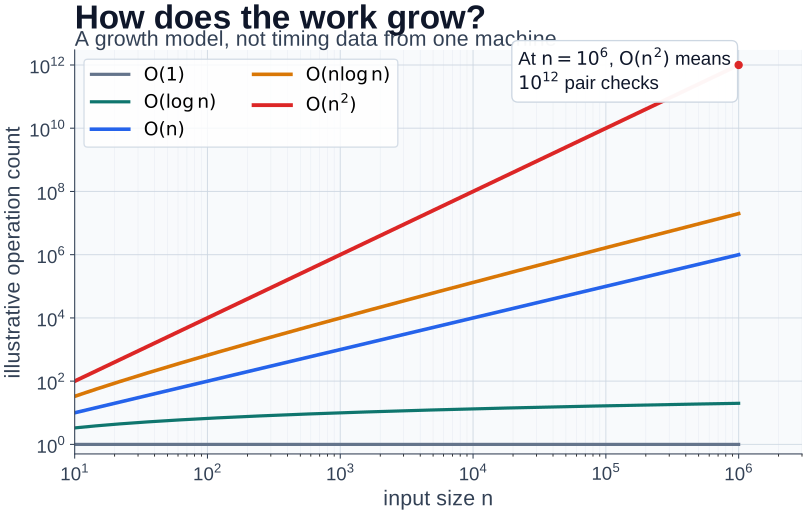
Figure 1:Scaling is a model of computational work, not a timing result from one machine: the operation count can become infeasible long before a calculation runs.
What to notice: this is a Python-produced plot, but not a new plotting API to learn yet. Read it as a model of operation counts; Chapter 8 teaches how to construct and scrutinize a plot. Actual runtime also depends on the workload, implementation, data layout, hardware, and measurement method.
For a first reading, follow this route:
For a return visit, use the memory, caches, and benchmark Deep Dive or the structures and operations Reference. They remain part of this chapter, not hidden prerequisites for the first route.
Try this chapter¶
Browser Python lab · Aliasing and Lookup Inspector: predict whether a grid copy shares mutable state, run the selected copy mode, then choose a structure for a stated access contract. The activity is optional; the static examples below remain complete without browser Python.
4.1 What Is a Data Structure?¶
A data structure organizes information to match an access pattern. In an N-body simulation, you might store particles in creation order (a list), map a known particle ID to its properties (a dictionary), or record which IDs have already been processed (a set). A spatial-index algorithm may additionally organize particles into cells or a tree for a neighbor query. The container is one ingredient in that algorithm; it does not by itself turn an all-pairs calculation into a tree code.
Quick Preview: Python’s Core Data Structures¶
| Structure | Mutable | Ordered | Duplicates | Use Case |
|---|---|---|---|---|
| list | Yes | Yes | Yes | Particle arrays, time series |
| tuple | No | Yes | Yes | Constants, coordinates, dict keys |
| dict | Yes | Yes* | Keys: No | Lookup tables, properties |
| set | Yes | No | No | Unique particles, membership |
*Dicts maintain insertion order (Python 3.7+ language guarantee)
Decision Framework: Choosing Your Data Structure¶
Before diving into each structure, here’s the mental model for choosing:
Need ordered sequence with duplicates?
├── Yes -> Need to modify it?
│         ├── Yes -> list
│         └── No (constants/config) -> tuple
└── No -> Need key-value mapping?
          ├── Yes -> dict (average-case O(1) lookup by key)
          └── No -> Need uniqueness/set math?
                    ├── Yes -> set (average-case O(1) membership)
                    └── No -> Probably list
Key invariants to remember:
| Structure | Mutable? | Keys/Elements Must Be... | When to Use |
|---|---|---|---|
list | Yes | Anything | Ordered data, will modify |
tuple | No | Anything | Constants, dict keys, records |
dict | Yes | Hashable | Fast lookup by key |
set | Yes | Hashable | Uniqueness, membership tests |
🌟 The More You Know: Different failures, different software boundaries
Ariane 5 (1996): A 64-bit floating-point value was converted to a 16-bit integer without an adequate range check, producing an overflow during the first flight.[1] This is a boundary and representation failure: a value’s permitted range was not made explicit at the conversion.
Mars Pathfinder (1997): A priority-inversion problem involving shared resources and task scheduling triggered resets. The team reproduced the failure, used instrumentation, and enabled priority inheritance.[2] This is a coordination and ownership lesson, not evidence that a Python queue choice alone prevents failures.
The stories are connected by a narrower point: software needs explicit value ranges, ownership rules, and operational checks. A container can support those contracts, but it cannot substitute for an algorithm, a scheduler, or a deployment procedure.
Building Intuition: Measuring Speed Empirically¶
Ready to discover something that will transform how you think about organizing data in your simulations? We’re going to measure the dramatic performance difference between different data structures. This empirical approach - measure first, understand why, then optimize - is exactly how computational scientists approach performance optimization.
# Let's discover why data structure choice matters for simulations!
import timeit

def benchmark_membership(n, trials=1000):
    """Compare list vs set membership testing with proper statistics."""
    # Create particle ID collections
    particle_list = list(range(n))
    particle_set = set(range(n))

    # Search for a particle NOT in the collection (worst case for list)
    escaped_particle = -1

    # Time list search - repeat many times for statistical validity
    list_time = timeit.timeit(
        lambda: escaped_particle in particle_list,
        number=trials
    ) / trials

    # Time set search
    set_time = timeit.timeit(
        lambda: escaped_particle in particle_set,
        number=trials
    ) / trials

    return list_time, set_time

print("Membership testing: list (linear scan) vs set (average-case hash lookup)")
print("=" * 55)
print(f"{'Size':>10} {'List (mus)':>12} {'Set (mus)':>12} {'Speedup':>10}")
print("-" * 55)

for n in [100, 1_000, 10_000, 100_000]:
    list_time, set_time = benchmark_membership(n)
    speedup = list_time / set_time if set_time > 0 else float('inf')
    print(f"{n:>10,} {list_time*1e6:>12.2f} {set_time*1e6:>12.2f} {speedup:>10,.0f}x")

print("\nOn this machine and workload, list search should grow with n,")
print("while set lookup is usually average-case O(1). Measure your own")
print("data: constants, hashing cost, memory, and access patterns matter.")
Membership testing: list (linear scan) vs set (average-case hash lookup)
=======================================================
Size List (mus) Set (mus) Speedup
-------------------------------------------------------
100 0.60 0.04 16x
1,000 6.87 0.04 187x
10,000 61.80 0.03 1,829x
   100,000       619.47         0.03     18,023x

On this machine and workload, list search should grow with n,
while set lookup is usually average-case O(1). Measure your own
data: constants, hashing cost, memory, and access patterns matter.
This difference can matter when membership testing is a measured bottleneck, but it is not a substitute for profiling the real workload. The mechanism is a hash table, which you will examine next.
Understanding Big-O Notation¶
Now that you’ve witnessed this dramatic performance difference empirically, let’s understand the mathematical pattern behind it. Big-O notation describes how an algorithm’s runtime scales with input size - it’s the language computational scientists use to discuss whether an algorithm is feasible for large-scale simulations.
Big-O describes how runtime grows with input size—not the exact speed—so constants, memory layout, and access patterns still matter.
Asymptotic operation counts (ignoring constants and implementation details):
| Complexity | 1,000 particles | 1,000,000 particles | Example |
|---|---|---|---|
| O(1) | 1 op | 1 op | Average-case hash-table lookup |
| O(log n) | 10 ops | 20 ops | Tree traversal |
| O(n) | 1,000 ops | 1,000,000 ops | One linear scan or reduction |
| O(n log n) | 10,000 ops | 20,000,000 ops | Sorting or some tree algorithms |
| O() | 1,000,000 ops | 1,000,000,000,000 ops | All-pairs comparison |
import math

print("Illustrative operation counts at n = 1,000,000:")
print(f"  O(1):       1 operation           - one average-case hash lookup")
print(f"  O(log n):   {math.log2(1e6):.0f} operations         - tree traversal")
print(f"  O(n):       1,000,000 operations  - one scan or reduction")
print(f"  O(n log n): {1e6 * math.log2(1e6):.0e} operations - a sorting/tree-like cost")
print(f"  O(n^2):      1,000,000,000,000 ops - all-pairs comparison")
Illustrative operation counts at n = 1,000,000:
O(1): 1 operation - one average-case hash lookup
O(log n): 20 operations - tree traversal
O(n): 1,000,000 operations - one scan or reduction
O(n log n): 2e+07 operations - a sorting/tree-like cost
O(n^2): 1,000,000,000,000 ops - all-pairs comparison
The table explains why a scaling question belongs beside a timing question. An all-pairs calculation can become infeasible at a particular problem size and hardware budget, but it is not made O(n log n) merely by putting data in a tree-shaped container. A tree algorithm needs an approximation policy; a spatial hash needs a cell size, occupancy distribution, adjacent-cell search, and final distance criterion.
4.2 Lists: Python’s Workhorse Sequence¶
Lists are Python’s most versatile data structure - useful for ordered measurements, records, or a changing collection. A list holds references to Python objects rather than a homogeneous raw-value buffer. That distinction matters when numerical array operations dominate, but it does not supply a universal speed comparison with NumPy.
A representation preview¶
Use a list when a changing, ordered collection is the clearest contract. When you need one dtype and repeated numerical operations across an entire grid or particle coordinate array, Chapter 7’s NumPy arrays provide a different model: an array stores same-type values in an explicit data buffer. The memory details, allocation behavior, and a careful measurement example appear in the Deep Dive, where they can be read when a real memory or performance question arises.
List Operations: Performance for Simulations¶
Different list operations have vastly different costs - critical knowledge when processing particle data or building spatial data structures.
import timeit


def compare_list_end_operations(n, trials=1_000):
    """Measure one machine's append/pop and insert(0)/pop(0) workload."""
    particles = list(range(n))
    end_time = timeit.timeit(
        lambda: (particles.append(-1), particles.pop()), number=trials
    ) / trials
    beginning_time = timeit.timeit(
        lambda: (particles.insert(0, -1), particles.pop(0)), number=trials
    ) / trials
    return end_time, beginning_time


for n in (100, 10_000, 100_000):
    end_time, beginning_time = compare_list_end_operations(n)
    print(f"n={n:>7,}: end={end_time * 1e6:7.2f} us; beginning={beginning_time * 1e6:7.2f} us")

print("\nThis workload normally makes the beginning operation grow with n.")
print("The timings are evidence about this Python build and workload, not a universal ratio.")
n= 100: end= 0.07 us; beginning= 0.11 us
n= 10,000: end= 0.06 us; beginning= 3.70 us
n=100,000: end= 0.06 us; beginning= 39.01 us
This workload normally makes the beginning operation grow with n.
The timings are evidence about this Python build and workload, not a universal ratio.
Python lists overallocate so appending is amortized O(1): usually fast, with occasional resizing. The allocation pattern is implementation-dependent; the Deep Dive shows how to inspect it without treating one interpreter’s byte count as a language guarantee.
4.3 Tuples: The Power of Immutability¶
What if you need to guarantee that initial conditions or physical constants won’t change during your simulation? Enter tuples - Python’s immutable sequences. This isn’t a limitation - it’s protection against an entire category of bugs that plague scientific codes!
Understanding Immutability in Physics Simulations¶
Let’s see how immutability protects your simulations and enables powerful optimizations:
# Physical constants should NEVER change during simulation
class PhysicsConstants:
    """Demonstrating safe vs unsafe constant storage."""

    # UNSAFE: Mutable list (can be accidentally modified)
    unsafe_constants = [
        6.674e-8,   # G (cm^3/g/s^2)
        2.998e10,   # c (cm/s)
        1.381e-16,  # k_B (erg/K)
    ]

    # SAFE: Immutable tuple (modification attempts fail loudly)
    safe_constants = (
        6.674e-8,   # G (cm^3/g/s^2)
        2.998e10,   # c (cm/s)
        1.381e-16,  # k_B (erg/K)
    )

# Demonstration of the danger
def convert_units_buggy(constants):
    """
    BUG: Accidentally modifies shared constants!

    The programmer intended to CREATE a converted copy,
    but instead MUTATED the original list in-place.
    This is a realistic bug in scientific codes.
    """
    if isinstance(constants, list):
        # BUG: In-place modification when we meant to copy!
        # Programmer forgot to make a copy first
        constants[0] = constants[0] * 1e3  # "Convert G to different units"
        return constants
    else:
        # With tuple, modification fails loudly
        try:
            constants[0] = constants[0] * 1e3
        except TypeError as e:
            return f"Caught bug immediately: {e}"

# Test with both
print("With mutable list:")
original_G = PhysicsConstants.unsafe_constants[0]
result = convert_units_buggy(PhysicsConstants.unsafe_constants)
print(f"  G was: {original_G:.3e}, now: {PhysicsConstants.unsafe_constants[0]:.3e}")
print(f"  Constants CORRUPTED!")

# Reset for tuple demo
PhysicsConstants.unsafe_constants[0] = 6.674e-8

print("\nWith immutable tuple:")
result = convert_units_buggy(PhysicsConstants.safe_constants)
print(f"  {result}")

print("\nLesson: Immutability turns silent corruption into immediate, loud errors!")
With mutable list:
G was: 6.674e-08, now: 6.674e-05
Constants CORRUPTED!
With immutable tuple:
Caught bug immediately: 'tuple' object does not support item assignment
Lesson: Immutability turns silent corruption into immediate, loud errors!
Tuples as Dictionary Keys¶
A tuple whose contents are hashable can be a dictionary key. That is useful
when an application’s declared inputs are naturally a discrete record—for
example (temperature_index, density_index, composition_id). The deeper cache
example below explains why this is an implementation choice, not a physical
model or a promise that arbitrary floating-point rounding is safe.
4.4 The Mutable vs Immutable Distinction¶
Time for one of Python’s most important concepts for scientific computing! Understanding mutability is the key to avoiding mysterious bugs where your simulation state changes unexpectedly. This connects directly to Chapter 1’s defensive programming principles - catching errors early prevents corrupted results.
Python’s Reference Model in Physics Simulations¶
Python names are bindings to objects. For immutable values, rebinding one name does not change another name’s value. For a mutable container, two names can refer to the same object, so mutation through either name is visible through both. This distinction matters whenever a simulation claims to preserve an initial state or to return an independent next state:
# Critical concept for simulation state management!

print("With IMMUTABLE objects (safe for constants):")
G_constant = 6.674e-8
G_backup = G_constant
print(f"Initially: G={G_constant:.3e}, backup={G_backup:.3e}")
print(f"Same object in memory? {G_constant is G_backup}")

G_backup = 6.674e-7  # Creates NEW object (typo won't affect original)
print(f"After change: G={G_constant:.3e}, backup={G_backup:.3e}")
print("Original constant is safe!")

print("\n" + "="*50)
print("With MUTABLE objects (dangerous for state!):")

# Particle system state
particles = [[1.0, 2.0, 3.0], [4.0, 5.0, 6.0]]  # Positions
backup = particles  # Think you're making a backup?

print(f"Initially: same object? {particles is backup}")

# Modify what you think is the backup
backup[0][0] = 999.0  # Trying to test something

print(f"Original particles: {particles}")
print(f"'Backup': {backup}")
print("You just corrupted your simulation state!")

print("\nLesson: decide explicitly whether this function shares, copies, or rebuilds state.")
With IMMUTABLE objects (safe for constants):
Initially: G=6.674e-08, backup=6.674e-08
Same object in memory? True
After change: G=6.674e-08, backup=6.674e-07
Original constant is safe!
==================================================
With MUTABLE objects (dangerous for state!):
Initially: same object? True
Original particles: [[999.0, 2.0, 3.0], [4.0, 5.0, 6.0]]
'Backup': [[999.0, 2.0, 3.0], [4.0, 5.0, 6.0]]
You just corrupted your simulation state!
Lesson: decide explicitly whether this function shares, copies, or rebuilds state.
🌟 The More You Know: Knight Capital and deployment control
On August 1, 2012, Knight Capital’s automated router sent millions of erroneous orders after a deployment failure. The SEC’s later order reports more than four million executions in 45 minutes and an eventual loss above $460 million.[3]
According to SEC filings and news reports, Knight was updating their trading software to handle a new NYSE order type. The deployment went to 7 of their 8 servers correctly, but one server retained old test code from 2003. When the market opened, this server began processing live orders using the old “Power Peg” test functionality, which was designed to continuously buy and sell stocks for testing purposes.
The important operational failures were not a generic dictionary or queue mistake. They included:
incomplete deployment of the new code;
an old function responding to a reused flag;
controls that did not stop the erroneous orders quickly enough; and
alerts that were not treated as actionable before the market opened.
In 45 minutes, the malfunctioning system:
produced more than four million executions;
accumulated multi-billion-dollar unwanted positions; and
exposed the cost of treating deployment state and operational alerts as secondary to the nominal code path.
For this chapter, the lesson is narrower and more useful: a program must make its state, ownership, version assumptions, and failure signals explicit. Choosing an immutable record or avoiding accidental aliasing helps locally; it does not replace deployment validation and system-level controls.
The Classic Mutable Default Argument Bug¶
This bug is so dangerous that Python linters specifically check for it. It’s particularly insidious in iterative simulations:
# Stage 1: Demonstrate the bug (15 lines)
# THE BUG: Default mutable created ONCE at function definition!
def accumulate_energies_buggy(energy, history=[]):
    """BUGGY: Trying to track energy history."""
    history.append(energy)
    return history

# Simulate multiple independent runs
print("Run 1:")
run1 = accumulate_energies_buggy(100)
run1 = accumulate_energies_buggy(95)
print(f"  Energy history: {run1}")

print("\nRun 2 (should be independent):")
run2 = accumulate_energies_buggy(200)
print(f"  Energy history: {run2}")
print("  Contains Run 1 data! Runs are coupled!")
Run 1:
Energy history: [100, 95]
Run 2 (should be independent):
Energy history: [100, 95, 200]
Contains Run 1 data! Runs are coupled!
# Stage 2: Show the fix (15 lines)
print("THE FIX: Use None sentinel pattern")

def accumulate_energies_fixed(energy, history=None):
    """Safe version - creates new list for each run."""
    if history is None:
        history = []  # Fresh list for each simulation
    history.append(energy)
    return history

print("\nRun 3 (intentional accumulation):")
run3 = accumulate_energies_fixed(100)
run3 = accumulate_energies_fixed(95, history=run3)
print(f"  Energy history: {run3}")

print("\nRun 4 (properly independent):")
run4 = accumulate_energies_fixed(200)
print(f"  Energy history: {run4}")
print("  Runs are independent!")
THE FIX: Use None sentinel pattern
Run 3 (intentional accumulation):
Energy history: [100, 95]
Run 4 (properly independent):
Energy history: [200]
Runs are independent!
Shallow vs Deep Copies in Grid Simulations¶
This distinction is critical for grid-based simulations in computational fluid dynamics, stellar atmospheres, or any field-based calculation:
# Stage 1: Set up the problem (12 lines)
import copy

# Create a 2D grid for temperature distribution
print("Simulating heat diffusion on a grid:")
grid = [[20.0, 20.0, 20.0],
        [20.0, 50.0, 20.0],  # Hot spot in center
        [20.0, 20.0, 20.0]]
print(f"Initial grid: {grid[1]}")  # Middle row

# Shallow copy - DANGEROUS for grids!
print("\n--- SHALLOW COPY (aliases inner arrays) ---")
grid_next_shallow = grid.copy()
Simulating heat diffusion on a grid:
Initial grid: [20.0, 50.0, 20.0]
--- SHALLOW COPY (aliases inner arrays) ---
# Stage 2: Show the shallow copy problem (10 lines)
# Try to update center point for next timestep
grid_next_shallow[1][1] = 35.0  # Cooling

print(f"Original grid center: {grid[1][1]} degC")
print(f"Next step grid center: {grid_next_shallow[1][1]} degC")
print("Modified both grids! Simulation is corrupted!")

# Reset for deep copy demo
grid = [[20.0, 20.0, 20.0],
        [20.0, 50.0, 20.0],
        [20.0, 20.0, 20.0]]
Original grid center: 35.0 degC
Next step grid center: 35.0 degC
Modified both grids! Simulation is corrupted!
# Stage 3: Show the deep copy solution (12 lines)
# Deep copy makes independent nested containers for this small built-in grid.
print("\n--- DEEP COPY (independent arrays) ---")
grid_next_deep = copy.deepcopy(grid)
grid_next_deep[1][1] = 35.0  # Cooling

print(f"Original grid center: {grid[1][1]} degC")
print(f"Next step grid center: {grid_next_deep[1][1]} degC")
print("Grids are independent for this update!")

print("\nMemory visualization:")
print("Shallow: grid -> [ref1, ref2, ref3] -> same inner arrays")
print("Deep:    grid -> [ref1, ref2, ref3] -> independent arrays")
--- DEEP COPY (independent arrays) ---
Original grid center: 50.0 degC
Next step grid center: 35.0 degC
Grids are independent for this update!

Memory visualization:
Shallow: grid -> [ref1, ref2, ref3] -> same inner arrays
Deep:    grid -> [ref1, ref2, ref3] -> independent arrays
4.5 Dictionaries: Average-Case O(1) Lookup for Physics¶
Now we explore one of computer science’s most useful inventions - the dictionary. In scientific Python, dictionaries are often useful for named properties, lookup tables, and caches. Their average-case lookup cost does not mean every numerical dataset should become a dictionary, nor that lookup is independent of key construction, memory, collisions, or the work after lookup.
Organizing Simulation Data with Dictionaries¶
Let’s see how dictionaries transform particle management in an N-body simulation:
# Stage 1: Basic dictionary structure (15 lines)
# N-body simulation: managing particle properties by identifier

# Individual particle data (could have thousands)
particles = {
    'particle_0001': {
        'mass': 1.989e30,  # grams (0.001 solar masses)
        'position': [1.5e13, 0.0, 0.0],  # cm
        'velocity': [0.0, 3.0e6, 0.0],   # cm/s
        'type': 'star'
    },
    'particle_0002': {
        'mass': 5.972e27,  # grams (Earth mass)
        'position': [2.5e13, 0.0, 0.0],
        'velocity': [0.0, 2.5e6, 0.0],
        'type': 'planet'
    }
}
# Stage 2: average-case O(1) lookup demonstration (15 lines)
# Lookup by known particle ID.
target = 'particle_0002'
print(f"Accessing {target}:")
print(f" Mass: {particles[target]['mass']:.2e} g")
print(f" Type: {particles[target]['type']}")
# Organize by type for efficient group operations
by_type = {}
for pid, data in particles.items():
ptype = data['type']
if ptype not in by_type:
by_type[ptype] = []
by_type[ptype].append(pid)
print(f"\nParticles by type: {by_type}")
print("A mapping lets an application find a record from a known identifier.")Accessing particle_0002:
Mass: 5.97e+27 g
Type: planet
Particles by type: {'star': ['particle_0001'], 'planet': ['particle_0002']}
A mapping lets an application find a record from a known identifier.
Understanding Hash Tables for Physics Applications¶
Let’s demystify the average-case lookup mechanism used by dictionaries:
def demonstrate_hashing_for_physics():
    """Show how hash tables enable fast lookups in physics codes."""

    # Common lookup table keys in physics simulations
    physics_keys = [
        (1.0e6, 1.0e-3),   # Hashable floats for mechanism only, not a cache-grid policy
        (2.0e6, 2.0e-3),
        (5.0e6, 1.0e-2),
        "H_ionization",     # Reaction rates
        "He_ionization",
        "opacity_table"     # Opacity types
    ]

    print("How hash tables accelerate physics lookups:")
    print("=" * 60)
    print("Key                  -> Hash        -> Bucket")
    print("-" * 60)

    for key in physics_keys:
        hash_value = hash(key)
        # Simplified bucket calculation
        bucket = abs(hash_value) % 100
        if isinstance(key, tuple):
            key_str = f"T={key[0]:.0e}, rho={key[1]:.0e}"
        else:
            key_str = str(key)
        print(f"{key_str:20s} -> {hash_value:11d} -> {bucket:3d}")

    print("\nThe average-case lookup process:")
    print("1. Hash the key -> integer")
    print("2. Use it to find a candidate table location")
    print("3. Check the stored key and resolve collisions if needed")
    print("\nThis illustrates a mapping lookup, not a physical table-interpolation method.")

demonstrate_hashing_for_physics()
How hash tables accelerate physics lookups:
============================================================
Key -> Hash -> Bucket
------------------------------------------------------------
T=1e+06, rho=1e-03 -> 7060515190775938164 -> 64
T=2e+06, rho=2e-03 -> -3756423604195419920 -> 20
T=5e+06, rho=1e-02 -> -5145451484737341997 -> 97
H_ionization -> -7590979357125914885 -> 85
He_ionization -> 217872519414005944 -> 44
opacity_table -> 5260287046942931854 -> 54
The average-case lookup process:
1. Hash the key -> integer
2. Use it to find a candidate table location
3. Check the stored key and resolve collisions if needed
This illustrates a mapping lookup, not a physical table-interpolation method.
The membership benchmark in Section 4.1 is deliberately narrow: it compares one absent-item lookup. A dictionary can be a good representation when an application repeatedly maps known identifiers to records; the [Deep Dive] (#memory-caches-and-benchmarks) shows how to benchmark a broader workload and how cache keys encode a modeling decision.
4.6 Sets: Mathematical Operations for Particle Systems¶
Sets represent unique, hashable values and provide average-case O(1) membership testing plus useful set operations. They can track processed IDs or overlapping domain memberships; they do not themselves compute geometric neighbors.
Set Operations in Particle Dynamics¶
# Particle tracking across domain boundaries
# (Common in parallel simulations with domain decomposition)

# Particles in different processor domains
domain_A = {'p001', 'p002', 'p003', 'p004', 'p005'}
domain_B = {'p004', 'p005', 'p006', 'p007'}
domain_C = {'p003', 'p007', 'p008', 'p009'}

# IDs represented in more than one domain (for example, ghost/overlap records)
overlapping_ids = (domain_A & domain_B) | (domain_B & domain_C) | (domain_A & domain_C)
print(f"Overlapping IDs needing a consistency check: {overlapping_ids}")

# Particles unique to each domain (no communication needed)
interior_A = domain_A - domain_B - domain_C
interior_B = domain_B - domain_A - domain_C
interior_C = domain_C - domain_A - domain_B
print(f"Interior particles (A): {interior_A}")

# Check particle conservation
all_particles = domain_A | domain_B | domain_C
print(f"Total unique particles: {len(all_particles)}")

# Particles in multiple domains (need consistency check)
duplicated = set()
all_domains = [domain_A, domain_B, domain_C]
for i in range(len(all_domains)):
    for j in range(i+1, len(all_domains)):
        duplicated |= (all_domains[i] & all_domains[j])

print(f"Particles in multiple domains: {duplicated}")
print("\nSets make overlap bookkeeping explicit.")
print("A production parallel code still needs ownership and communication rules.")
Overlapping IDs needing a consistency check: {'p004', 'p003', 'p007', 'p005'}
Interior particles (A): {'p001', 'p002'}
Total unique particles: 9
Particles in multiple domains: {'p004', 'p003', 'p007', 'p005'}
Sets make overlap bookkeeping explicit.
A production parallel code still needs ownership and communication rules.
Deep Dive: Memory, Caches, and Benchmarks¶
Now that we understand the core representations, this deeper path examines memory measurements, cache keys, and benchmark design. These details can guide a real optimization decision, but a local byte count or timing remains evidence about its own interpreter, input, and operation—not a universal library claim.
Memory Usage in Particle Systems¶
Let’s examine memory costs for different data structures in a particle simulation context:
# Stage 1: Basic Memory Measurement (8 lines)
import sys

def measure_particle_memory(n=10000):
    """Compare shallow container sizes for one ID-storage workload."""
    ids_list = [f"p_{i:06d}" for i in range(n)]
    ids_set = set(ids_list)

    print(f"Storing {n:,} particle IDs:")
    print(f"  List container: {sys.getsizeof(ids_list):,} bytes")
    print(f"  Set container:  {sys.getsizeof(ids_set):,} bytes")
    print("  (Both containers refer to the same string objects.)")

measure_particle_memory()
Storing 10,000 particle IDs:
List container: 85,176 bytes
Set container: 524,504 bytes
(Both containers refer to the same string objects.)
# Stage 2: Understanding the Tradeoff (10 lines)
def understand_mapping_tradeoffs():
    """Compare shallow containers for one ordered-record versus ID-map workload."""
    # Small particle system
    n = 100
    positions = [[i*1.0, 0.0, 0.0] for i in range(n)]

    list_bytes = sys.getsizeof(positions)
    id_to_position = {i: pos for i, pos in enumerate(positions)}
    mapping_bytes = sys.getsizeof(id_to_position)

    print(f"100 particles as list: {list_bytes:,} bytes")
    print(f"ID-to-position mapping: {mapping_bytes:,} bytes")
    print("The mapping supports lookup by known ID; it is not a spatial neighbor index.")

understand_mapping_tradeoffs()
100 particles as list: 920 bytes
ID-to-position mapping: 4,688 bytes
The mapping supports lookup by known ID; it is not a spatial neighbor index.
# Stage 3: Complete Memory Profile (15 lines)
def profile_simulation_structures(n_particles=1000):
    """Memory comparison for complete particle system."""
    import numpy as np  # Preview of Chapter 7

    # Create structures
    list_of_lists = [[i, i*1.0, 0.0, 0.0] for i in range(n_particles)]
    list_of_tuples = [(i, i*1.0, 0.0, 0.0) for i in range(n_particles)]
    dict_struct = {i: [i*1.0, 0.0, 0.0] for i in range(n_particles)}
    numpy_arr = np.zeros((n_particles, 4))

    print(f"Memory for {n_particles:,} particles (ID, x, y, z):")
    print("-" * 55)

    # Python structures: getsizeof is shallow!
    print(f"{'List of lists':18s}: {sys.getsizeof(list_of_lists):>8,} bytes (container only!)")
    print(f"{'List of tuples':18s}: {sys.getsizeof(list_of_tuples):>8,} bytes (container only!)")
    print(f"{'Dictionary':18s}: {sys.getsizeof(dict_struct):>8,} bytes (container only!)")

    # NumPy: .nbytes reports the logical data buffer size.
    print(f"{'NumPy .nbytes':18s}: {numpy_arr.nbytes:>8,} bytes (data buffer)")
    print(f"{'NumPy getsizeof':18s}: {sys.getsizeof(numpy_arr):>8,} bytes (object; ownership-dependent)")

    print("\nPython-container sizes omit their contained objects.")
    print("For an owning NumPy array, getsizeof commonly includes its owned buffer;")
    print(".nbytes remains the direct statement of logical element storage.")

profile_simulation_structures()
Memory for 1,000 particles (ID, x, y, z):
-------------------------------------------------------
List of lists : 8,856 bytes (container only!)
List of tuples : 8,856 bytes (container only!)
Dictionary : 36,952 bytes (container only!)
NumPy .nbytes : 32,000 bytes (data buffer)
NumPy getsizeof : 32,128 bytes (object; ownership-dependent)
Python-container sizes omit their contained objects.
For an owning NumPy array, getsizeof commonly includes its owned buffer;
.nbytes remains the direct statement of logical element storage.
Cache Efficiency in Grid Computations¶
Modern CPUs use several layers of memory. This experiment compares two traversal orders for one nested-list workload; interpreter overhead, CPU architecture, and the data representation all affect the result:
# Stage 1: Setup (8 lines)
import time

# Demonstrate cache effects in finite difference calculations
size = 500  # Grid size for heat equation
grid = [[20.0 + 0.1*i*j for j in range(size)]
        for i in range(size)]

print("Simulating heat diffusion finite differences:")
print("(Common in CFD and atmospheric modeling)")
Simulating heat diffusion finite differences:
(Common in CFD and atmospheric modeling)
# Stage 2: Row-major access (10 lines)
# Visit one inner list completely before moving to the next.
start = time.perf_counter()
total = 0.0
for i in range(size):
    for j in range(size):
        total += grid[i][j]
row_time = time.perf_counter() - start

print(f"Processing {size}x{size} grid:")
print(f"Row-first traversal:   {row_time*1000:.1f} ms")
Processing 500x500 grid:
Row-first traversal: 23.3 ms
# Stage 3: Column-major comparison (12 lines)
# Revisit many inner lists for each column.
start = time.perf_counter()
total = 0.0
for j in range(size):
    for i in range(size):
        total += grid[i][j]
col_time = time.perf_counter() - start

print(f"Column-first traversal: {col_time*1000:.1f} ms")
if row_time > 0:
    print(f"Ratio: {col_time/row_time:.1f}x")

print("\nImportant caveat: each Python row is a separate list object.")
print("This experiment does not predict a NumPy speedup or a production CFD runtime.")
Column-first traversal: 22.7 ms
Ratio: 1.0x
Important caveat: each Python row is a separate list object.
This experiment does not predict a NumPy speedup or a production CFD runtime.
Allocation and cache decisions¶
Python lists overallocate so that repeated .append() is amortized O(1). The
exact capacity sequence is an implementation detail, but observing allocation
events can explain a local timing trace:
particles = []
previous_size = sys.getsizeof(particles)

for i in range(20):
    particles.append(i)
    current_size = sys.getsizeof(particles)
    if current_size != previous_size:
        print(f"length {len(particles):2d}: allocation changed by {current_size - previous_size} bytes")
        previous_size = current_size

print("Exact byte counts and growth factors are interpreter-dependent.")
length 1: allocation changed by 32 bytes
length 5: allocation changed by 32 bytes
length 9: allocation changed by 64 bytes
length 17: allocation changed by 64 bytes
Exact byte counts and growth factors are interpreter-dependent.
Tuples can supply composite, hashable cache keys, but cache-key construction is a modeling decision. Raw floating-point values are appropriate only when the exact stored float values define the calculation. Rounding merely to increase cache hits can merge distinct cases; use grid indices or bins only when the model defines that discretization.
# A teaching cache for a discretized equation-of-state-like calculation.
# It demonstrates a cache contract; it is not an EOS interpolation model.
eos_cache = {}
calculation_count = 0


def get_pressure(T_index, rho_index, composition_id):
    """Return pressure and whether a declared discrete-grid cache hit occurred."""
    global calculation_count
    cache_key = (T_index, rho_index, composition_id)
    if cache_key in eos_cache:
        return eos_cache[cache_key], "cache_hit"

    calculation_count += 1
    T_K = 1e6 * (1.1 ** T_index)
    rho_g_cm3 = 1e-3 * (1.2 ** rho_index)
    k_B_erg_K = 1.381e-16
    mu = 0.6 if composition_id == 0 else 1.3
    m_H_g = 1.673e-24
    pressure_dyne_cm2 = rho_g_cm3 * k_B_erg_K * T_K / (mu * m_H_g)
    eos_cache[cache_key] = pressure_dyne_cm2
    return pressure_dyne_cm2, "computed"


for indices in ((10, 5, 0), (10, 5, 0), (11, 5, 0)):
    pressure, status = get_pressure(*indices)
    print(f"indices={indices}; P={pressure:.2e} dyne/cm^2; {status}")
print(f"expensive calculations in this toy cache: {calculation_count}")
indices=(10, 5, 0); P=8.88e+11 dyne/cm^2; computed
indices=(10, 5, 0); P=8.88e+11 dyne/cm^2; cache_hit
indices=(11, 5, 0); P=9.77e+11 dyne/cm^2; computed
expensive calculations in this toy cache: 2
🎯 Why This Matters: lookup tables beat recalculation
Stellar-evolution codes such as MESA use equation-of-state and opacity modules with tabulated inputs and interpolation.[4] That is a different claim from “a Python dictionary is the physical model.” A cache or lookup-table design must state its grid, interpolation, units, invalid-input behavior, and what a cache hit means for the calculation.
4.7 Choosing the Right Structure for Physics¶
After exploring all options, how do you choose? Here’s your decision framework for computational physics:
Performance Quick Reference for Physics¶
| Operation | List | Tuple | Dict | Set |
|---|---|---|---|---|
| Access by index | O(1) | O(1) | N/A | N/A |
| Search for value / membership | O(n) | O(n) | O(1)† by key | O(1)† |
| Add at end / new key or item | O(1)‡ | N/A | O(1)†‡ | O(1)†‡ |
| Remove a known value / key / item | O(n) | N/A | O(1)† | O(1)† |
| Iteration order | insertion | fixed sequence | insertion* | unspecified |
* Dicts maintain insertion order (Python 3.7+) † Average-case; worst-case can degrade with collisions ‡ Amortized; resize events can cost O(n)
Real Example: Combining Data Structures¶
Let’s see how different data structures work together in a simple particle tracking system:
# Simple example: Tracking particles with multiple data structures

# Constants (tuple - can't be changed accidentally!)
CONSTANTS = (6.674e-8, 2.998e10, 1.381e-16)  # G, c, k_B

# Particle data (dictionary for average-case lookup by ID)
particles = {
    'p001': {'mass': 1e30, 'x': 0.0, 'y': 0.0},
    'p002': {'mass': 2e30, 'x': 10.0, 'y': 0.0},
    'p003': {'mass': 1.5e30, 'x': 5.0, 'y': 5.0},
}

# Active particles (set for unique IDs and average-case membership testing)
active = {'p001', 'p002'}  # p003 is inactive

# Time series measurements (list - ordered by time)
measurements = [
    (0.0, 100.5),  # (time, energy)
    (1.0, 99.8),
    (2.0, 99.1),
]

# Example: Find total mass of active particles
total_mass = 0
for pid in active:
    if pid in particles:  # average-case O(1) lookup by known ID
        total_mass += particles[pid]['mass']

print(f"Total active mass: {total_mass:.1e} g")
print(f"Number of measurements: {len(measurements)}")
print(f"Constants are protected: type(CONSTANTS) = {type(CONSTANTS).__name__}")

# This simple combination shows:
# - Tuple for constants (immutable)
# - Dictionary for particle data (average-case lookup by ID)
# - Set for active particles (uniqueness and average-case membership)
# - List for time series (ordered)
Total active mass: 3.0e+30 g
Number of measurements: 3
Constants are protected: type(CONSTANTS) = tuple
Main Takeaways¶
You now have a way to reason about a representation before reaching for a method: name the access pattern, state whether mutation is allowed, and ask whether uniqueness or a key is part of the problem. A list preserves sequence, a tuple preserves an immutable record, a dictionary maps a known key to a value, and a set records unique hashable items.
The mutable-versus-immutable distinction is equally practical. An assignment can share a mutable object; a shallow copy shares its nested objects; a deep copy duplicates nested objects but may be the wrong cost or ownership choice for a large state. State whether a function mutates its input, returns a new state, or uses preallocated buffers, then test that contract.
Finally, complexity and timing are diagnostic tools. Average-case hash lookup can be valuable when known-ID lookup is the measured bottleneck, but it does not replace a spatial algorithm, a model approximation, or a workload-specific benchmark. When a calculation becomes slow, use this chapter to identify the question your representation must answer, then measure and redesign with the algorithm’s assumptions visible.
Once you can reason about control flow (Chapter 3) and data layout (this chapter), you’re ready to start abstracting your work: writing functions and modules that hide complexity while preserving correctness and performance. That’s the goal of Chapter 5.
Definitions¶
Aliasing: When two or more variables refer to the same object in memory, causing modifications through one to affect the others.
Amortized O(1): An operation that is usually O(1) but occasionally O(n), where the average over many operations remains O(1).
Big-O Notation: Mathematical notation describing how an algorithm’s runtime scales with input size, focusing on the dominant term.
Cache: Stored results reused to avoid repeating work. A Python memoization cache is distinct from the CPU’s hardware cache.
Data Structure: A way of organizing data in computer memory to enable efficient access and modification.
Deep Copy: Creating a recursively independent object graph. It is useful only when that ownership and copying cost match the intended state contract.
Dictionary: A mutable mapping type storing key-value pairs with average-case O(1) lookup time using hash tables. Worst-case O(n) with hash collisions.
Hash Function: A function mapping data of arbitrary size to fixed-size values, enabling fast lookups.
Hash Table: The underlying implementation for dictionaries and sets, enabling average-case O(1) lookups. Worst-case O(n) when many keys collide.
Immutable: Objects whose state cannot be modified after creation (tuples, strings, numbers).
List: Python’s built-in mutable sequence type that stores references to objects in order.
Memoization: Caching technique storing function results to avoid recalculating for the same inputs.
Mutable: Objects whose state can be modified after creation (lists, dictionaries, sets).
Named Tuple: A tuple subclass allowing element access by name as well as index.
O(1) - Constant Time: An operation whose asymptotic work does not grow with input size; hash-table O(1) claims are usually average-case.
O(n) - Linear Time: An operation whose runtime grows proportionally with input size.
O() - Quadratic Time: An operation whose runtime grows with the square of input size.
O(log n) - Logarithmic Time: An operation whose runtime grows logarithmically with input size.
O(n log n): Common complexity for efficient sorting algorithms and tree-based operations.
Reference / binding: A name can refer to an object; two names may refer to the same mutable object. Python does not promise that this corresponds to a user-visible memory address.
Set: A mutable collection of unique, unordered elements with average-case O(1) membership testing.
Shallow Copy: Creating a new container with references to the same contained objects.
Spatial Hashing: Organizing particles by spatial region so a query can first find candidate cells by key. Neighbor-query cost also depends on cell occupancy, adjacent cells, and distance checks.
Tuple: An immutable sequence type that cannot be changed after creation.
Key Takeaways¶
✓ Choose a representation from its ordering, mutability, key, and uniqueness contract.
✓ List membership is O(n); dictionary and set lookup are average-case O(1) for hashable keys or items.
✓ Assignment and shallow copying can share nested mutable state; document whether a function mutates, copies, or rebuilds it.
✓ A tuple can protect an immutable record and can serve as a hashable composite key when its contents are hashable.
✓ A list/set/dictionary timing is evidence about one workload. It does not establish a production speedup or replace a spatial algorithm.
✓ sys.getsizeof() needs an ownership-aware interpretation; measure contained objects and array buffers deliberately.
✓ Caches, spatial indices, and specialized numerical arrays are additional designs with their own assumptions and memory costs.
Reference: Structures, Operations, and Modules¶
This reference section catalogs all Python modules, functions, and methods introduced in this chapter. Keep this as a quick lookup guide for your physics simulations.
Standard Library Modules¶
time module - High-resolution timing for performance measurement
import timetime.perf_counter()- Returns float seconds with highest available resolutionUse for timing code segments:
start = time.perf_counter()Always use for benchmarking (not
time.time()which can go backwards!)
sys module - System-specific parameters (expanded from Chapter 1)
import syssys.getsizeof(object)- Returns the direct size reported by the objectFor Python containers, does not include separately referenced contents
For deep size: sum recursively or use
pympler.asizeof()For an owning NumPy array, compare
.nbyteswithgetsizeof()and inspect ownership
copy module - Create object copies with control over depth
import copycopy.copy(x)- Creates shallow copy (new container, same contents)copy.deepcopy(x)- Creates deep copy (recursively copies all contents)Use only when the desired ownership contract needs independent nested state
Consider rebuilt state or ping-pong buffers for repeated numerical updates
random module - Generate random numbers for Monte Carlo
import randomrandom.random()- Random float in [0.0, 1.0)random.uniform(a, b)- Random float in [a, b]random.choice(seq)- Random element from sequencerandom.sample(population, k)- k unique random elements
math module - Mathematical functions (review from Chapter 2)
import mathmath.sqrt(x)- Square root (use for distances)math.log(x)- Natural logarithmmath.log2(x)- Base-2 logarithm (for Big-O analysis)
Collections Module¶
collections module - Specialized container datatypes
from collections import OrderedDict, Counter, defaultdict, deque, namedtupleOrderedDict - Dictionary that remembers insertion order
.move_to_end(key, last=True)- Move key to end (or beginning if last=False).popitem(last=True)- Remove and return (key, value) pair from end/beginningUse for LRU caches in physics calculations
Counter - Dictionary subclass for counting hashable objects
Counter(iterable)- Create from iterable.most_common(n)- Returns n most common (element, count) pairs.update(iterable)- Add counts from iterablePerfect for histogram analysis of particle properties
defaultdict - Dictionary with default value factory
defaultdict(list)- Missing keys default to empty listdefaultdict(int)- Missing keys default to 0Eliminates KeyError in particle grouping
deque - Double-ended queue with O(1) operations at both ends
deque(maxlen=n)- Fixed-size queue (old elements dropped).append(x)/.appendleft(x)- Add to right/left end.pop()/.popleft()- Remove from right/left endUseful for rolling windows, pending work, and other queue-like workflows
namedtuple - Tuple subclass with named fields
Particle = namedtuple('Particle', ['id', 'mass', 'x', 'y', 'z'])
p = Particle(1, 1.0e30, 0, 0, 0)
print(p.mass)  # Access by name
Functools Module¶
functools module - Higher-order functions and operations
from functools import lru_cache@lru_cache(maxsize=128) - Decorator for automatic memoization
@lru_cache(maxsize=1000)
def expensive_calculation(T, rho):
    return complex_physics_calculation(T, rho)
Caches function results automatically
maxsize=Nonefor unlimited cache.cache_info()- Returns cache statistics.cache_clear()- Clear the cacheCache keys must encode a declared input contract; do not round floats merely to create more cache hits.
Built-in Functions for Data Structures¶
Type Checking
type(obj)- Returns object’s typeisinstance(obj, type)- Check if obj is instance of typeid(obj)- Returns an identity marker unique among live objects; useisto check identity, notid()as scientific data or a portable memory addressobj1 is obj2- Check if same object (identity)
Container Operations
len(container)- Number of elementsx in container- Membership test (average-case O(1) for sets/dict keys; O(n) for lists)sorted(iterable)- Returns new sorted listreversed(sequence)- Returns reverse iteratorenumerate(iterable, start=0)- Returns (index, value) pairszip(iter1, iter2, ...)- Parallel iteration
Copying
list(iterable)- Create new list from iterabletuple(iterable)- Create new tuple from iterableset(iterable)- Create new set from iterabledict(pairs)- Create dictionary from (key, value) pairs
Data Structure Methods Summary¶
List Methods (Expanded)
.append(x)- Add to end (amortized O(1)).extend(iterable)- Add all elements from iterable.insert(i, x)- Insert at position i (O(n)).remove(x)- Remove first x (O(n)).pop(i=-1)- Remove and return element at i.clear()- Remove all elements.index(x)- Find position of x (O(n)).count(x)- Count occurrences of x.sort()- Sort in-place.reverse()- Reverse in-place.copy()- Create shallow copy
Dictionary Methods (Expanded)
.get(key, default=None)- Safe access with default.setdefault(key, default)- Get or set with default.pop(key, default)- Remove and return value.popitem()- Remove and return the most recently inserted(key, value)pair (LIFO).update(other)- Update with other dict/pairs.keys()- View of keys.values()- View of values.items()- View of (key, value) pairs.clear()- Remove all items.copy()- Shallow copy
Set Methods (Expanded)
.add(x)- Add element.remove(x)- Remove element (raises KeyError if missing).discard(x)- Remove element (no error if missing).pop()- Remove and return arbitrary element.clear()- Remove all elements.union(other)or|- Elements in either set.intersection(other)or&- Elements in both sets.difference(other)or-- Elements in first but not second.symmetric_difference(other)or^- Elements in either but not both.update(other)or|=- Add elements from other.intersection_update(other)or&=- Keep only elements in both.difference_update(other)or-=- Remove elements in other.symmetric_difference_update(other)or^=- Keep elements in either but not both.issubset(other)- Check if all elements in other.issuperset(other)- Check if contains all elements of other.isdisjoint(other)- Check if no elements in common.copy()- Create shallow copy
Reference tables¶
Data Structure Operations¶
| Operation | List | Tuple | Dict | Set |
|---|---|---|---|---|
| Create empty | [] | () | {} | set() |
| Create with items | [1,2,3] | (1,2,3) | {'a':1} | {1,2,3} |
| Add item | .append(x) | N/A | d[k]=v | .add(x) |
| Remove item | .remove(x) | N/A | del d[k] | .remove(x) |
| Check membership | x in list | x in tuple | k in dict | x in set |
| Get by index | list[i] | tuple[i] | N/A | N/A |
Performance Quick Reference¶
| Operation | List | Tuple | Dict | Set | Deque |
|---|---|---|---|---|---|
| Access by index | O(1) | O(1) | N/A | N/A | O(n) |
| Search for value / membership | O(n) | O(n) | O(1)*‡ | O(1)‡ | O(n) |
| Add to end / new item | O(1)† | N/A | O(1)†‡ | O(1)†‡ | O(1) |
| Add to beginning | O(n) | N/A | N/A | N/A | O(1) |
| Remove from end | O(1) | N/A | N/A | N/A | O(1) |
| Remove from beginning | O(n) | N/A | N/A | N/A | O(1) |
| Remove specific | O(n) | N/A | O(1)‡ | O(1)‡ | O(n) |
* Dict searches by key, not value † Amortized - occasionally O(n) during resize ‡ Average-case; worst-case can degrade with collisions
The † and ‡ markers qualify every marked O(1) entry: they describe the named
container operation, not the cost of a whole scientific workload.
Common Methods for Physics¶
| Structure | Method | Physics Use Case |
|---|---|---|
| list | .append(x) | Add new particle |
| list | .extend(iter) | Merge particle lists |
| dict | .get(k, default) | Safe parameter lookup |
| dict | @lru_cache | Automatic memoization |
| set | .union(other) | Combine particle domains |
| set | .intersection(other) | Find overlapping IDs or records |
| deque | .appendleft() | Rolling window or pending-work queue |
| OrderedDict | .move_to_end() | LRU cache management |
When to Use Each Structure¶
| Physics Task | Best Choice | Why |
|---|---|---|
| Particle positions | List, then a typed array when array operations dominate | Ordered records; explicit numerical representation when warranted |
| Particle lookup by ID | Dictionary | Average-case lookup by known key |
| Active particles | Set | Average-case membership, uniqueness |
| Physical constants | Tuple/NamedTuple | Immutable, safe |
| EOS cache | Dictionary/LRU cache | Reuse results for a declared discrete-input contract |
| Collision candidates | Set | Track unique candidate IDs; geometry remains separate |
| Time series | List | Ordered, allows duplicates |
| Spatial grid | Mapping from cell ID to records | Average-case cell lookup plus stated neighbor-query policy |
| Pending boundary-work queue | Deque | Fast operations at both ends |
| Particle counts | Counter | Automatic histogram creation |
Recap and next connection¶
With data structures mastered, Chapter 5 will explore functions and modules—how to make data representations and scientific assumptions explicit, reusable, and testable. Begin with its core function-contract example; return to the advanced function patterns when a real interface needs them.
Lions, J.L., et al. (1996). “Ariane 5 Flight 501 Failure Report.” ESA/CNES.
Jones, M.B. (1997). “What Really Happened on Mars.” Microsoft Research.
U.S. Securities and Exchange Commission (2013). Release No. 70694.
Paxton et al. (2011). “Modules for Experiments in Stellar Astrophysics (MESA).” ApJS, 192, 3.