Learning objectives
By the end of this chapter, you will be able to:
(1) Design an algorithm in pseudocode by naming its state, branches, termination rule, and failure outcome before implementation.
(2) Implement and justify conditional logic (
if/elif/else, guard clauses, and logical operators) for a stated decision.(3) Choose a
foror boundedwhileloop, then distinguish an accepted result from a run that merely reached its iteration limit.(4) Diagnose a control-flow bug involving precedence, missing cases, misaligned paired data, or an unsupported numerical comparison.
(5) Recognize and apply accumulation, filtering, mapping, searching, and convergence patterns, using compact syntax only when it remains clear.
Prerequisites
Why this chapter matters
Programming is fundamentally about teaching computers to make decisions and repeat tasks. When you write an if statement or a loop, you’re translating human logic into instructions a machine can follow. But here’s the critical insight that separates computational thinkers from mere coders: the logic must be designed before it’s implemented. This chapter transforms you from someone who writes code to someone who designs algorithms.
We’ll start with the lost art of pseudocode — not as a bureaucratic exercise, but as the difference between code that works by accident and code that works by design. You’ll learn to recognize five universal algorithmic patterns that appear across scientific computing: accumulation, filtering, mapping, searching, and convergence. These patterns will appear in every project you build, from N-body simulations to data-driven modeling.
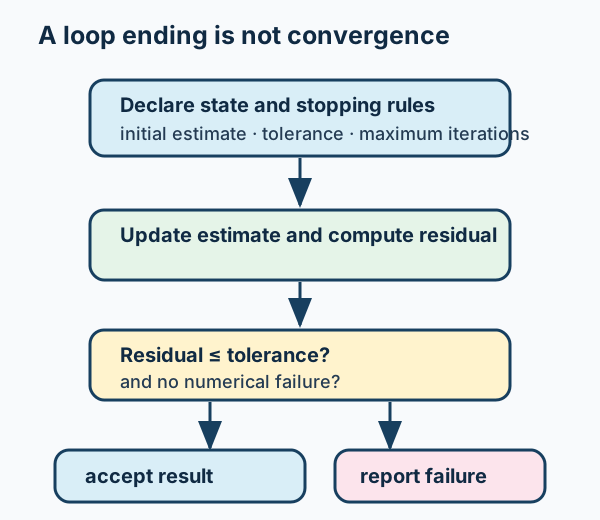
Figure 1:A trustworthy iterative algorithm makes its state, acceptance criterion, and non-convergence outcome explicit.
What to notice: reaching a maximum iteration count is not evidence that a result has converged. It is a separate, reportable outcome with a diagnostic trail.
The control flow structures we explore here are where your numerical calculations from Chapter 2 become dynamic algorithms. Every convergence test, every adaptive timestep, every Monte Carlo acceptance criterion depends on mastering these concepts deeply, not just syntactically. By chapter’s end, you’ll see code not as a sequence of commands, but as a carefully orchestrated flow of decisions and iterations that solve real scientific problems — the same style of thinking used in research pipelines and mission-scale software.
For a first reading, follow this route:
The walrus operator, ternary expressions, loop else, nested loops, Welford’s
algorithm, debugger commands, and the tables remain part of this chapter’s
prose and reference path; they are not hidden prerequisites for the first route.
Try this chapter
Browser Python lab · Bounded Convergence Inspector: predict whether an update rule meets a stated numerical contract before its iteration limit, run it, then revise the claim. The activity is optional; the static convergence check below remains complete without browser Python.
3.1 Algorithmic Thinking: The Lost Art of Pseudocode
Most students jump straight from problem to code, then wonder why they spend hours debugging. Professional computational scientists spend more time thinking than typing. Pseudocode is how we think precisely about algorithms without getting distracted by syntax. Think of it as your algorithm’s blueprint — you wouldn’t build a telescope without optical designs, so why write code without algorithmic designs?
Why Pseudocode Matters in Scientific Computing
Consider this scenario: You need to implement adaptive timestepping for an orbital integrator. Without pseudocode, you’ll likely write code, run it, watch orbits spiral incorrectly, debug for hours, and maybe get it working through trial and error. With pseudocode, you’ll identify edge cases, boundary conditions, and logical flaws before writing a single line of Python.
# NOTE: This snippet is intentionally incomplete (placeholder functions/variables)
# and is meant for reading, not running.
# WITHOUT PSEUDOCODE (typical student approach):
# "I'll figure it out as I code..."
def integrate_naive(state, t_end):
    dt = 0.01
    while state.time < t_end:
        new_state = step(state, dt)
        error = estimate_error(state, new_state)
        if error > tolerance:
            dt = dt * 0.5  # Seems reasonable?
        state = new_state
    return state
# Wait, this doesn't work... infinite loop when error is bad!
# Also, dt never increases... hours of debugging ahead
Now let’s see how pseudocode reveals problems immediately! This is exactly how professional scientists and engineers design algorithms: make the logic explicit first, then implement.
The Three Levels of Pseudocode Refinement
Professional algorithm development happens in stages, each revealing different issues. Don’t worry if this feels strange at first — every programmer has felt that way! But once you embrace pseudocode, you’ll save countless hours of debugging. Let’s build this skill together:
Level 1: Conceptual Overview (The Big Picture)
WHILE simulation not done:       # WHILE means "repeat as long as condition is true"
    Take a step
    Check IF step was good        # IF means "only do this when condition is true"
    Adjust timestep
This level helps you understand the overall flow. The WHILE construct creates a loop that continues until some condition becomes false. The IF construct makes a decision based on a condition. Already, we can ask critical questions: What defines “done”? What makes a step “good”? How much should we adjust? These questions matter!
Solution
No exit condition if step is never “good” — infinite loop risk!
No bounds on timestep adjustment — could grow infinitely or shrink to zero
“Simulation done” is vague — need precise termination condition
No error handling — what if the integration fails completely?
These aren’t nitpicks — they’re the difference between code that runs and code that runs correctly!
Level 2: Structural Detail (The Flow)
FUNCTION adaptive_integrate(initial_state, end_time):  # FUNCTION groups reusable code
    state <- initial_state                              # <- means "assign value to variable"
    dt <- estimate_initial_timestep(state)

    WHILE state.time < end_time:                       # Loop continues while time hasn't reached end
        DO:                                             # DO-UNTIL creates a loop that runs at least once
            trial_state = integrate(state, dt)
            error = compute_error(trial_state)
            IF error >= tolerance:
                dt <- max(dt * 0.5, dt_min)            # A rejected step changes the next trial
        UNTIL error < tolerance OR dt <= dt_min        # OR means "either condition can be true"

        IF error >= tolerance:
            RETURN failure("minimum timestep reached before an acceptable step")

        state <- trial_state
        dt <- adjust_timestep(error, dt)

    RETURN state                                        # RETURN sends value back to caller
Now we see the retry logic and minimum timestep safeguard. The DO-UNTIL construct ensures we attempt at least one integration step. The OR operator means either condition being true will exit the inner loop. FUNCTION defines a reusable block of code that can be called with arguments and RETURN a result.
Level 3: Implementation-Ready (Stage 1: Core Logic)
FUNCTION adaptive_integrate(initial_state, end_time, tolerance):
    state <- initial_state
    dt <- estimate_initial_timestep(state)

    WHILE state.time < end_time:
        trial_state <- rk4_step(state, dt)
        error <- estimate_error(state, trial_state)

        IF error < tolerance:                          # Decision point
            state <- trial_state
            dt <- min(dt * 1.5, dt_max)                # Can grow
        ELSE:                                          # ELSE handles "otherwise" case
            dt <- max(dt * 0.5, dt_min)                # Must shrink
Level 3: Implementation-Ready (Stage 2: Add Safety)
FUNCTION adaptive_integrate(initial_state, end_time, tolerance):
    state <- initial_state
    dt <- estimate_initial_timestep(state)
    dt_min <- 1e-10 * (end_time - initial_state.time)
    dt_max <- 0.1 * (end_time - initial_state.time)

    WHILE state.time < end_time:
        step_accepted <- False                          # Boolean flag (True/False)
        attempts <- 0

        WHILE NOT step_accepted AND attempts < MAX_ATTEMPTS:  # NOT inverts, AND requires both
            trial_state <- rk4_step(state, dt)
            error <- estimate_error(state, trial_state)

            IF error < tolerance:
                step_accepted <- True
                state <- trial_state
            ELSE:
                dt <- max(dt * 0.5, dt_min)
            attempts <- attempts + 1

        IF NOT step_accepted:
            RETURN failure("no acceptable step within MAX_ATTEMPTS")

        dt <- min(dt * 1.5, dt_max)                    # Grow only after an accepted step

    RETURN state
Each refinement level reveals new issues and solutions. The NOT operator inverts a boolean value (True becomes False, False becomes True). The AND operator requires both conditions to be true. This is computational thinking in action!
3.2 Boolean Logic in Scientific Computing
Every decision in your code ultimately reduces to true or false. But in scientific computing, these decisions often involve floating-point numbers, where equality is treacherous and precision is limited. Let’s master this fundamental building block that underlies everything from data quality checks to convergence criteria!
The Complete Set of Comparison Operators
Python provides six comparison operators that return boolean values (True or False):
# All comparison operators in Python
temperature = 5778  # Kelvin (Sun's surface)

# The six fundamental comparisons
print(f"Greater than: {temperature > 6000}")           # False
print(f"Less than: {temperature < 6000}")              # True
print(f"Greater or equal: {temperature >= 5778}")      # True
print(f"Less or equal: {temperature <= 5778}")         # True
print(f"Equal to: {temperature == 5778}")              # True
print(f"Not equal to: {temperature != 6000}")          # True

# Chaining comparisons (Python's elegant feature!)
print(f"\nMain sequence star? {3000 < temperature < 50000}")  # True
# This is equivalent to: (3000 < temperature) AND (temperature < 50000)
Greater than: False
Less than: True
Greater or equal: True
Less or equal: True
Equal to: True
Not equal to: True
Main sequence star? True
The != operator (not equal) is particularly useful for filtering out sentinel values or checking if something has changed. The ability to chain comparisons like 3000 < temperature < 50000 is a Python feature that makes code more readable and matches mathematical notation.
The Three Logical Operators: AND, OR, NOT
Python’s logical operators combine or modify boolean values:
# Demonstrating all three logical operators
is_bright = True
is_variable = False

# AND: Both conditions must be true
print(f"Bright AND variable: {is_bright and is_variable}")  # False

# OR: At least one condition must be true
print(f"Bright OR variable: {is_bright or is_variable}")     # True

# NOT: Inverts the boolean value
print(f"NOT bright: {not is_bright}")                       # False
print(f"NOT variable: {not is_variable}")                   # True

# Complex combinations (real telescope scheduling logic!)
observable = True
weather_good = True
calibrated = False
can_calibrate_now = True

can_observe = observable and weather_good and (calibrated or can_calibrate_now)
print(f"\nCan observe? {can_observe}")

# Truth table demonstration
print("\nTruth Table for AND:")
for a in [True, False]:
    for b in [True, False]:
        print(f"  {a:5} AND {b:5} = {a and b}")
Bright AND variable: False
Bright OR variable: True
NOT bright: False
NOT variable: True
Can observe? True
Truth Table for AND:
1 AND 1 = True
1 AND 0 = False
0 AND 1 = False
0 AND 0 = False
Special Comparison Operators: is, in
Python has two special operators that are incredibly useful in scientific programming:
import math

# The 'is' operator checks identity (same object in memory)
a = [1, 2, 3]
b = [1, 2, 3]
c = a

print(f"a == b: {a == b}")  # True - same values
print(f"a is b: {a is b}")  # False - different objects
print(f"a is c: {a is c}")  # True - same object

# Special case: None should always use 'is'
result = None
print(f"Checking None: {result is None}")  # Preferred
# Don't use: result == None
# Also: never use `is` for numeric equality (use ==, or math.isclose for floats)

# The 'in' operator checks membership
stellar_types = ['O', 'B', 'A', 'F', 'G', 'K', 'M']
print(f"\nIs 'G' a stellar type? {'G' in stellar_types}")  # True
print(f"Is 'X' a stellar type? {'X' in stellar_types}")    # False

# Works with strings too!
filename = "observations_2024.fits"
print(f"Is FITS file? {'fits' in filename}")  # True
a == b: True
a is b: False
a is c: True
Checking None: True
Is 'G' a stellar type? True
Is 'X' a stellar type? False
Is FITS file? True
Handy Reductions: any() and all()
These are extremely common in scientific code: they reduce many boolean checks to one decision.
snr_values = [3.2, 7.1, 2.0, 10.5]
print(any(snr >= 5 for snr in snr_values))   # at least one usable measurement?
print(all(snr >= 5 for snr in snr_values))   # are they all usable?
True
False
The Walrus Operator: Assignment Expressions (Python 3.8+)
Python 3.8 introduced the walrus operator (:=) which allows assignment within expressions:
def get_observations():
    # Stand-in for a real data loader
    return list(range(123))

# Traditional approach - two steps
data = get_observations()
if len(data) > 100:
    print(f"Large dataset: {len(data)} observations")
    # Notice we call len(data) twice!

# With walrus operator - assign and test in one line
if (n := len(data)) > 100:
    print(f"Large dataset: {n} observations")
    # Now n contains the length, no need to recalculate!

# Real astronomical example (simulated)
def check_observation_quality(observations):
    """Return high-SNR observations if we have enough."""
    good_obs = [obs for obs in observations if obs["snr"] > 5]
    if (good_count := len(good_obs)) >= 10:
        print(f"Found {good_count} good observations")
        return good_obs
    return None

observations = [{"snr": snr} for snr in [2, 3, 10, 6, 8, 1, 7, 9, 4, 5.1, 6.2, 3.3]]
_ = check_observation_quality(observations)

# Useful in while loops too
# while (line := file.readline()):  # Read and check in one step
#     process(line)

print("Note: Walrus operator requires Python 3.8+")
print("It's useful but not essential - all code can be written without it")
Large dataset: 123 observations
Large dataset: 123 observations
Note: Walrus operator requires Python 3.8+
It's useful but not essential - all code can be written without it
The Floating-Point Equality Trap
For a computed floating-point quantity, == is often not the comparison you
mean—but it remains correct when exact equality is the stated contract. When
the question is whether two temperatures agree at a stated resolution, name
that resolution and use it explicitly:
import math

# The floating-point trap strikes!
calculated_temp_K = 5778.0000000001
expected_temp_K = 5778.0
temperature_resolution_K = 0.01  # An illustrative instrument/reporting contract

print(f"Calculated == Expected? {calculated_temp_K == expected_temp_K}")  # False
print(f"Tiny difference: {calculated_temp_K - expected_temp_K:.2e} K")

# The intended contract: agreement within a stated absolute resolution.
print(math.isclose(
    calculated_temp_K,
    expected_temp_K,
    rel_tol=0.0,
    abs_tol=temperature_resolution_K,
))

# For a scale-dependent requirement, use a named relative tolerance instead.
# Chapter 2 develops why these two contracts are not interchangeable.
Calculated == Expected? False
Tiny difference: 1.00e-10 K
True
Short-Circuit Evaluation: Order Matters!
Python’s and and or operators use short-circuit evaluation — they stop evaluating as soon as the result is determined:
# Short-circuit evaluation can prevent errors (if the safe check is first)
stellar_data = []  # Empty for demonstration

# WRONG - will crash if data is empty!
# if stellar_data[0] > 0 and len(stellar_data) > 0:  # IndexError!

# CORRECT - checks length first (Python evaluates left operand first)
if len(stellar_data) > 0 and stellar_data[0] > 0:
    print("First star has positive measurement")
else:
    print("No data or first measurement not positive")

# Even more Pythonic (empty list evaluates to False)
if stellar_data and stellar_data[0] > 0:
    print("First star has positive measurement")

# OR also short-circuits
def expensive_check():
    print("  Running expensive calculation...")
    return True

# This won't call expensive_check() because True or anything is True
print("\nShort-circuit OR demonstration:")
result = True or expensive_check()  # expensive_check never runs!
print(f"Result: {result}")

# But this will call it
result = False or expensive_check()  # expensive_check must run
print(f"Result: {result}")
No data or first measurement not positive
Short-circuit OR demonstration:
Result: True
Running expensive calculation...
Result: True
🌟 Why This Matters: Satellite Collision Avoidance
Space agencies use automated collision avoidance systems that evaluate multiple conditions in sequence for efficiency. The logic follows similar principles: check simple conditions first, then expensive calculations only if needed.
# PSEUDOCODE: variables like distance/screening_threshold are placeholders.
def check_collision_risk(satellite1, satellite2):
    """
    Simplified collision risk logic similar to conjunction assessment.
    Real systems use complex probability calculations, but follow
    similar efficiency principles.

    Based on standard conjunction assessment practices where:
    - Initial screening uses simple distance checks
    - Detailed analysis only for close approaches
    - Probability calculations only when necessary
    """

    # Check cheap calculations first
    if distance > screening_threshold:
        return "Outside this illustrative screening threshold"

    # Only if close, calculate relative velocity
    if closing_velocity < 0:
        return "Moving apart"

    # Only if approaching, compute collision probability
    if collision_probability > probability_threshold:
        return "COLLISION RISK!"

    return "Monitor"
An initial screen can avoid applying more detailed analysis to every possible
pairing, but it does not itself establish collision risk. A single wrong
comparison can mean missed warnings or wasted compute. For an operational
overview, NASA distinguishes conjunction screening from close-approach risk
assessment: https://
Note: This example simplifies the actual collision avoidance algorithms for pedagogical clarity. Real systems use complex orbital mechanics and probability distributions, but the core principle of ordered boolean evaluation remains crucial.
3.3 Conditional Statements: Teaching Computers to Decide
Conditional statements are where your code makes decisions. In scientific computing, these decisions often involve numerical thresholds, convergence criteria, and boundary conditions. Let’s build your intuition for writing robust conditionals you can trust in long-running analyses and pipelines.
The if Statement: Your First Decision Maker
The if statement is the simplest conditional — it executes code only when a condition is true:
# Basic if statement
magnitude = 4.5

if magnitude < 6.0:
    print(f"Star is visible to naked eye (mag {magnitude})")

# Nothing happens if condition is false
magnitude = 8.0
if magnitude < 6.0:
    print("This won't print")

# Multiple statements in if block
stellar_mass = 10.0  # Solar masses

if stellar_mass > 8:
    print("Massive star detected!")
    print(f"Mass: {stellar_mass} Msun")
    print("Will end as supernova")
    remnant = "neutron star or black hole"
Star is visible to naked eye (mag 4.5)
Massive star detected!
Mass: 10.0 Msun
Will end as supernova
The if-else Statement: Binary Decisions
The else clause provides an alternative when the condition is false:
# Binary decision with if-else. This is a toy routing rule, not a physical
# definition of "nearby" or a complete observation-quality model.
redshift = 0.8

if redshift < 0.1:
    classification = "nearby galaxy"
else:
    classification = "distant galaxy"

print(f"z = {redshift}: {classification}")

# You can have multiple statements in each block
observation_snr = 3.5  # Signal-to-noise ratio

if observation_snr >= 5.0:
    print("Passes this toy screening threshold; investigate further")
    process_immediately = True
    confidence = "high"
else:
    print("Does not pass this toy screening threshold")
    process_immediately = False
    confidence = "low"
z = 0.8: distant galaxy
Does not pass this toy screening threshold
The elif Statement: Multiple Choices
The elif (else if) statement allows multiple conditions to be checked in sequence:
import math

def classify_stellar_fate_toy(mass_solar):
    """
    Deliberately coarse teaching classifier based only on initial mass.
    Demonstrates guard clauses and elif chains.

    This is not a stellar-evolution prediction: real outcomes also depend on
    metallicity, mass loss, rotation, and binary interaction.
    """
    # Guard clauses - validate input FIRST
    if mass_solar <= 0:
        raise ValueError(f"Mass must be positive: {mass_solar}")

    if not math.isfinite(mass_solar):
        raise ValueError(f"Mass must be finite: {mass_solar}")

    # Main classification logic with elif chain
    if mass_solar < 0.08:
        outcome = "brown dwarf (substellar object; not a remnant)"
    elif mass_solar < 8:
        outcome = "white-dwarf outcome (toy model)"
    elif mass_solar < 25:
        outcome = "neutron-star outcome (toy model)"
    else:  # Final catch-all
        outcome = "black-hole outcome (toy model)"

    # Add uncertainty near boundaries (real issue in astronomy!)
    boundaries = [0.08, 8, 25]
    min_distance = min(abs(mass_solar - b) for b in boundaries)

    if min_distance < 0.5:
        outcome += " (near toy threshold)"

    return outcome

# Test our classifier
print(classify_stellar_fate_toy(1.0))   # Sun-like initial mass
print(classify_stellar_fate_toy(7.8))   # Near toy threshold
print(classify_stellar_fate_toy(30))    # Massive initial mass
white-dwarf outcome (toy model)
white-dwarf outcome (toy model) (near toy threshold)
black-hole outcome (toy model)
Scientific note: This toy classifier uses coarse mass thresholds for pedagogy. Real stellar endpoints depend on additional physics (metallicity, rotation, binarity, mass loss).
Guard Clauses: Fail Fast, Fail Clear
Guard clauses handle special cases immediately, preventing deep nesting and making code clearer. This pattern is essential for scientific code where invalid inputs can cause subtle bugs hours into a simulation!
import math
import warnings

def calculate_orbital_period(a, M, validate=True):
    """
    Kepler's third law with comprehensive validation.
    Defensive checks like these can catch unit/scale mistakes early.

    Parameters:
        a: Semi-major axis [AU]
        M: Central mass [solar masses]
    """
    # Guard clauses handle problems immediately
    if validate:
        if a <= 0:
            raise ValueError(f"Semi-major axis must be positive: {a} AU")
        if M <= 0:
            raise ValueError(f"Mass must be positive: {M} Msun")

        # Check for orbit inside Schwarzschild radius!
        rs_au = 1.97e-8 * M  # Schwarzschild radius in AU
        if a < rs_au:
            raise ValueError(f"Orbit inside black hole event horizon: a={a} AU, Rs={rs_au} AU")

    # Main calculation - only runs if guards pass
    period_years = math.sqrt(a**3 / M)  # Simplified Kepler's third law

    # Sanity check result
    if validate and period_years > 13.8e9:
        warnings.warn(f"Period exceeds age of universe: {period_years:.2e} years")

    return period_years

# Test with real systems
print(f"Earth: {calculate_orbital_period(1.0, 1.0):.2f} years")
print(f"Mercury: {calculate_orbital_period(0.387, 1.0):.2f} years")
print(f"Proxima Centauri b: {calculate_orbital_period(0.0485, 0.122):.3f} years")
Earth: 1.00 years
Mercury: 0.24 years
Proxima Centauri b: 0.031 years
The Ternary Operator: Compact Conditionals
Python’s ternary operator provides a compact way to write simple if-else statements:
# Ternary operator: value_if_true if condition else value_if_false
magnitude = 3.5
visibility = "visible" if magnitude < 6.0 else "not visible"
print(f"Star with magnitude {magnitude} is {visibility}")

# Useful for setting defaults based on conditions
exposure_time = 30  # seconds
quality = "good" if exposure_time > 10 else "poor"

# Can be nested but don't overdo it!
stellar_class = "G"
temperature = 5778 if stellar_class == "G" else (7500 if stellar_class == "A" else 3500)
print(f"Class {stellar_class} star: ~{temperature}K")
Star with magnitude 3.5 is visible
Class G star: ~5778K
🌟 Why This Matters: The Mars Climate Orbiter Disaster
In 1999, NASA lost the Mars Climate Orbiter after a units mismatch contributed to navigation errors. A simple guard clause can help catch these mistakes early:
Note: The $327 million figure represents total mission cost. This anecdote simplifies a complex failure to emphasize the importance of unit validation. The actual failure involved multiple factors, but the unit confusion was the primary cause identified in NASA’s investigation reports.
import warnings

def process_thrust_data(force, units):
    """Guard clause example: validate units before using the value."""

    # Validate units BEFORE processing
    valid_units = {'N': 1.0, 'lbf': 4.448222}  # Conversion factors

    if units not in valid_units:
        raise ValueError(f"Unknown units: {units}. Use 'N' or 'lbf'")

    # Convert to standard units (Newtons)
    force_newtons = force * valid_units[units]

    # Additional sanity check (toy threshold)
    if force_newtons > 1000:  # Typical max thruster force
        warnings.warn(f"Unusually high thrust: {force_newtons} N")

    return force_newtons

# Example failure mode: one component produces lbf, another assumes N.
# A guard clause forces the mismatch into an explicit error early.
The mission was lost after the spacecraft entered the atmosphere too low. Guard clauses won’t prevent every failure, but they do prevent many expensive “garbage in, garbage out” mistakes.
3.4 Loops: The Heart of Scientific Computation
Now that you’ve mastered making decisions with conditionals, let’s make your code repeat tasks efficiently! Loops are where your programs gain superpowers — they’re the difference between analyzing one star and analyzing millions. Every N-body simulation, every light curve analysis, every Monte Carlo calculation depends on loops. The patterns you learn here will appear in every algorithm you write for the rest of your career.
The for Loop: Iterating Over Sequences
The for loop iterates over any sequence (list, tuple, string, range):
# Basic for loop
stellar_types = ['O', 'B', 'A', 'F', 'G', 'K', 'M']

for spectral_class in stellar_types:
    print(f"Class {spectral_class} star")

# Using range() for counting
print("\nCounting with range:")
for i in range(5):  # 0, 1, 2, 3, 4 (not 5!)
    print(f"Observation {i}")

# Range with start, stop, step
print("\nEvery 2nd hour from 20:00 to 02:00 (wrapping past midnight):")
for hour in [20, 22, 0, 2]:
    print(f"{hour:02d}:00")
Class O star
Class B star
Class A star
Class F star
Class G star
Class K star
Class M star
Counting with range:
Observation 0
Observation 1
Observation 2
Observation 3
Observation 4
Every 2nd hour from 20:00 to 02:00 (wrapping past midnight):
20:00
22:00
00:00
02:00
The Accumulator Pattern in Scientific Computing
The accumulator pattern is fundamental to scientific computing:
# Calculating center of mass for a star cluster
star_masses = [1.2, 0.8, 2.1, 0.5, 1.5]  # Solar masses
star_positions = [0.1, 0.3, 0.5, 0.7, 0.9]  # Parsecs from origin

total_mass = 0.0
weighted_position = 0.0

for mass, position in zip(star_masses, star_positions, strict=True):
    total_mass += mass
    weighted_position += mass * position

center_of_mass = weighted_position / total_mass
print(f"Cluster center of mass: {center_of_mass:.3f} pc")
print(f"Total cluster mass: {total_mass:.1f} Msun")

# This same pattern calculates:
# - Barycenter of binary systems (how we detect exoplanets!)
# - Average stellar metallicity in galaxies
# - Integrated luminosity functions
# - Weighted mean magnitudes
Cluster center of mass: 0.510 pc
Total cluster mass: 6.1 Msun
Common for Loop Patterns
Python provides several useful functions for loop patterns:
# enumerate() gives you index and value
magnitudes = [10.2, 10.1, 9.5, 10.3, 8.2, 10.2]

print("Finding bright events with enumerate:")
for i, mag in enumerate(magnitudes):
    if mag < 9.0:
        print(f"  Alert! Index {i}: magnitude {mag}")

# zip() for parallel iteration. In a scientific time series, a missing position
# should be an error rather than silently dropping the final unmatched time.
times = [0, 1, 2, 3, 4]  # seconds
positions = [0, 4.9, 19.6, 44.1, 78.4]  # meters

print("\nParallel iteration with zip:")
for t, x in zip(times, positions, strict=True):  # Python 3.10+
    if t > 0:  # Avoid division by zero
        velocity = x / t
        print(f"  t={t}s: v={velocity:.1f} m/s")
Finding bright events with enumerate:
Alert! Index 4: magnitude 8.2
Parallel iteration with zip:
t=1s: v=4.9 m/s
t=2s: v=9.8 m/s
t=3s: v=14.7 m/s
t=4s: v=19.6 m/s
Ordinary zip(times, positions) stops at the shorter sequence. That may be
convenient for text processing, but it can silently discard a measurement in
paired scientific data. Use strict=True when equal lengths are part of the
data contract; otherwise check lengths explicitly before iterating.
The while Loop: Conditional Iteration
The while loop continues as long as a condition remains true:
# Basic while loop
count = 0
while count < 3:
    print(f"Iteration {count}")
    count += 1  # Don't forget to update!
Iteration 0
Iteration 1
Iteration 2
import math

def bounded_relaxation(initial_value, target_value, rate, abs_tol, max_iterations):
    """Move toward a target, returning a value and an explicit stopping status.

    ``abs_tol`` is a supplied numerical contract in the same units as the
    values; it is not a universal convergence tolerance.
    """
    if not 0 < rate <= 1:
        raise ValueError("rate must be in (0, 1]")
    if abs_tol <= 0:
        raise ValueError("abs_tol must be positive")
    if max_iterations < 1:
        raise ValueError("max_iterations must be at least 1")

    value = initial_value
    for iteration in range(1, max_iterations + 1):
        value = value * (1 - rate) + target_value * rate
        if math.isclose(value, target_value, rel_tol=0.0, abs_tol=abs_tol):
            return value, "converged", iteration

    return value, "max_iterations_reached", max_iterations


value, status, iteration = bounded_relaxation(
    initial_value=100.0,
    target_value=1.0,
    rate=0.1,
    abs_tol=0.01,
    max_iterations=5,
)
print(f"Stopped after {iteration} iterations: {status}; value={value:.3f}")
Stopped after 5 iterations: max_iterations_reached; value=59.459
Check Your Understanding: interpret a stopped loop
Change max_iterations to 100, then run the same cell. What is different
between the two outcomes? What can the "converged" status establish, and
what remains outside this calculation?
Answer: With 100 iterations this toy update reaches the stated absolute tolerance; with 5 it only establishes that the iteration budget ended first. The successful status supports agreement with this explicit numerical contract. It does not validate the update rule, choose a tolerance, or establish the physical adequacy of a model.
Loop Control: break, continue, and else
Python provides additional loop control statements:
# break: Exit loop early
print("Using break to find the first sample above an illustrative screen:")
observations = [0.1, 0.3, 0.2, 5.8, 0.4, 6.2]

for obs in observations:
    if obs > 1.0:
        print(f"First sample above this screen: {obs}")
        break  # Stop searching

# continue: Skip to next iteration
print("\nUsing continue to skip bad data:")
measurements = [1.2, -999, 2.3, -999, 3.4]

for value in measurements:
    if value == -999:  # Sentinel value
        continue  # Skip this iteration
    print(f"Processing: {value}")

# else clause: Runs if loop completes without break
print("\nLoop else clause:")
search_list = [1, 2, 3, 4, 5]
target = 7

for item in search_list:
    if item == target:
        print("Found!")
        break
else:  # This runs because we didn't break
    print(f"Target {target} not found in list")
Using break to find the first sample above an illustrative screen:
First sample above this screen: 5.8
Using continue to skip bad data:
Processing: 1.2
Processing: 2.3
Processing: 3.4
Loop else clause:
Target 7 not found in list
The pass Statement: Placeholder
The pass statement does nothing — useful as a placeholder. It should not become a way to hide an unexpected error:
# pass as placeholder
for i in range(3):
    if i == 1:
        pass  # TODO: Add processing here later
    else:
        print(f"Processing {i}")

# Often used in exception handling
try:
    risky_operation = 1 / 1  # No error this time
except ZeroDivisionError:
    pass  # Accept silence only when this specific outcome is genuinely harmless

print("Continued after pass")
Processing 0
Processing 2
Continued after pass
Nested Loops: Processing 2D Data
Loops can be nested to process multi-dimensional data:
# Nested loops for 2D grid (like CCD image)
print("Processing 3x3 pixel grid:")
for row in range(3):
    for col in range(3):
        pixel_value = row * 3 + col  # Simulated pixel value
        print(f"({row},{col})={pixel_value}", end="  ")
    print()  # New line after each row

# More realistic: Finding peaks in 2D data
data_2d = [
    [1, 2, 1],
    [2, 9, 2],  # Peak at (1,1)
    [1, 2, 1]
]

print("\nFinding peaks in 2D array:")
for i in range(len(data_2d)):
    for j in range(len(data_2d[i])):
        if data_2d[i][j] > 5:
            print(f"Peak at ({i},{j}): value={data_2d[i][j]}")
Processing 3x3 pixel grid:
(0,0)=0 (0,1)=1 (0,2)=2
(1,0)=3 (1,1)=4 (1,2)=5
(2,0)=6 (2,1)=7 (2,2)=8
Finding peaks in 2D array:
Peak at (1,1): value=9
3.5 List Comprehensions: Elegant and Efficient
Now that you’ve mastered loops, let’s evolve them into something more compact. List comprehensions can make a simple transformation readable, but performance depends on the operation and workload; clarity is the reason to choose one.
From Loop to Comprehension
# Traditional loop approach
squares_loop = []
for x in range(10):
    if x % 2 == 0:  # Even numbers only
        squares_loop.append(x**2)
print(f"Loop result: {squares_loop}")

# List comprehension - same result, clearer intent!
squares_comp = [x**2 for x in range(10) if x % 2 == 0]
print(f"Comprehension: {squares_comp}")

# The anatomy of a list comprehension:
# [expression for item in sequence if condition]
#      v           v         v           v
#  Transform   Variable  Source    Filter (optional)
Loop result: [0, 4, 16, 36, 64]
Comprehension: [0, 4, 16, 36, 64]
Real Scientific Applications
# Filter and transform magnitude data from a survey
magnitudes = [12.3, 15.1, 13.7, 16.2, 14.5, 17.1, 11.8, 18.5, 13.2]

# Get fluxes for stars passing this illustrative magnitude screen (mag < 16)
observable_fluxes = [10**(-0.4 * mag)
                     for mag in magnitudes
                     if mag < 16.0]

print(f"Observable star count: {len(observable_fluxes)}/{len(magnitudes)}")
print(f"Brightest flux: {max(observable_fluxes):.2e}")
print(f"Faintest flux: {min(observable_fluxes):.2e}")

# Dictionary comprehension (bonus!)
star_dict = {f"star_{i}": mag
             for i, mag in enumerate(magnitudes)
             if mag < 15}
print(f"\nBright stars dictionary: {star_dict}")
Observable star count: 6/9
Brightest flux: 1.91e-05
Faintest flux: 9.12e-07
Bright stars dictionary: {'star_0': 12.3, 'star_2': 13.7, 'star_4': 14.5, 'star_6': 11.8, 'star_8': 13.2}
When NOT to Use Comprehensions
# BAD: Too complex - unreadable!
# result = [process(x) if condition(x) else alternative(y)
#           for x, y in zip(list1, list2)
#           if validate(x) and check(y)]

# GOOD: Clear loop for complex logic
def classify_galaxies(redshifts, luminosities):
    """When logic is complex, loops are clearer!"""
    classifications = []
    for z, L in zip(redshifts, luminosities, strict=True):
        if z < 0.5 and L > 1e10:
            classifications.append("nearby bright")
        elif z < 0.5:
            classifications.append("nearby faint")
        elif L > 1e10:
            classifications.append("distant bright")
        else:
            classifications.append("distant faint")
    return classifications

# Clear and maintainable!
z_values = [0.1, 0.8, 0.3, 1.2]
L_values = [5e9, 2e10, 8e10, 3e9]
galaxy_types = classify_galaxies(z_values, L_values)
print(f"Galaxy classifications: {galaxy_types}")
Galaxy classifications: ['nearby faint', 'distant bright', 'nearby bright', 'distant faint']
Deep Dive: advanced control flow patterns
Now let’s explore powerful patterns that appear throughout scientific computing. These aren’t just code tricks — they’re fundamental algorithmic building blocks!
Welford’s Algorithm: Numerically Stable Statistics
import math
import statistics

def running_statistics(data_stream):
    """
    Calculate mean and variance in single pass.
    Uses Welford's algorithm (1962) for numerical stability.
    """
    n = 0
    mean = 0.0
    M2 = 0.0

    for value in data_stream:
        n += 1
        delta = value - mean
        mean += delta / n
        delta2 = value - mean
        M2 += delta * delta2

    if n < 2:
        return mean, float('nan')

    variance = M2 / (n - 1)
    return mean, variance

# Test with problematic data (large baseline with small variations)
photometry = [1e8, 1e8 + 1, 1e8 + 2, 1e8 - 1, 1e8 + 0.5]
mean, var = running_statistics(photometry)
print(f"Stable algorithm: mean={mean:.1f}, std={math.sqrt(var):.2f}")

# Compare the risky one-pass formula with a library reference on this dataset.
naive_mean = sum(photometry) / len(photometry)
naive_var = sum(x**2 for x in photometry) / len(photometry) - naive_mean**2
reference_var = statistics.variance(photometry)
print(f"Risky one-pass variance: {naive_var:.3e}")
print(f"Reference sample variance: {reference_var:.3e}")
Stable algorithm: mean=100000000.5, std=1.12
Risky one-pass variance: 2.000e+00
Reference sample variance: 1.250e+00
Why is Welford’s algorithm numerically stable?
The risky one-pass variance formula is
mean(x**2) - mean(x)**2: when a large baseline has a small spread, it
subtracts two large, nearby quantities. That cancellation can erase the small
variance or even produce a negative result from roundoff.
Welford’s algorithm updates the mean from the deviation of each new value from the current mean, then accumulates the corresponding squared deviation. Its advantage is not that floating point cannot represent differences of order one near 108—it generally can—but that it avoids forming variance as a difference of two large aggregate terms.
Note
Why not use log space? Students often ask why we don’t use logarithms here like we did for the luminosity calculation. Log space is useful for products and positive quantities spanning huge dynamic ranges, but it changes arithmetic means and variances into different statistics. Welford’s algorithm is a useful stable streaming pattern; it is not the only valid variance algorithm or a reason to take logarithms of every dataset.
3.7 Debugging Control Flow
Logic errors are the hardest bugs because the code runs without crashing but produces wrong results. Let’s build your debugging arsenal!
Strategic Print Debugging
def debug_convergence(initial, target, rate, abs_tol=1e-6, max_iter=20):
    """
    Example of strategic debug output.
    Returns a value, a stopping status, and an iteration count.

    The inputs and absolute tolerance are dimensionless in this toy example.
    """

    if not 0 < rate <= 1:
        raise ValueError("rate must be in (0, 1]")
    if abs_tol <= 0:
        raise ValueError("abs_tol must be positive")
    if max_iter < 1:
        raise ValueError("max_iter must be at least 1")

    current = initial
    history = []

    for iteration in range(max_iter):
        old = current
        current = current * (1 - rate) + target * rate
        change = current - old
        history.append(current)

        # Strategic output - not everything!
        if iteration < 3 or iteration % 5 == 0:
            print(f"Iter {iteration:2d}: {old:.4f} -> {current:.4f} (delta={change:+.5f})")

        # Convergence check
        if abs(current - target) < abs_tol:
            print(f"CONVERGED after {iteration + 1} iterations")
            return current, "converged", iteration + 1

        # Detect problems early
        if len(history) > 3:
            if (history[-1] > history[-2] < history[-3]):
                print(f"OSCILLATION detected")

    print(f"FAILED after {max_iter} iterations")
    return current, "max_iterations_reached", max_iter

# Test the algorithm
print("Testing convergence:")
result, status, iterations = debug_convergence(0, 100, 0.1)
print(f"Caller receives {status} after {iterations} iterations")
Testing convergence:
Iter 0: 0.0000 -> 10.0000 (delta=+10.00000)
Iter 1: 10.0000 -> 19.0000 (delta=+9.00000)
Iter 2: 19.0000 -> 27.1000 (delta=+8.10000)
Iter 5: 40.9510 -> 46.8559 (delta=+5.90490)
Iter 10: 65.1322 -> 68.6189 (delta=+3.48678)
Iter 15: 79.4109 -> 81.4698 (delta=+2.05891)
FAILED after 20 iterations
Caller receives max_iterations_reached after 20 iterations
Using Assertions for Validation
The assert statement helps catch bugs during development:
def calculate_magnitude_average(magnitudes):
    """Calculate average magnitude with assertions for debugging."""

    # Assertions document and enforce assumptions
    assert len(magnitudes) > 0, "Need at least one magnitude"
    assert all(isinstance(m, (int, float)) for m in magnitudes), "All must be numbers"
    assert all(0 < m < 30 for m in magnitudes), "Magnitudes must be reasonable"

    # Safe to proceed after assertions
    return sum(magnitudes) / len(magnitudes)

# Test with good data
good_mags = [10.2, 10.5, 10.3]
avg = calculate_magnitude_average(good_mags)
print(f"Average magnitude: {avg:.2f}")

# WARNING: Assertions can be disabled in production with python -O
# This means they should NEVER be used for actual validation!
Average magnitude: 10.33
🌟 The More You Know: Kepler’s Control Flow Patterns
The Kepler mission’s pipeline used exactly the control flow patterns you just learned. Here’s an intentionally simplified pseudocode skeleton showing the shape of that logic:
Note: This algorithm is greatly simplified for pedagogical purposes. The actual Kepler pipeline used sophisticated techniques including Fourier transforms, multiple detrending algorithms, and extensive validation checks. However, the control flow patterns shown here — guard clauses, filtering, iteration, and conditional validation — formed the backbone of the real system.
# PSEUDOCODE: helper functions/variables like median, sigma, and fold_light_curve
# are placeholders to highlight control flow, not implementation details.
def kepler_planet_search(star_id, light_curve):
    """Simplified Kepler planet detection algorithm"""

    # Guard clause - data quality check
    if len(light_curve) < 1000:
        return None

    # Remove outliers (cosmic rays, etc.)
    cleaned = [point for point in light_curve
               if abs(point - median) < 5 * sigma]

    # Search for periodic dips
    best_period = None
    best_depth = 0
    best_folded = None

    for trial_period in range(1, 365):  # Days
        folded = fold_light_curve(cleaned, trial_period)
        depth = measure_transit_depth(folded)

        if depth > best_depth and depth > 3 * noise_level:
            best_period = trial_period
            best_depth = depth
            best_folded = folded

    # Validate as planet (not eclipsing binary)
    if best_period:
        if is_v_shaped(best_folded):  # Binary check the selected candidate
            return None
        if best_depth > 0.5:  # Too deep
            return None

        return {'period': best_period, 'depth': best_depth}

    return None
Kepler monitored on the order of ~150,000 stars. The control flow patterns you’ve mastered in this chapter — guard clauses, filtering, iteration, and validation — are exactly what enables pipelines to scale. For a real overview, see Jenkins et al. (2010): https://
Solution
The Bug: Operator precedence + missing parentheses.
This line:
elif obj_type == 'variable_star' and magnitude < 12 or time_critical:
is parsed as:
(obj_type == 'variable_star' and magnitude < 12) or time_critical
So when time_critical is True, that branch triggers for every object type (including galaxies and asteroids), and it can even steal priority from later elif cases.
Fix: Add parentheses to match the intended logic.
def assign_telescope_priority_fixed(observation):
    """Fixed version with clearer logic."""
    magnitude = observation['magnitude']
    obj_type = observation['type']
    time_critical = observation['time_critical']

    # Assign base priority by object type
    if obj_type == 'supernova':
        priority = 100
    elif obj_type == 'asteroid' and time_critical:
        priority = 80
    elif obj_type == 'variable_star' and (magnitude < 12 or time_critical):
        priority = 70
    elif obj_type == 'variable_star':
        priority = 50
    elif obj_type == 'galaxy':
        priority = 30
    else:
        priority = 10

    # Boost for bright objects
    if magnitude < 10:
        priority += 20

    return priority
Key Lessons:
Remember precedence:
not>and>orAdd parentheses when mixing
and/orWrite a tiny test case that breaks the buggy logic
Main Takeaways
What an incredible journey you’ve just completed! You’ve transformed from someone who writes code line by line to someone who designs algorithms systematically. This transformation mirrors the evolution every computational scientist goes through, from tentative beginner to confident algorithm designer.
You started by learning to think in pseudocode, a skill that gives you the power to design before you code. Those three levels of refinement you practiced are your blueprint for success. Every hour you invest in pseudocode saves many hours of debugging. When you design your next algorithm for analyzing galaxy spectra or simulating stellar evolution, you’ll catch logical flaws on paper instead of after hours of computation.
The complete set of comparison and logical operators you’ve mastered — from simple greater-than checks to complex boolean combinations with and, or, and not — gives you the full vocabulary for expressing any logical condition. You understand that == is dangerous with floats, that is checks identity not equality, and that in elegantly tests membership. These aren’t just syntax details; they’re the building blocks of every data validation, every convergence check, every quality filter you’ll ever write.
Your understanding of conditional statements goes beyond syntax to defensive programming philosophy. Guard clauses help you fail fast and avoid wasting hours (or compute budgets) on invalid inputs. The elif chains you practiced will classify objects, determine processing paths, and control how your code responds to real, messy data.
The loop patterns you’ve mastered are universal across scientific computing. Accumulators power statistics and reductions, convergence loops power solvers, and nested loops show up whenever you traverse grids or images. Whether using for loops to iterate through catalogs, while loops to converge solutions, or list comprehensions to filter data, you now have the core toolkit.
Most importantly, you’ve learned that bugs aren’t failures — they’re learning opportunities. Every infinite loop teaches you about termination conditions. Every off-by-one error reinforces indexing. The debugging strategies you’ve developed, from strategic print statements to assertions, will serve you throughout your career.
Remember that every major computational achievement relies on these fundamentals. You’re not just learning Python syntax — you’re building algorithmic literacy that transfers across domains.
Definitions
Accumulator Pattern: An algorithmic pattern where values are iteratively combined into a running total or aggregate, fundamental to reductions and statistical calculations in scientific data processing.
Adaptive Refinement: A universal pattern where parameters are adjusted based on quality metrics, with safeguards against infinite refinement, appearing in timestepping, mesh refinement, and optimization throughout computational science.
and: Logical operator that returns True only if both operands are true, using short-circuit evaluation.
assert: Statement that raises an AssertionError if a condition is false, used for debugging and documenting assumptions during development (not for production validation).
Boolean Logic: The system of true/false values and logical operations (and, or, not) that underlies all conditional execution in programs.
break: Statement that immediately exits the current loop, skipping any remaining iterations.
Conditional Statement: A control structure (if/elif/else) that executes different code blocks based on whether conditions evaluate to true or false.
continue: Statement that skips the rest of the current loop iteration and proceeds to the next iteration.
elif: “Else if” statement that checks an additional condition when the previous if or elif was false.
else: Clause that executes when all previous if/elif conditions were false, or when a loop completes without breaking.
for: Loop that iterates over elements in a sequence or iterable object.
Guard Clause: A conditional statement at the beginning of a function that handles special cases or invalid inputs immediately, preventing deep nesting.
if: Statement that executes code only when a specified condition is true.
in: Operator that tests membership in a sequence or collection.
is: Operator that tests object identity (same object in memory), not just equality of values.
List Comprehension: A concise Python syntax for creating lists: [expression for item in iterable if condition].
not: Logical operator that inverts a boolean value (True becomes False, False becomes True).
or: Logical operator that returns True if at least one operand is true, using short-circuit evaluation.
pass: Null statement that does nothing, used as a placeholder where syntax requires a statement.
Pseudocode: A human-readable description of an algorithm that focuses on logic and structure without syntactic details.
sentinel value: A special marker value (like -999, ‘END’, or None) that signals the end of data or a special condition, allowing loops to know when to stop processing
Short-circuit Evaluation: The behavior where logical operators stop evaluating as soon as the result is determined.
Walrus Operator (:=): Assignment expression operator (Python 3.8+) that assigns a value to a variable as part of an expression, allowing both assignment and testing in a single statement.
while: Loop that continues executing as long as a specified condition remains true.
Key Takeaways
✓ Pseudocode reveals logical flaws before they become bugs — always design before implementing
✓ Master all six comparison operators (>, <, >=, <=, ==, !=) and three logical operators (and, or, not)
✓ For computed floating-point quantities, use a tolerance chosen for the claim; use == only when exact equality is the stated contract
✓ The is operator checks identity, not equality — use it for None checks
✓ The in operator elegantly tests membership in sequences or strings
✓ Guard clauses handle special cases first, making main logic clearer
✓ for loops iterate over sequences, while loops continue until a condition becomes false
✓ break exits loops early, continue skips to the next iteration, else runs if loop completes
✓ List comprehensions can clarify simple transformations but become unreadable for complex logic; measure performance when it matters
✓ Short-circuit evaluation in and/or prevents errors and improves performance
✓ The accumulator pattern is fundamental to scientific computing, appearing in all statistical calculations
✓ For iterative numerical while loops, include a maximum iteration limit and inspect the returned status
✓ Welford’s algorithm helps avoid a cancellation-prone variance formula in streaming statistics
✓ Use assert statements to document and enforce assumptions during development
✓ Control-flow patterns make assumptions, stopping rules, and failure paths inspectable in scientific software
Reference: quick tables and debugging tools
| Operator | Description | Example |
|---|---|---|
> | Greater than | if magnitude > 6.0: |
< | Less than | if redshift < 0.1: |
>= | Greater or equal | if snr >= 5.0: |
<= | Less or equal | if error <= tolerance: |
== | Exact value comparison | if status == 'complete': |
!= | Not equal | if flag != -999: |
: Comparison Operators
| Operator | Description | Example |
|---|---|---|
and | Both must be true | if x > 0 and y > 0: |
or | At least one true | if bright or variable: |
not | Inverts boolean | if not converged: |
: Logical Operators
| Operator | Description | Example |
|---|---|---|
in | Membership test | if 'fits' in filename: |
is | Identity test | if result is None: |
is not | Negative identity | if data is not None: |
not in | Negative membership test | if 'error' not in log_file: |
:= | Walrus operator (Python 3.8+) | if (n := len(data)) > 100: |
: Special Operators
| Statement | Purpose | Example |
|---|---|---|
if/elif/else | Conditional execution | if mag < 6: visible = True |
for | Iterate over sequence | for star in catalog: |
while | Loop while condition is true | while not converged and n < max: |
break | Exit loop early | if converged: break |
continue | Skip to next iteration | if bad_data: continue |
pass | Do nothing (placeholder) | if not ready: pass |
assert | Debug check | assert len(data) > 0 |
: Control Flow Statements
| Function | Purpose | Example |
|---|---|---|
range(n) | Generate 0 to n-1 | for i in range(10): |
range(start, stop, step) | Generate with step | for i in range(0, 10, 2): |
enumerate(seq) | Get index and value | for i, val in enumerate(data): |
zip(seq1, seq2, strict=True) | Parallel iteration with an equal-length contract | for x, y in zip(xs, ys, strict=True): |
len(seq) | Sequence length | for i in range(len(data)): |
: Built-in Functions for Loops
| Function | Purpose | Example |
|---|---|---|
all(iterable) | All elements true | if all(x > 0 for x in data): |
any(iterable) | Any element true | if any(x < 0 for x in data): |
math.isclose() | Float comparison with a stated tolerance contract | if math.isclose(a, b, abs_tol=resolution): |
math.isfinite() | Check not inf/nan | if math.isfinite(result): |
math.isnan() | Check for NaN | if not math.isnan(value): |
math.isinf() | Check for infinity | if math.isinf(value): |
isinstance() | Type checking | if isinstance(x, float): |
: Comparison Functions
| Pattern | Purpose | Structure |
|---|---|---|
| Accumulator | Aggregate values | total = 0; for x in data: total += x |
| Filter | Select subset | [x for x in data if condition(x)] |
| Map | Transform all | [f(x) for x in data] |
| Search | Find first match | for x in data: if test(x): return x |
| Convergence | Iterate to solution | while not converged and n < max: |
| Guard clause | Handle edge cases | if invalid: return None |
| Sentinel | Signal termination | if value == -999: break |
: Common Algorithmic Patterns
Extended reference: operators, methods, and debugger commands
New Built-in Functions
Logical Testing
all(iterable)- Returns True if all elements are trueany(iterable)- Returns True if any element is trueisinstance(obj, type)- Check if object is of specified type
Loop Support
enumerate(iterable, start=0)- Returns index-value pairszip(*iterables, strict=False)- Combines iterables; usestrict=Truewhen equal lengths are requiredrange(start, stop, step)- Generate arithmetic progression
Control Flow Keywords
Conditionals
if- Execute block if condition is trueelif- Check additional condition if previous was falseelse- Execute if all previous conditions were false
Loops
for- Iterate over sequencewhile- Loop while condition is truebreak- Exit loop immediatelycontinue- Skip to next iterationelse- Execute if loop completes without break
Other
pass- Null operation placeholderassert- Raise AssertionError if condition is false
Operators
Comparison
>,<,>=,<=,==,!=- Numerical comparisonsis,is not- Identity comparisonsin,not in- Membership testing
Logical
and- Logical AND with short-circuit evaluationor- Logical OR with short-circuit evaluationnot- Logical NOT (inversion)
New Math Module Functions
import mathmath.isclose(a, b, rel_tol=1e-9, abs_tol=0.0)- Compare floats only after choosing tolerances for the claimmath.isfinite(x)- Check if neither infinite nor NaNmath.isnan(x)- Check if value is NaNmath.isinf(x)- Check if value is infinite
Debugging Support
IPython Magic Commands
%debug- Enter debugger after exception%pdb- Automatic debugger on exceptions
Debugger Commands (when in pdb)
p variable- Print variable valuepp variable- Pretty-print variablel- List code around current linen- Next lines- Step into functionc- Continue executionu/d- Move up/down call stackq- Quit debugger
Next Chapter Preview
You’ve conquered control flow — now get ready for the next level! Chapter 4 will reveal how to organize data deliberately using Python’s lists, dictionaries, sets, and tuples. You will connect each choice to an access pattern, mutability question, and measured workload rather than assuming a universal speedup.
Imagine trying to find a specific star in a catalog of millions. A list search and a dictionary lookup make different promises, and their actual costs depend on the operation, data size, hardware, and implementation. Chapter 4 will give you the vocabulary to reason about that tradeoff and measure it honestly.
The control flow patterns you’ve mastered here will operate on the data structures you’ll learn next. Your loops will iterate through dictionaries of astronomical objects. Your conditionals will filter sets of observations. Your comprehensions will transform lists of measurements into meaningful results. Together, control flow and data structures give you the power to handle the massive datasets of modern science — from Gaia’s billion-star catalog to the petabytes of data from the Square Kilometre Array.
Get excited — Chapter 4 is where your code goes from processing dozens of data points to handling thousands efficiently!