Learning objectives
By the end of this chapter, you will be able to:
(1) Transform functions and data into cohesive classes that model scientific concepts
(2) Distinguish between instance and class attributes and choose appropriately for scientific data
(3) Create methods that operate on object state while understanding the role of
self(4) Implement properties to compute derived values and validate scientific constraints
(5) Write special methods (
__init__,__str__,__repr__) to make objects Pythonic(6) Debug common OOP errors using introspection tools and error messages
(7) Recognize when OOP improves code organization versus when functions suffice
(8) Connect the transition from procedural to object-oriented thinking in scientific computing
Prerequisites
Before starting this chapter, verify you can:
Define and call functions with various parameter types (Chapter 5)
Understand scope and namespaces (Chapter 5)
Work with dictionaries and their methods (Chapter 4)
Create and import modules (Chapter 5)
Handle mutable vs immutable objects (Chapter 4)
Quick diagnostic:
# Can you predict what this prints?
def modify(data):
    data['value'] = data['value'] * 2
    return data

measurement = {'value': 100, 'unit': 'K'}
result = modify(measurement)
print(f"Original: {measurement['value']}")  # What value?
print(f"Result: {result['value']}")         # What value?
Original: 200
Result: 200
If you said both print “200”, you’re ready! Python uses call-by-sharing: the function receives a reference to the same object, so mutating a mutable object is visible to the caller; rebinding the local parameter is not.
Why this chapter matters
Functions organize calculations; classes can organize calculations that share one object’s state. For example, a simulation particle has a mass, position, and velocity. A class can keep its state, position update, and energy calculation together, with a place to check valid updates.
You will construct objects, use self in methods, and define properties that compute values or validate changes. You will also compare a class with a function-based design. Use a class when shared state and its rules make the interface clearer; a stateless conversion can remain a function. These patterns will help you read scientific objects such as NumPy arrays.
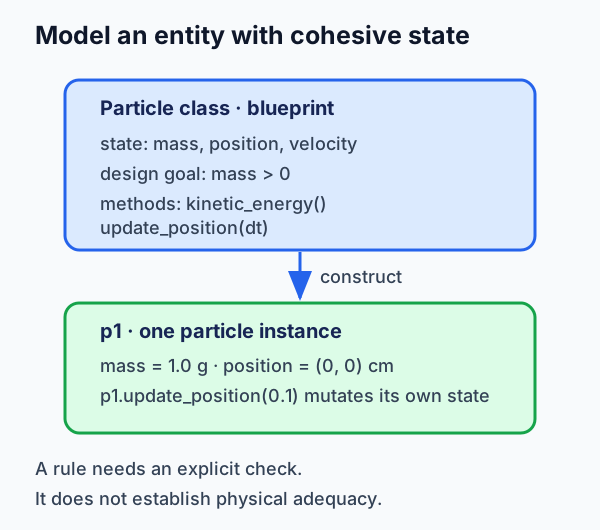
Figure 1:A class can keep related state and behavior together, and can enforce rules when their checks are implemented.
What to notice: positive mass is a design goal here. The introductory Particle
example below does not check it. A class protects only the paths it validates;
even a checked rule cannot establish that the model or measurements are
physically adequate.
For a first reading, follow the transformation from a particle dictionary to a
small object, then focus on self, method contracts, and properties. Return
later to the protocol and design-choice Deep Dives when a class needs to work
with Python syntax or you are deciding whether a class is warranted.
Try this chapter
Browser Python lab · Temperature invariant: predict whether construction accepts a temperature below absolute zero, run the local check, then explain both the boundary the class enforces and one measurement question it cannot answer. The activity is optional; the static example below remains complete without browser Python.
6.1 From Functions to Objects: The Conceptual Leap
Let’s start with a problem you’ve already solved with functions, then transform it into objects to see the difference. In Python, everything is actually an object - even functions and modules! But some objects are more complex than others, and creating your own classes lets you model your specific problem domain.
# Approach 1: Functions with dictionaries (what you know)
def create_particle(mass, x, y, vx, vy):
    """Create a particle dictionary."""
    return {
        'mass': mass,  # grams
        'x': x, 'y': y,  # cm
        'vx': vx, 'vy': vy  # cm/s
    }

def kinetic_energy(particle):
    """Calculate kinetic energy in ergs."""
    v_squared = particle['vx']**2 + particle['vy']**2
    return 0.5 * particle['mass'] * v_squared

def update_position(particle, dt):
    """Update position based on velocity."""
    particle['x'] += particle['vx'] * dt
    particle['y'] += particle['vy'] * dt
    return particle

# Using functions
p1 = create_particle(1.0, 0, 0, 10, 5)
energy = kinetic_energy(p1)
p1 = update_position(p1, 0.1)
print(f"Energy: {energy:.1f} ergs")
Energy: 62.5 ergs
Now let’s see the same problem with OOP:
# Approach 2: Object-Oriented (what you're learning)
class Particle:
    """A particle with position and velocity."""

    def __init__(self, mass, x, y, vx, vy):
        """Initialize particle state."""
        self.mass = mass  # grams
        self.x = x        # cm
        self.y = y        # cm
        self.vx = vx      # cm/s
        self.vy = vy      # cm/s

    def kinetic_energy(self):
        """Calculate kinetic energy in ergs."""
        v_squared = self.vx**2 + self.vy**2
        return 0.5 * self.mass * v_squared

    def update_position(self, dt):
        """Update position using constant-velocity kinematics.

        Contract: MUTATES self.x and self.y in place; returns None.

        This is not a force-integrating simulation. With fixed vx and vy,
        kinetic energy remains constant by construction. For long simulations
        with forces, choose an integrator appropriate to the model.
        """
        self.x += self.vx * dt
        self.y += self.vy * dt

# Using objects
p2 = Particle(1.0, 0, 0, 10, 5)
energy = p2.kinetic_energy()
p2.update_position(0.1)
print(f"Energy: {energy:.1f} ergs")
Energy: 62.5 ergs
Both approaches solve the problem, but notice the differences:
Organization: Data and methods stay together in the class
Syntax: Methods are called on objects (
p2.kinetic_energy())State: The object maintains its own state between method calls
Clarity: The object-oriented version reads more naturally
🌟 The More You Know: Spirit’s Flash-Memory Recovery and State Management
In January 2004, shortly after Spirit began science operations on Mars, the rover entered a repetitive reset and re-initialization loop. NASA’s anomaly account traces the incident to incorrect configuration parameters in operating system modules responsible for system and flash-memory files; the overloaded file systems had not been recognized or tested in the relevant ground testing.
Mission operations first worked around flash-memory use, then deleted files, reallocated memory, and rebuilt the file system. This was a recovery and operations problem, not evidence that object-oriented programming would by itself have prevented the failure. It does, however, motivate a narrower design question: can a software component make its lifecycle state explicit enough that invalid transitions are easier to inspect and test?
# FICTIONAL classroom pattern, not Spirit flight software.
class RoverComponent:
    def __init__(self, name):
        self.name = name
        self.initialized = False
        self.error_count = 0

    def initialize(self):
        if not self.initialized:
            # Safe initialization
            self.initialized = True
The pattern makes one local state contract visible; it does not substitute for requirements, file-system limits, integration testing, or operations procedures. Spirit nevertheless returned to normal operations and ultimately worked for more than six years, far beyond its planned 90-Martian-day mission.
That distinction is the useful lesson for scientific code: a class can help name and protect a local state boundary, while real reliability depends on the larger system around it.
Sources: NASA’s Spirit mission account, NASA’s lessons-learned summary, and Reeves, Neilson, and Litwin (2005), The Mars Rover Spirit FLASH Anomaly.
6.2 Classes and Objects: Building Blocks
Functions and modules can organize reusable calculations and validate inputs. A class is useful when several operations share state and should enforce the same rules for constructing or updating it.
Organization: modules group related functions; classes group the state and behavior of instances.
Consistency: validation must be written explicitly in either design. A class can centralize it at construction and through controlled updates.
Reuse: functions already support reuse. Choose a class when a shared state contract makes the interface clearer, not merely because calculations are related.
A class is a blueprint for creating objects. An object (or instance) is a specific realization of that blueprint. Think of a class as the concept “thermometer” and objects as specific thermometers in your lab.
import math

# Define a class (blueprint)
class Measurement:
    """A scientific measurement with uncertainty."""

    def __init__(self, value, error):
        """Initialize a finite numeric value with a non-negative uncertainty."""
        if (
            isinstance(value, bool)
            or isinstance(error, bool)
            or not isinstance(value, (int, float))
            or not isinstance(error, (int, float))
        ):
            raise ValueError("value and error must be finite numbers")
        try:
            finite = math.isfinite(value) and math.isfinite(error)
        except OverflowError:
            finite = False  # An integer too large to convert to a finite float.
        if not finite:
            raise ValueError("value and error must be finite numbers")
        if error < 0:
            raise ValueError(f"Error must be non-negative, got {error}")
        self.value = value
        self.error = error

    def relative_error(self):
        """Calculate relative error as percentage.

        Note: Returns infinity if value is exactly zero. For values
        very close to zero, the relative error may be misleadingly large.
        """
        if self.value == 0:
            return float('inf')
        return abs(self.error / self.value) * 100

    def __repr__(self):
        """Unambiguous representation for debugging."""
        return f"Measurement({self.value}, {self.error})"

# Create objects (instances)
temp = Measurement(293.15, 0.1)  # Temperature in Kelvin
# Pressure in dyne/cm^2 (CGS unit for pressure)
# Note: CGS (centimeter-gram-second) is traditional in astronomy
pressure = Measurement(1.01325e6, 500)  # 1 atm = 1.01325e6 dyne/cm^2

print(f"Temperature: {temp.value} +/- {temp.error} K")
print(f"Pressure: {pressure.value:.2e} +/- {pressure.error} dyne/cm^2")
print(f"Pressure relative error: {pressure.relative_error():.3f}%")
Temperature: 293.15 +/- 0.1 K
Pressure: 1.01e+06 +/- 500 dyne/cm^2
Pressure relative error: 0.049%
Understanding self
The self parameter is how each object keeps track of its own data. When you call temp.relative_error(), Python automatically passes temp as the first argument. Here’s what happens behind the scenes:
class Counter:
    """Demonstrates how self works."""

    def __init__(self):
        """Initialize counter at zero."""
        self.count = 0  # Each object gets its own count

    def increment(self):
        """Increment this counter by one."""
        self.count += 1  # self refers to the specific object

    def get_count(self):
        """Return current count value."""
        return self.count

# Each object maintains independent state
c1 = Counter()
c2 = Counter()

c1.increment()
c1.increment()
c2.increment()

print(f"Counter 1: {c1.get_count()}")  # 2
print(f"Counter 2: {c2.get_count()}")  # 1

# What Python actually does when you call c1.increment():
# Counter.increment(c1)  # c1 becomes 'self' in the method
Counter 1: 2
Counter 2: 1
This seemingly simple concept of bundling data with behavior revolutionized programming. Let me tell you how it started...
🌟 The More You Know: How Norwegian Scientists Invented OOP to Simulate Complex Systems
In 1962, Norwegian computer scientists Kristen Nygaard and Ole-Johan Dahl faced a mounting challenge at the Norwegian Computing Center. Nygaard had been developing simulations since 1957 - first for nuclear reactor calculations, then for operations research problems. Their early projects included analyzing factory layouts, airport departure systems, and harbor operations. The existing approaches using ALGOL 60 were becoming unwieldy for modeling these complex, interconnected systems with hundreds of interacting components.
In 1965, they used SIMULA I to analyze the Raufoss ammunitions factory layout, including cranes and storage points. The 1,130-card program simulated 2.5 days of factory operations in 22 seconds. SIMULA I modeled interacting processes; the class and object constructs came with SIMULA 67.
# Simplified concept in modern Python:
class FactoryStation:
    def __init__(self, name, capacity, processing_time):
        self.name = name
        self.capacity = capacity
        self.queue = []

    def receive_item(self, item):
        # Each station manages its own queue and processing
        self.queue.append(item)
By 1967, Simula 67 formalized these concepts into classes, inheritance, and virtual methods - the foundation of modern OOP. Alan Kay, influenced by Simula (along with Sketchpad and his biology background), coined “object-oriented programming” around the same time. He later explained: “I thought of objects being like biological cells and/or individual computers on a network, only able to communicate with messages.”
The impact was profound but gradual. Simula influenced Smalltalk in the 1970s, then C++ in the 1980s, and eventually Java in the 1990s. The Norwegian Computing Center, initially focused on practical simulation problems, had accidentally created one of computing’s most transformative paradigms. Today, when you create a Particle class or a Galaxy object, you’re using concepts born from the need to simulate factories, airports, and harbors in 1960s Norway!
[Sources: Dahl & Nygaard (1978). “The development of the SIMULA languages.” ACM SIGPLAN Notices; Kay, A. (2003). Email to Stefan Ram on OOP definition]
Instance vs Class Attributes
Instance attributes belong to specific objects. Class attributes are shared by all instances. This bundling of data and methods is called encapsulation - a core principle of OOP:
class Simulation:
    """Demonstrates instance vs class attributes."""

    # Class attribute - shared by all simulations
    speed_of_light = 2.998e10  # cm/s (CGS)
    total_runs = 0

    def __init__(self, name, particle_count):
        """Initialize a new simulation."""
        # Instance attributes - unique to each simulation
        self.name = name
        self.particle_count = particle_count
        self.time = 0.0
        self.box_size_cm = 1.0e-4  # 1 micron box
        # Increment shared counter
        Simulation.total_runs += 1

    def advance(self, dt):
        """Advance simulation by dt seconds."""
        self.time += dt

# Create simulations
sim1 = Simulation("Test A", 1000)
sim2 = Simulation("Test B", 5000)

print(f"Total simulations: {Simulation.total_runs}")
print(f"Sim1 particles: {sim1.particle_count}")
print(f"Sim2 particles: {sim2.particle_count}")
print(f"Speed of light: {Simulation.speed_of_light:.2e} cm/s")
print(f"Box size: {sim1.box_size_cm:.2e} cm")
Total simulations: 2
Sim1 particles: 1000
Sim2 particles: 5000
Speed of light: 3.00e+10 cm/s
Box size: 1.00e-04 cm
6.3 Methods: Functions Attached to Objects
Methods are functions that belong to a class. They can access and modify the object’s state through self. Let’s build up from simple to complex.
import math  # Import at the top of your files in production code

# First: A simple class with basic methods
class Sample:
    """Scientific sample with basic operations."""

    def __init__(self, mass_g, volume_cm3):
        """Initialize with mass in grams, volume in cm^3."""
        self.mass = mass_g
        self.volume = volume_cm3

    def density(self):
        """Calculate density in g/cm^3."""
        return self.mass / self.volume

    def is_denser_than_water(self):
        """Check if denser than water (1 g/cm^3)."""
        return self.density() > 1.0

# Using simple methods
iron = Sample(7.87, 1.0)  # Iron sample
print(f"Iron density: {iron.density()} g/cm^3")
print(f"Sinks in water: {iron.is_denser_than_water()}")
Iron density: 7.87 g/cm^3
Sinks in water: True
Now let’s advance to more complex mathematical methods:
import math

class Vector2D:
    """A 2D vector for physics calculations."""

    def __init__(self, x, y):
        """Initialize vector components in cm."""
        self.x = x
        self.y = y

    def magnitude(self):
        """Calculate vector magnitude (length)."""
        return (self.x**2 + self.y**2)**0.5

    def normalize(self):
        """Scale vector to unit length (magnitude = 1).

        Contract: MUTATES self.x and self.y in place; returns None.
        """
        mag = self.magnitude()
        if mag == 0:
            raise ValueError("Cannot normalize a zero vector")
        self.x /= mag
        self.y /= mag

    def dot(self, other):
        """Calculate dot product with another vector."""
        return self.x * other.x + self.y * other.y

    def angle_with(self, other):
        """Calculate angle with another vector in radians."""
        dot_product = self.dot(other)
        mags = self.magnitude() * other.magnitude()
        if mags == 0:
            raise ValueError("Angle is undefined when either vector has zero magnitude")
        cos_angle = dot_product / mags
        # Clamp to [-1, 1] to avoid numerical errors
        cos_angle = max(-1, min(1, cos_angle))
        return math.acos(cos_angle)

# Using vector methods
v1 = Vector2D(3, 4)
v2 = Vector2D(1, 0)

print(f"v1 magnitude: {v1.magnitude()} cm")
print(f"Dot product: {v1.dot(v2)} cm^2")
print(f"Angle: {v1.angle_with(v2):.2f} radians")

v1.normalize()  # Makes magnitude = 1
print(f"After normalization: ({v1.x:.2f}, {v1.y:.2f})")
print(f"New magnitude: {v1.magnitude():.2f}")
v1 magnitude: 5.0 cm
Dot product: 3 cm^2
Angle: 0.93 radians
After normalization: (0.60, 0.80)
New magnitude: 1.00
Method Types: Instance, Class, and Static
import math

class DataProcessor:
    """Demonstrates different method types."""

    version = "1.0"

    def __init__(self, data):
        """Materialize and validate one finite numeric input sequence."""
        try:
            values = list(data)
        except TypeError as error:
            raise ValueError("data must be an iterable of finite numbers") from error
        if not self.validate_data(values):
            raise ValueError("data must be a non-empty sequence of finite numbers")
        self.data = values

    # Instance method - needs self
    def process(self):
        """Process this object's data."""
        return sum(self.data) / len(self.data)

    # Class method - gets class, not instance
    @classmethod
    def from_values(cls, values):
        """Create an instance from an iterable of values."""
        return cls(values)

    # Static method - doesn't need self or cls
    @staticmethod
    def validate_data(values):
        """Check a materialized sequence of finite, non-Boolean numbers."""
        try:
            count = len(values)
        except (TypeError, OverflowError):
            return False
        if count == 0:
            return False
        for x in values:
            if isinstance(x, bool) or not isinstance(x, (int, float)):
                return False
            try:
                if not math.isfinite(x):
                    return False
            except OverflowError:
                return False
        return True

    # Static method with physics example
    @staticmethod
    def celsius_to_kelvin(celsius):
        """Convert Celsius to a finite, physically meaningful Kelvin value."""
        if isinstance(celsius, bool) or not isinstance(celsius, (int, float)):
            raise ValueError("temperature must be finite and not below absolute zero")
        try:
            finite = math.isfinite(celsius)
        except OverflowError:
            finite = False
        if not finite:
            raise ValueError("temperature must be finite and not below absolute zero")
        kelvin = celsius + 273.15
        if not math.isfinite(kelvin) or kelvin < 0:
            raise ValueError("temperature must be finite and not below absolute zero")
        return kelvin

# Using different method types
processor = DataProcessor([10, 20, 30])
print(f"Average: {processor.process()}")

# Class method creates a new instance
processor2 = DataProcessor.from_values([1, 2, 3, 4, 5])
print(f"Factory average: {processor2.process()}")

# Static methods work without instance
valid = DataProcessor.validate_data([1, 2, 3])
print(f"Data valid: {valid}")

# Physics static method
temp_k = DataProcessor.celsius_to_kelvin(25)
print(f"Temperature: {temp_k} K")
Average: 20.0
Factory average: 3.0
Data valid: True
Temperature: 298.15 K
🌟 Why This Matters: Real Astropy OOP
Here’s how Astropy uses the OOP patterns you’re learning:
from astropy.coordinates import SkyCoord
from astropy import units as u

# SkyCoord is a class with properties and methods!
m31 = SkyCoord(ra=10.68*u.degree, dec=41.27*u.degree)
m33 = SkyCoord(ra=23.4621*u.degree, dec=30.6602*u.degree)
print(m31.galactic)  # Property with coordinate transformation
print(m31.separation(m33))  # Method for angular distance

# You're learning the same patterns that power professional astronomy code!
6.4 Properties: Smart Attributes
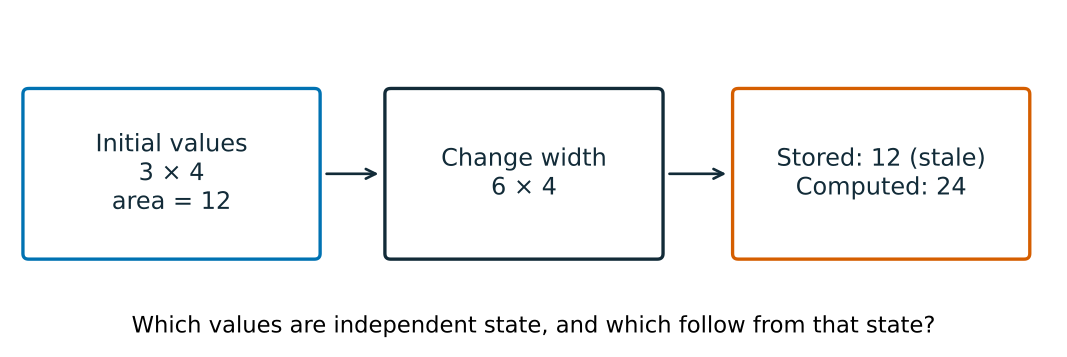
If a derived value is stored separately, an update can leave it inconsistent. Which values should the rectangle store?
Properties can enforce declared invariants through a controlled public interface. A circle’s radius must be positive. A temperature can’t go below absolute zero. A probability must be between 0 and 1. Without a controlled setter, any code could set circle.radius = -5 and corrupt your simulation. With one, the class can reject values it explicitly recognizes as invalid:
What properties give you:
Validation on assignment — Reject invalid values immediately, not when they cause cryptic errors downstream
Computed attributes — Derive area from radius automatically, guaranteeing consistency
Encapsulation — Hide internal storage (
_radius) while exposing a clean interface (radius)Invariant enforcement through the public interface — Reject invalid assignments where the class controls updates; this is not a proof that every scientific assumption or internal mutation is valid
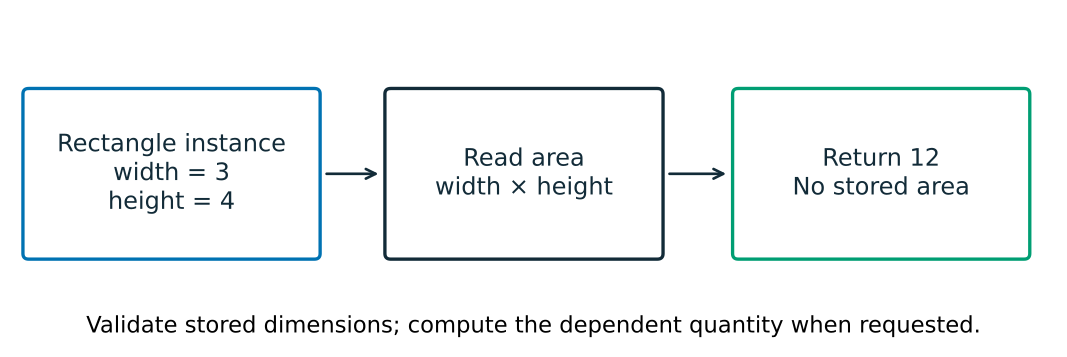
The rectangle stores validated dimensions and derives area when requested. The following circle applies the same idea to radius and area.
import math

class Circle:
    """Circle with computed properties."""

    def __init__(self, radius):
        """Initialize with radius, using validation."""
        # This now uses the setter for validation!
        self.radius = radius

    @property
    def radius(self):
        """Get radius in cm."""
        return self._radius

    @radius.setter
    def radius(self, value):
        """Set radius with validation."""
        if isinstance(value, bool) or not isinstance(value, (int, float)):
            raise ValueError(f"Radius must be a finite positive number, got {value}")
        try:
            finite = math.isfinite(value)
        except OverflowError as exc:
            raise ValueError(f"Radius must be a finite positive number, got {value}") from exc
        if not finite or value <= 0:
            raise ValueError(f"Radius must be a finite positive number, got {value}")
        self._radius = value

    @property
    def area(self):
        """Computed area in cm^2 using $\\pi r^2$."""
        return math.pi * self._radius**2

    @property
    def circumference(self):
        """Computed circumference in cm using $2\\pi r$."""
        return 2 * math.pi * self._radius

# Properties look like attributes but run code
circle = Circle(5)
print(f"Radius: {circle.radius} cm")
print(f"Area: {circle.area:.2f} cm^2")
print(f"Circumference: {circle.circumference:.2f} cm")

# Changing radius automatically updates computed properties
circle.radius = 10
print(f"New area: {circle.area:.2f} cm^2")

# Validation prevents invalid states (even in __init__ now!)
try:
    bad_circle = Circle(-5)  # This will raise an error
except ValueError as e:
    print(f"Error: {e}")
Radius: 5 cm
Area: 78.54 cm^2
Circumference: 31.42 cm
New area: 314.16 cm^2
Error: Radius must be a finite positive number, got -5
Properties for Unit Safety
import math

class Temperature:
    """Temperature with automatic unit conversion."""

    @staticmethod
    def _require_finite_number(value):
        """Validate an original input before any unit arithmetic."""
        if isinstance(value, bool) or not isinstance(value, (int, float)):
            raise ValueError("temperature must be a finite number")
        try:
            finite = math.isfinite(value)
        except OverflowError:
            finite = False
        if not finite:
            raise ValueError("temperature must be a finite number")

    def __init__(self, kelvin):
        """Initialize with temperature in Kelvin."""
        self.kelvin = kelvin  # Route construction through the same validation.

    @property
    def kelvin(self):
        """Get temperature in Kelvin."""
        return self._kelvin

    @kelvin.setter
    def kelvin(self, value):
        """Set temperature with validation."""
        self._require_finite_number(value)
        if value < 0:
            raise ValueError("Kelvin temperature must be non-negative")
        self._kelvin = value

    @property
    def celsius(self):
        """Get temperature in Celsius."""
        return self._kelvin - 273.15

    @celsius.setter
    def celsius(self, value):
        """Set temperature in Celsius."""
        self._require_finite_number(value)
        # Use kelvin setter for validation
        self.kelvin = value + 273.15

    @property
    def fahrenheit(self):
        """Get temperature in Fahrenheit."""
        return self._kelvin * 9/5 - 459.67

    @fahrenheit.setter
    def fahrenheit(self, value):
        """Set temperature in Fahrenheit."""
        self._require_finite_number(value)
        # Convert to Kelvin, using kelvin setter for validation
        self.kelvin = (value + 459.67) * 5/9

# Same temperature, different units
temp = Temperature(300)
print(f"Water at {temp.kelvin:.1f} K")
print(f"  = {temp.celsius:.1f}  degC")
print(f"  = {temp.fahrenheit:.1f}  degF")

# Set in any unit, always consistent
temp.celsius = 100
print(f"Boiling: {temp.kelvin:.1f} K")
Water at 300.0 K
= 26.9 degC
= 80.3 degF
Boiling: 373.1 K
Astronomy-Specific Properties Example
import math

class Observation:
    """Astronomical observation with computed conditions."""

    def __init__(self, target, altitude_deg, moon_days_since_new=0):
        """Initialize observation with target and conditions."""
        self.target = target
        self.altitude_deg = altitude_deg  # Object altitude in degrees
        self.moon_days = moon_days_since_new

    @property
    def airmass(self):
        """Calculate airmass from altitude (plane-parallel approximation).

        Note: This simplified sec(z) formula diverges at low altitudes.
        Production code should use Pickering (2002) or similar.
        """
        if not 10 <= self.altitude_deg <= 90:
            raise ValueError(
                "This plane-parallel toy model is only used here for "
                "10 <= altitude_deg <= 90; choose a validated airmass model outside that range."
            )
        # Convert to zenith angle
        zenith_deg = 90 - self.altitude_deg
        zenith_rad = math.radians(zenith_deg)
        # Plane-parallel approximation: X = sec(z).
        # Its stated domain guard above avoids presenting a low-altitude clamp
        # as a physical result.
        return 1.0 / math.cos(zenith_rad)

    @property
    def moon_phase(self):
        """Calculate moon illumination fraction (0=new, 1=full)."""
        # Simplified: actual calculations need ephemeris
        # Moon cycle is ~29.53 days
        phase_angle = 2 * math.pi * self.moon_days / 29.53
        # Illumination: 0 at new moon (day 0), 1 at full moon (day ~14.76)
        return (1 - math.cos(phase_angle)) / 2

    @property
    def moon_illumination_category(self):
        """Categorize lunar illumination, not total sky brightness."""
        if self.moon_phase < 0.25:
            return "Dark"
        elif self.moon_phase < 0.75:
            return "Grey"
        else:
            return "Bright"

# Example observation
obs = Observation("M31", altitude_deg=60, moon_days_since_new=7)
print(f"Observing {obs.target}:")
print(f"  Airmass: {obs.airmass:.2f}")
print(f"  Moon illumination: {obs.moon_phase:.1%}")
print(f"  Moon illumination category: {obs.moon_illumination_category}")
Observing M31:
Airmass: 1.15
Moon illumination: 45.9%
Moon illumination category: Grey
🌟 Why This Matters: The Therac-25 and the Importance of Validation
The Therac-25 accidents show why a local validation rule is not enough for a safety-critical system. Between 1985 and 1987, the machine caused at least six accidents involving massive radiation overdoses; three patients died directly from the overdoses.
The investigation identified multiple unsafe conditions: race conditions, unsafe state transitions, poor error reporting, and inadequate system engineering. The machine could operate in electron-beam mode (low power) or X-ray mode (high power with a metal target); in a dangerous configuration, high power could be delivered without that target.
The class below is a fictional local-invariant illustration, not a reconstruction of Therac-25 software and not a claim that Python properties would have prevented the accidents:
# PSEUDOCODE: this deliberately omits the device's real state model and the
# value of ELECTRON_MAX. It is not runnable Python or a Therac reconstruction.
class RadiationTherapyMachine:
    def __init__(self):
        self._mode = None
        self._power_level = 0
        self._target_in_place = False

    @property
    def power_level(self):
        return self._power_level

    @power_level.setter
    def power_level(self, value):
        # Reject one modeled unsafe configuration; this is not the device's model.
        if self._mode == "electron" and value > ELECTRON_MAX:
            raise ValueError("Power too high for electron mode!")
        if self._mode == "xray" and not self._target_in_place:
            raise ValueError("X-ray mode requires target!")
        self._power_level = value
Setter validation can make one local state transition explicit. It cannot by itself establish concurrency safety, hardware interlocks, requirements traceability, or independent system verification—the broader controls that safety-critical software needs.
[Source: Leveson, N.G. & Turner, C.S. (1993). “An Investigation of the Therac-25 Accidents”. IEEE Computer, 26(7), 18-41.]
🌟 The More You Know: Hubble’s Mirror and Independent Measurement
In 1990, the Hubble Space Telescope reached orbit with a catastrophic optical flaw: its primary mirror was ground to the wrong shape. The incident shows why independent measurements, explicit interfaces, and careful investigation of disagreement matter in scientific work.
The class below is a fictional classroom illustration, not a reconstruction of Hubble’s testing software and not evidence that a Python property alone would have prevented the failure. It illustrates a narrower design question: how might a program reject an input outside a documented range and flag disagreement with an independent expectation?
Use the example to discuss the limits of validation: a check is only as useful as its assumptions, tolerances, independent evidence, and response when it finds a disagreement.
# ILLUSTRATIVE Python: the values below are classroom values, not Hubble
# specifications or a reconstruction of the mirror-testing software.
import warnings

class MirrorMeasurement:
    def __init__(self, expected_value, allowed_range, relative_tolerance):
        self.expected_value = expected_value
        self.allowed_range = allowed_range
        self.relative_tolerance = relative_tolerance
        self._measured_value = None

    @property
    def measured_value(self):
        return self._measured_value

    @measured_value.setter
    def measured_value(self, value):
        low, high = self.allowed_range
        if not low <= value <= high:
            raise ValueError(f"Outside the declared design range: {value}")

        deviation = abs(value - self.expected_value) / self.expected_value
        if deviation > self.relative_tolerance:
            warnings.warn(
                f"Measurement deviates {deviation * 100:.2f}% from expectation",
                UserWarning,
                stacklevel=2,
            )

        self._measured_value = value
Validation code can make a local contract visible and testable. It cannot replace independent measurement, system-level verification, or scientific judgment.
🌟 Why This Matters: Mars Climate Orbiter
In 1999, Mars Climate Orbiter was lost after ground navigation calculations received angular-momentum-desaturation impulse data in pound-force seconds (lbf-s) while another interface expected newton-seconds (N-s). The mismatch introduced an approximately 4.45 conversion factor into navigation calculations; it was not a claim that the physical thrusters fired at 4.45 their intended force.
The class below is a classroom illustration of a single unit-conversion boundary, not a reconstruction of the mission or a claim that a property alone prevents system-level interface failures. It deliberately names impulse rather than thrust: newton-seconds and pound-force seconds are impulse units. See NASA’s Mars Climate Orbiter Mishap Investigation Board report for the actual failure analysis.
import math

class NavigationImpulse:
    def __init__(self, impulse_newton_seconds=0.0):
        self.impulse_newton_seconds = impulse_newton_seconds

    @staticmethod
    def _require_finite_number(value):
        if isinstance(value, bool) or not isinstance(value, (int, float)):
            raise ValueError("impulse must be a finite number")
        try:
            finite = math.isfinite(value)
        except OverflowError:
            finite = False
        if not finite:
            raise ValueError("impulse must be a finite number")

    @property
    def impulse_newton_seconds(self):
        return self._impulse_ns

    @impulse_newton_seconds.setter
    def impulse_newton_seconds(self, value):
        self._require_finite_number(value)
        self._impulse_ns = value

    @property
    def impulse_pound_force_seconds(self):
        return self._impulse_ns * 0.224809

    @impulse_pound_force_seconds.setter
    def impulse_pound_force_seconds(self, value):
        self._require_finite_number(value)
        self.impulse_newton_seconds = value / 0.224809
The lesson is narrower: a class can store one documented internal unit and convert at a well-defined boundary. That convention helps only when every input path is validated and the interface is tested; a Python property does not itself guarantee unit consistency or prevent a system-level interface error.
Deep Dive: Python Protocols and Special Methods
Special methods (also called “magic methods” or “dunder methods”) let your objects work with Python’s built-in functions and operators. The phrase “duck typing” is shorthand for a related idea: an operation can depend on the capability an object supplies, rather than on one nominal class alone. Code may still make explicit type checks when a scientific interface needs them.
🌟 The More You Know: How Python Made Protocols Visible
In December 1989, Guido van Rossum began developing Python at CWI in Amsterdam, building on ideas from ABC and work around the Amoeba distributed operating system. He named the language after Monty Python’s Flying Circus. Python’s history is not a story in which one language suddenly made operator overloading possible—C++ and other languages already had related mechanisms. The useful Python design lesson is more specific: common operations are exposed through documented methods that ordinary classes can implement.
Want an object to work with len()? Implement __len__(). Want it to support
addition? Implement __add__(). Python’s interpreter dispatches the operation
through those protocol methods. That visible connection is valuable for a
reader: syntax such as a + b has an inspectable object-level contract.
For a user-defined Python class, for example:
class Vector:
    def __add__(self, other):
        # Define a documented operation for this class.
        return Vector(self.x + other.x, self.y + other.y)

v1 + v2  # Calls Vector.__add__
Scientific libraries take advantage of the same protocol hooks. Numeric, an ancestor of NumPy, used operations such as addition, slicing, length, and printing to make arrays work naturally in Python:
# Scientific arrays that feel built in.
array1 + array2    # Element-wise addition via __add__
array[5:10]        # Slicing via __getitem__
len(array)         # Size via __len__
print(array)       # Readable output via __str__
When you implement __str__ or __add__, you are making your class participate
in one of Python’s protocols. The obligation is not merely to add a magic name:
the operation needs a clear scientific meaning, documented units where relevant,
and behavior that callers can test.
Sources: Python’s history documentation, CWI’s account of Python’s origin, and Van Rossum (1996), foreword to Programming Python.
class Fraction:
    """A reduced fraction of two integers with arithmetic operations."""

    def __init__(self, numerator, denominator):
        """Initialize an integer fraction with a positive denominator."""
        if (
            isinstance(numerator, bool)
            or isinstance(denominator, bool)
            or not isinstance(numerator, int)
            or not isinstance(denominator, int)
        ):
            raise ValueError("numerator and denominator must be integers")
        if denominator == 0:
            raise ValueError("Denominator cannot be zero")
        if denominator < 0:
            numerator = -numerator
            denominator = -denominator
        self.num = numerator
        self.den = denominator
        self._reduce()

    def _reduce(self):
        """Reduce to lowest terms using GCD (Euclidean algorithm)."""
        # Euclidean algorithm: repeatedly replace larger number
        # with remainder when divided by smaller number
        a, b = abs(self.num), abs(self.den)
        while b:  # Continue until remainder is 0
            a, b = b, a % b  # GCD(a,b) = GCD(b, a mod b)
        self.num //= a
        self.den //= a

    def __str__(self):
        """Human-readable string for print()."""
        return f"{self.num}/{self.den}"

    def __repr__(self):
        """Unambiguous string for debugging."""
        return f"Fraction({self.num}, {self.den})"

    def __float__(self):
        """Convert to float."""
        return self.num / self.den

    def __add__(self, other):
        """Add two fractions: a/b + c/d = (ad+bc)/bd"""
        if not isinstance(other, Fraction):
            return NotImplemented  # Let Python try other.__radd__
        new_num = self.num * other.den + other.num * self.den
        new_den = self.den * other.den
        return Fraction(new_num, new_den)

    def __eq__(self, other):
        """Check equality: a/b == c/d if ad == bc"""
        if not isinstance(other, Fraction):
            return NotImplemented
        return self.num * other.den == other.num * self.den

# Using special methods
f1 = Fraction(1, 2)
f2 = Fraction(1, 3)

print(f"f1 = {f1}")  # Calls __str__
print(f"f1 + f2 = {f1 + f2}")  # Calls __add__
print(f"f1 as float: {float(f1)}")  # Calls __float__
print(f"f1 == Fraction(2,4): {f1 == Fraction(2, 4)}")  # Calls __eq__
f1 = 1/2
f1 + f2 = 5/6
f1 as float: 0.5
f1 == Fraction(2,4): True
Essential Special Methods
class DataSet:
    """Collection that acts like a built-in container."""

    def __init__(self, values=None):
        """Initialize with optional values (makes a defensive copy)."""
        self.values = list(values) if values is not None else []

    def __len__(self):
        """Support len(dataset)."""
        return len(self.values)

    def __getitem__(self, index):
        """Support dataset[index]."""
        return self.values[index]

    def __setitem__(self, index, value):
        """Support dataset[index] = value."""
        self.values[index] = value

    def __contains__(self, value):
        """Support 'value in dataset'."""
        return value in self.values

    def __iter__(self):
        """Support for loops."""
        return iter(self.values)

    def __bool__(self):
        """Support if dataset: (True if not empty)."""
        return len(self.values) > 0

    def __repr__(self):
        """Unambiguous representation for debugging."""
        return f"DataSet({self.values})"

# Acts like a built-in container
data = DataSet([10, 20, 30, 40, 50])

print(f"Length: {len(data)}")
print(f"First: {data[0]}")
print(f"Contains 30: {30 in data}")
print(f"Is non-empty: {bool(data)}")

data[1] = 25
for value in data:
    print(value, end=" ")
Length: 5
First: 10
Contains 30: True
Is non-empty: True
10 25 30 40 50 Deep Dive: Choosing Objects or Functions
Now that you understand HOW to create classes with all their powerful features - properties for validation, special methods for integration, inheritance for code reuse (Chapter 10) - you need wisdom about WHEN to use them. Not every problem needs objects. Creating unnecessary classes can make code harder to understand, not easier. The art of programming lies in choosing the right tool for the right job.
Here’s how to decide. Note: In Chapter 10, we’ll explore the “is-a” relationship (inheritance) versus “has-a” relationship (composition) in detail. For now, focus on single classes.
Use Objects When:
Managing State Over Time
class RunningStatistics:
    """Maintains statistics as data arrives."""

    def __init__(self):
        """Initialize empty statistics."""
        self.count = 0
        self._mean = 0.0
        self._M2 = 0.0

    def add_value(self, x):
        """Add new value to statistics.

        Contract: MUTATES internal state (count, _mean, _M2); returns None.
        """
        self.count += 1
        delta = x - self._mean
        self._mean += delta / self.count
        self._M2 += delta * (x - self._mean)

    @property
    def mean(self):
        """Current mean."""
        return self._mean if self.count > 0 else None

    @property
    def variance(self):
        """Current sample variance, or None until two values exist."""
        if self.count < 2:
            return None
return self._M2 / (self.count - 1)# Object maintains state between calls
stats = RunningStatistics()
for value in [1, 2, 3, 4, 5]:
stats.add_value(value)
variance_text = "n/a" if stats.variance is None else f"{stats.variance:.1f}"
print(f"After {value}: mean={stats.mean:.1f}, sample var={variance_text}")After 1: mean=1.0, sample var=n/a
After 2: mean=1.5, sample var=0.5
After 3: mean=2.0, sample var=1.0
After 4: mean=2.5, sample var=1.7
After 5: mean=3.0, sample var=2.5
Modeling Real Entities
class Galaxy:
    """Model a galaxy with properties."""

    def __init__(self, name, distance_mpc, redshift):
        """Initialize galaxy with observed properties."""
        self.name = name
        self.distance_mpc = distance_mpc  # Megaparsecs
        self.redshift = redshift

    def recession_velocity(self):
        """Approximate low-redshift recession velocity in km/s."""
        c = 3e5  # km/s
        return c * self.redshift

    def lookback_time_gyr(self):
        """Estimate low-redshift lookback time in Gyr using a stated H0."""
        if self.redshift < 0:
            raise ValueError(
                "This low-redshift lookback approximation is not defined for a blueshifted object"
            )
        H0 = 70  # km/s/Mpc
        return self.redshift * 1000 / H0

m31 = Galaxy("Andromeda", 0.78, -0.001)  # Blueshifted!
print(f"{m31.name}: v={m31.recession_velocity():.0f} km/s")

# A deliberately illustrative low-redshift object, consistent with H0 = 70 km/s/Mpc.
example_galaxy = Galaxy("Illustrative low-redshift galaxy", 43.0, 0.01)
print(f"Lookback estimate: {example_galaxy.lookback_time_gyr():.2f} Gyr")
Andromeda: v=-300 km/s
Lookback estimate: 0.14 Gyr
Use Functions When:
Simple Transformations
# No need for a class here
import math

def celsius_to_kelvin(celsius):
    """Convert Celsius to a finite Kelvin temperature above absolute zero."""
    if isinstance(celsius, bool) or not isinstance(celsius, (int, float)):
        raise ValueError("temperature must be finite and not below absolute zero")
    try:
        finite = math.isfinite(celsius)
    except OverflowError:
        finite = False
    if not finite:
        raise ValueError("temperature must be finite and not below absolute zero")
    kelvin = celsius + 273.15
    if not math.isfinite(kelvin) or kelvin < 0:
        raise ValueError("temperature must be finite and not below absolute zero")
    return kelvin

def orbital_period_years_solar_mass(semi_major_axis_au):
    """Return P in years for a negligible companion orbiting one solar mass."""
    if isinstance(semi_major_axis_au, bool) or not isinstance(semi_major_axis_au, (int, float)):
        raise ValueError("semi-major axis must be finite and positive")
    try:
        finite = math.isfinite(semi_major_axis_au)
    except OverflowError:
        finite = False
    if not finite or semi_major_axis_au <= 0:
        raise ValueError("semi-major axis must be finite and positive")
    try:
        period = semi_major_axis_au ** 1.5
    except OverflowError as error:
        raise ValueError("period is not representable as a finite number") from error
    if not math.isfinite(period):
        raise ValueError("period is not representable as a finite number")
    return period

# Simple functions are clearer than unnecessary classes
temp_k = celsius_to_kelvin(25)
period = orbital_period_years_solar_mass(1.0)  # Earth, to this approximation
print(f"Temperature: {temp_k} K")
print(f"Period: {period} years")
Temperature: 298.15 K
Period: 1.0 years
Stateless Operations
# These don't need to remember anything between calls
def mean(values):
    """Calculate mean."""
    return sum(values) / len(values)

def population_standard_deviation(values):
    """Calculate population standard deviation for a non-empty sequence."""
    if not values:
        raise ValueError("values must not be empty")
    m = mean(values)
    variance = sum((x - m)**2 for x in values) / len(values)
    return variance**0.5

data = [1, 2, 3, 4, 5]
print(f"Mean: {mean(data)}")
print(f"Population std: {population_standard_deviation(data):.2f}")
Mean: 3.0
Population std: 1.41
🌟 Why This Matters: Why ndarray Is an Object
ndarray Is an ObjectAn ndarray is not only a collection of values. It also has shape, dtype,
strides, and a memory representation. That makes it a useful example of a
scientific object: selected operations can be methods because they act on that
array’s representation, while many operations remain ordinary NumPy functions.
This is not a binary choice between an object-oriented API and a functional API: NumPy deliberately supports both styles.
# ILLUSTRATIVE NumPy API contrast; requires `import numpy as np` to run.
array = np.array([1, 2, 3])
mean = array.mean()
reshaped = array.reshape(3, 1)

# Functional forms are also part of NumPy's public interface.
same_mean = np.mean(array)
same_shape = np.reshape(array, (3, 1))
The design lesson is not “methods are faster” or “objects replace functions.” It is that an abstraction should expose the data and operations a reader needs without hiding its important representation. For large numerical workloads, measure the stated operation on the stated array and backend rather than infer performance from API style alone.
🌟 The More You Know: How Astropy Coordinated an Astronomy Ecosystem
By the early 2010s, astronomy Python had many independently developed packages. That variety created real coordination costs: common functionality, interfaces, documentation, tests, and maintenance effort could be distributed across projects. An early-2011 mailing-list conversation about the proliferation of general astronomy packages led to a planning wiki where more than 100 people voted for a shared package effort.
The formal beginning of the Astropy Project was a planning meeting at the Harvard Center for Astrophysics in fall 2011—not a single package merger at a Python in Astronomy conference. The project combined code already developed by several contributors with common development practices and an ecosystem of affiliated packages. Its purpose was coordination and interoperability, not a claim that every astronomical concept should become a class.
The following contrast is schematic rather than an archival program. It shows why stable interfaces can matter when scientific objects carry a coordinate frame, metadata, or units:
# SCHEMATIC: representative separate-package workflow, not archival code.
import pyfits
import pywcs
import coords

data = pyfits.getdata('image.fits')  # Returns numpy array
header = pyfits.getheader('image.fits')  # Returns header object
wcs = pywcs.WCS(header)  # Different coordinate object
# Convert pixel to sky - returns plain numpy array, no units!
sky = wcs.wcs_pix2sky([[100, 200]], 1)
# Now convert to different coordinate system - different package!
galactic = coords.Position((sky[0][0], sky[0][1])).galactic()
Astropy can instead supply coordinated interfaces:
# Requires Astropy and an actual FITS file.
from astropy.io import fits
from astropy.wcs import WCS

with fits.open('image.fits') as hdul:
    wcs = WCS(hdul[0].header)

# A celestial WCS can return a SkyCoord with frame information.
sky = wcs.pixel_to_world(100, 200)
galactic = sky.galactic
Objects can help model astronomical concepts: a coordinate may carry a frame,
epoch, and distance; a table can carry column metadata and masks; and an Astropy
Quantity carries units through supported operations. Astropy does not make
every number unit-bearing automatically, and its interfaces still need tests at
the boundaries where data enter or leave a calculation.
The transferable lesson is community design: a shared scientific interface can make it easier to reuse code, compare results, and maintain tools together. That is a stronger and more realistic reason to care about representation than claiming that one abstraction alone produced a scientific discovery.
Sources: Astropy’s project history, the Astropy Project overview, and Robitaille et al. (2013), Astropy: A Community Python Package for Astronomy.
Reference: Debugging Small Scientific Objects
Understanding how to inspect and debug objects is crucial. Python provides powerful introspection tools to examine objects at runtime:
class Instrument:
    """Scientific instrument for debugging demo."""

    def __init__(self, name, wavelength_nm):
        """Initialize instrument with name and wavelength."""
        self.name = name
        self.wavelength_nm = wavelength_nm
        self._calibrated = False

    def calibrate(self):
        """Calibrate instrument."""
        self._calibrated = True
        return f"{self.name} calibrated"

# Create instrument
spectrometer = Instrument("HARPS", 500)

# Introspection tools
print(f"Type: {type(spectrometer)}")
print(f"Class name: {spectrometer.__class__.__name__}")
print(f"Is Instrument?: {isinstance(spectrometer, Instrument)}")

# Check attributes
print(f"\nHas 'calibrate'?: {hasattr(spectrometer, 'calibrate')}")
print(f"Wavelength: {getattr(spectrometer, 'wavelength_nm', 'N/A')}")

# List all attributes (filtering out special ones)
attrs = [a for a in dir(spectrometer) if not a.startswith('_')]
print(f"\nPublic attributes: {attrs}")

# Instance __dict__ vs dir()
# __dict__ shows instance attributes only
# dir() shows everything the object can access
print(f"\nInstance __dict__: {vars(spectrometer)}")
print(f"dir() has {len(dir(spectrometer))} items (includes inherited)")
print(f"__dict__ has {len(vars(spectrometer))} items (instance only)")
Type: <class '__main__.Instrument'>
Class name: Instrument
Is Instrument?: True
Has 'calibrate'?: True
Wavelength: 500
Public attributes: ['calibrate', 'name', 'wavelength_nm']
Instance __dict__: {'name': 'HARPS', 'wavelength_nm': 500, '_calibrated': False}
dir() has 31 items (includes inherited)
__dict__ has 3 items (instance only)
Type Hints with Classes (Optional)
Python supports type hints to document expected types, making code clearer:
from typing import Optional, List

class ObservationLog:
    """Demonstrates type hints with classes."""

    def __init__(self, observer: str, target: str) -> None:
        """Initialize observation log with type hints."""
        self.observer: str = observer
        self.target: str = target
        self.entries: List[str] = []
        self.completion_time: Optional[float] = None

    def add_entry(self, entry: str) -> None:
        """Add log entry."""
        self.entries.append(entry)

    def get_entry_count(self) -> int:
        """Return number of entries."""
        return len(self.entries)

    def mark_complete(self, time_hours: float) -> None:
        """Mark observation complete."""
        self.completion_time = time_hours

# Type hints help IDEs and documentation
log = ObservationLog("J. Smith", "M31")
log.add_entry("Target acquired")
log.add_entry("Exposure started")
log.mark_complete(2.5)

print(f"Observer: {log.observer}")
print(f"Entries: {log.get_entry_count()}")
print(f"Duration: {log.completion_time} hours")
Observer: J. Smith
Entries: 2
Duration: 2.5 hours
Main Takeaways
Keep related state and behavior in a class when they share a clear contract. Use a function for a calculation that needs no persistent state.
Route construction and permitted updates through validation. A property can compute a value from current state; it does not establish that a scientific model or external interface is correct.
Use
selfto access one instance’s state. Instance attributes belong to that object; class attributes are shared.Add special methods when an object needs a specific Python operation. Test the behavior and units of the resulting interface.
Definitions
attribute - A variable that belongs to an object. Instance attributes are unique to each object; class attributes are shared by all instances
class - A blueprint or template for creating objects. Defines what attributes and methods objects will have
class attribute - Data shared by all instances of a class, defined directly in the class body
constructor - The __init__ method that initializes new objects when they’re created
duck typing - A style in which an operation relies on supported behavior or a protocol rather than only a declared class; code may still use explicit type checks when needed
encapsulation - The bundling of data and methods that operate on that data within a single unit (class)
instance - A specific object created from a class. Each instance has its own set of instance attributes
instance attribute - Data unique to each object, defined with self.attribute
method - A function defined inside a class that operates on instances of that class
object - A specific instance of a class containing data (attributes) and behavior (methods)
object-oriented programming - A programming paradigm that organizes code around objects (data) and methods (behavior)
property - A special attribute that executes code when accessed or set, created with the @property decorator
self - The first parameter of instance methods, referring to the specific object being operated on
setter - A property method that validates and sets attribute values, defined with @attribute.setter
special method - Methods with double underscores (like __init__, __str__) that define object behavior for built-in operations
static method - A method that doesn’t receive self or cls, defined with @staticmethod
Reference: Class Syntax, Protocols, and Debugging
Class Definition Syntax
| Element | Syntax | Example |
|---|---|---|
| Define class | class Name: | class Particle: |
| Constructor | def __init__(self): | def __init__(self, mass): |
| Instance attribute | self.attr = value | self.mass = 1.67e-24 |
| Class attribute | attr = value | SPEED_OF_LIGHT = 3e10 |
| Instance method | def method(self): | def velocity(self): |
| Property getter | @property plus a getter | @property + def energy(self): |
| Property setter | @attr.setter plus a setter | @energy.setter + def energy(self, value): |
| Class method | @classmethod | @classmethod + def from_values(cls, values): |
| Static method | @staticmethod | @staticmethod + def validate(data): |
Essential Special Methods
| Method | Purpose | Called By |
|---|---|---|
__init__ | Initialize object | MyClass() |
__str__ | Human-readable string | str(obj), print(obj) |
__repr__ | Developer string | repr(obj) |
__len__ | Get length | len(obj) |
__getitem__ | Get by index | obj[i] |
__setitem__ | Set by index | obj[i] = val |
__contains__ | Check membership | x in obj |
__iter__ | Make iterable | for x in obj |
__add__ | Addition | obj1 + obj2 |
__eq__ | Equality test | obj1 == obj2 |
__bool__ | Truth value | if obj:, bool(obj) |
__call__ | Make callable | obj() |
__abs__ | Absolute value | abs(obj) |
__float__ | Convert to float | float(obj) |
When to Use Classes vs Functions
| Use Classes When | Use Functions When |
|---|---|
| Managing state over time | Simple transformations |
| Modeling real entities | Stateless operations |
| Operations belong to data | One-way data flow |
| Several operations share one state contract | One calculation validates its inputs |
| Complex initialization | Simple input output |
| Multiple related methods | Single operation |
Debugging Object Tools
| Function | Purpose | Example |
|---|---|---|
type(obj) | Get object’s class | type(particle) |
isinstance(obj, cls) | Check if object is instance | isinstance(p, Particle) |
hasattr(obj, 'attr') | Check if attribute exists | hasattr(p, 'mass') |
getattr(obj, 'attr') | Get attribute safely | getattr(p, 'mass', 0) |
setattr(obj, 'attr', val) | Set attribute | setattr(p, 'mass', 1.0) |
dir(obj) | List all accessible attributes | dir(particle) |
vars(obj) or obj.__dict__ | Get instance attributes only | vars(particle) |
help(obj) | Get documentation | help(Particle) |
Recap and next connection
Finish Part I with the Part I Recap — Trustworthy Scientific Programming. It turns Chapters 1–6 into a diagnostic return route when a computation is hard to trust. Then Part II begins with Chapter 7: NumPy Fundamentals. There, arrays provide a different kind of abstraction: many numerical values, their shape, and operations over them. Carry forward the same habits—name assumptions, protect invariants, and test a known case.
References
Mars Exploration Rover Spirit Recovery (2004)
NASA JPL. (2004). Mars Exploration Rover Mission: Spirit Anomaly Report. Jet Propulsion Laboratory.
Reeves, G., & Neilson, T. (2005). “The Mars Rover Spirit FLASH Anomaly.” IEEE Aerospace Conference Proceedings.
SIMULA and OOP Origins (1960s)
Nygaard, K., & Dahl, O. J. (1978). “The development of the SIMULA languages.” ACM SIGPLAN Notices, 13(8), 245-272.
Holmevik, J. R. (1994). “Compiling SIMULA: A Historical Study of Technological Genesis.” IEEE Annals of the History of Computing, 16(4), 25-37.
Therac-25 Radiation Accidents (1985-1987)
Leveson, N.G. & Turner, C.S. (1993). “An Investigation of the Therac-25 Accidents.” IEEE Computer, 26(7), 18-41.
Hubble Space Telescope Mirror Error (1990)
Allen, L. (1990). The Hubble Space Telescope Optical Systems Failure Report. NASA-TM-103443.
Chaisson, E. (1994). The Hubble Wars. New York: HarperCollins. ISBN 0-06-017114-6.
Mars Climate Orbiter Loss (1999)
Stephenson, A. G. et al. (1999). Mars Climate Orbiter Mishap Investigation Board Report. NASA.
Oberg, J. (1999). “Why the Mars Probe Went Off Course.” IEEE Spectrum, 36(12), 34-39.
NumPy Design Decisions (2005)
Oliphant, T. E. (2006). A guide to NumPy (Vol. 1). USA: Trelgol Publishing.
Van Der Walt, S., Colbert, S. C., & Varoquaux, G. (2011). “The NumPy array: a structure for efficient numerical computation.” Computing in Science & Engineering, 13(2), 22-30.
Astropy Unification (2011-2013)
Robitaille, T., et al. (2013). “Astropy: A community Python package for astronomy.” Astronomy & Astrophysics, 558, A33.
Greenfield, P. (2011). “What Python Can Do for Astronomy.” Proceedings of the 20th Annual Python in Science Conference.
Python Language Design
Van Rossum, G. (1996). Foreword for “Programming Python” (1st ed.). O’Reilly Media.
Van Rossum, G., & Drake, F. L. (2009). Python 3 Reference Manual. CreateSpace.
Martelli, A. (2000). “The Python ‘Duck Typing’ Principle.” comp.lang.python newsgroup archives.
Object-Oriented Design Principles
Kay, A. (1993). “The early history of Smalltalk.” ACM SIGPLAN Notices, 28(3), 69-95.
Kay, A. (2003). Email correspondence to Stefan Ram on the definition of object-oriented programming.
Python OOP Resources
Lutz, M. (2013). Learning Python (5th ed.). O’Reilly Media.
Ramalho, L. (2015). Fluent Python. O’Reilly Media.
Beazley, D., & Jones, B. K. (2013). Python Cookbook (3rd ed.). O’Reilly Media.